1.3 x 1.75 Labels (1300*1.75): The 2026 Professional Guide to Small Format Labeling
18th Sep 2026
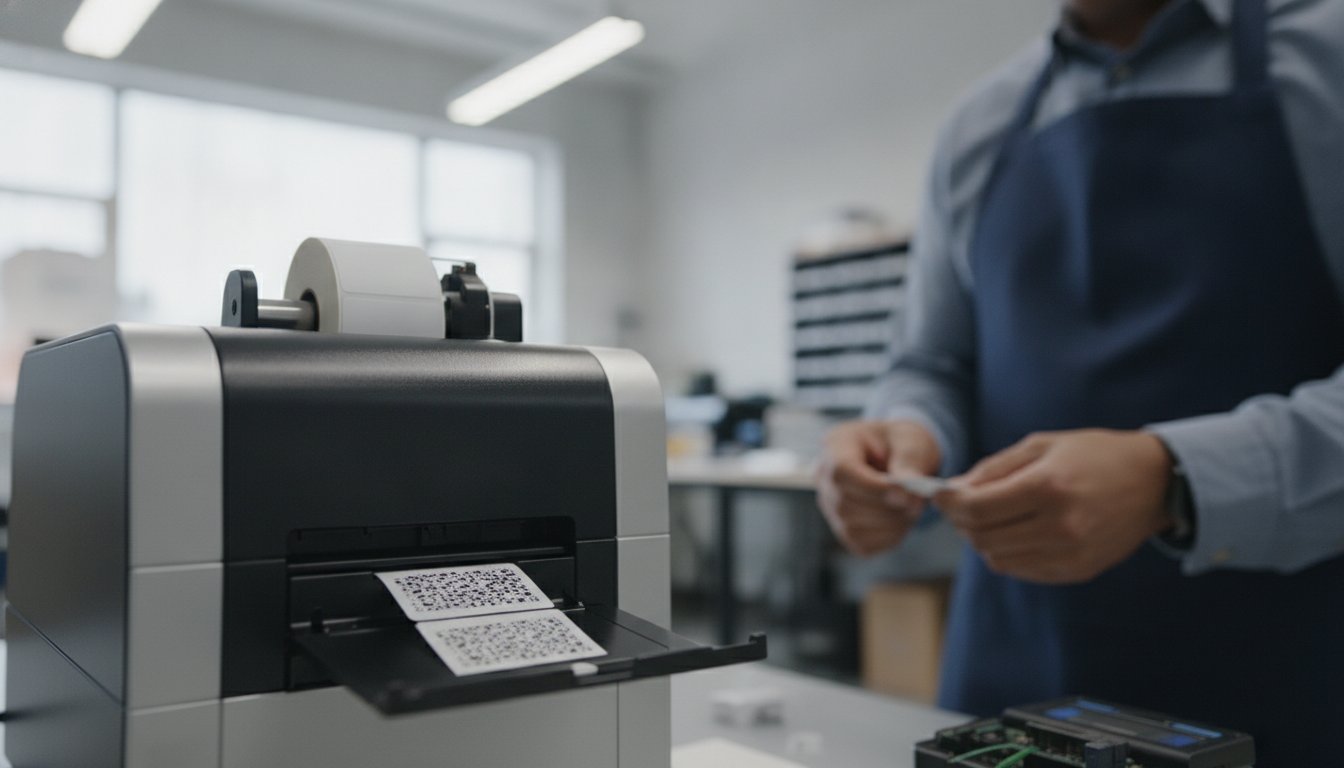
A single millimeter of misalignment can turn a professional product into a pile of wasted media. It's a common frustration for businesses trying to print 1300*1.75 labels in-house, especially when small text becomes a blurry mess or labels peel off curved surfaces. You've likely dealt with the headache of printer jams and the struggle to find chemical-resistant materials that actually fit this specific format. It shouldn't be this difficult to get a clean, durable result every time you hit print.
We understand that small format labeling requires precision and the right hardware-media synergy. That's why we've created this professional guide to help you master every technical detail. You'll learn how to select the perfect materials for the 1.3 x 1.75 size and ensure your printer settings are calibrated for success. We'll also preview essential 2026 regulatory updates, including new California food date labeling requirements and USDA "Product of USA" standards. From choosing between inkjet and thermal transfer to optimizing your BarTender software workflow, we're covering everything you need for flawless in-house production.
Key Takeaways
- Learn how to identify the best applications for the specialized 1.3 x 1.75 format, from retail pricing to jewelry tagging.
- Discover the critical differences between inkjet and thermal transfer materials to ensure your 1300*1.75 labels remain crisp and chemical-resistant.
- Master printer sensor calibration to eliminate common alignment issues and jams when running small-format media.
- Improve legibility on tiny labels by utilizing specific design techniques like "Quiet Zones" and optimized font selections.
- Streamline your production by matching specialized DuraFast media with professional software like BarTender for perfect results.
Understanding the 1.3 x 1.75 (1300*1.75) Label Format
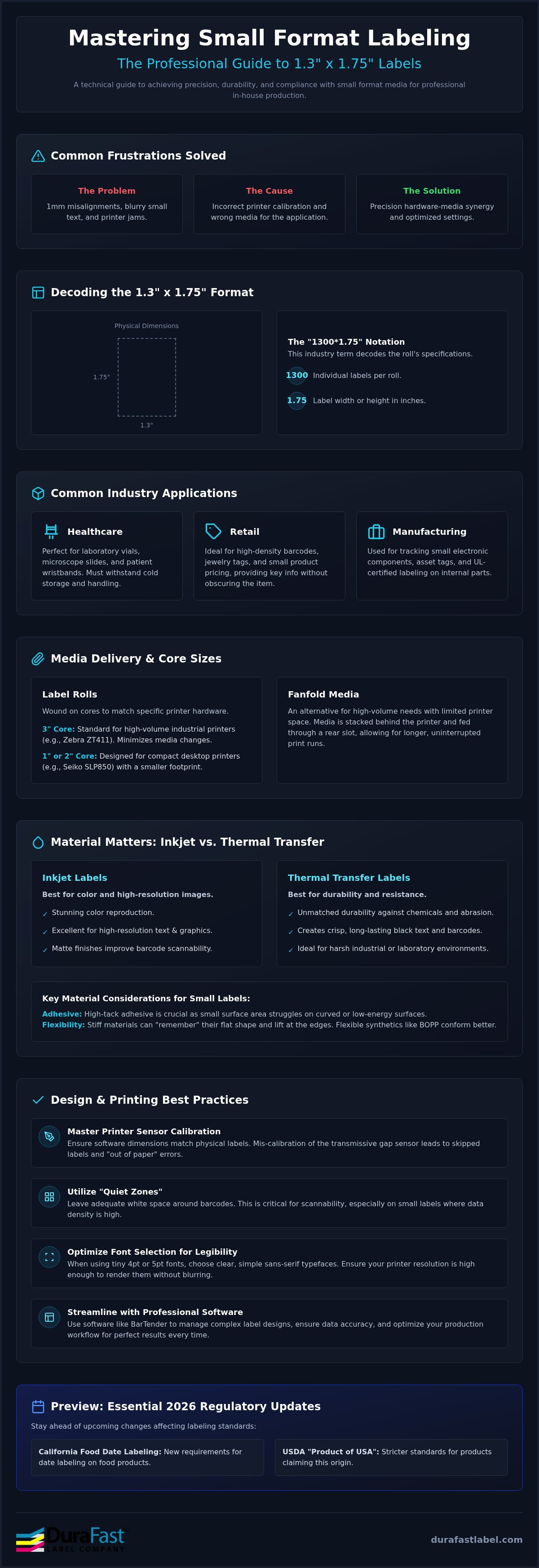
The 1.3-inch by 1.75-inch label is a specialized small-format media designed for high-density information. In the labeling world, you'll often see the term 1300*1.75. This typically decodes to a roll containing 1,300 individual labels with a 1.75-inch width or height. Understanding this notation helps you manage inventory and ensure the roll fits your specific printer's outer diameter limits. It's a precise size that balances scannability with a compact footprint, making it a favorite for tight spaces.
Small labels demand extreme precision. Off-model measurements confuse your printer's sensors, leading to skipped labels or misaligned text. Most thermal label printers use transmissive sensors to detect the gap between each label. If your software settings don't match the physical 1300*1.75 specifications, the sensor won't know where one label ends and the next begins. This results in the dreaded "out of paper" error even when your roll is full. You'll waste time and expensive label materials and printing methods trying to manually recalibrate a machine that simply needs the correct dimensions entered into the driver.
Common Industry Applications for Small Labels
Small labels serve critical roles across various sectors where space is a luxury. They're often used in:
- Healthcare: These labels fit perfectly on laboratory vials, microscope slides, and patient wristband inserts. They must withstand cold storage and frequent handling.
- Retail: Use them for high-density barcodes on small product packaging or jewellery ring labels. They provide enough room for a price and a scannable UPC without obscuring the product itself.
- Manufacturing: They're ideal for tracking small electronic components and creating asset tags. Many manufacturers use them for UL-certified labeling on circuit boards and internal parts.
- Cannabis & Dispensaries: For providers of premium products like Green Express DC, these 1.3 x 1.75 labels are essential for displaying lab-tested results and mandatory safety warnings on small jars and tincture bottles.
In laboratory and research settings, accurate labeling is paramount for safety and compliance. For instance, when professionals buy research chemicals with COA from JM Precision Labs, they rely on these durable 1.3 x 1.75 labels to ensure that batch numbers and third-party verification data remain legible throughout the testing process.
Roll vs. Fanfold: Choosing Your Media Delivery
The way your labels are delivered impacts your daily workflow and printer choice. Most rolls are wound on specific core sizes to match hardware requirements.
- Industrial Cores: A 3-inch core is standard for high-volume industrial barcode printers like the Zebra ZT411. These machines handle larger rolls, reducing the need for constant media changes during long shifts.
- Desktop Cores: Smaller 1-inch or 2-inch cores are designed for compact units. For example, the Seiko SLP850 uses smaller rolls to maintain its space-saving desktop footprint.
- Fanfold: If you have high-volume needs but limited internal printer space, fanfolded media is a smart alternative. It sits in a stack behind the printer and feeds through a rear slot. This allows for longer production runs without the physical constraints of a roll's diameter.
Material Matters: Selecting the Right Media for 1.3 x 1.75 Prints
Selecting the right material for a 1.3 x 1.75 label isn't just about aesthetics; it's about physics. Because these labels have a smaller surface area, the adhesive must work harder to stay put. This is especially true on curved containers or plastic surfaces with low surface energy. If the material is too stiff, the label's "memory" will cause the edges to lift. Choosing a flexible synthetic or a high-tack adhesive ensures your 1300*1.75 rolls stay exactly where you put them. Paper works for dry shelves. Synthetic materials like BOPP handle the tough jobs.
Legibility is the next hurdle. When printing 4pt or 5pt fonts on a small format, every dot matters. Inkjet technology offers stunning color and high resolution, while thermal transfer provides unmatched durability against chemicals and abrasion. If your application involves food, consult the FDA Food Labeling Guide to ensure your material and text placement meet regulatory standards for packaged goods. Every millimeter of space must be used wisely to stay compliant without sacrificing design.
Inkjet Labels for 1.3 x 1.75 Applications
For applications requiring color or high-resolution imagery, inkjet labels are the primary choice. Matte finishes are generally better for barcode scannability because they don't reflect light into the scanner's lens. However, glossy materials offer a premium look for retail products. If you're labeling small chemical bottles, specialized matte chemical labels are essential. These materials, when paired with pigment-based inks, offer GHS-compliant durability that resists smearing and fading even when exposed to harsh solvents.
Thermal Transfer and Direct Thermal Options
If you don't need color, thermal technology is often more cost-effective. Direct thermal labels are perfect for short-term uses, such as visitor badges or temporary retail pricing, because they don't require a ribbon. For more permanent needs, thermal transfer uses a ribbon to "melt" ink into the label. Using a full resin ribbon on synthetic media like BOPP provides a nearly indestructible finish. For those using compact desktop units, Seiko SLP850 labels provide a reliable solution for high-speed, small-format printing without the bulk of industrial rolls. If you're unsure which material fits your environment, you can always reach out for a material recommendation tailored to your specific 1300*1.75 requirements.
Printer Compatibility: Is Your Hardware Ready for Small Format Media?
Compatibility is the bridge between a great design and a usable label. Not every printer is equipped to handle narrow media rolls. Many industrial units have a minimum width requirement that exceeds an inch. Fortunately, the 1.3-inch width of the 1300*1.75 format sits in a "sweet spot." It's wide enough to be gripped securely by the drive rollers but narrow enough to fit into compact desktop hardware. If your media is too narrow for your printer's specifications, you'll experience frequent slippage and wasted materials.
Small labels require high-precision sensor detection. You'll generally work with two main sensor configurations:
- Transmissive Sensors: These shine light through the liner to detect the gap between die-cut labels.
- Reflective Sensors: These look for a black mark printed on the back of the liner, which is common for specialized materials.
You must ensure your sensor is positioned directly over the label path rather than the liner edge. If you're using a black mark, you'll need to calibrate the reflective sensor specifically for that mark's density. Skewing is the biggest threat to this format. Even a half-millimeter tilt can cause your text to drift off the edge. This makes adjustable media guides essential. They lock the roll in place and prevent the side-to-side "walking" that ruins print jobs. Following best practices for label design helps you account for these minor mechanical shifts by including healthy margins in your layout.
Epson ColorWorks Solutions
The Epson ColorWorks C6000A is a top-tier choice for this size. By using Epson C6000 labels, you can leverage the printer's 1200 dpi resolution. This level of detail is critical when you're cramming complex GHS symbols or 4pt font onto a small surface. The "A" model's integrated auto-cutter is particularly impressive. It provides clean, straight cuts for individual labels, which is much more professional than hand-tearing narrow strips. It's an efficient way to produce small batches without the setup time required for larger digital presses.
Industrial Thermal Transfer with Zebra
For high-speed, high-volume production, the Zebra ZT411 remains the industry standard. It's built for 24/7 operation and handles large rolls of 1300*1.75 media with ease. One technical challenge with narrow media is ribbon wrinkle. Because the label is much narrower than the ribbon, the uneven pressure can cause the ribbon to fold. You can solve this by adjusting the printhead pressure toggles to balance the load across the narrow strip. Always perform a manual calibration when loading new media. This teaches the printer exactly where the "top of form" is, ensuring every barcode is perfectly centered on every label.
Best Practices for Small Format Label Design and Printing
Designing for a 1.3-inch width is a game of millimeters. One of the most critical elements is the "Quiet Zone." This is the mandatory white space surrounding a barcode. If your design bleeds into this zone, scanners will fail to read the code. For a 1.3-inch width, margins are non-negotiable. Legibility at 4pt or 5pt requires specific choices too. Sans-serif fonts like Arial or Helvetica are best. They don't have the "tails" or serifs that can blur together at small sizes, ensuring your text remains crisp even under a magnifying glass.
BarTender Professional software is the industry standard for managing these tiny layouts. It allows you to link your 1300*1.75 label design directly to a database. This ensures every barcode and serial number is unique and accurate without the risk of manual entry errors. It also handles the technical math for "Quiet Zones" automatically. This saves you from expensive trial-and-error printing and reduces media waste during the setup phase.
Designing for the 1.3 x 1.75 Canvas
Small labels mean limited real estate, so you must prioritize your information. Ask yourself what the most important piece of data is for the end user. Is it the price, the SKU, or a safety warning? To maximize space, use 2D barcodes like DataMatrix or QR codes. They hold significantly more data in a smaller footprint than traditional 1D "picket fence" barcodes. This leaves more room for essential human-readable text. For a deeper dive into establishing your in-house workflow, check out our guide on printing your own labels.
Printer Calibration and Sensor Adjustment
Even a perfect design fails if the hardware isn't maintained. Tiny barcodes are sensitive to "dead pixels" caused by dust or adhesive buildup on the printhead. Clean your printhead with isopropyl alcohol every time you change a ribbon or a roll. For thermal transfer printing, you'll need to fine-tune your darkness and heat settings. Too much heat causes the ink to bleed into the "Quiet Zones." Too little results in a faint, unscannable image. If you encounter persistent "media out" errors on your 1300*1.75 rolls, it's often a sensor misalignment. Ensure the sensor is positioned directly over the label gap, not the edge of the liner. If you're struggling with alignment issues, contact our technical experts for a personalized setup consultation.
Custom Solutions: Why DuraFast is Your Partner for 1.3 x 1.75 Labels
Small-format labeling doesn't have to be a trial-and-error process. We've spent years perfecting the synergy between hardware, software, and media. This expertise allows us to provide more than just a product; we offer a complete solution. When you choose DuraFast, you're gaining access to a specialized partner that understands the nuances of the 1.3 x 1.75 format. We don't just sell rolls. We ensure they work in your specific environment.
Expert consultation is at the heart of what we do. We help you match 1300*1.75 rolls to your specific printer model, whether you're using an Epson ColorWorks or a Zebra industrial unit. This prevents the common alignment and sensor issues that often plague small-scale print runs. Our comprehensive support package includes:
- Authorized hardware from leading manufacturers like Epson and Zebra.
- BarTender software configuration for small-format barcodes.
- Specialized consumables like DuraFast Matte Chemical Labels.
- Fast shipping across North America to keep your production line moving.
The DuraFast Quality Guarantee
Quality isn't a suggestion; it's a requirement for small labels. We perform rigorous testing on all 1.3 x 1.75 media to confirm adhesive performance and ink compatibility. This is vital for specialized applications like jewellery ring labels where the adhesive must not touch the product. DuraFast rigorously vets its North American suppliers to ensure all media meets the strict 2026 design-for-recycling and material safety standards required for modern industrial applications. We take the guesswork out of compliance so you can focus on your business.
Ready to Optimize Your Labeling?
We believe you should be 100% confident in your media before you commit to a large order. That's why we offer sample rolls for testing in your specific environment. Whether you need high-volume 1300*1.75 rolls for an industrial Zebra or smaller batches for a desktop unit, we can customize your order. We handle non-standard core sizes and fanfold needs with ease. Our team is ready to help you eliminate jams and blurry text for good. Contact our labeling experts today for a personalized quote and see the difference that hardware-media synergy makes.
Achieve Precision in Your Small Format Production
Success in small format labeling comes down to the perfect match between your hardware and your media. You've seen how choosing the right synthetic materials and calibrating your sensors can eliminate the frustration of jams and misalignments. Whether you're managing 1300*1.75 rolls for retail pricing or specialized healthcare vials, precision is your most valuable asset. Mastering these technical details ensures your barcodes remain scannable and your text stays crisp under any conditions.
DuraFast has been serving North American businesses since 2012, providing the expert technical support you need for Epson and Zebra hardware. We offer a wide selection of specialized materials, including durable BOPP and Vinyl, to meet the toughest durability requirements. Our team is here to help you navigate the complexities of 2026 labeling regulations and software integration. Don't let small labels create big problems in your workflow.
Request a Quote for 1.3 x 1.75 Labels and Printers today to start optimizing your in-house production. We're ready to help you find the perfect solution for your unique labeling needs.
Frequently Asked Questions
What does 1300*1.75 mean in label specifications?
In the industry, 1300*1.75 typically describes a roll containing 1,300 individual labels with a 1.75-inch dimension. This notation helps you calculate your total print yield and ensures the roll diameter fits your printer's internal media bay. It's a specialized format that requires careful verification of your hardware's maximum outer diameter to avoid feeding issues during high-volume runs.
Can I use 1.3 x 1.75 labels in an Epson ColorWorks C6000A?
Yes, the Epson ColorWorks C6000A is perfectly suited for this format. It handles media as narrow as 1 inch, making the 1.3-inch width of these labels easy to process. You'll benefit from the printer's 1200 dpi resolution, which is essential for keeping small text and micro-barcodes legible. Using the integrated auto-cutter on the "A" model provides a clean, professional finish for every individual tag.
Do I need a thermal ribbon for 1.75-inch labels?
You only need a thermal transfer ribbon if you're using a thermal transfer printer like the Zebra ZT411. If you use direct thermal labels, the image is created by heat alone, so no ribbon is required. For inkjet printers, you'll need ink cartridges instead. When using ribbons for narrow 1.75-inch media, ensure the ribbon width is slightly wider than the label to protect the printhead from abrasion.
What is the best material for small retail price tags?
For standard indoor retail use, premium matte paper is often the most cost-effective choice. It provides excellent contrast for barcode scanners and a clean look for pricing. However, if your tags will be handled frequently or exposed to moisture, choose a synthetic material like BOPP. These synthetic options resist tearing and smudging, ensuring your price information remains intact from the stockroom to the checkout counter.
How do I prevent my printer from skipping small labels?
Skipping usually happens because the printer's sensor isn't detecting the gap between labels. You can prevent this by performing a manual calibration in your printer settings. Ensure the transmissive sensor is physically aligned with the label path rather than the liner's edge. Cleaning the sensor with compressed air also helps, as dust buildup can block the light path and cause the printer to skip labels.
Are 1.3 x 1.75 labels available in chemical-resistant materials?
Yes, you can find this size in specialized synthetic materials. DuraFast Matte Chemical Labels are a top choice for applications requiring resistance to solvents and harsh environments. When you pair these labels with the correct pigment-based inks or resin ribbons, they meet GHS and BS5609 standards. This ensures your 1300*1.75 media remains legible and attached even when exposed to water, oils, or chemicals.
Which software is best for designing 1.3 x 1.75 barcodes?
BarTender Professional is widely considered the best software for this task. It offers precise control over "Quiet Zones" and font scaling, which is critical for 1.3-inch widths. The software includes built-in drivers for major brands like Epson and Zebra, making it easy to manage complex data like serialization or 2D barcodes. It streamlines the design process by allowing you to see exactly how your layout fits the physical label.
Can I get 1.3 x 1.75 labels on a 1-inch core for a desktop printer?
Yes, we can provide this label size on 1-inch cores for desktop printers. While industrial printers typically require 3-inch cores, desktop units like the Seiko SLP850 are designed for smaller rolls. Using the correct core size is vital for preventing motor strain and ensuring smooth media feeding. If you have a specific desktop model, we can customize the roll winding to match your printer's internal specifications.