2D Barcode Scanner Benefits for Inventory and Supply Chains
22nd Nov 2026
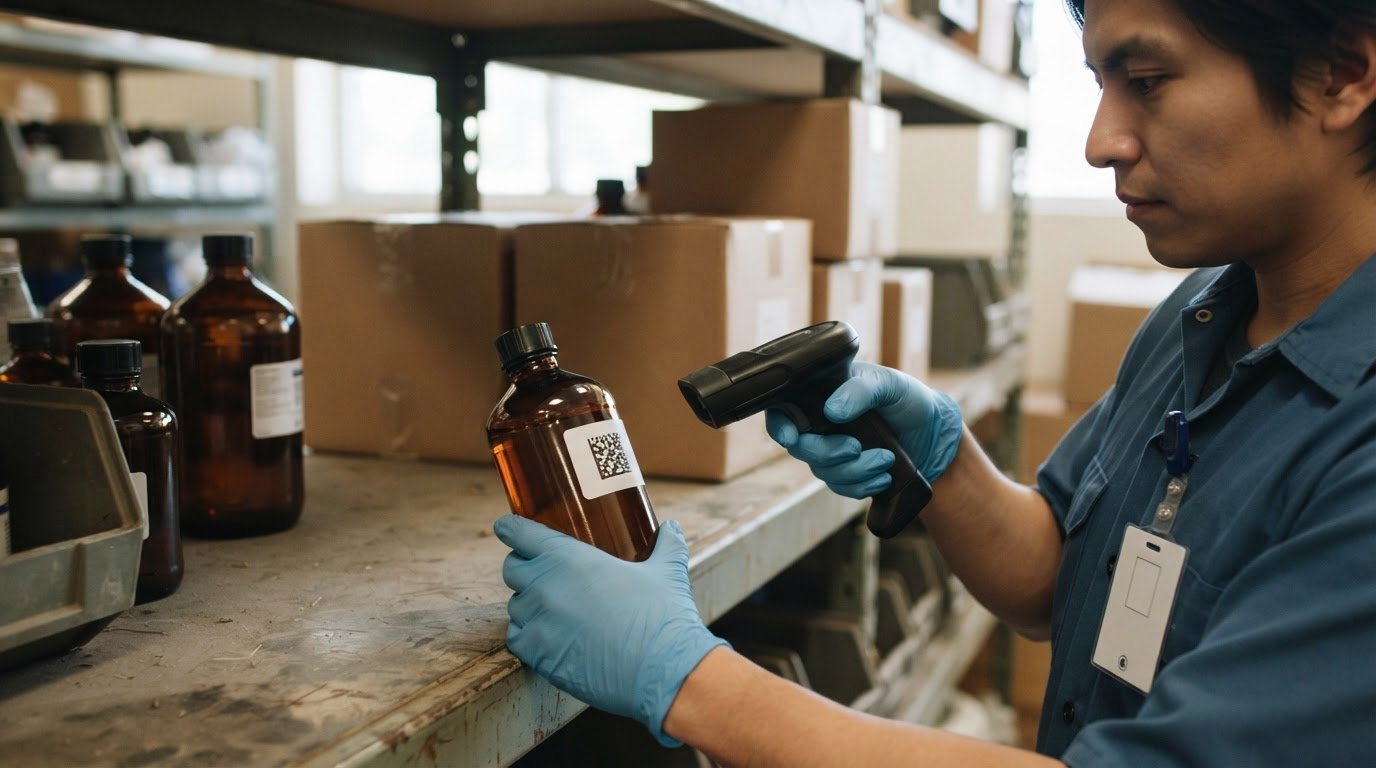
A laser scanner can handle familiar barcodes, but it can’t read every format or scan a code from a phone screen. A 2D barcode scanner uses an image-based engine to capture and decode barcodes, and it can read both 1D and 2D formats.
When comparing an imager with a traditional laser scanner, focus on your inventory workflow. An imager can read codes displayed on backlit devices and decode barcodes outdoors in bright sunlight, where glare can make a laser scanner harder to use.
This guide explains how 2D barcodes store information, how QR codes compare with Data Matrix codes, and where 2D imagers can help with inventory and supply-chain scanning. You’ll also see how 2D scanning differs from 1D scanning, so you can judge which capabilities matter for your labels, products, and work environment.
Key Takeaways
- Choose between QR and Data Matrix formats by considering the kind of information your labels need to carry.
- Understand how two-dimensional codes hold data differently from familiar linear barcodes.
- Identify inventory and supply-chain tasks where adding more information to a label can be useful.
- See how image-based scanning handles both 1D and 2D codes, including codes on screens.
- Use your scanning environment and barcode formats to guide the choice between an imager and a traditional laser scanner.
Data Matrix and QR code formats
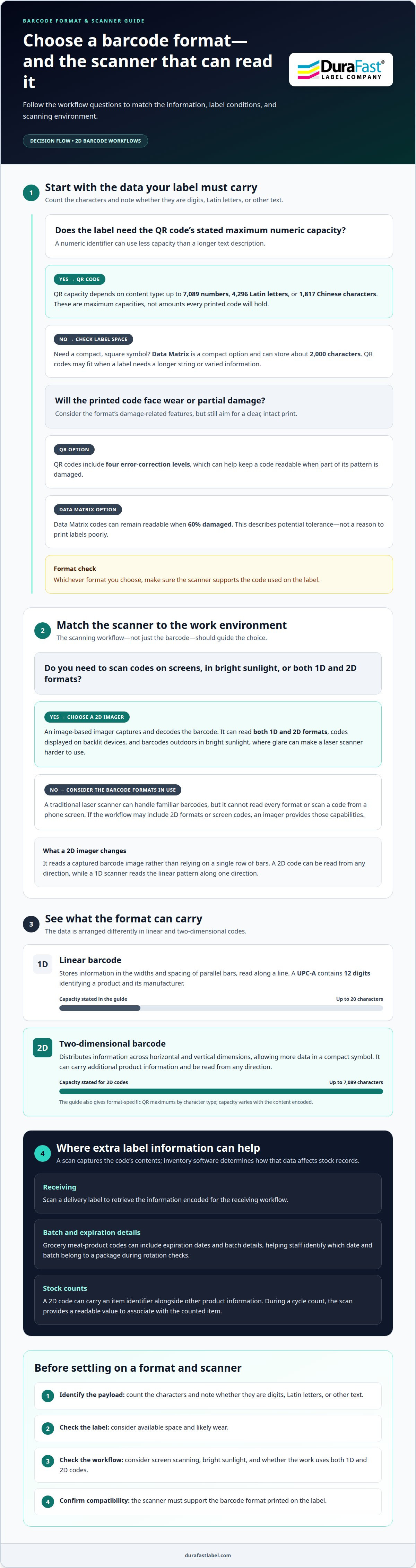
QR codes and Data Matrix codes are two-dimensional formats, but their storage limits differ. A QR code can hold up to 7,089 numbers, 4,296 Latin letters, or 1,817 Chinese characters. Data Matrix codes can store about 2,000 characters. These are maximum capacities, not amounts every printed code will hold.
QR code capacity depends on the type of content. A code made mostly of digits can hold more data than one containing Latin letters or Chinese characters. For example, a numeric inventory identifier uses less capacity than a longer text description. Choose the format and content based on what workers need to retrieve when they scan.
QR codes also include four error-correction levels. This feature can help keep a code readable when part of its pattern is damaged. Data Matrix codes can remain readable when 60% damaged. That figure describes a potential tolerance, not a reason to print labels poorly. A clear, intact code still supports dependable scanning in everyday handling.
Data Matrix is a compact option for putting information into a small, square symbol. Its capacity of about 2,000 characters can suit labels that need more than a short product identifier. For example, a small package label could carry a batch reference and product details. The right payload depends on the information your inventory process needs at the point of scanning.
By contrast, a QR code can accommodate substantially more numeric data at its stated maximum. It may fit when a label needs to encode a longer string or varied information. A 2D barcode scanner captures the symbol as an image and decodes the pattern, rather than reading a single row of bars. The chosen scanner must support the code format used on the label.
One-dimensional barcodes encode data through the widths and spacing of parallel bars. A UPC-A barcode, for example, contains 12 digits identifying a product and its manufacturer. The scanner reads the linear pattern along one direction. A 2D format distributes information across both horizontal and vertical dimensions, allowing it to store more data within a compact symbol.
Start by identifying the data the code must hold: count the characters and note whether they are digits, Latin letters, or other text. Then consider available label space and likely wear. QR codes have four error-correction levels, while Data Matrix codes also offer damage tolerance. Match the format to label conditions, and make sure the scanner can read it.
How 2D barcodes differ from 1D barcodes
A 1D barcode stores information in the widths and spacing of bars, which a scanner reads along a line. A UPC-A code contains 12 digits that identify a product and its manufacturer. By comparison, 2D barcodes carry information across horizontal and vertical dimensions. They can hold up to 7,089 characters, compared with a 1D barcode’s 20-character capacity.
That difference can change what a label supports. A 1D code may work well for a product identifier used in inventory tracking. A 2D code can carry more information in one symbol, and it can be read from any direction. For example, a worker can scan a code without carefully aligning a single row of bars with the reader.
The scanner technology differs too. Traditional 1D scanners often use laser or charge-coupled device technology to read linear codes. A 2D imager captures a barcode image and decodes it, and it can scan both 1D and 2D formats. This makes an imager useful where one workflow handles UPC-A labels alongside QR codes or Data Matrix symbols.
Yes, 2D scanners are available with USB, Bluetooth, and wireless connections, depending on the model. In the United States, the price depends on factors such as the scanner’s connection type and supported capabilities. Choose based on how the scanner will work with your station and inventory process.
For a computer or POS setup, connect a USB scanner to the appropriate port or pair a Bluetooth model using the device’s connection process. Confirm that scans appear in the intended application. Some scanners send data as keyboard input, while a POS system may require a particular interface or configuration.
Many scanners need no separate scanning software when a computer recognizes them as an input device. A POS system or inventory application may still need configuration, and some setups require a driver or vendor software. Review the scanner’s instructions and the system’s interface requirements before deploying it across workstations.
Match the scanning range to the distance between the worker and the label. Consider scan speed alongside code size, print quality, and daily volume. For durability, compare the scanner’s construction with workstation conditions, including frequent handling or dust exposure. These factors matter more than choosing by one headline specification.
If a scan fails, first check that the code format is supported and the symbol is visible, then reconnect the cable or repeat Bluetooth pairing. Test another code to separate a damaged label from a scanner or connection issue. If data appears incorrectly in a POS system, review its input settings. Contact DuraFast Label Company for help selecting a scanner for your workflow.
2D barcode uses in inventory and supply chains
At receiving, a 2D code can connect an item or package with its encoded information. A worker can scan a delivery label, then use the returned data in the receiving workflow. The scan captures what the code contains; inventory software determines how that information affects stock records.
Batch and expiration details can support product handling. Retailers can use 2D barcodes on grocery meat products to include expiration dates and batch details. For example, a store can scan a package code while reviewing items for rotation. The encoded details help staff identify which batch and date belong to that specific product.
For stock counts, a 2D code can carry an item identifier alongside other product information. A scan during a cycle count gives the system a readable value to associate with the counted item. This can help distinguish similar products with different descriptions or batches, provided the code and inventory records use consistent identifiers.
During picking and packing, a scan can help match an order line to a labeled product. For example, two packages may have similar names but different batch details. Scanning a package code lets staff capture its encoded information before packing. The warehouse system can then apply its own rules to confirm the selected item.
Shipping workflows also use codes to identify parcels and related details. A delivery label may contain information that a scanner can retrieve without connecting to backend or third-party systems. This can help identify a package from the label alone, but not every code contains the same fields.
Across a supply chain, the same code can support handoffs between receiving, storage, picking, and shipping. In operations that integrate intelligent automation and robotic handling from providers like Defend Autonomous Robotics Trading LLC, reliable barcode scanning helps coordinate material tracking with automated workflows. Define what the data is for at each step: identifying a product, recording a batch, or associating a parcel with delivery information. A code only provides the information encoded in it, so align label content with tracking tasks.
A damaged label can make scanning difficult, particularly when the symbol is obscured or its printed pattern is unclear. Place codes where routine handling is less likely to cover them, and keep essential text readable. On meat packages, for example, expiration and batch details should remain easy to find during product rotation.
To plan a workflow, map scan points from receipt to dispatch. Decide what each scan must identify, where the information will be used, and which system records the result. Then test a representative item, such as a batch-labeled product, at each handoff. This keeps code content relevant to inventory and supply-chain tasks.
2D imagers versus 1D laser scanners
The practical difference comes down to what each reader can capture and where it can work. Compare code formats, label conditions, and the scanning environment before choosing.
Choosing Scanners for Work Settings
A suitable scanner must match the barcode formats and working conditions in retail, warehouses, or healthcare. One site may scan product labels at checkout, while another handles parcels or small pharmaceutical containers.
For retail, consider whether staff need to read both 1D product codes and 2D symbols. In a warehouse, code orientation and scanning distance may affect how workers reach labels inside shelving or on packages. Healthcare workflows may use small containers carrying serial numbers, batch information, product descriptions, and URLs. Select an imager when those 2D formats are part of the task.
Reading Screens and Damaged Labels
A 2D imager can read QR codes displayed on backlit devices, including mobile phone screens. That matters when a customer presents a screen-based code instead of a printed label.
A damaged code may remain readable when enough of its pattern survives for decoding. QR codes use four error-correction levels, and Data Matrix codes can remain readable when 60% damaged. Neither feature means every damaged label will scan. If the symbol is covered or too much information is lost, the reader may not decode it.
A 1D laser scanner reads the pattern of a linear barcode, so it suits workflows based on familiar 1D labels. It cannot capture QR codes or Data Matrix symbols. A 2D imager captures an image and can decode both 1D and 2D barcodes, making it useful when a workplace handles multiple formats.
Orientation can also shape the choice. Two-dimensional barcodes can be read from any direction, reducing the need to align one row of bars with the scanner. Full 2D area imagers can capture codes in any orientation from over 3 feet away. That can help when labels are positioned beyond close handheld reach.
Outdoor conditions create another clear distinction. Bright sunlight may wash out a laser scanner’s beam, while a 2D imager can decode barcodes outdoors in bright sunlight. For a receiving area or yard, that capability can matter more than the familiar operation of a laser reader. When planning commercial yards or mixed-use sites, operations and development teams often coordinate with transport planning consultancies like ML Traffic Engineers Australia to ensure site access and vehicle flow support loading and distribution needs.
Dirty or damaged labels deserve attention too. A 1D scanner may have difficulty reading a dirty or damaged barcode, while an imager works from the captured image and the code’s remaining pattern. The format’s error correction can help, but the scanner still needs enough visible information to decode the symbol.
The takeaway is straightforward: choose a 1D laser scanner for a workflow limited to linear codes and compatible conditions. Choose a 2D imager when staff need QR or Data Matrix support, screen scanning, flexible orientation, or outdoor reading. That capability is useful only when it matches the codes and conditions workers actually encounter.
What is a 2D barcode scanner and how does it work?
An image-based barcode reader captures a symbol and decodes its pattern. Unlike a reader that follows a single line of bars, it processes a two-dimensional symbol as an image. A QR code is one example. The scanner converts encoded information into a usable format, consistent with the National Institute of Standards and Technology’s description of a barcode reader.
The scan begins when the barcode enters the scanner’s field of view. Its imaging engine captures the symbol, including the pattern distributed across its horizontal and vertical dimensions. Decoding software then interprets that pattern and extracts the encoded data. A printed QR code and a Data Matrix label are different symbols, so a 2D barcode scanner must support the format it needs to read.
After decoding, the scanner sends the captured information to a connected device or system. The output might be a product-label identifier or details encoded on a parcel. The receiving software determines how to use that value. An inventory application, for example, can use a scanned identifier to find the matching record, while a shipping workflow can use parcel-label data.
A useful distinction is between reading a code and acting on its contents. The scanner captures and converts encoded information, but it doesn’t decide whether an item should be counted, shipped, or returned. Those actions depend on the receiving application and its workflow. This distinction explains why a successful scan may still require the right system settings.
Image capture also makes QR scanning possible on more than printed labels. Image-based scanners and mobile phone cameras can read and decode QR codes. For instance, a worker may scan a QR code shown on a phone screen. The 2D barcode scanner still needs a clear view of the symbol, and the connected application must be ready to receive its decoded content.
A small parcel provides another example of a direct scan. A 2D barcode on its delivery label can be scanned to retrieve its information without connecting to backend or third-party systems. This describes access to information encoded in that label, not every possible parcel record or status. The scanner reads the code; its contents define what information the scan can return.
To understand a scan in practice, follow the data through three stages:
- Capture: The imaging engine records the visible barcode pattern.
- Decode: The scanner interprets the pattern and extracts its encoded information.
- Transfer: The connected device or application receives that information for its workflow.
This capture, decode, and transfer process explains what an imager contributes to inventory scanning. The image-based approach supports QR codes and other two-dimensional formats, while the receiving system controls how decoded data is applied. Contact DuraFast Label Company about barcode scanners to discuss a scanner for your workflow.
DuraFast Label Company: barcode scanner
DuraFast Label Company offers barcode scanners for businesses selecting equipment for inventory and supply-chain workflows. A 2d barcode scanner is useful when your team needs to capture barcode data at receiving, during stock counts, or while preparing orders. Match supported barcode formats and connection type to your workplace tasks and systems.
Label production can also be part of the setup. DuraFast offers the Epson ColorWorks C6000A, industrial color label printers, and DuraFast Matte Chemical Labels alongside a reliable 2d barcode scanner. These products support different labeling needs, while the scanner reads codes printed on labels that match your workflow.
For a quality 2d barcode scanner and labeling supplies for your operation, contact DuraFast Label Company.
Make Your Next Scanning Decision Practical
Turn the scanner choice into a clear workflow decision. Identify where employees scan, what information the system needs, and how the equipment will connect to that process. This gives you a practical basis for selecting a 2D barcode scanner without choosing features that don’t serve your operation.
Next, consider the labels. Code format, print quality, and placement all affect how scanning works day to day. If your labeling setup is changing along with your scanning needs, plan both as parts of the same workflow. The goal is a reliable path from printed code to useful inventory information.
Share the way your team handles barcode scanning and labeling, and DuraFast Label Company can help you explore relevant equipment options. Contact DuraFast Label Company to discuss your scanner needs and take the next step with confidence.
Frequently Asked Questions
What Benefits Does an Imager Provide Over Traditional Laser Scanning?
An imager can reduce workflow interruptions when a station handles different barcode types or presentations. For example, a retail counter may scan a printed product label, then a QR code displayed by a customer. A 2D barcode scanner can handle both types when the model supports them. Before selecting equipment, map the codes your team encounters and consider how scanned information enters the checkout, inventory, or receiving process.
What barcode formats can an imager read?
Supported formats vary by scanner model. Common two-dimensional formats include QR, Data Matrix, and PDF417; some scanners also support formats such as GS1 DataBar. Many imagers read linear codes, including UPC, alongside two-dimensional symbols. For example, a receiving workflow might use UPC labels on products and PDF417 on documents. Match the 2D barcode scanner’s supported formats to your labels, then test each format in the software that receives the scan.
What is the difference between a 2D imager and a 1D laser barcode scanner?
A 2D imager captures and decodes barcode images, while a 1D laser scanner reads linear bar patterns. The practical difference is the mix of codes each can handle. For example, a workstation using only UPC labels may suit a laser scanner, while a station processing QR or Data Matrix codes needs an imager. Test a sample scan in your actual application, too, so you can confirm the decoded value reaches the intended field.
How much does a 2D barcode scanner cost in the US?
Price depends on connection type and supported capabilities.
What are the best 2D barcode scanners for small businesses?
Choose a 2D imager that supports your barcode formats and fits your connection and workflow needs. Listed options include the Datalogic QW2520 USB models and the QuickScan QD2500 with USB or multi-interface connectivity.