5 Ways to Reduce Ink Cost Per Label Through Smarter Printing
23rd Nov 2026
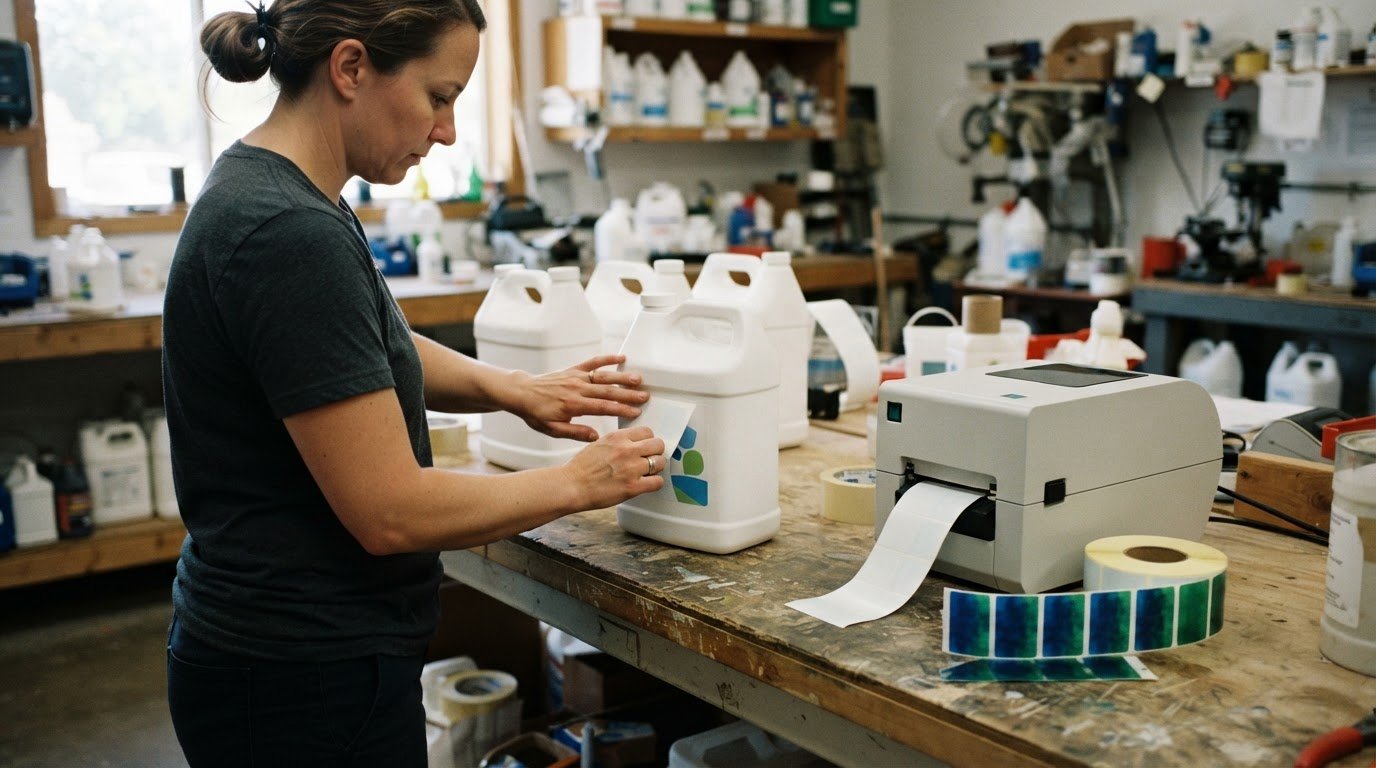
The biggest ink savings can start with the label design, not the cartridge. A practical approach to reducing ink cost per label in 2026 is to measure coverage first: reducing heavy ink coverage by half can cut ink spending by a similar proportion. But the cartridge estimate is only part of the picture. Cleaning cycles, setup prints and discarded labels can all affect the real cost of usable labels.
If your label costs are hard to predict, look beyond the price of ink alone. This guide covers five practical ways to find savings, from simplifying color coverage and reducing print waste to calculating ink use and choosing label materials and purchase quantities. You’ll learn which costs to track, how design and stock affect ink consumption, and how small changes may lower the cost per label without compromising the print your application needs.
Key Takeaways
- Track discarded labels, cleaning cycles, and setup prints to understand why actual ink use can exceed the cartridge yield estimate.
- Calculate ink cost per label from cartridge price and real-world yield, then account for label stock and other production costs.
- Match ink and label materials to the application so adhesion and print performance don’t lead to avoidable reprints.
- Plan ink purchases around actual usage and storage needs instead of buying more than your operation can use.
- Use label design software and a printer suited to your workflow to make label production easier to manage.
1. Reducing ink coverage and spot-color setup costs
Start with the printed area, not just the label count. In digital label printing, ink consumption follows the area printed rather than run length. A 50 × 30 mm label filled with color can therefore use more ink per label than a text-only paper label with 20% coverage. Reducing heavy ink coverage by half can cut ink spending by a similar proportion. Keep essential text, codes, and brand colors, then remove large background fills where the design still works.
Paper labels with limited text coverage generally need less ink than full-coverage film designs. Choose a stock and finish that suit the label’s use, then print a proof before ordering a full run. A glossy or coated surface doesn’t automatically reduce ink use; the design’s printed area and the stock’s compatibility with the printer both matter. For an example of a specialty inkjet stock, inkjet card-grading labels show how a defined label application can guide material selection.
Estimate cost per square meter by adding ink at typical coverage, media, and printer or printhead amortization. Divide that figure by the number of labels that fit in a square meter to estimate cost per label. Compare designs using the same stock and production assumptions. A short-run test can show whether a coverage change preserves legibility and color before you commit to a full production run.
Color choices affect setup too. If the artwork allows, resolve the palette to two spot colors plus the stock. Adding specific PMS spot colors to offset printing can increase setup time and wash-up fees. Ganging multiple small jobs with similar paper and ink requirements onto one sheet can share setup costs; label jobs can also share a roll before finishing separates them. In 1H25, total oil flows through the strait averaged 20.9 million b/d, or the equivalent of about 20% of global petroleum liquids consumption, and one-quarter of total global maritime traded oil, according to the U.S. Energy Information Administration.
There’s no single average ink cost per label across digital, flexographic, and thermal printing. Digital costs vary with coverage; flexographic plate costs are spread across the run; and thermal printing costs depend on consumables, not ink alone. Supplier prices are not meaningfully comparable unless cartridge yield, label stock, and design coverage also match. Compare those inputs for the same job instead of relying on a supplier-wide ranking.
Printer economics can change over three years. In the example, the higher-quality option recovers its additional investment in just over one year. Use your own print volume and coverage to make the comparison relevant.
2. Reducing waste when printing labels and business paperwork
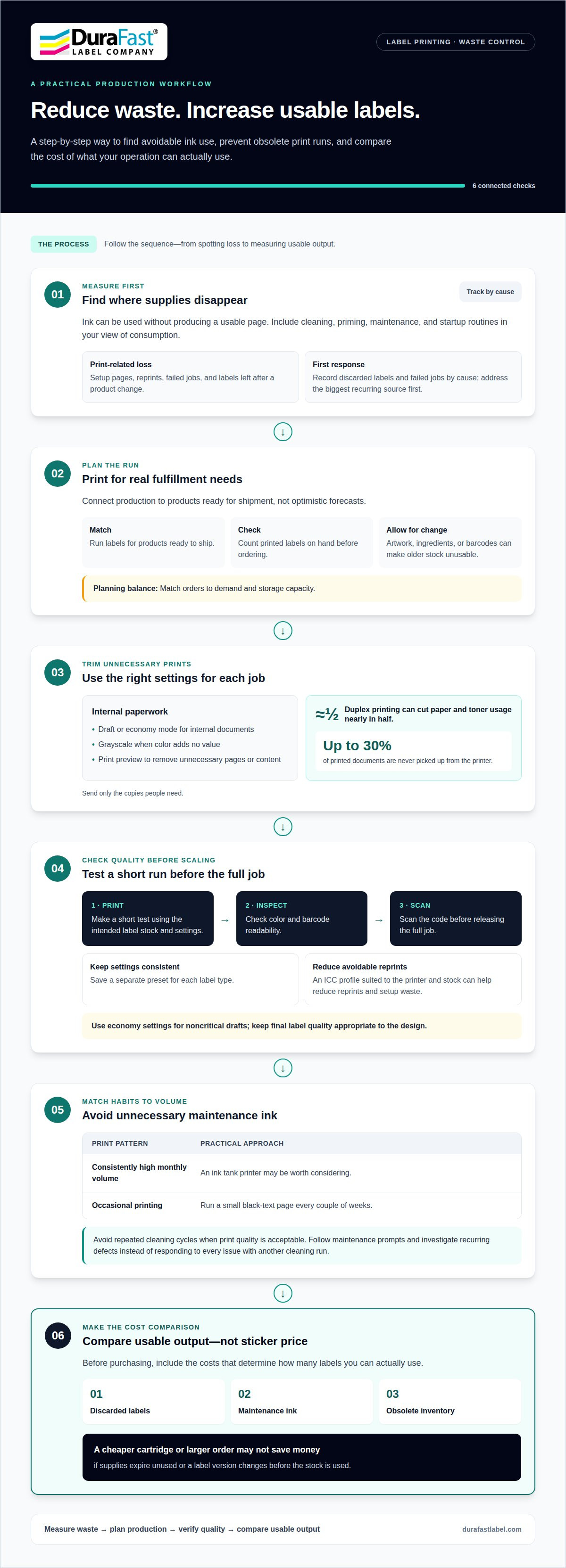
Waste includes more than labels that miss the cutter. Inkjet printers can use ink for cleaning, priming, maintenance, and startup routines, even when no usable page is produced. Reprints, setup pages, and labels left over after a product change also consume supplies. Track discarded labels and failed jobs by cause, then address the biggest recurring source first. This helps distinguish avoidable waste from routine printer maintenance.
Coordinate print production with distribution. Match each label run to products ready for shipment, and avoid printing versions that may change before use. Updates to artwork, ingredients, or barcodes can make older inventory unusable. Plan orders around demand and storage capacity, and count printed labels on hand before each purchase. This ties print volume to actual fulfillment needs instead of optimistic forecasts.
For business paperwork, use settings that suit the job. Draft or economy mode can extend cartridge life for internal documents, while grayscale avoids color use when color adds no value. Duplex printing can cut paper and toner usage nearly in half. Print preview helps remove unnecessary pages or content before a job starts. Up to 30% of printed documents are never picked up from the printer, so send only the copies people need. For broader workplace document workflows, partnering with print management providers such as BENDIX imaging can help streamline fleet efficiency and monitor routine consumption.
Balance ink savings with barcode readability and color accuracy. Use economy settings for noncritical drafts, but keep final label quality appropriate to the design. An ICC profile suited to the printer and stock can help reduce reprints and setup waste. Print a short test, inspect the color and barcode, and scan the code before releasing the full job. Save a separate preset for each label type to keep settings consistent between jobs.
Match printer habits to print volume. Consistently high monthly volume may justify considering an ink tank printer, while occasional printing calls for a different routine. Infrequent use can increase ink consumed during maintenance; for occasional printing, run a small black-text page every couple of weeks. Avoid repeated cleaning cycles when print quality is acceptable. Follow the printer’s maintenance prompts and investigate recurring defects instead of responding to every issue with another cleaning run.
Before the next purchase, compare usable output rather than the sticker price of supplies. Include the cost of discarded labels, maintenance ink, and obsolete inventory in the calculation. A cheaper cartridge or larger order may not save money if its contents expire unused or a label version changes. If production waste is tied to a particular stock or workflow, discuss the label application and printing setup to identify where adjustments may help.
3. Calculating ink cost per color label
Start with cartridge price and expected yield, then calculate each color’s cost per label. Divide each cartridge’s cost by its label yield, then add the results for each color. Treat this as an example, not a universal rate: artwork coverage and actual yield change the result.
Use the same design and label stock when comparing print jobs. A standard commercial process uses four colors: cyan, magenta, yellow, and black, or CMYK. For each color, divide cartridge cost by the number of labels it produces under the job’s conditions. Add those figures for an ink-only estimate. Then record the number of saleable labels, not just the number sent to the printer. This captures failed prints and makes comparisons more useful for retail packaging.
Next, distinguish ink cost from total label cost. Add label material, printer and printhead amortization, and production expenses to the ink estimate. For a per-label figure, divide the combined cost by the quantity of usable labels. For a per-square-meter estimate, add ink, media, and equipment costs for that area, then divide by the number of labels that fit within a square meter. Keep units consistent throughout the calculation.
CMYK suits designs that need blended colors or varied artwork. PMS spot colors can provide a specific named color, but setup and wash-up may add costs in offset printing. Compare the color requirements with the production method before buying supplies. If the design needs a small, stable palette, calculate whether spot colors reduce process-color use enough to offset setup costs. Include every color and setup step in the comparison.
Color management makes estimates more repeatable. Use an ICC profile suited to the printer and label stock, then print a proof on the actual material. Check color, text, and barcode readability before approving a full run. A proof can reveal adhesion or color problems before they lead to a larger reprint. Record the profile, stock, settings, and usable yield for each approved job. Reuse that record when the design returns, and recalculate if the artwork, material, or print volume changes.
4. Adhesive and ink cost pressures
Label costs can rise even when ink coverage stays unchanged. Pressure-sensitive labels combine facestock, adhesive, and release liner, and each component can face separate supply pressures. Some components of pressure-sensitive labels printed in the United States are subject to tariffs of at least 10%. Label adhesive and ink production sites were also affected by force majeure declarations in March 2026. These pressures can affect material availability and the cost of replenishing supplies, not just the ink line in a budget.
Match the adhesive and label surface to the product’s needs before ordering. A film label may need an inkjet coating or primer to help ink adhere to a nonporous surface. Prepared film can cost more than uncoated film, but an incompatible surface can cause smearing, poor adhesion, or wasted prints. Test the actual label material with the intended ink and application. A short proof can show whether the print remains usable after application before a larger run ties up stock.
Ink type also affects the cost and performance balance. Pigment inks generally cost more per milliliter than dye inks, but provide better lightfastness and water resistance. For a label exposed to light or moisture, the lowest ink purchase cost may not meet the job’s requirements. Compare the performance needed in the finished application with the ink and label combination. This helps avoid failures or replacement printing caused by choosing ink on price alone.
Cost pressures can vary by sector. Some label manufacturers pass through double-digit cost increases, particularly in food, retail, and pharmaceutical sectors. For planning, track ink, adhesive, and facestock assumptions separately for each label. When a supplier update changes one component, revise that input rather than treating every increase as an ink cost. This makes it easier to see whether a higher unit cost comes from ink, material, or both.
Frequent printing can make ink-system decisions more consequential. Tank-style systems can have a low ink cost per page, but buyers should also weigh the higher upfront printer price and maintenance requirements. Compare expected print volume with those ownership factors, then include the label material suited to the application. A low ink cost alone doesn’t establish the lowest total cost. For roll-to-roll production, robust digital pigment press technology is one available equipment option to consider within a workflow that uses pigment ink when partnering with DuraFast Label Company.
Build a practical review around each label job: identify the surface and adhesive, choose ink for the required print performance, and record material changes separately. Revisit the record when component costs or supply conditions change. This keeps an expensive material substitution from being mistaken for higher ink use and clarifies where savings may be possible without compromising the label’s intended use.
5. Bulk ink purchasing
Bulk buying can reduce separate purchases, but a larger order helps only if the ink is used before it goes to waste. Start with actual consumption by printer and color. Review recent cartridge changes, print volume, and planned packaging changes. Then set a purchase quantity that covers expected use without tying up money in stock that may sit unused. Track different ink families separately in your inventory.
Compare standard and high-yield cartridges by cost per listed page or label, not package size alone. For an XL cartridge, compare its percentage price increase with its percentage increase in listed yield. A higher purchase price can still mean a lower unit cost if yield increases by more. Compare options for the same printer model and cartridge family, and calculate each color separately when the label design uses color ink.
Refill bottles and replacement cartridges work differently. Ink tank printers use refill bottles instead of replacement cartridges, which can suit frequent printing. Include the printer’s upfront cost and maintenance needs in the decision. For lower or irregular volume, managing a large bottle supply may add storage and handling without matching actual use. Estimate consumption during normal operations before switching systems or ordering in bulk.
Storage matters after purchase. Keep cartridges sealed until needed and store them at normal room temperature. Use a first-in, first-out routine: place newly received stock behind existing cartridges, and record the printer model, color, and received date. This helps staff select the correct supply and reduces the chance of overlooking older inventory. Keep packaging and cartridge labels together so the product family is easy to identify.
Compatible or remanufactured cartridges may appear cheaper, but compare the full purchase conditions. Match the cartridge to the exact printer model and cartridge family. Check for the correct chip or electronics, clear yield information, and reliable return and warranty support. If any of those details differ, the apparent saving may not reflect the operating cost. Record successful cartridge use by printer so future purchases can be guided by your own workflow.
Review bulk quantities whenever print volume, artwork, or printer use changes. A steady high-volume job may support larger purchases, while seasonal or frequently revised labels call for tighter inventory control. Compare the cost per listed yield, expected consumption, storage conditions, and the risk of obsolete packaging together. Discuss your label printing and ink purchasing needs to identify equipment and supplies suited to your workflow.
DuraFast Label Company: Labelview label design and barcoding software
DuraFast Label Company offers Labelview label design and barcoding software for businesses managing label layouts and barcode content. It can be a useful next step when you’re reviewing label designs, updating product information, or trying to keep printing files organized. Pairing consistent artwork with an appropriate printer and label stock helps make production decisions easier to manage.
For color labels, options include the Epson ColorWorks C6000A and Afinia L801 Color Label Printer. DuraFast Matte Chemical Labels may suit applications that call for that label type. The right combination depends on your design, material, and printing workflow, so consider how each part fits the labels you produce.
Contact DuraFast Label Company to discuss label design software, printers, or label materials for your workflow.
Make your next label run easier to plan
A useful next step is to turn your cost review into a repeatable production decision. Tie each label design to its intended use, printer, and stock, then revisit that match when artwork or packaging needs change. This keeps ink choices connected to the finished label rather than treated as a separate purchasing decision. A consistent review process can make reducing ink cost per label in 2026 part of everyday production planning.
DuraFast Label Company offers the Epson ColorWorks C6000A, Afinia L801 Color Label Printer, and DuraFast Matte Chemical Labels. These options can support different label-printing requirements, from color printing to specialty label materials. Selecting the right fit starts with the application and the workflow you need to support.
Ready to plan your next step? Contact DuraFast Label Company to discuss your label printing needs and find a suitable direction for your operation.
Frequently Asked Questions
How Are Label Manufacturers Responding to These Cost Pressures?
Label manufacturers can respond by reviewing material choices, production schedules, and order quantities. For example, combining compatible jobs may use press time more efficiently, while a revised material specification may address availability or cost changes. These decisions depend on the label’s use and print process. Before adopting a material change across recurring orders, test it with the intended printer and application.
How do you cut cost without cutting quality?
Reduce costs in ways that don’t affect a label’s essential function. Simplify decorative backgrounds, remove unnecessary color, or adjust blank space while preserving required text, barcode contrast, and brand elements. Test the revised design on the actual stock. Review it under normal viewing conditions and scan its barcode with the equipment used in your workflow. Keep the original artwork so you can compare both versions.
Is it worth redesigning to a cheaper spec?
A redesign can be worthwhile when it reduces recurring production costs without compromising label performance. Compare the one-time artwork and approval effort with expected savings across planned print runs. Include any new testing, material, or setup requirements. Redesigning a label used once may offer little value, while an ongoing design gives savings more opportunities to offset the initial work.
How to calculate ink cost per label for 2026 print runs?
For reducing ink cost per label in 2026, use actual job data rather than cartridge yield alone. Record the cartridges used, labels printed, acceptable labels retained, and rejected labels for a representative run. Include cleaning or setup prints that consume ink. Divide the ink expenditure for that run by usable labels, then track the result across repeat jobs. Separate designs and stocks in your records so unlike runs don’t distort the comparison.
How do artwork design choices such as coverage, color count, and halftones reduce label ink usage?
Artwork uses less ink when it prints fewer filled areas and avoids colors that don’t contribute to the label’s purpose. Halftones create lighter visual tones through varying dot patterns rather than solid fills. Review large backgrounds, gradients, and overlapping color builds in the design file. Preserve contrast around small text and barcodes, then compare a proof with the original before approving changes.
How can businesses measure ink usage and waste per label accurately?
Keep a production log for each design and printer. Record cartridge changes, run quantities, usable output, rejected labels, cleaning activity, and setup prints. Keep the label stock and print settings consistent during comparisons. Calculate results using usable labels, not the total fed through the printer. A separate log for each job type helps identify whether higher ink use comes from heavier artwork, maintenance, or print defects.
What maintenance and calibration steps prevent excess ink use in label printers?
Follow the printer manufacturer’s maintenance schedule and use cleaning cycles when the printer indicates they’re needed or print quality shows a problem. Match the selected media and print settings to the loaded stock. Check alignment and color output with a proof after changing materials or artwork. Correct setup can prevent reprints, while unnecessary cleaning can consume ink without improving an already acceptable result.
What are the trade-offs of low-ink printing for label durability, compliance, and brand appearance?
Lower ink use can affect more than color intensity. Thin or faint elements may be harder to read, and reduced coverage can change how brand colors appear. For labels with specific performance or compliance requirements, preserve the required information and test the finished label on its intended surface. Check readability, color, and durability under the conditions the label will face before using an economy setting for production.