Afinia X350 Review: High-Speed Digital Label Production
21st Jul 2026
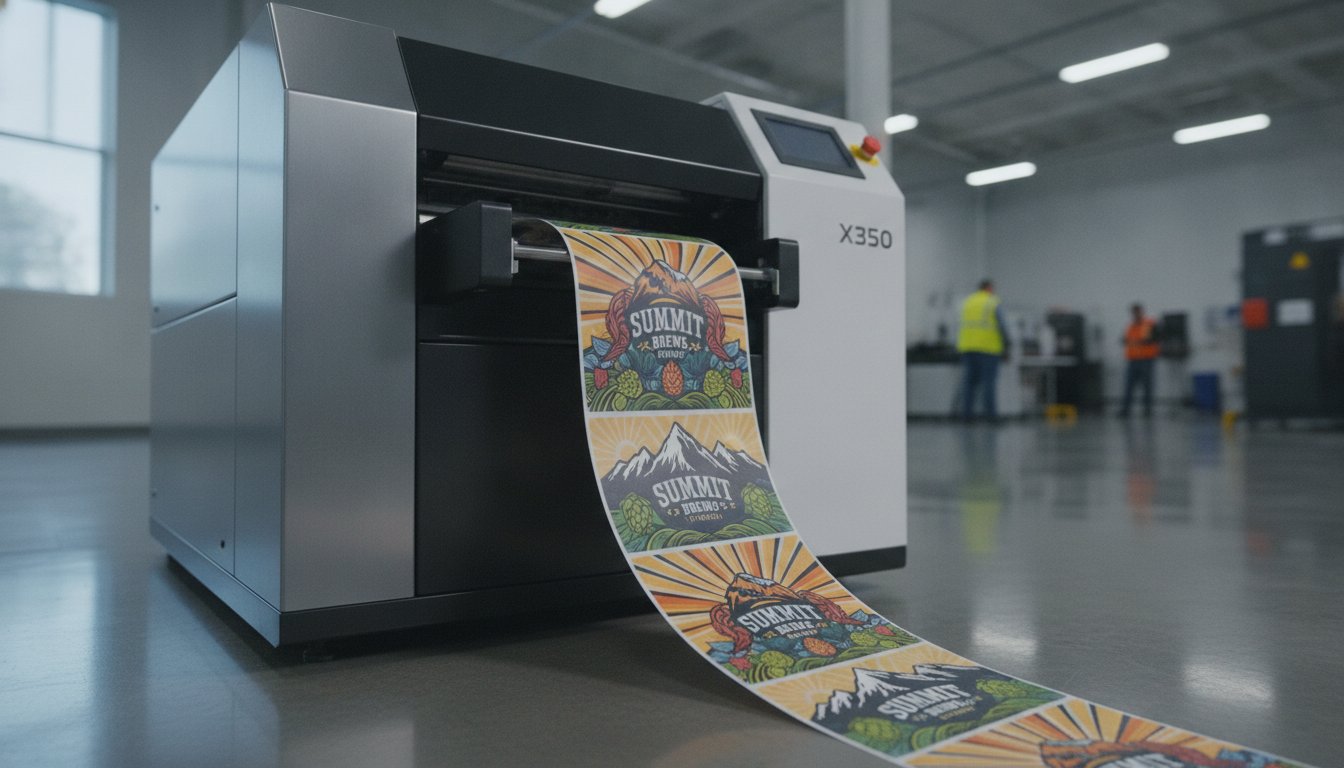
Are you paying an "outsourcing tax" every time you order a new batch of product labels? Many growing businesses feel trapped between small desktop units that are too slow and massive industrial presses that are too expensive. It's frustrating to watch your profit margins shrink because of high outsourcing fees or ink that smudges in industrial settings. In this Afinia X350 Label Press Review, we'll explore how this digital roll-to-roll system bridges the gap between small-scale printing and full industrial production.
We know you need a solution that offers faster turnaround times for product launches without sacrificing quality. You want professional results that meet tough durability standards like BS 5609 for water resistance. This 2026 performance review breaks down everything you need to know about the X350's pigment inkjet technology and its 13-inch wide capacity. We'll look at how it lowers your cost per label and provides the reliability your brand requires to scale efficiently. With the digital label printing market projected to reach $12.72 billion this year, it's the perfect time to take control of your production line and stop relying on third-party schedules.
Key Takeaways
- Learn why the shift to AstraJet pigment technology ensures your labels resist fading and moisture in tough industrial environments.
- See how the 13-inch wide printing path allows you to handle larger formats and multi-up designs for maximum production efficiency.
- This Afinia X350 Label Press Review breaks down the total cost of ownership to help you calculate your exact ROI when moving production in-house.
- Discover how to integrate BarTender software and roll-to-roll media handling for a seamless, unattended workflow that saves labor hours.
- Compare the long-term savings of pigment-based digital printing against the high costs and lead times of traditional outsourcing.
What is the Afinia X350 Digital Label Press?
The Afinia X350 isn't just a larger version of a desktop printer. It's a purpose-built digital press designed to handle the heavy lifting of a modern production floor. It occupies the "missing middle" in the industry. It serves brands that have outgrown small desktop units but aren't ready to invest in million-dollar flexographic setups. In this Afinia X350 Label Press Review, we see a significant shift in technology that changes the game for in-house production. By moving from older Memjet-based systems to the new AstraJet pigment technology, Afinia has prioritized durability and industrial reliability.
Digital printing has matured to a point where speed no longer requires a sacrifice in quality. In 2026, manufacturers face massive SKU variability. Seasonal packaging and regional regulations mean you need to change designs on the fly. The X350 provides this agility. It allows mid-to-high volume manufacturers to print 10,000 labels this morning and another 10,000 different designs this afternoon. You don't have to wait for a print house to fit you into their schedule.
Key Technical Specifications at a Glance
The X350 is built for continuous, high-speed output. It isn't meant to sit idle. Its specifications reflect a machine ready for multi-shift operations:
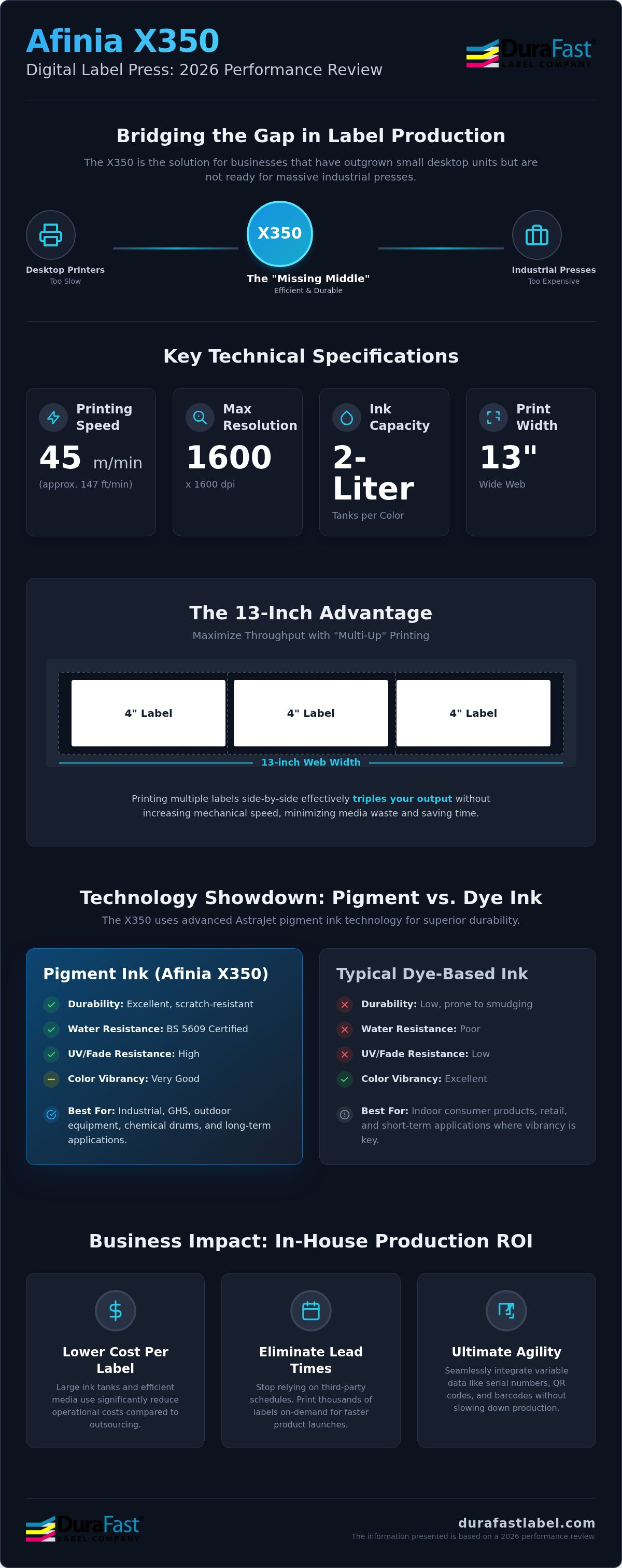
- Printing speed: It reaches up to 45 meters per minute, which is roughly 147 feet per minute. This allows you to finish large runs in a fraction of the time required by entry-level machines.
- Max resolution: At 1600 x 1600 dpi, the print quality is stunning. Small legal text on pharmaceutical labels remains perfectly legible, and brand colors stay vibrant.
- Large ink capacity: The system uses 2-liter tanks. This reduces the frequency of ink swaps and ensures your cost per label remains low. You can find the full range of Afinia inks to keep your press running without downtime.
The 13-Inch Advantage: Why Width Matters
Width is about more than just printing large labels. It's about efficiency. With a 13-inch wide web, you can utilize "multi-up" printing. If you have a standard 4-inch product label, you can print three of them side-by-side across the web. This effectively triples your throughput without needing to increase the machine's mechanical speed. It's the most efficient way to use your inkjet labels while minimizing media waste.
This width also opens doors to new markets. You can now print large-format labels for chemical drums, oversized shipping crates, or wrap-around packaging for large consumer goods. When you combine this width with pigment-based inks that resist fading and moisture, you get a press that handles everything from gourmet food jars to industrial outdoor equipment.
Performance Breakdown: AstraJet Speed and Pigment Durability
The AstraJet printhead technology is the engine behind the X350's industrial reliability. Unlike entry-level heads that might struggle with heat or nozzle clogging during long shifts, AstraJet is engineered for consistency. It handles high-speed throughput without the banding or color drift that often plagues smaller units. This Afinia X350 Label Press Review finds that the real innovation lies in how the machine balances this speed with the chemical stability of pigment ink. It doesn't just print fast; it prints labels that last.
Durability is a non-negotiable requirement for industrial settings. Labels on chemical containers or outdoor equipment must remain legible despite exposure to sunlight, rain, or harsh solvents. The X350's pigment-based inks are BS 5609 certified. This means they meet the rigorous standards for marine immersion and extreme weather. For businesses following the OSHA Hazard Communication Standard, this level of durability is essential for safety and compliance. The ink bonds deeply with the media. It creates a scratch-resistant surface that usually doesn't require additional lamination.
Variable data printing is another area where the X350 shines. You can print unique serial numbers, QR codes, or localized barcodes on every single label. The system processes this data in real time. It doesn't pause or slow down the 45 meters per minute pace. This agility is vital for logistics and track-and-trace applications in 2026.
Pigment Ink vs. Dye Ink: Which is Better for You?
If you've used dye-based printers, you know the colors are vibrant but fragile. One drop of water can ruin a label. Pigment ink is different. It uses solid particles suspended in liquid. These particles stay on the surface of matte chemical labels, providing superior lightfastness. Your labels won't fade under warehouse LED lights or direct sun. While dye ink might offer a slightly wider color gamut, pigment ink provides the industrial grit needed for real-world handling. It dries almost instantly. This prevents smudging as the labels are wound onto the take-up reel at high speeds.
Maintaining Print Quality at 45 Meters Per Minute
Running at 45 meters per minute is impressive. It's fast enough to produce thousands of labels in a single coffee break. The X350 maintains photographic quality by using automated nozzle cleaning cycles. These cycles run in the background to ensure every jet is firing perfectly. The system also manages color consistency across the entire 13-inch web. Whether you are printing on gloss or matte inkjet labels, the results are crisp. If you want to see how these prints hold up in your specific environment, you can request a printed sample from our team.
Business Impact: ROI and In-House Cost Savings
Investing in a digital press is a major step for any production facility. The primary goal is always the same: lowering the cost per label while increasing operational flexibility. This Afinia X350 Label Press Review confirms that the machine delivers a compelling return on investment by slashing the "outsourcing tax" many brands pay to third-party print houses. When you outsource, you pay for the printer's overhead, their profit margin, and the shipping costs. By bringing production in-house with the X350, you only pay for the media and the ink.
The total cost of ownership (TCO) in 2026 is influenced heavily by ink efficiency and maintenance. The X350 uses massive 2-liter ink tanks, which significantly lowers the cost per milliliter compared to desktop cartridges. While a flagship desktop unit like the Afinia L801 is excellent for smaller batches, the X350 is built for the long haul. It handles the high-volume runs that would be cost-prohibitive on smaller machines. You also eliminate the waste associated with minimum order quantities (MOQs). Instead of ordering 50,000 labels to get a price break and throwing away 10,000 when a design changes, you simply print what you need.
Volume Thresholds: When Does the X350 Make Sense?
There is a specific "sweet spot" where a digital press becomes more profitable than a desktop printer. If your monthly volume exceeds 50,000 labels, the labor savings alone start to pay for the machine. Because the X350 runs at 45 meters per minute, an operator can finish a massive job in an hour rather than a full shift. This efficiency allows you to scale your production without adding more employees to the payroll. The break-even point for the hardware investment often arrives much sooner than expected when you factor in the elimination of rush fees and shipping delays from external vendors.
Eliminating Lead Times and Minimum Order Quantities
Supply chain resilience is a major focus for businesses in 2026. Waiting three weeks for a label delivery can stall a product launch and cost you thousands in lost sales. The X350 allows for same-day label changes. This is a game-changer for seasonal promotions or private-label products. If a client needs a custom run of 5,000 units by Friday, you can say yes without hesitation. This agility transforms the label from a bottleneck into a competitive advantage. Transitioning from a desktop unit to the X350 means moving from "just in case" inventory to "just in time" production, freeing up capital that was previously tied up in warehouse shelves full of pre-printed rolls.
Workflow Integration: Media Handling and Maintenance
Integrating the X350 into your production line requires a shift in how you think about media. It's a roll-to-roll system that enables continuous, high-speed printing without the need for constant monitoring. This Afinia X350 Label Press Review highlights how the machine's advanced tension control system prevents web skewing during long runs. You can set a large job and walk away to handle other tasks. The installation requires a stable floor and a climate-controlled environment to keep the pigment inks at the right viscosity for consistent jetting.
Maintenance is surprisingly simple for a machine of this scale. Peak performance depends on a consistent routine that takes only a few minutes each day. Daily tasks include checking the printhead service station and monitoring the 2-liter ink tanks. Weekly, you should inspect the aerosol extraction filters to ensure the internal printing environment stays clean. These small steps prevent nozzle clogs and ensure your colors remain vibrant throughout the life of the printhead.
Media Compatibility: From Paper to Synthetic Films
To get the best results, you must use high-quality inkjet labels specifically coated for pigment technology. The AstraJet heads are precise; they need media that can absorb the ink quickly to prevent bleeding or smudging at 45 meters per minute. Loading 13-inch rolls is straightforward, but the weight of industrial-sized media means you should use the machine's built-in alignment guides to ensure perfect tracking. Whether you're printing on silver BOPP for vitamins or textured stocks for wine, the X350 handles the transition between media types with minimal calibration.
The Role of Label Design Software
Software is the brain of your printing operation. Integrating the X350 with BarTender Professional allows you to manage complex variable data and color profiles with ease. You can ensure your brand's specific "red" looks the same on a matte paper label as it does on a gloss synthetic film. By using software automation to pull data directly from your inventory system, you eliminate the need for manual data entry and significantly reduce the risk of operator error. If you have questions about the physical requirements for your facility, reach out to our technical team for a site readiness checklist.
Final Verdict: Is the Afinia X350 Right for Your Business?
Deciding on a digital press involves balancing your current production needs with your future growth goals. This Afinia X350 Label Press Review has shown that the machine is a high-performance bridge between desktop convenience and industrial scale. Its primary strengths are undeniable: a massive 13-inch print width, blistering speeds of 45 meters per minute, and the extreme durability of AstraJet pigment inks. It's built for businesses that have outgrown the limitations of smaller units and want to stop paying the high premiums of outsourced printing.
Of course, you must weigh these benefits against the requirements of the system. The X350 has a larger footprint than a standard office printer and requires a dedicated space in a climate-controlled facility. It's a professional-grade press, not a plug-and-play desktop toy. If your volume is still relatively low, you might find the Epson ColorWorks C6000A more suitable for on-demand, small-batch tasks. However, if you're running thousands of labels daily and need the lowest possible cost per print, the X350 is the clear winner for 2026.
Ideal Use Cases: Food, Chemical, and Logistics
The X350 shines in industries where label failure isn't an option. It's a top-tier choice for GHS label printing because its pigment inks resist the harsh chemicals and moisture often found in industrial environments. E-commerce fulfillment centers also benefit from its speed, allowing them to keep up with rapid shipping cycles without bottlenecking the warehouse. For gourmet food and craft beverage brands, the 13-inch width allows for stunning, wrap-around designs that pop on the shelf and resist the condensation of refrigeration.
Next Steps: Getting a Print Cost Analysis
Before making a final decision, it's vital to see the quality and calculate the costs for your specific designs. Every label uses a different amount of ink, and your media choice will impact the final result. We recommend reaching out to a specialist to verify that your chosen substrates are fully compatible with AstraJet technology. You can see the results for yourself by requesting a customized sample kit. Our team can help you run the numbers to see exactly how much you'll save by moving your production in-house. Contact DuraFast for an Afinia X350 quote and print sample today!
Take Control of Your Label Production
The X350 isn't just a simple hardware upgrade; it's a strategic shift for your business growth. It combines the user-friendly nature of a desktop unit with the raw power of an industrial press. By utilizing the 13-inch wide print path and AstraJet pigment technology, you're investing in labels that don't just look professional but survive the harshest industrial environments. You'll no longer be at the mercy of a third-party printer's schedule.
This Afinia X350 Label Press Review confirms that moving production in-house eliminates the high costs and long lead times of outsourcing. You'll gain the flexibility to launch products faster while keeping your inventory lean and your profit margins high. For broader needs like custom packaging and direct mail, professional services from micro-printing.com remain an excellent resource.
DuraFast Label Company is here to help you make this transition smoothly. We provide expert North American support for all Afinia hardware. We also maintain the largest selection of 13-inch wide inkjet media and keep Afinia pigment ink cartridges in stock to ensure zero downtime. Don't settle for delays. Contact DuraFast to start your custom ROI analysis today! Taking control of your supply chain starts with the right partner.
Frequently Asked Questions
What is the main difference between the Afinia X350 and the L901?
The X350 is a full-scale digital press with a 13-inch web width, whereas the L901 is a desktop-class printer with an 8.5-inch width. While the L901 is excellent for short-to-mid runs, the X350 is engineered for continuous, high-speed industrial production. It uses AstraJet pigment technology to provide superior durability compared to standard dye-based systems. This Afinia X350 Label Press Review highlights that the X350 is the better choice for manufacturers scaling toward high-volume throughput.
Does the Afinia X350 use pigment or dye-based ink?
The Afinia X350 uses durable pigment-based inks for all four color channels. This technology is superior to dye-based inks because it provides excellent resistance to UV fading, moisture, and chemical exposure. It's the ideal choice for industrial labels that must remain legible in harsh environments. You won't have to worry about your labels smudging or fading during shipping or long-term outdoor storage; the particles stay locked on the media surface.
What is the maximum print width of the Afinia X350?
The maximum print width for the Afinia X350 is 13 inches, which is approximately 330 mm. This wide-format capability allows you to print large-scale labels for chemical drums or oversized packaging. It also enables multi-up printing, where you can place several smaller labels side-by-side across the web to maximize your production efficiency. This width is a significant advantage over standard 8-inch industrial printers and helps reduce media waste during long runs.
Is the Afinia X350 compatible with GHS labeling requirements?
Yes, the Afinia X350 is fully compatible with GHS labeling requirements when paired with the correct certified media. The pigment-based inks are BS 5609 certified, which is the international standard for labels used in marine environments. This ensures your chemical labels remain compliant and legible even after exposure to salt water and extreme weather. It provides the durability needed for hazardous material identification and meets strict regulatory safety standards.
How fast can the Afinia X350 print labels?
The Afinia X350 can print at speeds up to 45 meters per minute, which is approximately 147 feet per minute. This high-speed performance allows you to finish massive print runs in a fraction of the time required by entry-level desktop units. It maintains high resolution even at these top speeds, ensuring your text and barcodes remain crisp and scannable. It's built to keep your production line moving without the typical bottlenecks of smaller systems.
What kind of maintenance does the Afinia X350 require daily?
Daily maintenance for the X350 is minimal and typically takes less than ten minutes of operator time. You'll need to perform a quick check of the printhead service station and ensure the aerosol extraction filters are clear. The machine handles most of its nozzle cleaning through automated cycles that run in the background. Consistent daily care prevents ink buildup and ensures your print quality remains at peak levels for every shift you run.
Can I use existing label design software with the X350?
You can use most industry-standard label design software with the X350, including BarTender Professional and other Windows-compatible applications. The press uses a standard Windows-based driver, so it integrates easily with your existing digital workflows. This compatibility allows you to manage variable data, such as serial numbers and QR codes, without needing to learn a proprietary system. It makes the transition to in-house digital printing much easier for your production team.
Does DuraFast Label Company provide ink and labels for the X350?
DuraFast Label Company provides a comprehensive inventory of Afinia pigment ink cartridges and specialized inkjet media for the X350. We stock a wide range of 13-inch wide materials, including matte paper, gloss synthetic, and chemical-resistant films. Our team ensures that you have the supplies needed to avoid downtime. We also offer expert support to help you select the right combinations for your specific industrial application and volume requirements.