BarTender Professional Software License: A 2026 Buyer’s Guide
20th Oct 2026

The right BarTender Professional software license depends on how your team plans to use the software and on the terms of the specific offer. Before choosing, map out who will design and print labels, which computers and printers are involved, and what your label workflow requires. Then compare those needs with the license scope and terms stated for the product.
It’s natural to focus on software functions first, especially when labels rely on changing information or need particular formats. But the license terms matter too: the people and equipment covered, the license duration, and any stated maintenance or support. Reviewing those details together helps you judge whether an offer fits your day-to-day process.
This 2026 buyer’s guide explains what to review when comparing BarTender Professional software offers, how to organize your requirements, and how to connect the software decision to your label-printing workflow. DuraFast Label Company offers BarTender Professional Software as part of its label-printing software selection.
Key Takeaways
- The Professional edition name alone does not tell you the full scope or terms of a license.
- Compare each offer’s stated users, computers, printers, and license duration with your setup.
- List your label formats, data sources, and required functions before evaluating product details.
- Use a practical checklist to compare BarTender Professional software offers against your workflow.
- Review the exact product information, including any stated maintenance and support terms, before deciding.
What Does a BarTender Professional Software License Cover?
A BarTender Professional software license sets out the terms for using the software. It is separate from the label printer and materials used to produce labels, such as blank labels and ribbon. The specific offer determines what the license covers, so review its product details rather than relying on the edition name alone.
For a useful comparison, identify the scope and terms that affect your setup. Look for information about authorized users, computers, printers, license duration, and any stated maintenance or support. If the product information does not clearly address a requirement that matters to your workflow, treat that as an open question rather than assuming the offer covers it.
What is the difference between an edition and a license type?
The edition identifies the software product or tier being considered. The license type describes the terms under which the software may be used. These terms answer different questions, so they should not be treated as interchangeable. A product title may name an edition without spelling out every part of the license scope.
When comparing offers, look for the exact license type and the permitted use described in the product information. Note which people and computers are covered, how the offer treats printers, and whether a time period or ongoing term is specified. These details help you compare the offer with your actual setup without making assumptions based on a label or title.
Why do Professional license listings look different?
Product listings can present different terms, configurations, or levels of detail. One listing may state a license duration, while another may focus on the software edition or other parts of the offer. A difference in wording does not, on its own, establish that two listings cover the same use. Compare the full product information for each offer independently.
Pay particular attention to any stated user, computer, and printer scope, along with license duration and maintenance or support terms. Don’t transfer a term from one listing to another. If a detail is important to your decision but is not explained in the product information, keep it on your comparison checklist until you have a clear answer.
Also consider what your labels need to contain and how their information is prepared. Labels can include barcodes, and the appropriate format depends on the label’s purpose and workflow. For background on barcode types and uses, see Understanding Barcodes. A software edition name alone does not tell you whether a specific offer meets every requirement in your label process.
Keep the comparison practical: identify the software edition, then read the license and product terms for the specific offer. Write down who will use the software, which equipment is involved, and what the label workflow requires. That gives you a consistent basis for comparing BarTender Professional software offers.
Compare BarTender Professional License Types, Printer Scope, and Features
Compare the stated license terms separately from the software functions described for the product. Build your comparison around the details in each offer, then check those details against your workflow. The table below is a checklist of questions to answer, not a claim that every offer includes the same terms or functions.
Application license versus workstation license
License labels can describe different arrangements, but the name alone is not enough to establish who may use the software or how printers are covered. Read the definition attached to the specific offer. If it names a workstation or application arrangement, confirm what that means for users, computers, and printers in your setup before comparing it with another option.
| What to compare | General Professional information | Configuration detail to read |
|---|---|---|
| License model | The product information should identify the license arrangement for the offer. | Read the exact license model named in the listing. |
| Printer scope | Printer coverage depends on the terms stated for the specific configuration. | Check the stated scope and compare it with the printers in your workflow. |
| Users and computers | The offer’s terms determine which users and computers are covered. | Confirm the stated scope fits the people and computers that will use the software. |
| Data needs | Assess the product information against the sources and label process your team uses. | Check that the functions described fit your actual data and label requirements. |
| Support terms | Maintenance and support terms should be reviewed for the specific offer. | Read any stated duration, conditions, and coverage rather than assuming they apply to every listing. |
Which Professional features matter to your workflow?
Start with a sample label and trace each piece of information back to its source. Is the content fixed, entered by a user, or drawn from business records? Do several label designs share fields or layouts? Does the job require a particular barcode or another specialized function? These questions help you identify which software capabilities to look for in the current product information.
Separate essential functions from useful extras. For example, if a label must use information from a particular source, record the source and the fields the label needs. If the design is simple and the content rarely changes, focus on the functions and terms that apply to that straightforward job. For barcode labels, consult GS1 Barcode Standards when your workflow calls for standardized barcode formats.
Before choosing: Compare the functions and license terms in the current product information with your written requirements. Review the exact listing for scope, license duration, and any stated maintenance or support. If you’re evaluating BarTender Professional Software from DuraFast, share your planned user, computer, printer, and data requirements with DuraFast to make the discussion specific to your workflow.
Is BarTender Professional the Right License for Your Label Workflow?
The word “Professional” identifies the edition, not whether a particular offer fits your team. To assess the fit, consider what your labels need to do, where the information comes from, who will use the software, and which printers are part of the process. Review these workflow needs separately from the license terms.
Use a real label job as your test. A fixed label printed occasionally has different requirements from a recurring job that uses updated business information. A shared workflow may involve more users or computers than a single-person setup. In each case, compare what the work requires with the scope and functions described for the offer.
When does a workflow justify evaluating Professional?
Consider the kinds of label jobs you produce and the tasks involved in preparing them. A workflow with changing information, repeatable layouts, or specialized requirements may call for functions beyond basic label design. List those needs and compare them with the current product information for BarTender Professional software. Don’t assume a feature is included unless it is stated for the product you are evaluating.
These workflow signals can help organize your evaluation:
- Occasional, simple printing: If one person produces straightforward labels infrequently, write down the essential design and printing requirements first. Use them to assess whether a Professional offer is appropriate for the job.
- Recurring labels with changing information: If label details change between jobs, document which fields vary and how staff obtain that information. Then compare the process with the functions stated for the software.
- Shared label production: If several people take part in creating or printing labels, identify their roles and the computers they use. Check those requirements against the license scope in the offer.
- Several printers: List every printer involved in the workflow, including printers used by different teams. Compare that list with the exact printer terms stated for the license.
When should you compare another BarTender tier?
If your requirements go beyond the functions described for Professional, compare the current information for other BarTender editions. Focus on the tasks your workflow must support, such as the level of label design, connections to other business processes, or centralized administration. Use current product descriptions to make the comparison, rather than assuming that an edition name guarantees a particular function.
Professional is worth evaluating when its stated functions match your label jobs and its license terms fit the people, computers, and printers involved. If you’re considering it, compare both the product information and the specific offer terms with your requirements before selecting a listing.
Keep the decision grounded in actual work. Write down the label types, information sources, printing frequency, user roles, computers, and printer count. Add any specialized requirements, then look for each one in the product information. The edition name is one part of the decision, not a substitute for confirming the offer’s scope.
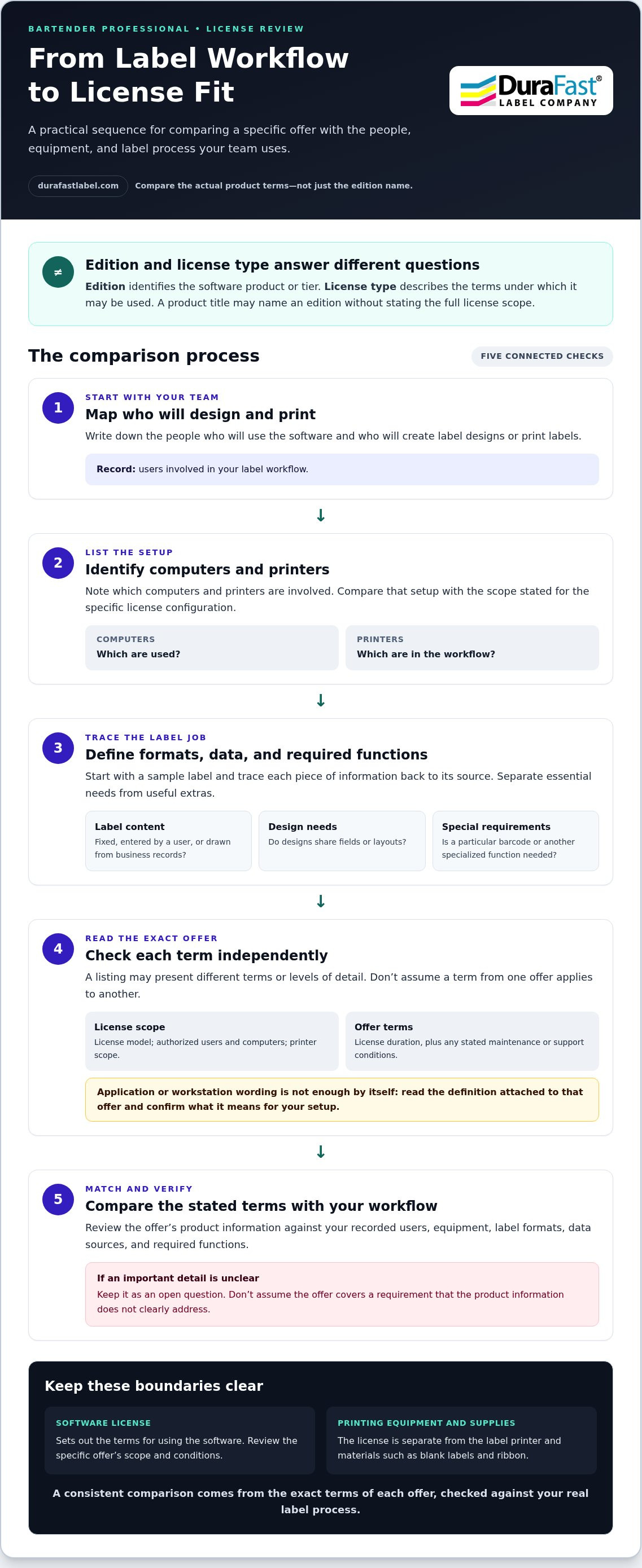
How to Choose a BarTender Professional Software License
Choose by comparing your label workflow with the terms and product details in the offer. A short requirements checklist makes it easier to compare options consistently and spot missing information. Gather the details below before selecting a listing or getting in touch with DuraFast about BarTender Professional Software.
Build a license requirements checklist
Start with the people and equipment involved, then describe how labels are designed and populated with information. This sequence gives you a clear picture of what the license and software need to support.
- List users, computers, and printers. Record who will design or print labels, which computers they use, and which printers are part of the workflow. Keep users of the software distinct from people who only receive printed labels.
- Describe how the equipment is used. Note where each printer is used and which people or teams rely on it. Include anticipated workflow changes that could affect the equipment in scope.
- Document label formats and templates. Describe the types of labels you produce and whether their layouts stay fixed or need to accommodate changing fields. This helps you identify the functions to compare.
- Map the information sources. Record where label information comes from, such as a spreadsheet or business records, and whether staff enter or update it as part of printing. Note which fields change and how often.
- List specialized requirements. Record any specific barcode, data-entry, or other function your label process needs. Compare each requirement with the product information for the edition and offer you’re considering.
For example, a single person printing fixed labels from one computer has different requirements to document from a team that shares label production and uses changing business information. The checklist does not choose the license for you. It turns your workflow into practical criteria for assessing the product details and license terms.
Review license terms before selecting a listing
With your requirements in hand, compare each listing with the same checklist. Read the full product name and license description. Look for the stated users, computers, printers, license duration, and any maintenance or support terms. If an important detail is missing, don’t assume it matches another offer.
Review each term as written. Note what the listing says about the license arrangement and any period or support coverage. Offers may present different terms, so avoid carrying a printer scope, duration, or support detail from one listing over to another. Compare the current product information with your needs before making a decision.
A clear requirements list helps DuraFast understand the label workflow you’re evaluating. Discuss your BarTender Professional license needs and include the user, computer, printer, data, and function details you’ve gathered.
Get Help Evaluating BarTender Professional Software from DuraFast
DuraFast offers BarTender Professional Software as part of its label-printing software selection. Before choosing an offer, bring together the details that shape your decision: who will use the software, which computers and printers are involved, what functions your labels require, and what terms the listing states. A clear picture of your workflow gives you a practical basis for comparing the offer with your needs.
What to include in a license inquiry
Describe how your team prepares and prints labels, then include the details that affect the software and license requirements. Explain whether label information is fixed or changes between jobs, who takes part in printing, and which printers are used. This provides useful context for a discussion about BarTender Professional Software without assuming that every offer has the same scope or terms.
- Workflow: Describe what you print, how often, and who designs or prints the labels.
- Users and computers: List the people involved and the computers they use for label work.
- Printers: Identify the printers used in the workflow and how they fit into the process.
- Label and data requirements: Describe label formats, layouts, and the sources of information used on labels.
- Functions and terms: Note required label functions and the license or support details you want to compare.
Specifics make a conversation more productive. “We need software for label printing” gives little context. “Our team uses two computers to prepare changing product labels from business records and prints them on several devices” describes the workflow and the points to consider. You don’t need to resolve every licensing question first. A concise outline of what you do and what the software needs to support is a useful starting point.
What to do before making a purchase decision
Review the current product information for BarTender Professional and the exact offer you are considering. Compare the stated functions and license scope with your users, computers, printers, and label requirements. Read any license duration, maintenance, and support terms as written. Avoid applying terms from one listing to another configuration.
Use your requirements checklist for a final comparison. Mark each requirement as addressed, not needed, or unclear in the product information. Pay close attention to functions your labels depend on and to any scope or term that affects your setup. This keeps your decision focused on the stated offer rather than assumptions based on the Professional name.
DuraFast offers BarTender Professional Software for buyers evaluating label-printing software. For a focused next step, contact DuraFast about BarTender Professional and share the license terms, printer scope, functions, and workflow requirements you’re comparing.
Make Your Next Licensing Decision With Clarity
Turn your requirements into a short purchasing brief before you choose. Describe the label jobs, information sources, users, computers, and printers involved, then use the current offer’s terms to guide your comparison. This approach helps you assess how a BarTender Professional software license fits your workflow today and what requirements to revisit if that workflow changes.
DuraFast lists BarTender Professional Software among its offerings and provides label-printing equipment, supplies, and software tools. Bring your workflow details and license questions together so your evaluation stays focused on the product information and your actual setup.
Contact DuraFast about BarTender Professional to discuss the software and your licensing requirements. Share the details you’re comparing, including your users, computers, printers, and label workflow.
Frequently Asked Questions
How much does a BarTender Professional software license cost?
Price depends on the specific offer and its stated terms. Review the current product information for the BarTender Professional software you’re considering instead of relying on a price associated with a different configuration. Before comparing offers, identify the scope and functions your workflow requires so you can assess the product details consistently.
Can one BarTender Professional license be used with multiple printers?
Printer coverage depends on the terms of the specific license offer. Read the product information for its stated printer scope and compare it with the printers in your workflow. Don’t assume that terms in one listing apply to another offer.
Is BarTender Professional a perpetual license or a subscription?
The format and duration depend on the specific offer. Read the current product information to see what it states about the license term. Don’t infer renewal, cancellation, or upgrade terms from a label such as “subscription” or “perpetual” alone. Use the terms attached to the offer you’re evaluating.
Does BarTender Professional work with every label printer?
Don’t assume that a software offer supports every printer or setup. Identify the exact make and model of each printer in your workflow, then compare those requirements with current product information. If you use multiple printer models, include each one in your review.
Does BarTender Professional include database connectivity?
Check the current product information for the specific edition and offer to see what it states about data sources and connections. Write down the source your labels use and the fields they need, then compare those requirements with the stated software functions. Don’t assume a particular database or connection method is supported unless the product information says so.
What is the difference between a BarTender application license and a workstation license?
Those terms can describe different license arrangements, but their meaning and scope should be read in the context of the specific offer. Check what the product information says about authorized users, computers, and printers. Compare those terms with your workflow rather than assuming that the same scope applies across different listings.
Do BarTender Professional licenses include maintenance and support?
Maintenance and support depend on the terms stated for the offer. Review the product information for any included coverage, its duration, and any conditions. Don’t assume that a support period or term in one listing applies to every BarTender Professional software offer.