Bringing Label Production In-House to Reduce Printing Costs
31st Oct 2026
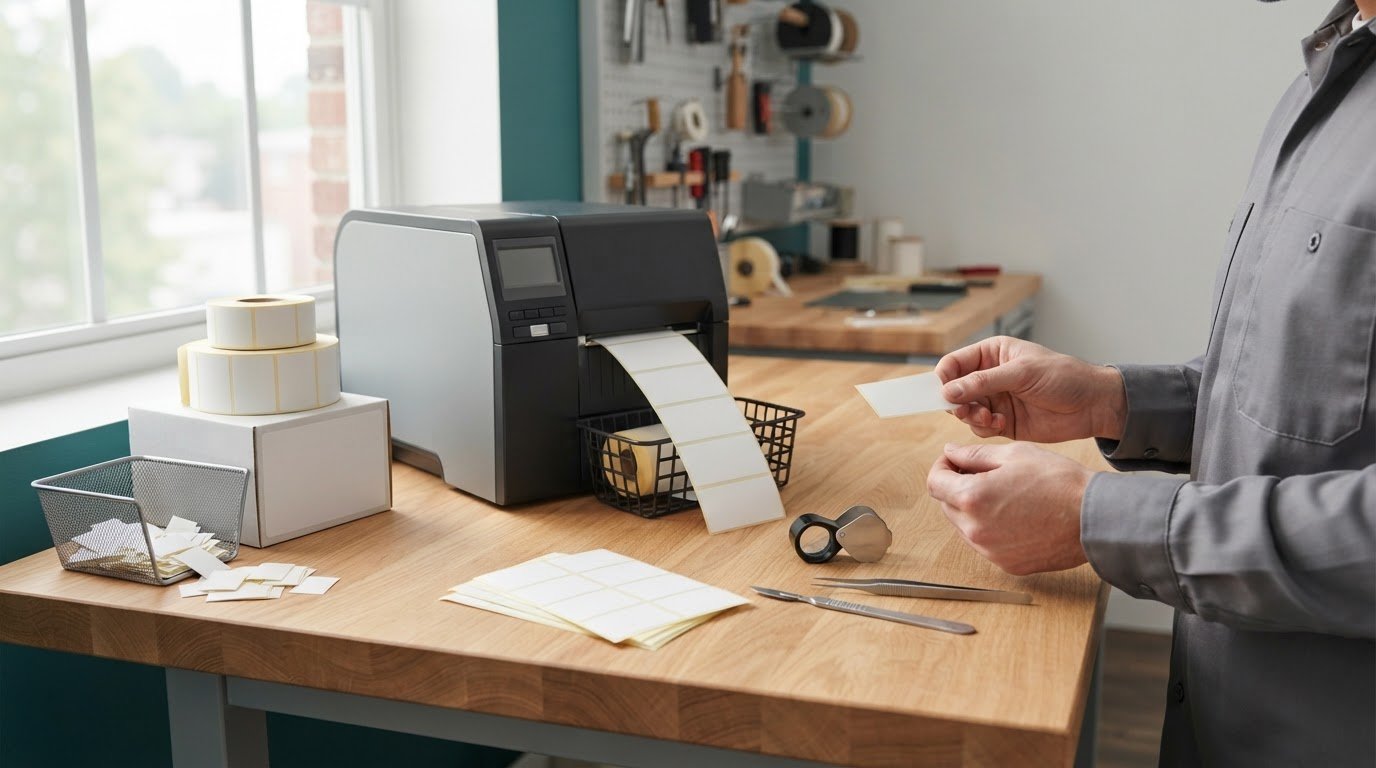
Bringing label production in-house can reduce printing costs, and in-house production printing can save a business more than 30% of the total cost of a print job or project. The savings depend on the full production picture, including label volume, waste, equipment, and labor. Printing on demand can also help limit excess or outdated label stock.
Outsourcing may feel simpler when label needs are steady and predictable. But frequent product changes, long lead times, or unused inventory can make it less efficient. The key is to compare the cost and flexibility of in-house production with the demands of your operation.
This article explains how to assess label volume and costs, weigh lead times, and maintain print quality. You’ll also learn what equipment and tools an in-house setup may require, and how to decide whether producing labels on demand suits your business.
Key Takeaways
- Compare label volume and demand patterns before deciding whether in-house production can make financial sense.
- Include equipment, finishing tools, and measuring tools in your setup plan, not just the printer.
- Printing on demand can help reduce waste from excess or outdated label inventory.
- In-house printing can make it easier to spot quality issues and correct them before they affect a larger batch.
- Weigh the potential cost savings against the time and production demands of managing labels internally.
Quality control and correcting printing errors
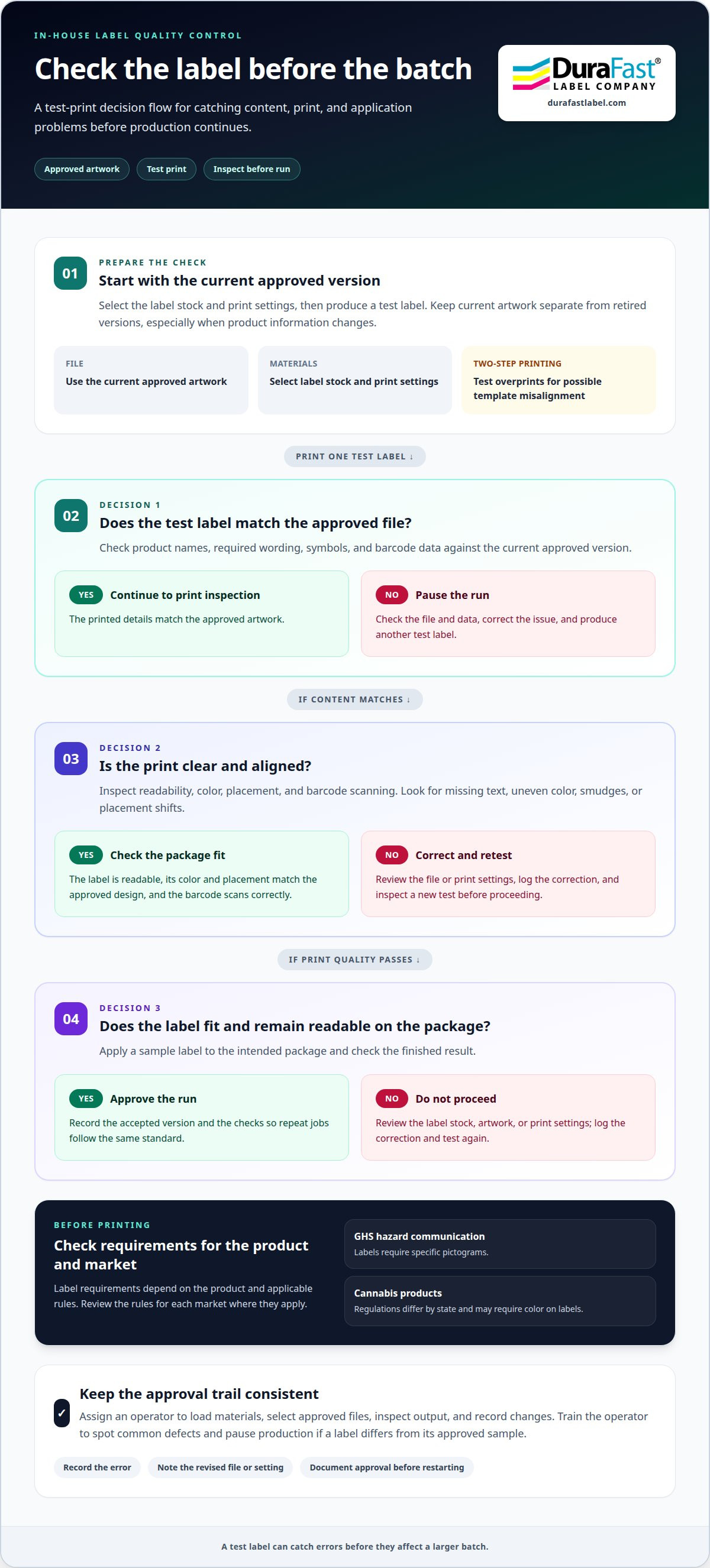
In-house label printing lets your team inspect output and correct errors before they affect more labels. A practical quality check compares each test print with the approved artwork, product details, and intended use. For example, before a run for a new product, confirm the label shows the current name, ingredients, barcode, and branding.
What regulations govern product labeling in the United States? Requirements depend on the product and applicable rules. Globally Harmonized System hazard communication labels require specific pictograms. Cannabis labeling regulations differ by state and may require color on labels, so teams handling those products need to review the rules for each market.
Make approval specific. Check that text is readable, key details match the approved file, and barcodes scan correctly. Compare the label’s color and placement against the brand’s approved design. A sample audit can include a pillow law label layout, checking the printed result against its source artwork without assuming every label follows the same requirements.
What steps are involved in setting up an in-house label production workflow? Start with approved artwork, select the label stock and print settings, produce a test label, inspect it, and then approve the run. Record the accepted version and checks so repeat jobs follow the same standard.
- Check the file: Confirm product names, required wording, symbols, and barcode data against the current approved version.
- Inspect a test print: Look for missing text, uneven color, smudges, and placement shifts before printing a batch.
- Verify application: Apply a sample label to the intended package and check that it fits and remains readable.
- Log corrections: Note the error, revised file or setting, and approval before restarting production.
Two-step printing carries a specific risk: printing over a pre-printed template can cause misalignment and waste labels. A test print can reveal the mismatch before the run continues. Keep current artwork separate from retired versions, especially when product information changes.
What training and staffing are needed for in-house label printing? Assign an operator to load materials, select approved files, inspect output, and record changes. Train the operator to spot common defects, follow the approval workflow, and pause production if a label differs from its approved sample.
What are the risks and common challenges of producing labels in-house? Key risks include incorrect information, inconsistent branding, misalignment, and wasted stock. Clear file control, test-print reviews, and documented approvals help catch problems before they affect a larger run.
Reducing outsourced-label lead times
An outsourced label order passes through several handoffs before labels reach the production floor. A business submits artwork and specifications, reviews a proof, approves the order, then waits for printing and delivery. If a product launch depends on those labels, a delay at any stage can hold up production. A new ingredient statement or package size may also require revised artwork and another approval cycle.
Bringing label printing into your facility can shorten the path from a label change to a usable batch. For example, a manufacturer updating a product name can revise the approved file, print a small quantity, inspect it, and use it for the next production run. That flexibility can matter when labels change often or demand is hard to forecast. It still takes preparation: your team needs suitable materials, current artwork, and a reliable print process.
Map the outsourced process to identify where waiting occurs. Track each handoff, from artwork submission through delivery, and note what causes rework. Then compare that sequence with an in-house workflow:
- Prepare files: Store approved artwork and identify the current version for each product.
- Stage materials: Keep the label stock needed for planned production available at the printer.
- Print and inspect: Produce a sample, check its content and alignment, then proceed with the required batch.
- Record updates: Save revised artwork and retire outdated files to prevent accidental reprints.
An in-house workflow can reduce dependence on an external order cycle, but its value depends on how you use labels. A company with stable designs and predictable orders may prefer scheduled deliveries to frequent print changes. A business with seasonal packaging, changing product details, or small batches may benefit more from printing as needed. Weigh the cost of waiting against the effort of managing materials, equipment, and trained operators.
Keep a backup plan for unusual demand. If a campaign needs more labels than your in-house setup can produce, the capacity gap may affect output. Forecast product launches and seasonal changes, then decide which labels to prioritize. For example, print labels for a scheduled production run before optional promotional versions.
Review lead-time performance using actual order records. Note when artwork was approved, when labels arrived, and whether production waited. Those dates reveal whether delays come from revisions, approvals, production scheduling, or delivery. If label timing is affecting an upcoming workflow, discuss your label-production needs as you compare the options.
Assessing label volume and demand
Choose a printer based on demand, not just a machine category. Count the labels used for each product, then compare the totals with your actual print requirements. A business shipping several product versions may have high combined volume but small batches per design. Another may print one stable label in repeated runs. These patterns call for different production plans.
Review order and production records by product and label version. Track routine use, seasonal peaks, new launches, and labels replaced after artwork changes. For example, a food producer with several package sizes should track each label separately. One combined total can hide which designs need frequent short runs and which need repeat production.
What label printers, materials, and software are best for different production volumes? For low or variable demand, consider a desktop printer suited to the label type; steady, larger runs may call for an industrial printer. Match materials to the product and application, and choose design software that supports approved templates, barcode data, and version control.
Assess capacity by matching the work to the workflow. Consider how often labels change, how many versions run together, and whether production needs color, variable information, or barcode printing. BarTender Professional can support label design and barcoding. The printer, label material, and software must work together to produce the output your business needs.
- Separate demand: Group labels by product, version, and production frequency.
- Find peaks: Identify launches or seasonal periods that increase demand.
- Account for revisions: Include labels replaced after product information or artwork changes.
- Compare capacity: Assess whether internal equipment can handle routine and peak work.
Growing businesses should plan for 3-5 years or more of growth when assessing production needs. That means considering expected product changes and expansion, not just current label consumption. A printer that suits today’s short runs may not support a broader range of products later. Conversely, buying for a projected peak can leave equipment underused if growth does not materialize as planned. The case for bringing label production in-house depends on how demand and product needs may evolve.
When is outsourcing label production better than bringing it in-house? Outsourcing can suit businesses with stable designs, infrequent orders, or demand that doesn’t justify managing equipment, materials, and print work internally. It can also help cover a production spike beyond in-house capacity.
Use your records to compare recurring demand with the work of managing printing internally. If label versions change often, on-demand production can keep current files in use and reduce obsolete stock. If demand is consistent and predictable, outsourcing may remain practical. Before bringing label production in-house, weigh label volume, variation, and your team’s capacity to manage production.
Cost reduction from in-house printing
Compare the full cost of outsourced labels with the full cost of producing them internally. In-house production printing can save a business more than 30% of the total cost of a print job or project. That figure is a potential outcome, not a guaranteed saving for every label program. The result depends on volume, material use, labor, equipment, and how often designs change.
Start with invoices for a representative print job. Include label production, finishing, shipping, and extra charges for revisions or small orders. Then estimate internal costs for the same usable quantity, including printer and finishing equipment, label stock, ink or ribbon, software, operator time, maintenance, and rejected prints. Comparing consumables alone with an outsourced invoice leaves out major costs.
Waste affects both sides of the comparison. An outsourced order can leave excess labels when demand changes or product information is revised. Printing on demand can reduce waste from obsolete or excess inventory. For example, if a product name changes, you can print labels from the updated file instead of keeping a large supply of the old version. Internal printing can still waste stock if setup errors or poor file control produce unusable labels.
Build the comparison around a consistent measure, such as the cost of producing the quantity needed for one product run. Separate recurring costs from one-time equipment purchases. Then test the calculation against different demand patterns, such as a stable design and one that changes often. This reveals whether savings depend on a particular product, run size, or revision pattern.
- Outsourced baseline: Add the invoice, delivery, revision, and excess-stock costs for the same label job.
- Internal production: Include equipment, materials, labor, software, finishing, and rejected labels.
- Usable output: Compare labels that meet specifications, not simply the quantity printed.
- Changing demand: Account for labels that could become outdated before use.
Estimate labor realistically. An employee may need to prepare artwork, load materials, run the printer, inspect output, and record the job. If these tasks interrupt other work, include that time in the internal cost. A repeatable workflow makes labor easier to estimate across jobs, while frequent file changes can add review and setup time.
Finally, use actual production records to revisit your calculation. Compare the outsourced estimate with internal material use, staff time, and waste for similar jobs. If the internal setup prints small batches often, on-demand production may reduce unused stock. If equipment sits idle between occasional runs, its purchase and operating costs may outweigh the savings. Base the decision on total cost per usable job, not a single printer or label expense.
How much does in-house label printing equipment cost?
The equipment budget depends on the work your setup must handle. A finished label operation may need a printer or digital press, finishing equipment, and measuring tools. It also needs compatible label materials and software. Buying or leasing equipment affects how costs are spread, while label volume and job variety shape the setup you need.
Start by defining the finished label. A business printing simple identification labels has different needs from one producing full-color product labels with variable details. List label sizes, materials, print methods, and expected run patterns. Then identify the equipment needed to meet those requirements consistently. This prevents you from mistaking a printer purchase for the full cost of production.
Separate the budget into equipment and ongoing operating needs. Include the printer, finishing and measuring tools, software, label stock, ink or ribbon, and staff time. Account for storage and workflow tasks such as preparing files, loading materials, inspecting output, and maintaining records. These affect the cost of each usable label, even when they don’t appear on the printer invoice.
- Printer or press: Match the production method to label design, material, and expected work.
- Finishing equipment: Include the tools needed to turn printed output into finished labels.
- Measuring tools: Use them to support consistent production quality.
- Software and materials: Account for design files, label stock, ink, or ribbon.
- Operating time: Include setup, inspection, file updates, and routine production tasks.
Buying equipment can require a larger initial outlay, while leasing spreads payments over time. Compare both approaches with expected use, ownership needs, and how long the setup must serve your business. A printer used regularly for changing label versions may warrant a different investment approach from equipment used for occasional runs. Compare the total operating cost with the cost of obtaining finished labels.
Build a realistic estimate from actual jobs. Choose representative labels, then list the required printer, finishing steps, materials, software, and operator tasks. Include unusual formats or artwork changes if they are part of normal production. A setup that handles only the easiest label may add expense when other products need different materials or finishing.
Before choosing equipment, compare your production requirements with available printer and finishing options. Discuss your in-house label equipment needs to help narrow the setup around your workflow.
Bringing production printing in-house means buying or leasing the equipment and tools needed to produce finished print projects. Build your estimate around the work you expect to produce, including the equipment and tools required to complete it. This keeps the buy-or-lease comparison focused on a working setup, not just the printer.
An in-house production print department needs a robust printer or digital press, finishing equipment, and measuring tools to support consistent quality. Include each component in your production plan and compare it with the label jobs, materials, finishing steps, and operating tasks you have identified. The budget should reflect the full setup needed for usable output, not just the equipment invoice.
DuraFast Label Company: Epson ColorWorks C6000A
DuraFast Label Company offers the Epson ColorWorks C6000A for businesses evaluating **bringing label production in-house**. Its range also includes industrial thermal transfer printers and specialized label materials, such as DuraFast Matte Chemical Labels. These options let you compare a printer and label material with your production needs, such as label type, print method, and expected workflow.
If you’re narrowing down an in-house setup, consider how the equipment and labels fit your current production requirements. Contact DuraFast Label Company to discuss the available options.
Make Your Next Label Decision With Confidence
Before committing to a new production setup, turn your findings into a clear decision plan. Choose a representative label job and map its artwork, material, approval, printing, and finishing needs. This practical test can show whether bringing label production in-house fits your team’s workflow, rather than relying on assumptions about future demand. Identify what matters most to your operation, such as faster revisions, tighter control over branding, or fewer unused labels.
Then match those priorities to the equipment and materials that support your label requirements. DuraFast Label Company offers label-printing options for businesses considering an in-house setup. A conversation about your production needs can help you explore relevant options and take a more informed next step. Contact DuraFast Label Company to discuss your label production plans. A thoughtful evaluation now can help you build a setup that better fits the way your business works.
Frequently Asked Questions
What equipment is needed to bring label production in-house?
A typical setup includes a label printer, compatible materials, and any finishing equipment needed to produce ready-to-use labels. You’ll also need measuring tools to support consistent output and software to create or manage label files. For example, a business printing product labels with changing barcode data may need software for label design and barcoding. Match each component to the label size, material, print method, and workflow.
What are the costs per label for in-house printing versus outsourcing?
There’s no single per-label cost that applies to every business. For in-house production, divide the total cost of materials, ink or ribbon, labor, equipment use, and rejected labels by the number of usable labels produced. For outsourcing, divide the complete order cost, including delivery and unusable excess, by the usable quantity received. Compare the same design, material, and quantity to keep the calculation fair.
How do you calculate whether in-house label production will save money?
Compare the total cost of producing the same labels in-house and through outsourcing over a consistent planning period. Include equipment purchase or lease, software, materials, employee time, finishing, waste, and outsourced order and delivery costs. Account for labels that may become obsolete after product changes. A spreadsheet organized by product and label version can reveal whether savings depend on one high-volume label or several frequently revised designs.
What quality control standards apply to in-house label production?
Quality checks should reflect the product’s applicable labeling requirements and your company’s approved specifications. Confirm that each file uses current product information, then inspect a sample for readable text, correct placement, and accurate barcode data. For hazard communication labels, include the specific required pictograms. Keep approved artwork and version records together so operators can distinguish the current design from retired files before printing.