Buying Guide: Zebra ZQ521 Linerless Shipping Labels
22nd Sep 2026
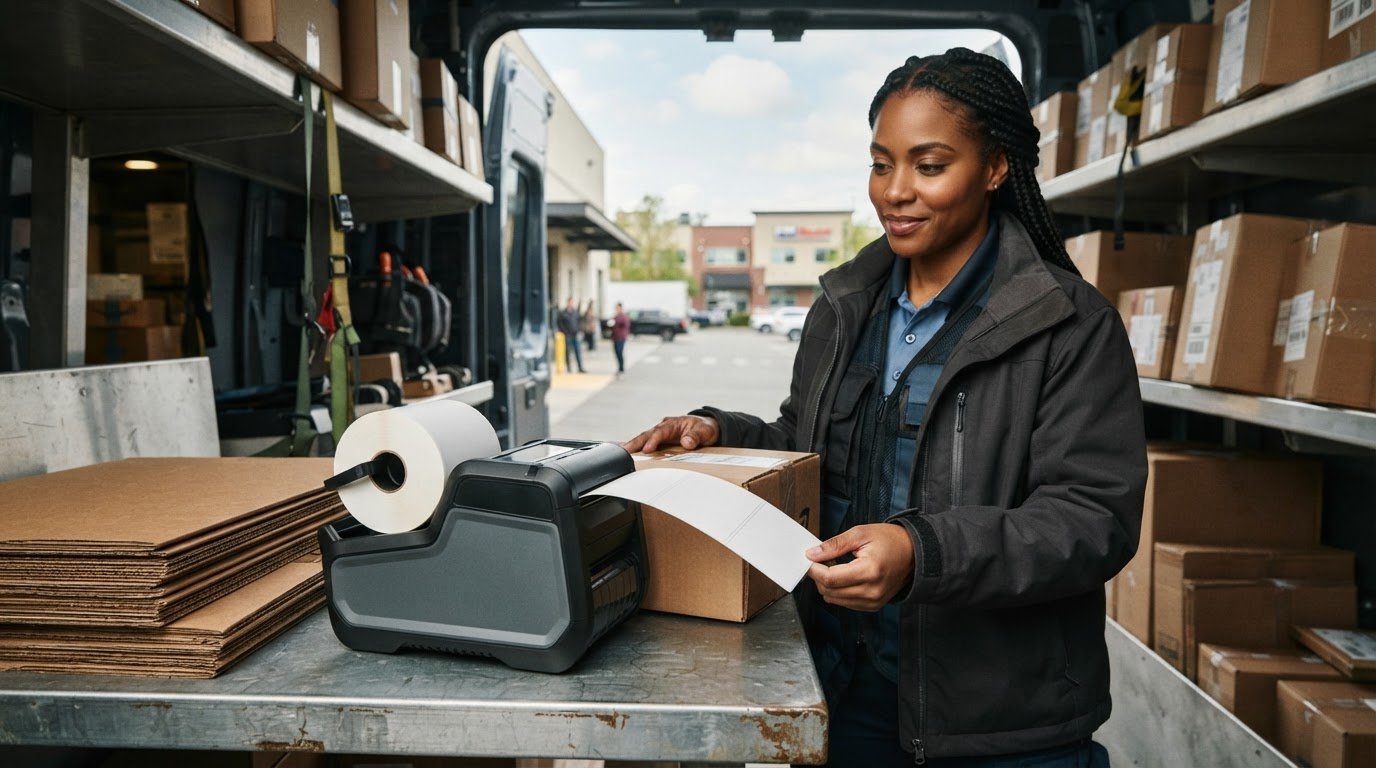
Up to 60% of a traditional media roll is discarded backing that never carries a single barcode. If you manage high-volume logistics or field delivery routes, you already know the daily headache of peeling slick glassine strips, sweeping clutter out of vehicle cabs, and clearing adhesive platen jams mid-route. Investing in ZQ521 linerless shipping labels turns your mobile printer into a zero-waste powerhouse that keeps drivers moving without constant media swaps.
In this buying guide, you'll discover how ZQ521 linerless shipping labels eliminate waste, increase roll capacity, and streamline mobile operations in tough logistics settings. We examine the exact 2.24-inch roll outer diameter and 0.75-inch core dimensions your printer demands, detail critical silicone platen roller maintenance, and highlight reliable direct thermal media that bonds instantly to corrugated cartons and poly mailers. Here is everything you need to choose the right roll and keep your mobile printers running smoothly.
Key Takeaways
- Learn how switching to ZQ521 linerless shipping labels delivers up to 60% more printable footage per roll, significantly cutting mid-shift media reloads.
- Discover how eliminating slick silicone release liners removes dangerous cab floor slip hazards and wipes out daily vehicle trash cleanup.
- Verify exact media dimensions, including the required 2.24-inch maximum roll outer diameter and 0.75-inch inner core, to guarantee smooth mechanical feeding.
- Master the manufacturer-recommended cleaning routine for specialized silicone platen rollers to prevent costly adhesive build-up and roller binding.
- Find out how continuous linerless rolls allow variable-length printing, letting you print both short receipts and full-size delivery labels from a single roll.
Understanding ZQ521 Linerless Shipping Labels: Zero-Backing Technology Explained
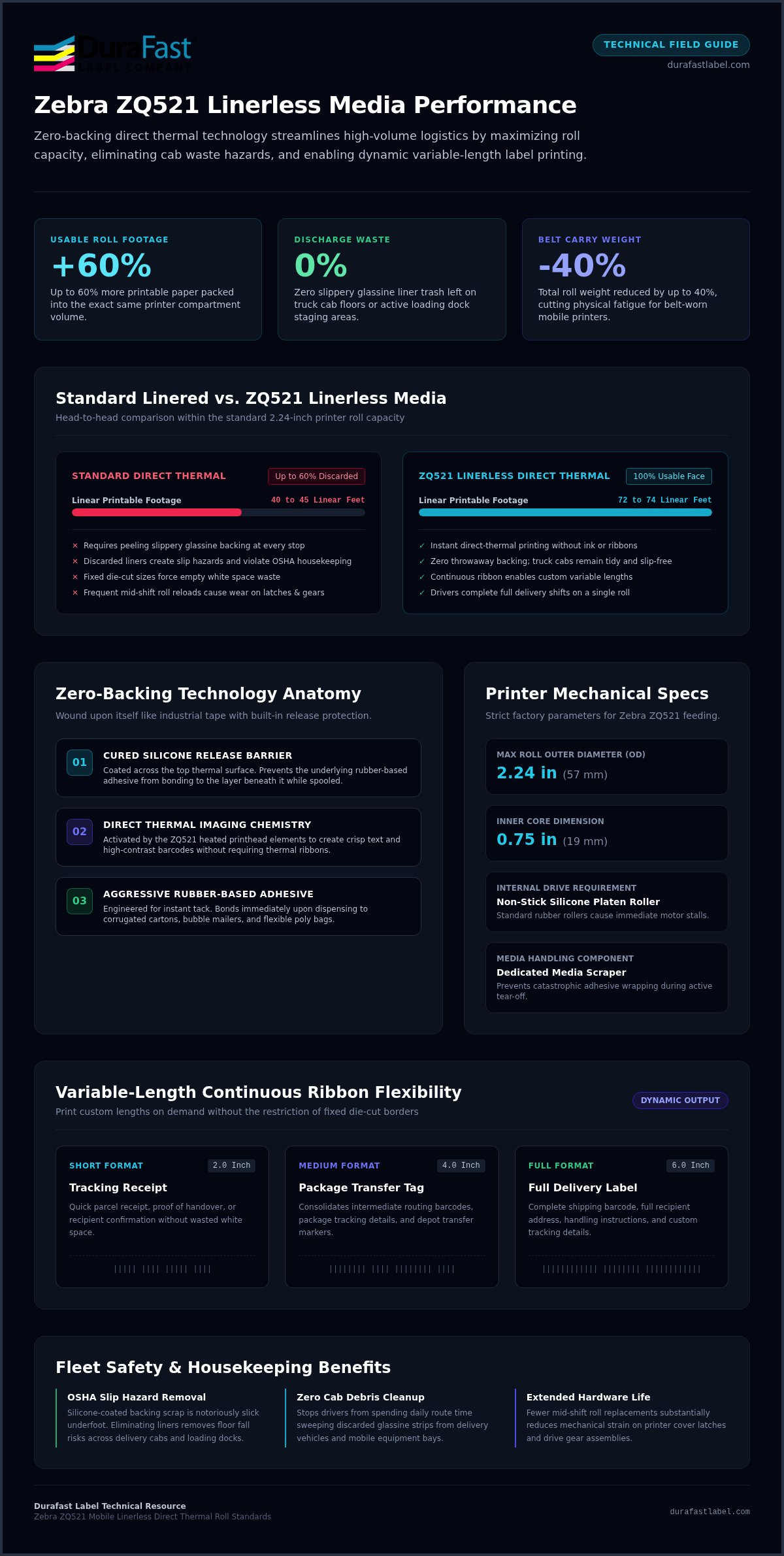
Traditional pressure-sensitive labels rely on a treated paper liner to keep adhesive sheets from fusing together in storage. Linerless media removes that throwaway backing entirely. Think of it like a roll of industrial packaging tape. The printable paper carries an aggressive adhesive on the underside, wound directly upon itself around a compact core. Because the label stock uses direct thermal printing technology, the printer's heated printhead elements create sharp text and scannable barcodes without requiring ink or thermal transfer ribbons. Switching to ZQ521 linerless shipping labels takes miles of slippery glassine backing out of your mobile fleet, keeping truck cabs clean and eliminating slip hazards during active delivery stops.
The Mechanics of Silicone Release Coatings
How do pressure-sensitive labels stay tightly spooled on a roll without sticking together? The secret lies in a cured silicone release barrier coated across the top thermal surface. This invisible layer prevents the rubber-based adhesive from bonding to the label beneath it while stored in the printer bay. Once a worker dispenses and tears a label, the exposed adhesive grips corrugated cartons, bubble mailers, and flexible poly bags with instant tack. Continuous rolls also drop fixed die-cut borders. Your team can print a quick two-inch tracking receipt or a full six-inch shipping barcode from the exact same spool without wasting empty paper.
Zebra ZQ521 Hardware Compatibility Standards
Running exposed adhesive through a mobile printer demands purpose-built internal hardware. Standard rubber rollers will immediately grab the adhesive layer, causing catastrophic media wraps and motor stalls. Factory linerless Zebra ZQ521 units solve this using non-stick silicone platen rollers and dedicated media scrapers. Consistent feeding also hinges on strict roll geometry. Compatible linerless labels for the ZQ521 must stay within a 2.24-inch (57 mm) maximum roll outer diameter wound on a 0.75-inch (19 mm) inner core. Loading verified ZQ521 linerless shipping labels that match these mechanical limits guarantees smooth feeding and prevents costly mid-route jams.
Core Operational Advantages: Why Linerless Media Maximizes Mobile Field Efficiency
Every minute a route driver spends unspooling paper, clearing cab debris, or replacing empty rolls eats into daily delivery quotas. Switching to linerless technology immediately changes that workflow equation. Stripping away heavy backing paper reduces total roll weight by up to 40%, which eases physical fatigue for delivery personnel carrying mobile devices on their belts all day. It also keeps fleet vehicles completely free of waste paper. Discarded silicone-coated liners are notoriously slick underfoot; leaving them on truck floors or loading docks violates standard OSHA warehouse safety and housekeeping standards. Adopting ZQ521 linerless shipping labels wipes out backing scrap entirely, maintaining tidy vehicle cabs and safer footing across active parcel routes.
Increased Roll Capacity and Fewer Media Swaps
How much usable footage fits in a mobile printer when you eliminate the silicone carrier? Because the liner usually accounts for nearly half the overall roll thickness, ZQ521 linerless shipping labels pack up to 50% to 60% more printable paper into the same 2.24-inch roll envelope. A single roll yields roughly 72 to 74 linear feet compared to roughly 40 to 45 feet on standard linered stock. That dramatic jump lets drivers complete entire shifts without stopping to reload media. Fewer roll changes also mean less physical wear on printer cover latches and drive gears over years of route operations.
Variable-Length Printing and Material Conservation
Fixed die-cut sizes force you to use a full 4" x 6" label even when you only need a few lines of routing text. Linerless media operates as a continuous ribbon, giving you complete formatting freedom. Drivers can output a two-inch delivery receipt, a four-inch package transfer tag, or a full routing barcode from the identical spool. This flexible workflow:
- Eliminates wasted white space across diverse parcel shipments
- Consolidates barcodes, package tracking data, and recipient signatures on one custom slip
- Decreases overall square footage of media purchased each quarter
Pairing these rolls with rugged direct thermal label printers optimizes consumables across your entire mobile deployment. If you need help calculating your fleet's material savings, you can easily connect with our labeling specialists for expert roll volume guidance.
Linerless vs Standard Direct Thermal Shipping Labels for Mobile Routes
Choosing between traditional die-cut media and linerless rolls comes down to balancing roll capacity against maintenance habits. While standard direct thermal labels remain common in stationary shipping bays, mobile delivery fleets face spatial constraints inside portable hardware. A mobile printer compartment cannot simply be expanded. Selecting ZQ521 linerless shipping labels allows logistics teams to double their on-person print capacity without increasing printer hardware dimensions or carrying extra bulk. For a broader look at how direct thermal mechanisms compare across industrial hardware, explore our detailed analysis in The 2026 Professional Guide to Thermal Label Printers.
Yield, Footage, and Weight Comparisons
How do the two formats measure up inside the tight 2.24-inch media cavity of a Zebra ZQ521? A side-by-side evaluation highlights major operational contrasts:
- Printable Footage: Standard linered rolls provide roughly 40 to 45 linear feet because the thick release backing occupies valuable spool space. Linerless rolls deliver approximately 71.8 to 74 linear feet on the same 0.75-inch core.
- Label Count: For a typical 4" x 6" shipping label, a linered roll yields around 80 to 90 labels. A continuous linerless roll yields roughly 140 to 148 labels per roll.
- Package Weight: Because there is no dead paper backing, roll shipment weight drops by up to 40%, cutting parcel freight costs when dispatching supplies to regional terminals.
Fleet Safety and Environmental Compliance
Operational costs extend beyond initial roll purchase prices. Linered paper carries a silicone coating that makes commercial recycling virtually impossible, sending tons of discarded backing straight to municipal dumps. Reviewing EPA data on packaging and container waste highlights the mounting regulatory pressure on transport operators to cut landfill contributions. Eliminating the liner helps fleets hit concrete corporate sustainability goals.
Field safety provides an equally urgent justification. Drivers who peel dozens of labels per hour often let slick backing strips drop to the vehicle floor. These smooth strips act like ice under rubber boots, creating genuine slip hazards during fast-paced parcel delivery stops. Switching to ZQ521 linerless shipping labels removes backing litter entirely, protecting drivers while cutting end-of-shift cab cleaning times.
Media Selection and Maintenance Guide for Zebra ZQ521
Operating a mobile printing fleet without downtime requires pairing the right roll geometry with consistent preventative care. Exposed adhesive passes directly across sensitive mechanical components, making hardware upkeep distinct from standard direct thermal workflows. Loading premium mobile direct thermal labels engineered for portable housings ensures your devices feed smoothly without unexpected mechanical drag.
Step 1: Verifying ZQ521 Physical Media Specifications
Precision sizing is non-negotiable. Standard desktop rolls simply will not fit inside the mobile housing. Before issuing media to route personnel, verify these mechanical parameters:
- Roll Outer Diameter: Keep outer roll diameter at or below 2.24 inches (57 mm) to prevent the media from binding against internal housing walls.
- Core Diameter: Ensure rolls are wound around a standard 0.75-inch (19 mm) core for proper mobile spindle seating.
- Print Width: Use stock that accommodates the printer's maximum 4.09-inch (104 mm) print line to fit standard shipping barcodes and address blocks.
Step 2: Cleaning Non-Stick Platen Rollers and Cutters
Never clean silicone platen rollers with standard isopropyl alcohol wipes. Harsh solvents strip the non-stick silicone coating, turning your roller into an adhesive magnet that guarantees severe label jams. Instead, perform this dedicated care routine:
- Printhead: Wipe down the printhead glass after every single roll of linerless paper using a 90%+ isopropyl alcohol cleaning swab to remove trace residue.
- Silicone Roller: Remove loose paper dust and adhesive particles by lightly dabbing the sticky side of clean label stock against the roller surface.
- Emergency Cleaning: If the roller binds, wash it using 1 part mild liquid dish soap to 25 parts water with a lint-free swab, follow with clean water, and advance 3 to 5 feet of media.
- Media Scraper: Clean the built-in linerless scraper using media adhesive every five rolls.
Step 3: Sensor Calibration and Printhead Pressure Tuning
Does your application rely on fixed registration marks or continuous tear-off? For continuous rolls, set printer tracking to continuous mode so the feed motor relies strictly on firmware-directed linear steps. If your stock includes black registration marks on the reverse side, align the transmissive sensor and calibrate darkness settings to maintain crisp, 203 dpi scannable barcodes. If you want help dialing in your settings or need roll samples, reach out to DuraFast's technical specialists to ensure seamless compatibility with your ZQ521 linerless shipping labels.
Optimizing Your Fleet Deployment with High-Performance Linerless Media
Transitioning an entire delivery fleet to linerless media requires a coordinated rollout strategy. Standardizing roll specifications across all depot locations stops drivers from accidentally loading improper media that jams internal drive gears. Assessing daily route volumes helps you forecast consumable usage accurately, making sure drivers never run out of labels during peak delivery windows. Pairing high-volume routes with verified ZQ521 linerless shipping labels keeps scan rates high and eliminates mid-shift delivery disruptions. For logistics operations that balance stationary depot labeling alongside mobile field printing, checking our Industrial Label Printer Roundup helps align high-throughput warehouse production with mobile parcel workflows.
Evaluating Fleet Readiness for Linerless Conversion
Are your mobile printers ready for sticky media? Before deploying rolls across your team, audit every mobile unit in service. Standard ZQ521 models need dedicated silicone platen roller kits installed before running exposed adhesive. Once your hardware is verified, set your team up for long-term reliability with these key steps:
- Equip Maintenance Kits: Provide drivers with approved cleaning pens and lint-free swabs stored in vehicle charging docks.
- Operator Training: Teach drivers the proper media-dab cleaning technique to clear adhesive particles without scratching delicate platen coatings.
- Track Environmental Gains: Calculate total pounds of eliminated liner waste across your routes to support corporate sustainability metrics.
Sourcing Certified Media from DuraFast Label Company
Fleet efficiency hinges on an uninterrupted supply of tested consumables. DuraFast Label Company supplies high-performance mobile labeling media engineered specifically for demanding field operations across North America. Choosing precision-wound direct thermal linerless labels guarantees smooth feeding, instant tack on corrugated cartons or poly mailers, and clean tear-off performance at every stop.
With an established nationwide distribution network, DuraFast provides dependable stock availability and rapid order fulfillment. Standardizing your fleet on reliable ZQ521 linerless shipping labels keeps your drivers productive, reduces equipment maintenance costs, and keeps packages moving on schedule.
Streamline Your Mobile Fleet with Zero-Waste Labeling
Equipping your delivery drivers with premium ZQ521 linerless shipping labels transforms everyday field logistics. You gain up to 60% more printable footage per spool, eliminate frustrating mid-shift roll changes, and wipe out hazardous backing trash from delivery cabs. When combined with proper silicone platen cleaning routines and the required 2.24-inch roll dimensions, your mobile printers deliver dependable, shift-long uptime across every delivery route.
As a trusted North American provider of industrial labeling equipment and supplies, DuraFast Label Company maintains an extensive catalog of certified direct thermal and linerless mobile media. With rapid nationwide fulfillment from strategically placed inventory facilities, we make it simple to standardize supplies across your entire depot network. Contact our mobile labeling team today to discuss roll specifications, request samples, and start maximizing your fleet's daily delivery output.
Frequently Asked Questions
Can a standard Zebra ZQ521 print on linerless shipping labels?
No, a standard linered ZQ521 cannot run linerless stock without modification. Linerless paper carries exposed adhesive that requires factory-installed or upgraded non-stick silicone platen rollers and special media scrapers. Running ZQ521 linerless shipping labels through a standard linered model causes immediate wrapping around the rubber platen roller. You must purchase a factory linerless configuration or install Zebra's linerless platen roller conversion kit first.
What happens if you use linerless labels in a standard direct thermal printer?
Loading linerless labels into a standard direct thermal printer causes immediate adhesive wrapping. Standard printers use textured rubber platen rollers that bond tightly to exposed pressure-sensitive adhesives. Within inches of advancing media, the paper sticks, wraps around the drive roller, and stalls the feed motor. This can tear internal gears and require complete roller replacement before the printer can feed any media again.
How much more label footage is on a linerless roll compared to a standard roll?
A linerless roll delivers up to 50% to 60% more printable footage than a traditional linered roll of identical outer diameter. Because disposable backing paper takes up roughly half of a standard roll's volume, removing it packs roughly 72 to 74 linear feet of paper onto a 2.24-inch spool, compared to around 40 to 45 feet on standard rolls. That yields nearly double the shipping labels per spool.
Do linerless labels stick well to recycled cardboard and plastic mailing bags?
Yes, quality direct thermal linerless rolls feature aggressive, permanent rubber-based adhesives formulated specifically for modern logistics packaging. They create an instant, fiber-tearing bond on recycled corrugated cardboard boxes, kraft mailers, and low-density polyethylene shipping sacks. The high-tack adhesive resists peeling during transit, ensuring package routing data and barcodes stay firmly affixed through rough conveyor sorting and outdoor handling.
How often do you need to clean the platen roller on a ZQ521 linerless printer?
Clean the printhead glass after every single roll, and inspect the silicone platen roller regularly. For routine upkeep, gently dab the sticky side of clean label stock against the silicone roller to lift loose dust and paper fibers. Never use isopropyl wipes or abrasive solvents on the platen, as chemicals degrade the non-stick coating. If sticking occurs, use an emergency wash of mild dish soap diluted in water.
Can linerless shipping labels withstand rain, sunlight, and extreme winter temperatures?
Quality ZQ521 linerless shipping labels withstand typical parcel delivery conditions, but storage environment matters. Top-coated direct thermal paper resists rain droplets, surface scuffing, and sub-zero temperatures once applied to packages. However, spare rolls must be kept away from direct sunlight, vehicle dashboards, and excessive vehicle cabin heat during summer months to prevent premature activation of the thermal chemicals or adhesive edge oozing before printing.
Is specialized software needed to print variable-length labels on the ZQ521?
No specialized proprietary software is required. Standard enterprise label design tools like BarTender Professional, Loftware NiceLabel, and Zebra CPCL or ZPL print drivers support variable-length continuous printing natively. You simply define page boundaries based on document content rather than fixed die-cut templates. The printer feeds only the exact linear length required for barcodes and addresses, automatically stopping at your specified print line.