Chemical Resistant Drum Label Printers and Label Supplies
14th Nov 2026
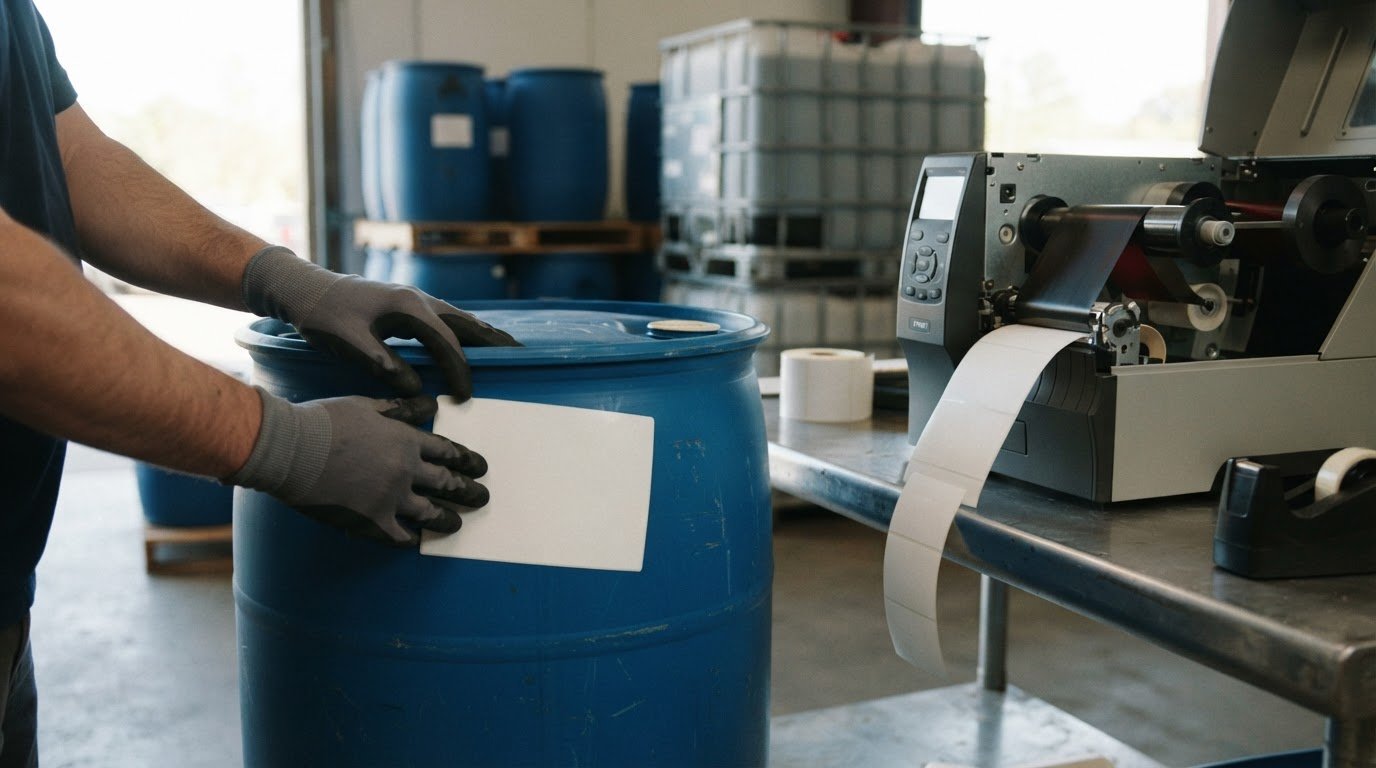
The printer alone doesn’t make a drum label chemical-resistant. A chemical resistant label printer for drums needs to work with compatible label stock and print supplies. Thermal-transfer printing is one option for durable labels, while pigment-based inkjet can also produce chemical-resistant labels when paired with appropriate synthetic media.
Choosing a chemical resistant label printer for drums can feel complicated, especially when labels must remain readable on containers exposed to moisture or demanding storage conditions. Consider the entire setup: printer, label material, ribbon or ink, and the conditions the finished label will face.
This guide compares thermal-transfer and inkjet printing for chemical labels and explains what to consider when matching printers, media, and ribbons to your needs. It also covers practical choices for drums, totes, bins, and secondary containers, helping you narrow down a suitable setup.
Key Takeaways
- Match the printer technology to the label material and the conditions the container will face.
- Choose label stock with moisture and chemical exposure in mind, not just printer compatibility.
- Plan label layouts for drums, totes, bins, and secondary containers with clear, readable hazard information.
- For thermal-transfer printing, pair the ribbon and label material to support a durable print.
- Explore DuraFast Matte Chemical Labels alongside compatible printing options for a practical labeling setup.
Printer options for durable chemical labels
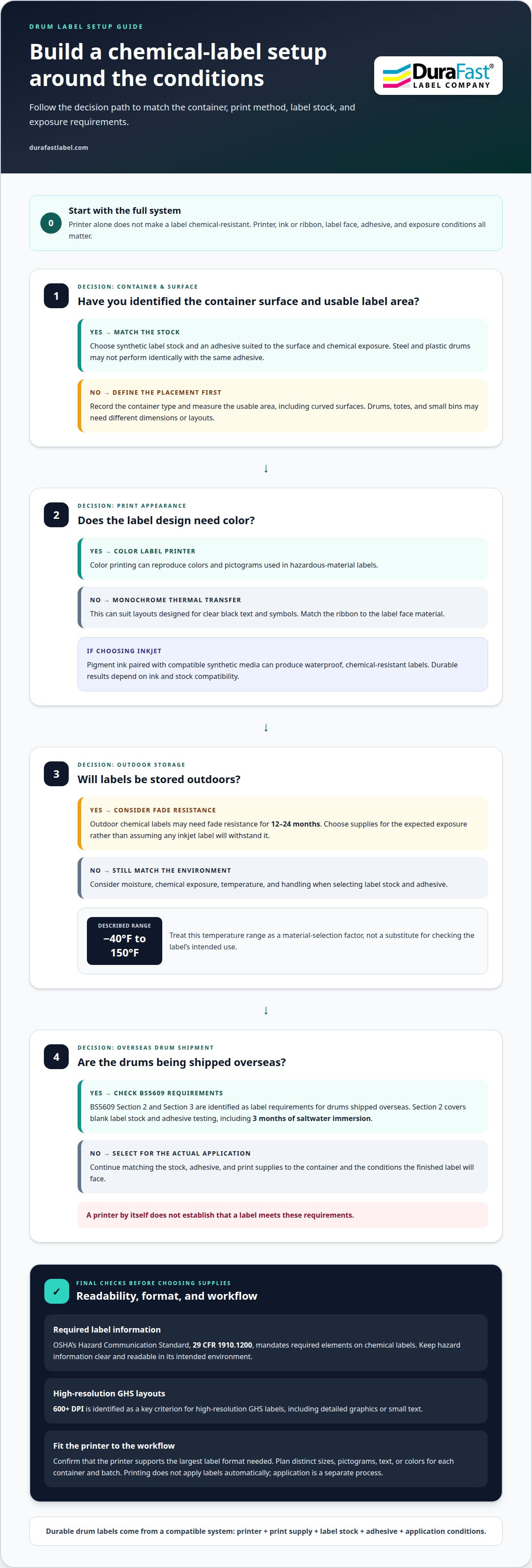
A chemical resistant label printer for drums is part of a matched system, not a solution on its own. Printer, ink or ribbon, label face, and adhesive all affect performance. Start with the chemicals, container surface, and storage environment. Then choose print technology and supplies suited to those conditions.
How much do chemical-resistant label printers and supplies cost? Costs vary with printer type, print volume, and compatible media and ink or ribbon. There is no single meaningful price for every setup. Define the application and supply requirements before comparing equipment.
For inkjet printing, pigment ink paired with appropriate synthetic media can produce waterproof, chemical-resistant labels. Durable results depend on compatibility between the ink and label stock. For outdoor storage, chemical labels may need fade resistance for 12-24 months. Choose supplies for the expected exposure, rather than assuming any inkjet label will withstand chemicals.
Thermal-transfer printing is another option. It uses a ribbon to transfer print onto the label, so the ribbon and face material need to work together. This setup can suit facilities that need durable printed information. The right choice depends on the container surface, chemical exposure, and printing workflow.
For drums shipped overseas, BS5609 Section 2 and Section 3 are identified as label requirements. Section 2 covers blank label stock and adhesive testing, including 3 months of saltwater immersion. This makes material and adhesive selection important alongside printer choice. A printer by itself doesn’t establish that a label meets these requirements.
OSHA’s Hazard Communication Standard, 29 CFR 1910.1200, mandates required elements on chemical labels. Label content and label durability are separate considerations: clear hazard information must remain readable in its intended environment. A temperature range described for chemical-label durability is -40°F to 150°F. Treat this as a material-selection factor, not a substitute for checking the label’s intended use.
For steel and plastic drums, select synthetic label stock and an adhesive suited to the surface and chemical exposure. The same adhesive may not perform identically on both surfaces. Match the stock to the drum material, then assess exposure to moisture, temperature, and handling. Label formats vary by task, from drum stock to inkjet card grading labels. For detailed graphics or small text, consider print resolution; 600+ DPI is identified as a key criterion for high-resolution GHS labels.
Labels for drums, totes, bins, and secondary containers
Container shape, label size, and print workflow guide the setup. Match each label to its surface and the information it needs to carry.
Container and Label Size Selection
Choose a printer that supports the largest label format you need and fits your workspace. Drums, totes, and small bins may need different label dimensions or layouts. Measure the usable area, including curved surfaces, then confirm that the printer supports the selected stock and format.
Digital printing can produce changing designs on demand, including labels for repackaged chemicals. Printing does not apply labels automatically, so application requires a separate process. Map each container type to a label size, then print only the designs needed for each batch.
Industrial Drum Labeling
Industrial labeling covers chemical drums, totes, bins, and secondary containers. Each label should suit its container and present relevant product information clearly. Chemical batches may need different pictograms and safety details, so avoid treating one drum design as suitable for every product.
To troubleshoot an industrial drum label printer, inspect the loaded media, ribbon, and feed path, then print a test label. If the output is faint or misaligned, first confirm that the supplies are compatible and loaded correctly. Adjust settings only after checking these basics.
Plan the whole workflow, not just the printer. If you print labels for several container types, group designs by chemical, label size, and application point. This helps staff choose the right version as inventory changes. Keep fixed details consistent, while allowing necessary product-specific information and colors to vary.
Digital printing is one option for labeling repackaged chemicals for distribution. On-demand production can reduce reliance on preprinted rolls for every batch and make it easier to update designs when label content changes. This also helps avoid keeping obsolete designs in active stock.
Before choosing equipment, record these workflow details:
- Container examples, such as steel drums, totes, and plastic bins.
- Label dimensions and usable placement area for each container.
- Whether batches need distinct pictograms, text, or colors.
- How labels move from printing to application and inventory tracking.
These details help define a compliant, repeatable process for industrial containers. To discuss a labeling setup for your containers, get in touch.
Printer types for hazardous-material labeling
Hazardous-material labels combine hazard symbols with readable text. Printer choice affects how these details appear. A color label printer can reproduce colors and pictograms, while monochrome thermal-transfer printing suits layouts designed for clear black text and symbols. Choose a method based on the design, print volume, and required media.
The Globally Harmonized System of Classification and Labelling of Chemicals, or GHS, harmonizes hazard classification and chemical communication worldwide. Many countries have gradually adopted GHS guidelines since 2009. GHS labels use pictograms and clear text covering hazards, prevention, and response actions during exposure or emergencies. A printer produces the layout; it doesn’t decide which hazard information belongs on each chemical label.
For varied products, digital color printing can produce different designs on demand. You can print the pictograms and safety information for each chemical batch without switching between rolls of preprinted designs. This can also simplify label management across many stock keeping units. Choose the printer technology and compatible media together to help keep printed details legible in the intended environment.
Thermal-transfer printers are another option for hazardous-material labels. They print with a ribbon, so compatibility between ribbon and label stock matters. Consider this technology for workflows with set layouts and consistent text or barcode requirements. Compare thermal-transfer label printers as a category when evaluating equipment.
OSHA’s Hazard Communication Standard, 29 CFR 1910.1200, mandates required elements on chemical labels. The printer can reproduce the prepared label design, but staff still need accurate, product-specific information. For example, two chemical batches may require different pictograms or safety text. Store and select the correct design for each product to reduce mix-ups during printing.
GHS supports classification and labeling intended to protect human health and the environment. Hazardous-material labels also need stock and print supplies suited to their exposure. A label that withstands handling but loses readable text cannot communicate effectively. Match the print method to the design, then assess the finished label for legible warnings and clearly rendered pictograms.
- Choose color printing when the layout relies on color distinctions.
- Choose thermal transfer for workflows centered on ribbon-based printing.
- Organize designs by chemical product and its hazard information.
- Review a test label for readable text and recognizable pictograms.
Readers checking the cited framework can identify the Globally Harmonized System of Classification and Labelling of Chemicals as GHS Rev. 9, 2021. Keeping that reference alongside label-design procedures can help teams consult the intended edition when reviewing how hazard information is represented, while the printer remains a means of reproducing the approved design.
Label types and supply loading
Choose label stock and print supplies as a matched set. The right combination depends on printer technology, container surface, and exposure. For moisture, select waterproof or water-resistant label material; the printer itself does not need to be waterproof. For chemical drums, consider the label’s full environment, from application through storage and handling.
Inkjet systems need compatible media and ink. Pigment inks can produce durable prints on suitable synthetic stock, but the label material still matters. Browse inkjet label supplies when planning an inkjet workflow, and do not assume every roll fits every printer. Match the stock format to the printer’s supported media and the label design.
Thermal-transfer setups use both label stock and ribbon. Select them together for the print job, since a mismatch can affect the clarity of text, symbols, or barcodes. Keep the ribbon aligned with the label path, then print a test before starting the production batch. This can reveal feeding or print-quality issues before you use more stock.
Load supplies according to the printer’s media path and instructions. Orient the roll correctly and keep the label edge straight. Set the media guides snugly without pinching the stock. For thermal transfer, route the ribbon through the print path as directed. Check that labels feed evenly, then use a test print to verify alignment and content.
Digital printing can simplify inventory by letting you use a few formats of blank label stock and reduce waste from obsolete preprinted designs. For example, a facility handling several chemical products can print the required design as each batch is prepared. Store blank stock by material and format, and identify ribbons or ink supplies by printer type.
A label layout needs enough space for readable text, hazard pictograms, and any barcodes used in the workflow. Make variable product information easy to update. Print designs on demand when batch details change instead of holding rolls that may become outdated. Consistent color and placement also help keep labels uniform across print runs.
Use this loading routine to keep each run accurate:
- Confirm the media type and format match the printer.
- Load the roll and align its guides without forcing the stock.
- For thermal transfer, thread the compatible ribbon correctly.
- Print a test label and inspect text, symbols, and feed alignment.
Check the first label before running a full batch to catch setup issues early. Record the stock format and supply combination used for each design. This gives staff a clear reference when replenishing supplies or switching between inkjet and thermal-transfer jobs.
Thermal-transfer printing and chemical resistance
Thermal-transfer printing uses a ribbon to print on label stock. For chemical drums, the print method is only one part of the system: label material, ribbon, adhesive, and exposure all matter. A manufacturing setup should account for the chemicals, moisture, abrasion, and handling the finished label may encounter.
Start by defining the exposure: list the chemical contents, container surface, and storage environment. Then select compatible label stock and ribbon for the application. A thermal-transfer printer cannot make unsuitable stock chemically resistant, and a clear test print does not prove the label will withstand every condition in service. Assess the finished combination, not just the printer.
Ribbon selection affects how print transfers to the label. Match the ribbon to the media and printer, then produce a sample using the final design. Check the clarity of small text, pictograms, and barcodes. If the label may face abrasion, include handling conditions in your assessment. Testing the complete combination is more useful than judging ribbon or stock separately.
Label-design software can help organize multiple applications. Keep fixed details in a controlled layout and update variable fields for each chemical batch. For example, a manufacturing facility may need separate designs for products with different hazard information. After an update, print a sample to catch shifted text, missing symbols, or changed barcode placement before the batch run.
Thermal transfer can suit workflows that rely on repeatable layouts and ribbon-based printing. It may be less convenient when labels require extensive color artwork or frequent design changes. Compare those needs with digital inkjet printing, which can produce different designs on demand. The best fit depends on your priorities: layout consistency, design flexibility, and supplies suited to the application.
Use this sequence to evaluate a thermal-transfer setup:
- Describe chemical exposure, moisture, abrasion, and handling.
- Match the label stock and ribbon to the printer.
- Print a sample using the production layout.
- Review readability and the finished label under relevant conditions.
For thermal-transfer applications, compare ribbon options alongside compatible label stock. Document the chosen combination so staff can reproduce the setup when supplies change. A sample and clear records also make future design updates easier to manage across applications.
Need help matching thermal-transfer supplies to a chemical-label workflow? Discuss your label application.
DuraFast Label Company: DuraFast Matte Chemical Labels
DuraFast Label Company offers DuraFast Matte Chemical Labels for businesses selecting supplies for chemical-container labeling. Pair the label stock with a compatible printing method and assess the finished label for its intended use. For in-house color printing, a high-speed color label printer is an option; for thermal transfer, consider the Zebra ZT411 Thermal Transfer Printer. Labelview label design and barcoding software can support label layout and barcode creation.
These offerings provide a practical starting point when you’re matching label media, printer technology, and design workflow. The right combination depends on the container, label content, and exposure conditions discussed above. To discuss your chemical-label setup, contact DuraFast Label Company.
Plan Your Next Chemical-Label Run
Before choosing a chemical resistant label printer for drums, define the next production run. Identify which containers need labels, what information changes by batch, and how the labels will be printed. These decisions help narrow the fit among printer, software, and media without treating any single component as the whole solution.
DuraFast Label Company offers the Epson ColorWorks C6000A, Afinia L801 Color Label Printer, and DuraFast Matte Chemical Labels. Consider these options as you plan an in-house workflow for chemical-container labels. The next step is to describe your label format and printing needs, then discuss a setup suited to your application. Contact DuraFast Label Company to discuss your requirements and move forward with a clear plan.
Frequently Asked Questions
What makes a drum label printer resistant to chemicals, solvents, and oils?
A chemical-resistant label printer for drums works with label stock and print supplies selected for the exposure. The printer itself does not make a label resistant. Match the label face and adhesive to the drum surface, then pair them with compatible ink or ribbon. For solvents or oils, assess a printed sample using the actual label materials and exposure conditions before adopting the combination for routine use.
Which label printers can print durable GHS labels for chemical drums?
Color inkjet and thermal-transfer printers can both print GHS label designs. Pigment-based inkjet printing paired with suitable synthetic media is one option for color layouts. Thermal transfer suits ribbon-based workflows using compatible stock. Examples of available printer models include the Afinia L801 Color Label Printer and Zebra ZT411 Thermal Transfer Printer. Select by the design, supplies, and workflow, then review a sample for readable warnings and symbols.
Are thermal transfer or inkjet printers better for chemical-resistant drum labels?
Neither method is universally better. Choose according to label design and production needs. Inkjet is useful for printing varied color designs on demand, while thermal transfer uses a ribbon and can suit repeatable layouts. For example, a facility updating product-specific graphics may favor digital inkjet, while a workflow built around established designs may use thermal transfer. In both cases, match supplies to the application.
How durable are printed drum labels against abrasion, moisture, UV, and temperature extremes?
Durability varies with the label material, adhesive, print supplies, and exposure. Chemical labels intended for outdoor storage may need fade resistance for 12-24 months. A listed temperature range for chemical-label durability is -40°F to 150°F. These figures don’t establish resistance to every chemical or abrasion level. Assess the finished label under the handling and storage conditions it will encounter.
How do you choose the right label size and format for chemical drums?
Choose a format that fits the drum’s usable label area and keeps information readable. Measure the placement area, accounting for the curve, seams, and handling points. Then allocate space for product details, hazard pictograms, text, and any barcode. A large drum label may need a different layout from a small secondary-container label, even when both identify the same chemical.
What testing standards or certification should chemical drum labels meet?
For drums shipped overseas, BS5609 Section 2 and Section 3 are identified for labels. Section 2 covers blank label stock and adhesive testing, including 3 months of saltwater immersion. OSHA’s Hazard Communication Standard, 29 CFR 1910.1200, addresses required elements on chemical labels. These serve different purposes: label content and label performance. Match the applicable standard to the shipping route and use.
What label materials and adhesives withstand chemical exposure on steel and plastic drums?
Use synthetic label stock and an adhesive suited to the drum’s surface and chemical exposure. Match the stock to the drum material, whether steel or plastic, and consider moisture, temperature, and handling.