Datalogic Barcode Scanners: How to Choose the Right Scanner in 2026
29th Sep 2026
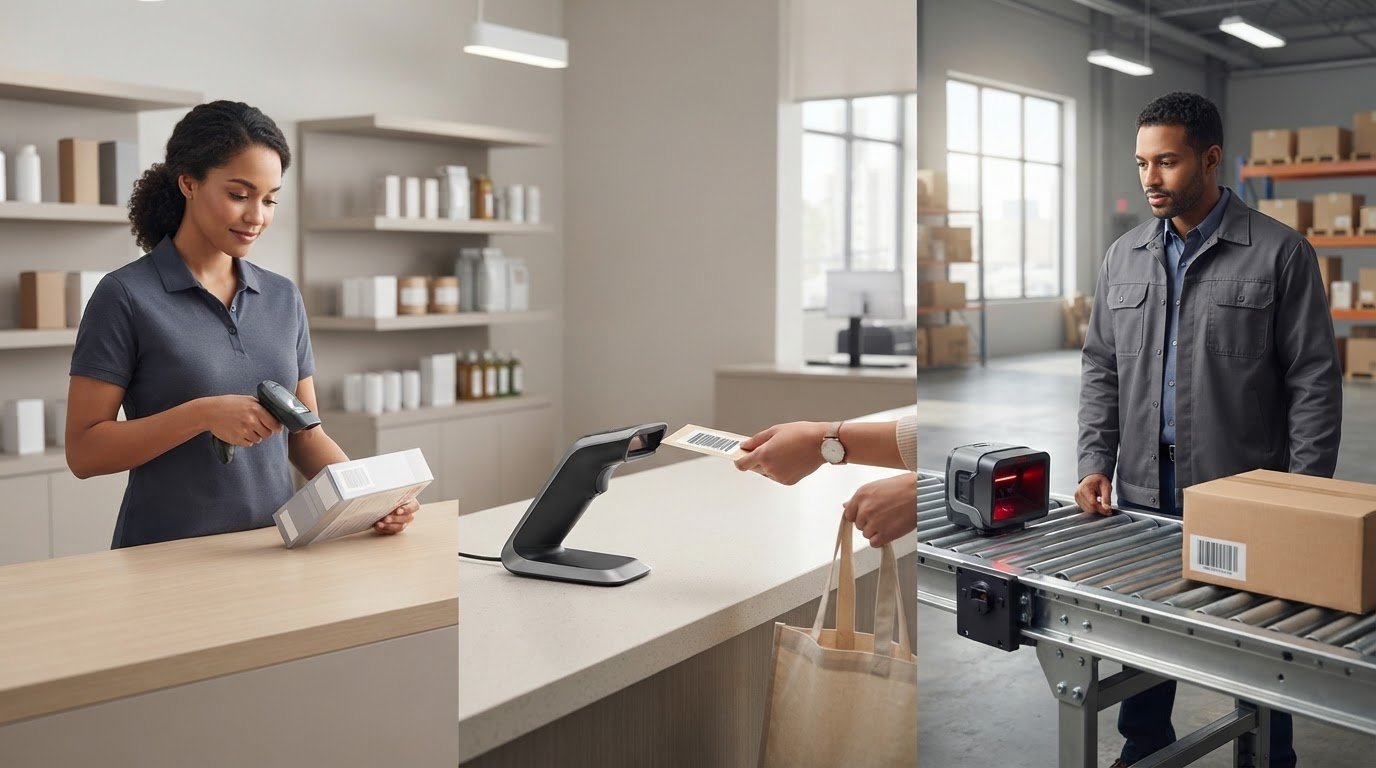
The scanner with the most features isn’t always the right one for your workflow. Choosing among Datalogic barcode scanners starts with a simpler question: what do you need to scan, and where will scanning happen? A handheld device, a hands-free presentation scanner, and a fixed industrial scanner serve different tasks.
It’s easy to get stuck comparing specification sheets, especially if you’re unsure whether a scanner will read your barcodes or connect to your equipment. Narrow the options first by identifying the scan task, barcode type, and host setup. Then compare models against those requirements.
This guide explains how to match scanner styles to daily work, check barcode readability, and confirm connectivity and compatibility. You’ll finish with a practical shortlist and a clear set of details to verify before requesting a quote. DuraFast Label Company offers Datalogic barcode scanners alongside labeling equipment. Confirm current model availability, interfaces, and compatibility before choosing.
Key Takeaways
- Start with the scanning task, then consider where and how the scanner will be used.
- Check that a candidate scanner supports the symbologies you use, including the size, print quality, and scanning distance involved.
- Compare handheld, presentation, and fixed scanners by placement and workflow, then verify the connection options your host device requires.
- Before comparing models, document scan volume, handling needs, work conditions, and device setup.
- When evaluating Datalogic barcode scanners, gather barcode samples and host details, then confirm current availability and specifications.
Datalogic Scanners: Functions and Workflow Integration
A barcode scanner reads a symbol, converts it into encoded data, and sends that data to a connected host, such as a point-of-sale (POS) terminal or computer. The scanner captures the code; the host software determines what the information means and what happens next. Scanning an item won’t automatically update inventory unless the connected application is set up to process the scan.
A barcode printer performs a different job: it creates labels with barcodes for a scanner to read later. For example, a printer may produce an item or shipping label, and a scanner may capture its data during checkout, receiving, identification, or inventory tracking.
What information does a barcode scanner capture?
A scanner reads a symbol and transfers its encoded data to a host. A UPC-A barcode may encode a product identifier, while a QR Code can contain other types of information. These examples don’t mean every scanner reads both formats. Check the supported symbologies for the specific model, then confirm the host application can use the data as intended.
Where do Datalogic scanners fit in business operations?
Datalogic barcode scanners may suit retail checkout, receiving, and other business workflows where staff need to capture barcode information. The scan can pass an identifier to a POS or inventory application, which processes it according to the organization’s setup. Suitability depends on the task, barcode format, scan location, and host requirements, not just the brand.
For company background, Datalogic has a broader history in automatic data capture. For buyers, the practical question is how a candidate scanner fits the workflow and equipment already in place. Review an inventory-management guide for broader setup context, then compare the model’s supported symbologies, interface, and compatibility with current documentation.
DuraFast offers Datalogic barcode scanners alongside barcode printers, labels, and BarTender Professional software. Before purchase, confirm the specific model and its details. Start by noting what needs scanning, where the scan happens, and which system must receive the data. These details give you a useful basis for comparing scanner types.
Match Datalogic Scanners to Your Barcode Needs
Start with the barcode formats your team actually scans, rather than a broad label such as “retail” or “warehouse.” A scanner’s ability to read a code depends on its supported symbologies, so verify those for each candidate model. Don’t assume a scanner reads every format simply because it can scan barcodes.
Do you need a 1D or 2D barcode scanner?
A 1D barcode uses lines and spaces, as in a UPC-A symbol. A 2D symbol, such as a QR Code, stores information in a pattern across two dimensions. These examples illustrate common formats, but they aren’t a complete symbology list. Before shortlisting Datalogic barcode scanners, identify the exact codes on your products, packages, or screens and confirm the model supports them.
How do barcode condition and distance affect scanner choice?
Format is only part of the match. Barcode size, print quality, contrast, placement, and scanning distance can all affect readability in your workflow. Gather representative examples: the smallest code, a worn or low-contrast label, and any barcode displayed on a phone or another screen. Note how far staff typically scan from and whether they scan close up or across a work area.
Use those details to ask focused questions. Check working distance and environmental limits in the documentation for the specific model. General guidance can help define your requirements, but it can’t confirm model-level performance. Don’t rely only on a test with a clean, large label if everyday scanning involves smaller or less legible codes.
Prepare this quick verification checklist:
- Barcode examples: UPC-A, QR Code, or the exact formats you use.
- Label condition: Smallest size, worn edges, low contrast, or other common print issues.
- Scan surface: Paper labels, packaging, or digital screens.
- Typical distance: Note how far the scanner will be from the code during routine use.
- Work area: Describe relevant environmental conditions to compare with the model’s stated limits.
Share these details when asking about model fit. You can contact DuraFast about scanner options and confirm current model details before making a selection.
Compare Datalogic Scanner Forms, Connection Options, and Work Areas
Once you know what needs scanning, consider where the scanner will sit and how staff will use it. Form factor affects placement and handling, while the connection determines how data reaches the host. Treat these as separate decisions: a handheld or fixed design does not confirm a particular interface or compatibility.
Handheld, presentation, or fixed scanner: which style suits the task?
Handheld scanners suit tasks where staff bring the scanner to an item, such as checking products during receiving. Presentation scanners sit at a counter for hands-free scanning as items are presented. Fixed scanners may fit installed or automated workflows where the scanner stays in one position. These are general use patterns, not claims about specific Datalogic models. Verify each model’s form factor and intended use in its current documentation.
| Approach | Typical use | Placement | Connection to verify | Ask yourself |
|---|---|---|---|---|
| Handheld | Mobile item checks or receiving | Held by the operator | USB, Bluetooth, or another documented interface | Does the task require staff to move between items? |
| Presentation | Counter-based hands-free scanning | On or near a checkout counter | Host interface and any required pairing | Can staff present items consistently at the scanner? |
| Fixed | Installed or automated scanning | Mounted at a defined scan point | Documented interface and system integration needs | Will the scanning location remain fixed? |
Which connection should you check before ordering?
A wired connection may suit a stationary workstation, while a wireless connection may support movement around a work area. Don’t assume a model offers USB, Bluetooth, or any particular alternative. Confirm its exact interface, then check that it works with the host operating system and application. For wireless setups, verify pairing steps and configuration requirements. Range and battery life are model-specific, so consult current documentation rather than relying on category descriptions.
Check environmental suitability just as carefully. Dust, moisture, cleaning routines, and handling conditions can affect which device is appropriate. Compare your work area with the model’s documented environmental ratings and durability details. Don’t infer ruggedness from a product category or brand name.
If scanning is part of a wider scan-and-print workflow, review thermal label printer options alongside the host setup. DuraFast offers Datalogic barcode scanners, but confirm model availability, connections, and compatibility before selection. For help with scanner inquiries, contact DuraFast about scanner options.
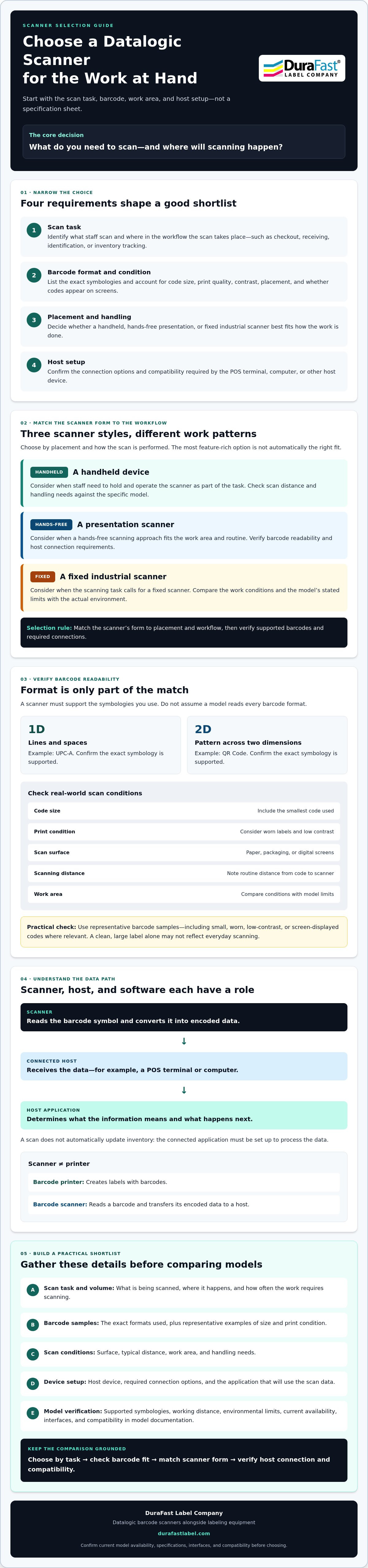
Use This Checklist to Shortlist the Right Datalogic Barcode Scanner
A useful shortlist matches required capabilities to your workflow rather than relying on brand name alone. Use these steps to organize your needs before comparing specifications. Record scan volume and handling patterns as observations, not as pass-or-fail thresholds.
- Define the task. Note what staff scan, where each scan takes place, and whether the scanner needs to move with the operator or stay at a workstation.
- Identify the barcode. List the formats in use and gather representative examples. Include variations in size and print condition, and note whether codes appear on labels or screens.
- Assess the environment. Describe the work area and any relevant exposure to dust, moisture, cleaning routines, or frequent handling. Compare those conditions with each model’s documented limits.
- Check the host setup. Write down the operating system, application, required interface, and connection type. Include any known pairing, configuration, or deployment requirements.
- Verify the exact model. Check supported barcode formats, interface options, compatibility, environmental specifications, and current availability against up-to-date model documentation.
What should you confirm about the scanner and host system?
Compatibility depends on the complete setup, not just the scanner’s connector. Share the host operating system and software, then verify that the model’s documented interface and connection method suit both. Confirm support for the barcode formats you listed and ask whether configuration or deployment steps are required. Specifications can vary by model, so request confirmation for the exact unit you’re considering.
How can you test a scanner before standardizing?
Prepare representative labels and test them in the intended work area. Include ordinary examples and any codes that may be small, worn, or difficult to read. Check that scans transfer correctly into the actual host application and that the data is handled as expected. Record exceptions, such as a code that fails to read or data that arrives in an unexpected format. Before standardizing, confirm that the shortlisted model addresses those issues in your setup.
This checklist gives you a practical basis for comparing Datalogic barcode scanners without relying on broad category claims. DuraFast offers Datalogic scanners, but verify current models and model-specific details before selection. Ask DuraFast about Datalogic scanner fit with your barcode examples, host details, work area, and scan task ready.
Explore Datalogic Barcode Scanners with DuraFast
DuraFast offers Datalogic barcode scanners alongside related barcode and labeling equipment. To make a scanner inquiry useful, describe the job the device needs to do and the system it must work with. Clear requirements can help narrow the options, but confirm the exact model and its specifications before purchase.
What information should you include in a scanner inquiry?
Bring practical examples instead of relying on a general description of your workflow. Include barcode formats and sample labels, typical scanning distance, and work-area conditions. Describe whether scanning happens by hand, at a counter, or at an installed scan point.
Also identify the host device and operating system, the application that receives scanned data, and the connection you need. If you’re planning a wider inventory process, consider what happens after each scan and how the data should be used. A barcode scanner inventory management guide can help you think through that broader workflow.
What should you verify before placing an order?
Confirm the details for the exact model under consideration. A general product category doesn’t confirm a scanner’s capabilities or fit. Check:
- Model and availability: Confirm the specific model currently offered and its availability.
- Barcode support: Verify that it reads the symbologies used in your operation.
- Interfaces: Check the documented connection options against your host setup.
- Compatibility: Confirm support for your operating system and application.
- Work-area fit: Review documented environmental limits and other requirements specific to your location.
Ask for clarification about any requirement that isn’t confirmed in current documentation. This matters especially when your setup depends on a particular barcode format, connection, or operating condition. Verify model details rather than relying on assumptions.
Have your barcode samples, host setup, work area, and scan task ready. Then contact DuraFast to discuss Datalogic barcode scanners and confirm the relevant model details before finalizing your selection.
Move Forward with a Clear Scanner Shortlist
A good scanner choice starts with the work, not a long specification sheet. Match the device to the barcode formats you use, where scanning happens, and how the host system receives data. Then verify the exact model’s supported symbologies, interface, compatibility, and environmental limits against current documentation.
These checks turn a broad search for Datalogic barcode scanners into a focused shortlist. Bring barcode samples, host and application details, and a description of the work area when confirming model fit and current availability.
DuraFast offers Datalogic barcode scanners alongside barcode printers, labels, and BarTender Professional software. If you’re ready to review scanner options, contact DuraFast to discuss Datalogic barcode scanners. Have your requirements ready to help make the inquiry specific.
Frequently Asked Questions
What are Datalogic barcode scanners used for?
Datalogic barcode scanners capture encoded information for connected business systems. Depending on the scanner and setup, they may support retail checkout, receiving, item identification, or inventory workflows. The scanner reads the code, while the connected POS or inventory application processes the data. Check that the model suits the task, reads the barcode formats in use, and connects to the system that needs the information.
Do Datalogic barcode scanners read both 1D and 2D barcodes?
Some scanner models may support both 1D and 2D barcodes, but support varies by model. A linear UPC-A code and a QR Code are examples of different formats, not proof that a particular scanner reads both. Identify the exact symbologies your operation uses, then check the candidate model’s current documentation. Confirm support for every required format before selecting a scanner.
How do I choose a Datalogic scanner for my business?
Start with the work, then match the scanner to your barcodes and setup. Note whether scanning is handheld, counter-based, or installed; the barcode formats, sizes, and print conditions; typical scanning distance; and work-area conditions. Then confirm the host device, operating system, software, and connection requirements. Compare documented capabilities for each model rather than choosing by brand or category alone.
Can a Datalogic barcode scanner connect to my existing POS system?
It may connect if the specific scanner’s interface and documented compatibility match your POS setup. Check the POS device, operating system, application, and required connection, such as USB or Bluetooth, against the exact model’s documentation. Also confirm whether pairing or configuration is needed. Don’t assume all Datalogic scanners support the same connections or work with every POS system.
What is the difference between a handheld and presentation barcode scanner?
A handheld scanner is held and aimed by an operator, which can suit tasks that involve moving between items. A presentation scanner stays at a counter or workstation so users can present items for hands-free scanning. The better fit depends on the task, placement, and handling needs. These are general form-factor distinctions, so verify the exact design and intended use of each model you’re considering.
Can a barcode scanner read codes from a phone screen?
A scanner can read a code from a phone screen only if the specific model supports that barcode format and is suitable for screen scanning. Check the model documentation, then test representative codes on the devices and displays used in your workflow. Screen brightness, code size, and scanning distance may affect results, so a paper-label test alone won’t confirm screen-scanning suitability.
How do I check whether a Datalogic scanner is compatible with my software?
Write down the host device, operating system, application, and required scanner interface. Check the exact model’s current documentation for supported connections and software or system compatibility. Confirm any required configuration, pairing, or deployment steps with the relevant supplier or software documentation. If possible, test scans in the actual application and verify that the data arrives in the expected format before adopting the scanner across your workflow.