Direct Thermal Printer Guide: Technology, Applications, and Selection in 2026
17th Jul 2026
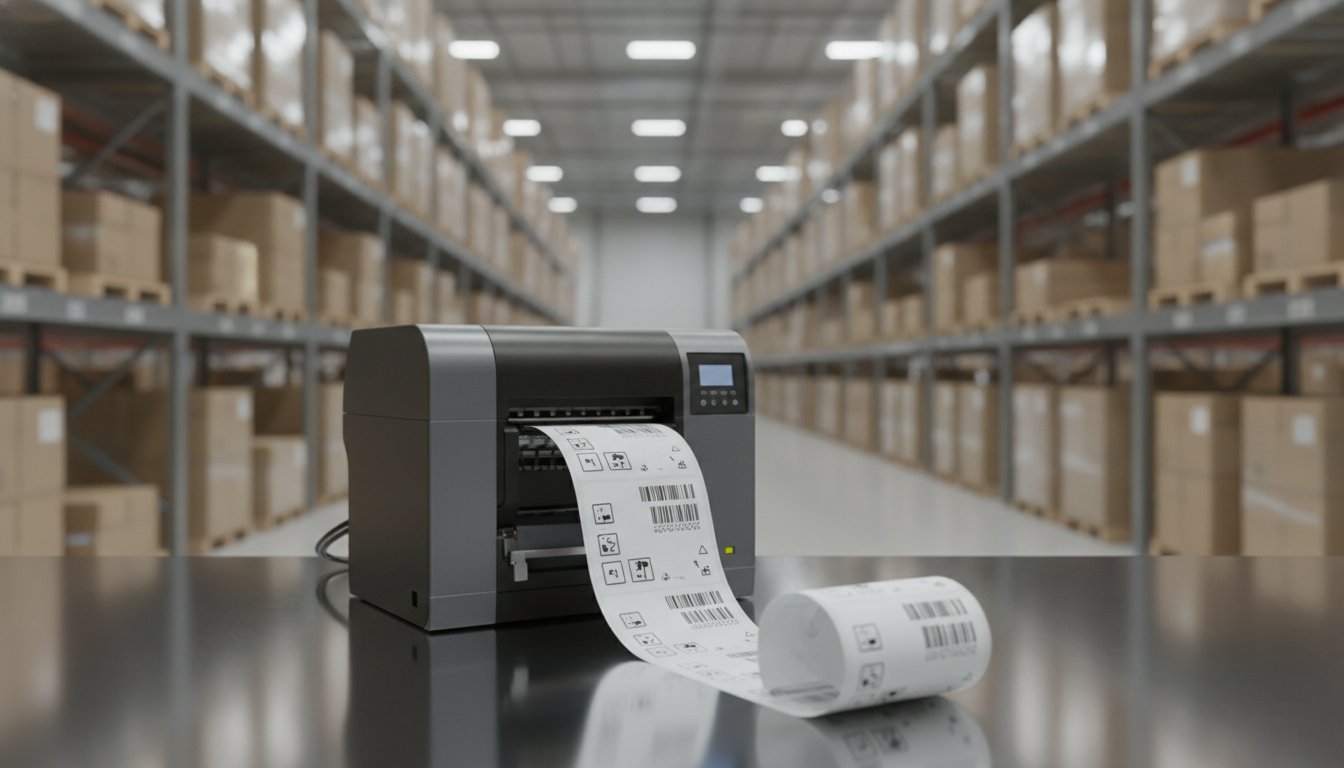
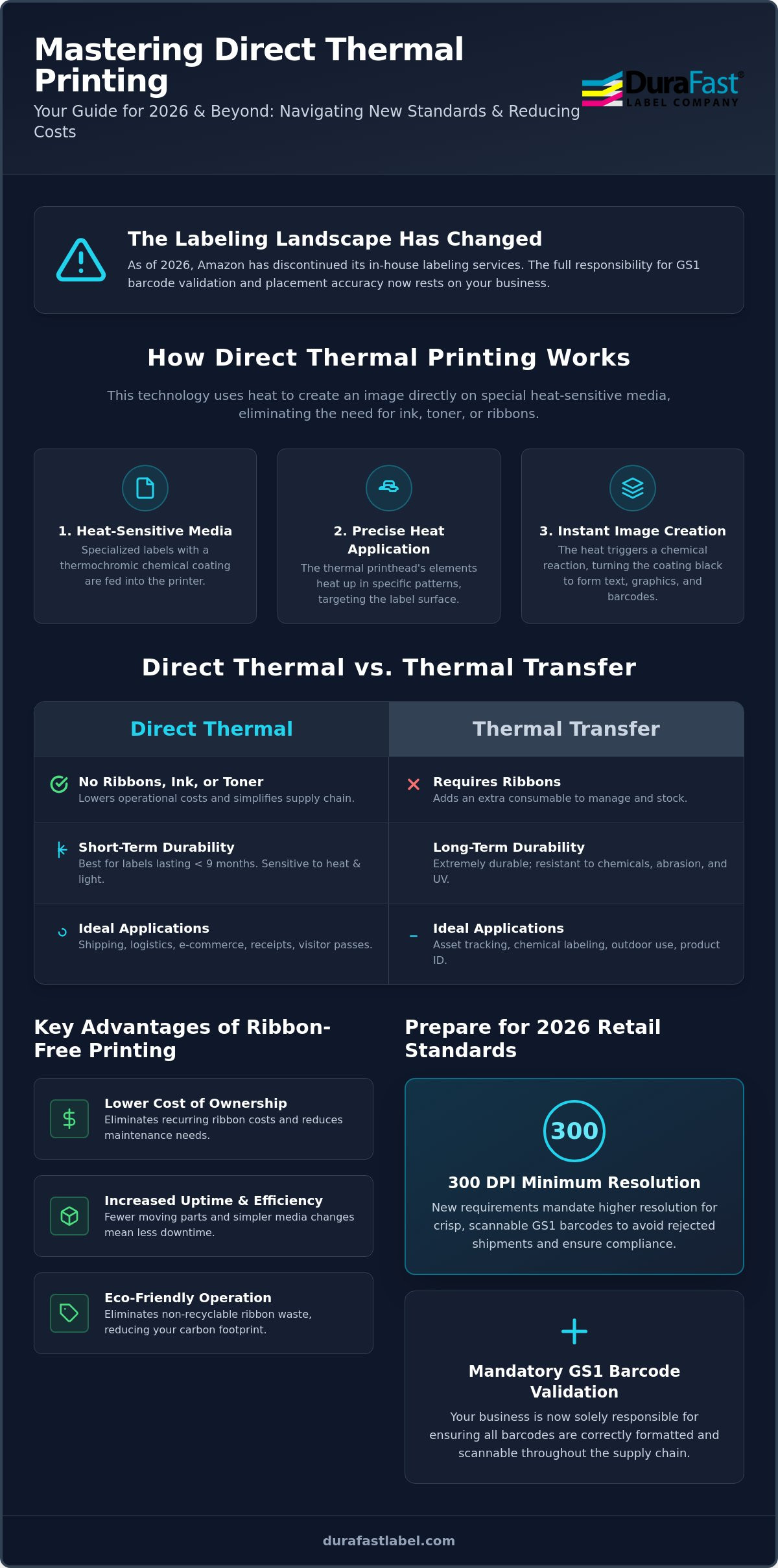
As of early 2026, Amazon has officially discontinued all in-house labeling services. This shift means the responsibility for GS1 validation and placement accuracy now rests entirely on your business. If you're tired of the high cost of ink or the frustration of loading ribbons, switching to a direct thermal printer is a smart move to regain control. These machines eliminate the need for expensive consumables. They use heat-sensitive media to create crisp, scan-ready labels in seconds.
You likely already know that direct thermal technology is the gold standard for high-speed shipping; however, choosing the wrong hardware can lead to faded barcodes and rejected shipments. We understand the pressure to keep operational costs low while meeting strict new retail standards like the IEC 63333-2:2026 requirements. This guide will help you master the essentials of direct thermal printing to streamline your labeling workflow and significantly reduce your cost per label. We'll explore the latest 300 DPI requirements, compare industry leaders like Zebra and Godex, and show you how to select a setup that won't fail during high-volume tasks.
Key Takeaways
- Simplify your maintenance and reduce costs by learning how heat-sensitive technology removes the need for ink, toner, and ribbons.
- Determine if a direct thermal printer is the right fit for your specific workflow by comparing its performance against thermal transfer for short-life applications.
- Avoid rejected shipments by understanding the 2026 requirements for 300 dpi resolution and GS1 barcode validation.
- Scale your operations effectively by matching your daily output to the right desktop or industrial hardware specifications.
- Streamline your entire process with a complete ecosystem of professional design software and high-quality thermal media.
What is a Direct Thermal Printer and How Does It Work?
Direct thermal printing is a streamlined solution for businesses that value speed and simplicity. Unlike traditional inkjet or laser setups, a direct thermal printer doesn't require ink, toner, or ribbons to produce an image. Instead, it relies on specialized heat-sensitive paper that reacts directly to a thermal printhead. This technology has become a cornerstone of modern logistics, accounting for a 56.6% market share in the thermal printing segment as of 2025. To understand the history and mechanics behind this process, you can explore more about What is a Direct Thermal Printer and How Does It Work? through foundational technical resources.
The process is remarkably efficient. The media used in these printers is coated with a colorless chemical layer. As the paper passes under the printhead, specific heating elements fire in precise patterns. A thermochromic reaction occurs at the printhead interface where localized heat triggers a chemical change in the media's coating to produce a visible black mark. This creates your text, graphics, and barcodes instantly without any drying time or smudging.
The Core Components of a Thermal System
A reliable printing setup depends on three primary parts working in harmony. The thermal printhead is the most critical component. It determines the resolution of your labels and the overall longevity of the machine. High-quality printheads ensure that even small GS1 barcodes remain crisp and scannable.
Next is the thermochromic media. Since there is no ribbon, the quality of your direct thermal labels is vital because the "ink" is essentially built into the paper itself. Finally, the platen roller acts as a support system. This rubber cylinder pulls the media through the printer while providing the consistent pressure needed to ensure the printhead makes perfect contact with the label surface.
Key Advantages of Ribbon-Free Printing
Choosing this technology offers several practical benefits for your daily workflow. Maintenance is much simpler because there are fewer moving parts. You don't have to deal with ribbon jams, wrinkles, or the complexity of matching ribbon types to label materials. This simplicity leads to significantly higher uptime. In high-volume environments like shipping docks, your team can swap out a roll of labels and get back to work in seconds.
Environmental impact is another major factor. Traditional thermal transfer printing leaves behind a used ribbon film that often cannot be recycled. By using a direct thermal printer, you eliminate this waste entirely. This reduces your carbon footprint and simplifies your supply chain by cutting out the need to stock and dispose of used ribbons.
Direct Thermal vs. Thermal Transfer: Which Technology Fits Your Workflow?
Direct thermal technology is often the most cost-effective choice for businesses focused on logistics. A direct thermal printer typically has a lower initial purchase price than a thermal transfer model. This is because it lacks the complex internal ribbon drive and take-up spindles required for ribbon-based printing. However, your decision should depend on how long your labels need to remain readable. If you are shipping products that reach customers within days, direct thermal is the clear winner. If you are labeling chemical drums for five-year outdoor storage, thermal transfer remains the industry standard.
The technical aspects of direct thermal printing highlight a major trade-off: sensitivity. Because the paper reacts to heat, it remains sensitive to environmental factors long after it leaves the printer. High temperatures, direct sunlight, and even heavy friction can cause the label to darken or "ghost." In contrast, thermal transfer uses a ribbon to melt ink onto the substrate. This creates a permanent bond that resists chemicals and extreme UV exposure. While direct thermal media costs slightly more per square inch than standard paper, you save money by never buying ribbons or ink.
When to Choose Direct Thermal
This technology excels in high-speed environments where efficiency is the top priority. It is the best choice for labels intended to last less than six to nine months. E-commerce fulfillment centers prefer this method because it eliminates the downtime associated with ribbon changes. You can keep your shipping lines moving without stopping to clear ribbon wrinkles or jams. It's also ideal for indoor applications like retail receipts, deli labels, or visitor badges where exposure to extreme heat isn't a concern.
Understanding Media Longevity and Fading
The primary concern with a direct thermal printer has traditionally been fading. Standard labels can yellow or lose contrast when exposed to sunlight for extended periods. However, advancements in 2026 have introduced high-quality top-coated thermal papers. These specialized direct thermal labels feature a protective barrier that significantly improves scratch resistance and slows down the fading process. This makes them more durable than the entry-level options found in the past. If you're unsure which media type will survive your specific warehouse conditions, it's helpful to consult with a labeling specialist to test different samples for your environment.
Primary Applications for Direct Thermal Printing in 2026
While shipping labels are the most recognizable use case, the reach of direct thermal technology has expanded significantly across multiple industries. By 2026, retail has become the largest application segment, accounting for roughly 35% of the market. This growth is driven by the need for on-demand, high-speed output that doesn't rely on complex consumables. From the pharmacy counter to the warehouse floor, a direct thermal printer provides a reliable way to generate barcodes that scan perfectly every time.
Logistics and E-commerce Efficiency
Standardizing on the 4x6 format is essential for maintaining compliance with major carriers like UPS, FedEx, and USPS. Small-to-medium businesses often rely on desktop thermal printers to handle their daily shipping needs without the footprint of industrial machinery. On-demand printing also reduces label inventory waste. Instead of ordering thousands of pre-printed labels that might become obsolete, you can print exactly what you need for each unique shipment. This flexibility is vital now that Amazon requires unique Amazon Barcodes (FNSKU) for all units, as resellers can no longer use manufacturer UPCs for pooled inventory.
Healthcare and Patient Safety
In sterile clinical environments, ribbon-free printing is often the preferred choice. It eliminates the risk of ribbon-related contamination and ensures that sensitive patient data isn't left behind on a used transfer ribbon. Hospitals use a direct thermal printer to create patient wristbands and laboratory specimen labels that must remain legible despite frequent handling. The high contrast of thermal barcodes is critical for error-free tracking in labs, where a single misread can lead to serious diagnostic mistakes. Direct thermal wristbands are specifically engineered to resist moisture and soap, ensuring patient identification remains secure throughout their stay.
Retail, Hospitality, and Warehouse Management
Selecting the Best Direct Thermal Printer for Your Business Needs
Choosing the right hardware is about more than just the initial price tag. You need to match your daily print volume to the durability of the machine. A high-quality direct thermal printer is an investment in your warehouse's uptime. In 2026, new standards like IEC 63333-2 require improved spill resistance and electromagnetic compatibility for printers in retail environments. This means the entry-level consumer models often fall short in professional settings where reliability is non-negotiable.
Don't overlook print resolution. While 203 DPI works for standard 4x6 shipping labels, retail compliance in 2026 often requires a minimum of 300 DPI. This higher density ensures that dense GS1-128 barcodes remain scannable by automated sorting systems. If your barcodes are blurry or lack the mandatory 0.25-inch quiet zone, you risk shipment rejections and costly vendor fines. Trusted brands like Zebra, Godex, and Brother dominate the market because they build machines that handle these technical requirements with ease.
Desktop Thermal Printers for Small Business
If you're running a boutique e-commerce shop or a retail counter, space is at a premium. Desktop models offer a compact footprint without sacrificing essential features. They're designed for employees with minimal technical training, featuring simple "drop-in" media loading. These machines are perfect for printing a few hundred labels per day. You can browse our desktop thermal printer selection to find a model that fits your workspace and connectivity needs, whether you require Wi-Fi for mobile printing or a standard USB setup.
Industrial Barcode Printers for High Volume
For 24/7 warehouse operations, you need a workhorse with a metal frame and a high-duty cycle. Industrial printers handle thousands of labels daily and accommodate larger media rolls. This reduces the time your team spends stopping to change rolls during peak shipping hours. Models like the Zebra ZT series are built to withstand dust and vibration on the factory floor. To ensure your facility stays compliant with the latest GS1 validation rules, check out our industrial barcode printer solutions. If you need help comparing specific print speeds or duty cycles for your facility, speak with our technical team for a personalized hardware recommendation.
Connectivity for Modern Workflows
Modern workflows demand flexibility. While Ethernet remains the standard for fixed workstations, Wi-Fi and Bluetooth connectivity are now essential for mobile labeling. Using a direct thermal printer with wireless capabilities allows your team to print labels at the point of application. This reduces walking time and minimizes the chance of applying the wrong label to a package. Whether you're integrating with a cloud-based WMS or a local retail POS, ensure your hardware supports the latest security protocols to keep your data safe.
Optimizing Your Thermal Printing Strategy with DuraFast Solutions
Investing in a high-quality direct thermal printer is only the first step toward a more efficient warehouse. To truly lower your cost per label and eliminate errors, you need a strategy that connects your hardware, software, and supplies into one seamless ecosystem. Many businesses struggle with rejected shipments or failed barcode scans because they treat these components as separate purchases. By choosing a complete solution, you ensure that every part of your labeling process is optimized for the latest 2026 industry standards.
DuraFast provides the heavy lifting by vetting the best technology on the market. As an authorized dealer for Zebra and Godex, we help you match the right machine to your specific environmental demands. Whether you're managing a small retail storefront or a sprawling distribution center, our North American support team ensures you have the right tools to maintain peak uptime. This holistic approach prevents the common pitfalls of mismatched media or underpowered software that can stall your shipping lines.
Integrating BarTender Software for Compliance
Professional label design is the backbone of a reliable workflow. BarTender Professional Software allows you to automate barcode generation, which virtually eliminates the manual data entry errors that lead to shipping defects. This is particularly important for meeting the strict GS1 validation rules enforced by major retailers and e-commerce platforms. You can design templates that scale effortlessly from compact desktop units to heavy-duty industrial printers without losing formatting or resolution quality.
Effective software integration also helps you manage your inventory more accurately. For a deeper look at how these tools work together on the warehouse floor, read our guide on Barcode Scanner Inventory Management. Using centralized software ensures that every direct thermal printer in your facility produces consistent, compliant results every time an employee hits print.
Sourcing the Right Media and Supplies
It's tempting to buy the cheapest labels available online, but "bargain" media often carries hidden costs. Poorly manufactured labels frequently have uneven chemical coatings or abrasive surfaces that can permanently damage your printhead. Replacing a printhead is far more expensive than the small savings found on discount rolls. DuraFast manufactures specialized direct thermal labels designed to run smoothly through your specific printer model, protecting your hardware and ensuring crisp barcode edges.
We offer custom sizes and materials to meet specialized business needs, from moisture-resistant pharmacy labels to high-tack warehouse tags. Streamlining your reorders with a consistent supplier ensures that your print quality never fluctuates. If you're ready to stop guessing and start saving, contact DuraFast for a personalized thermal printing audit today. We'll help you identify bottlenecks in your current setup and recommend a complete solution that fits your budget and your 2026 growth goals.
Future-Proof Your Labeling Operations
Direct thermal technology is no longer just a budget-friendly alternative; it's a strategic tool for high-speed fulfillment. By 2026, the industry shift toward 300 DPI resolution and automated GS1 validation makes choosing the right direct thermal printer more critical than ever. You've seen how specialized top-coated media can prevent the fading issues of the past while completely eliminating the waste and complexity of ribbons. Success in this landscape requires more than just a machine. It requires a partner who understands the entire ecosystem of hardware, software, and supplies.
As an authorized Zebra and Godex partner and a certified BarTender software provider, DuraFast is here to help you navigate these technical requirements. We manufacture our own specialized thermal media right here in North America to ensure your printheads stay protected and your barcodes stay scannable. We've done the heavy lifting of vetting the best equipment so you can focus on growing your business with confidence. Ready to optimize your workflow? Shop our full selection of professional direct thermal printers and supplies to find the perfect fit for your facility. We're excited to help you streamline your operations and reduce your long-term labeling costs.
Frequently Asked Questions
Do direct thermal printers need ink or toner?
No, a direct thermal printer does not require any ink, toner, or ribbons to operate. These machines use a specialized thermal printhead that applies heat directly to chemically treated media. This process creates images instantly through a thermochromic reaction. It's an efficient way to lower your ongoing costs and simplify your daily maintenance routines because you only need to stock one consumable: the labels themselves.
How long do direct thermal labels last before fading?
Standard direct thermal labels typically remain legible for six to nine months under normal indoor conditions. However, exposure to direct sunlight or high temperatures will accelerate the fading process. If you need more durability, modern top-coated labels available in 2026 provide a protective barrier. This significantly improves scratch resistance and slows down the chemical reaction to environmental factors, extending the label's useful life for many applications.
Can I use regular paper in a direct thermal printer?
You cannot use standard office paper in these printers because it lacks the necessary heat-sensitive chemical coating. Only specialized thermal media will react to the printhead's heating elements to produce an image. Using the wrong material won't just result in blank labels; it can also cause unnecessary wear and tear on your printhead. Always match your media to the specific technology of your hardware to ensure consistent results.
What is the difference between 203 dpi and 300 dpi in thermal printing?
The primary difference is the level of detail and clarity in your printed images. While 203 DPI is the standard for 4x6 shipping labels, 300 DPI is increasingly required for retail compliance in 2026. Higher resolution ensures that small text and dense GS1 barcodes remain sharp. This prevents scanning errors and helps you avoid costly vendor fines for unreadable labels that fail to meet automated sorting requirements.
Are direct thermal printers only capable of printing in black?
Most direct thermal printer systems print exclusively in black because the chemical reaction in the paper is designed to darken when heated. While some specialized multi-color thermal papers exist for niche uses, they aren't common for standard business applications. If your workflow requires vibrant, full-color branding or complex product imagery, you should explore color inkjet label printers instead to achieve the high-fidelity results your brand needs.
Can direct thermal printers print barcodes reliably for retail?
Yes, they can print highly reliable barcodes as long as you maintain the correct hardware settings. For 2026 retail standards, you must ensure your printer supports at least 300 DPI for dense barcodes. It's also mandatory to maintain a 0.25-inch quiet zone on both sides of every barcode. Using high-quality media ensures that the edges remain crisp enough for automated retail scanners to read them accurately every time.
What happens if a direct thermal label is exposed to high heat?
If a direct thermal label is exposed to extreme heat, the entire surface will eventually darken or turn completely black. This happens because the chemical coating reacts to any significant heat source, not just the printer's printhead. This sensitivity is why we don't recommend this technology for labels that will be placed near industrial heaters, inside hot delivery vehicles, or on products stored in non-climate-controlled outdoor environments for long periods.
Is direct thermal more cost-effective than thermal transfer for shipping?
Direct thermal is generally more cost-effective for high-volume shipping because it eliminates the ongoing expense of ribbons. You don't have to stock multiple types of consumables or spend time clearing ribbon jams and wrinkles. While the labels themselves might cost slightly more than standard paper, the savings in hardware simplicity and reduced labor often outweigh the difference. It's the ideal choice for shipping labels with a short lifespan.