How to Justify Buying a Label Printer by Comparing Costs
24th Oct 2026

The cheapest label per unit isn't always the lowest-cost option overall. Justifying purchase of a label printer means comparing the full cost of printing in-house with the cost and timing of ordering labels from a professional service. Buying can make sense when your print volume is steady, labels change often, or waiting for outside production disrupts work.
It’s reasonable to focus on a label printer’s upfront cost, but that is only part of the decision. Supplies, staff time, setup, maintenance, misprints, and extra inventory can all affect the total. The print method matters, too: label material, design, durability requirements, and production volume help determine what fits.
This guide shows you how to build a fair comparison based on your actual label use and workflow. Weigh print volume, turnaround needs, and printing methods, then compare costs across practical planning periods. You’ll have a clearer basis for deciding whether to print labels in-house, keep ordering them, or use both approaches.
Key Takeaways
- Compare in-house and outsourced printing using your real label volume, turnaround needs, and print method.
- Build a full ownership estimate that includes supplies, staff time, maintenance, waste, and printer setup.
- Use your expected savings and ongoing costs to estimate payback, then test how the result changes as volume shifts.
- Account for workflow risks such as printer downtime, training, stock management, and label design changes.
- Identify the labeling requirements that apply to your products and industry before selecting a printer and materials.
Comparing production volumes, lead times, and print methods
Before buying, compare your recurring label volume, turnaround needs, and print method with outsourced production. Ask what label materials and sizes each printer supports, how production volume affects output, and which supplies the method requires. Those answers help you assess whether owning a printer fits your workflow.
- Measure actual label demand. Use order records to separate routine batches from seasonal peaks, short runs, and frequent design changes. Track how many labels each product needs and how often its artwork changes. A company printing one stable design has a different workload from one testing several versions. One commenter reported printing five electronics-design iterations in a day. That example shows how in-house production can support repeated testing, but your own schedule and volume should guide the decision.
- Compare turnaround with the cost of waiting. Record when labels must be ready, including time for approval, delivery, and error correction. One commenter said an online print service could take two weeks to deliver a printed item. Compare that reported delay with your own ordering experience, not an assumed industry average. If a late shipment holds up packing or a product launch, include that operational impact in your comparison. If demand fluctuates, consider whether keeping a second source would reduce reliance on one workflow.
- Match the print method to the label job. Inkjet can suit color graphics and changing designs, while thermal printing supports many barcode and shipping workflows. Thermal transfer uses a ribbon; direct thermal prints without one, so compare the supplies and label materials each method needs. A Zebra ZT411 is a thermal transfer printer example, while an industrial digital color press is a high-volume color label printer example. Compare sample output on the intended stock, including small text, barcodes, and any custom artwork. For a specialized format such as pillow law labels, test the actual label shape and material.
- Test the full workflow before committing. A trial run or second-source arrangement can let you test another supplier without ending your current relationship. Supplier changes may involve quoting, a site visit that includes quality audits, and trial runs; the timeline depends largely on how quickly those stages are completed. Trial costs may be absorbed or charged upfront and credited after the supplier wins the business. ISO 9001 is described as the industry gold standard for quality management in label suppliers, and Clause 8.4 requires certified companies to evaluate, monitor, and re-evaluate suppliers. One commenter reported excellent prints by day 4 after setup and tuning, while another spent two weeks building a printer kit. Even learning printer tuning took a couple of hours for one commenter. Ask vendors what setup, testing, and supplier-evaluation steps apply to your workflow.
How much does a label printer cost, including supplies and maintenance?
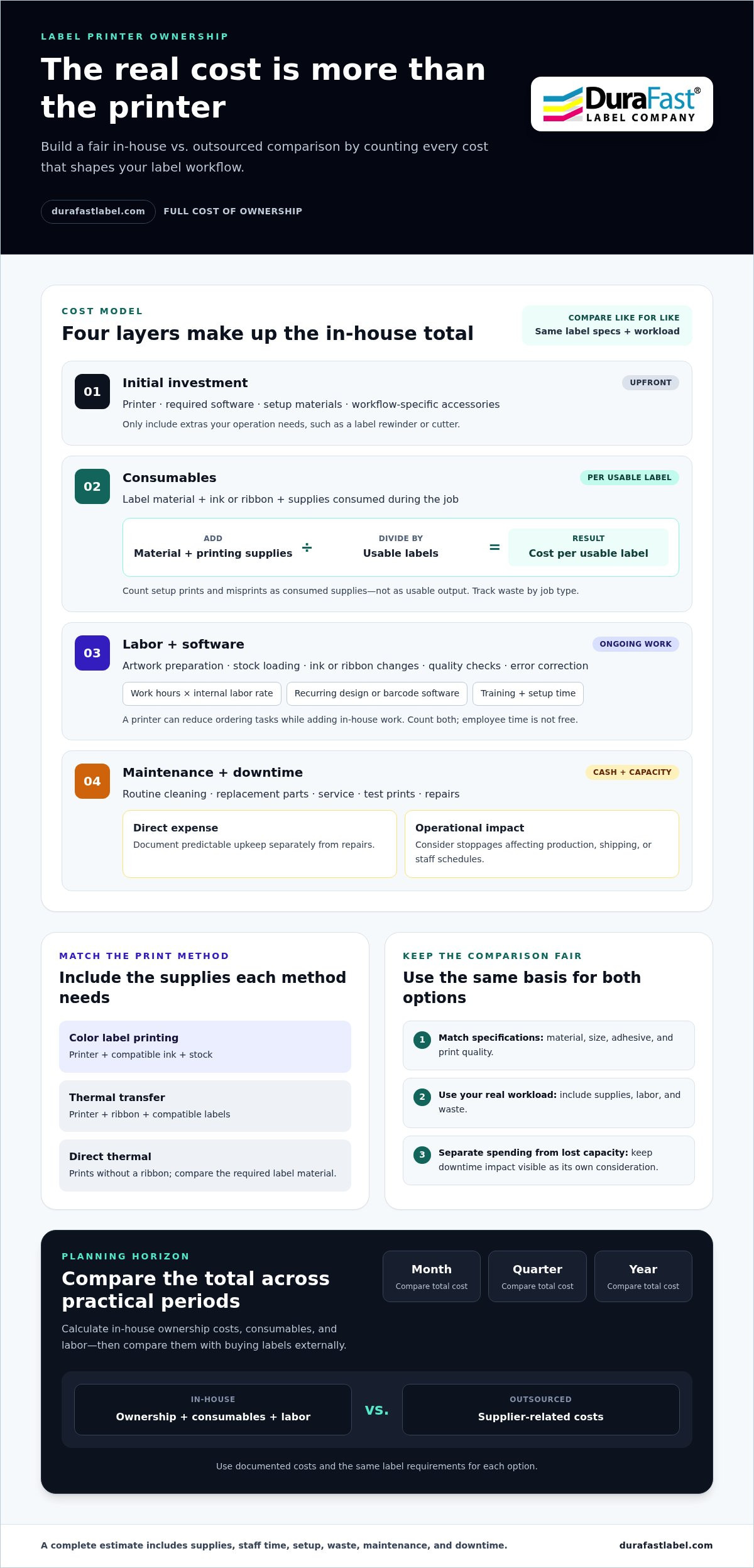
Build a total ownership estimate instead of comparing printer prices alone. Include equipment, labels, ink or ribbon, software, labor, setup, waste, and ongoing upkeep. Use the same label specifications and workload for each option so the comparison reflects your operation.
- List the initial investment. Record the printer, any required software, and setup materials as separate cost lines. Include accessories only if your workflow needs them, such as a label rewinder or cutter. For color label printing, account for the printer and compatible ink and stock. For thermal transfer, include the printer, ribbon, and compatible labels. Separating these items makes it easier to compare print methods without overlooking required components.
- Calculate consumables cost per usable label. Add the label material and printing supplies used for a typical job. Divide that amount by the number of usable labels, not the total attempted, because setup prints and misprints also consume supplies. For example, a design change may leave part of a roll unusable. Track waste by job type, then apply that rate to planned volume. When comparing in-house and outsourced labels, match material, size, adhesive, and print quality.
- Count labor and software. Estimate time spent preparing artwork, loading stock, changing ribbons or ink, checking print quality, and correcting errors. Multiply those work hours by your organization’s internal labor rate. Add recurring software costs if label-design or barcode tools require a subscription. Include training and setup time for each workflow. A printer may reduce ordering tasks while adding in-house work, so count both rather than treating employee time as free.
- Include maintenance and downtime. Add a cost line for routine cleaning, replacement parts, service, and test prints. Separate predictable upkeep from repairs, and document the assumptions in your estimate. Consider how a printer stoppage affects production, shipping, or staff schedules. Keep this operational impact separate from direct cash expenses so decision-makers can distinguish actual spending from lost capacity. Apply the same maintenance assumptions to printer and outsourced options.
- Project the total over useful planning periods. Compare documented supplier-related costs over one month, one quarter, and one year. For each period, calculate in-house ownership costs plus consumables and labor, then compare them with purchasing labels externally. Test a lower-volume and higher-volume scenario using your records. If the equipment choice or compatible supplies need narrowing, discuss your label-printing requirements with DuraFast Label Company as part of building a practical cost comparison.
The workflow may require label-design or barcode software, and recurring software costs should be included if those tools require a subscription. Evaluating these software and hardware components ensures a comprehensive financial assessment for your business.
How can I calculate the ROI and payback period for a label printer?
Use your organization’s records to assess whether in-house label printing creates measurable value. A clear return-on-investment calculation can help justify buying a label printer. Separate direct savings from benefits such as greater control over production schedules, so the case is easier to assess and update.
- Choose a comparison period and baseline. Gather invoices and internal records for labels you currently buy. Group jobs by product or label type when their requirements differ. Include relevant ordering and handling costs, but separate occasional expenses from regular ones. Record the volume associated with each cost. This gives your model a practical starting point and helps prevent an unusual order from distorting the comparison.
- Estimate the full cost of in-house production. Include equipment, labels, ink or ribbon, software, staff time, setup, waste, and maintenance. Track the work involved in preparing files, running jobs, checking output, and correcting mistakes. Apply your organization’s labor assumptions consistently. Keep costs for different print methods separate when their supplies or workflows differ. This helps show whether apparent savings remain after production tasks move in-house.
- Calculate net savings for each period. Subtract in-house operating costs from the comparable cost of purchased labels. Use one month, one quarter, and one year to show how the result changes over time. Note your assumptions for volume, labor, and waste in each calculation. A positive result indicates lower modeled spending in-house for that period. A negative result means outsourcing costs less under those assumptions.
- Work out ROI and payback. Calculate ROI as net benefits minus the initial investment, divided by that investment, then multiplied by 100. Define net benefits as avoided purchasing costs less ongoing in-house costs. Estimate payback by dividing the initial investment by net savings per period. Keep the time unit consistent. If net savings are zero or negative, the model shows no payback for that scenario.
- Test whether the business case holds under changing conditions. Recalculate using different label volumes, staffing needs, and waste assumptions. Consider whether a seasonal peak or temporary product launch drives most of the modeled savings. Show decision-makers which assumptions matter most and what evidence supports them. A transparent comparison is more useful than a single attractive figure. This analysis helps justify buying a label printer when expected savings hold across realistic operating conditions.
What are the risks and hidden costs of buying a label printer?
- Test compatibility with your actual label jobs. Before selecting equipment, match its supported label material, size, adhesive, and roll format to your current jobs. A printer suited to shipping labels may not work for small product labels or specialty materials. Print samples using actual artwork, including fine text, barcodes, and color details. Check how labels feed, cut, and peel in your workflow. A mismatch can waste stock, require artwork changes, or call for extra equipment. Record the specifications for each label type before comparing printers.
- Plan for training and process ownership. Assign responsibility for label templates, print settings, supply changes, and quality checks. Without clear ownership, employees may save conflicting designs or use inconsistent settings. Test the workflow with the people who will operate it, not only the person choosing equipment. Allow time for training, test prints, and documenting routine tasks. Color and thermal transfer printers may require different routines, so don’t assume one procedure suits both.
- Control stock, waste, and design changes. In-house printing can leave labels unused when packaging, product information, or artwork changes. Set a review process for approved templates and keep obsolete stock separate from usable inventory. Track setup prints, misprints, and leftover rolls by job. For example, a product redesign could make previously printed labels unsuitable, even if the printer still works properly. Consider storage conditions for labels and printing supplies, since damage or aging can reduce usable stock. Include these risks in your ownership estimate instead of assuming every purchased label will be used.
Compatible label sizes, materials, adhesives, and roll formats depend on printer specifications and job requirements. Check those specifications and test samples, particularly for small product labels or specialty materials.
Project documented supplier-related costs across one month, one quarter, and one year. This shows leadership the business impact and supports a clearer assessment of hidden costs.
What workplace, shipping, or product-labeling regulations should I consider
- Identify which labels carry compliance information. List each product, package, and workplace use that requires a label. A shipping label, a chemical product label, and an internal shelf label serve different purposes. Record the information each must display, who approves it, and where it appears. Then match each label to its destination and use. Requirements can depend on product category, sales market, and label use, so don’t assume one template suits every job.
- Assign ownership for label content and revisions. Name the team responsible for reviewing wording, symbols, barcodes, and artwork before printing. Keep approved templates separate from drafts, and record the version used for each product or shipment. For example, a product-description change should trigger a review of affected templates and stored stock. Printer access alone does not ensure accurate label content. Build a documented approval step into the workflow before a new design goes into production.
- Check shipping data and scan performance. Compare the information on each shipping label with the order and carrier workflow. Test barcode readability after printing, applying, and handling the label. A barcode that looks clear on screen may print poorly on unsuitable stock or at the wrong size. Test on real packages, including cartons with curved or textured surfaces. Record the label format, placement, and scan result so staff can repeat a process that works reliably.
- Match industry standards to the product sector. Some industries use category-specific quality certifications. IATF 16949 is an example of a category-specific certification for automotive labels. If your organization supplies automotive products, determine whether that certification affects your supplier or label-production requirements. Other sectors may have different standards and review processes. Add the relevant requirements to the printer evaluation, including material selection, quality checks, and records. Don’t assume a printer alone makes a label compliant; the content, material, process, and use all matter.
- Build compliance checks into printer selection. Before choosing equipment, list the label formats, materials, and approval controls your workflow needs. Test representative labels and barcode scans, then document results for the people responsible for compliance and operations. If workplace, shipping, or product rules affect your label specifications, discuss your label requirements as part of assessing suitable printing options. Keep the final requirements with approved templates, so future print runs follow the same controlled process.
DuraFast Label Company: Epson ColorWorks C6000A
DuraFast Label Company can help connect your cost comparison with relevant label-printing equipment and materials. If your workflow needs color labels, consider the Epson ColorWorks C6000A or Afinia L801 Color Label Printer. For thermal transfer printing, the Zebra ZT411 Thermal Transfer Printer offers another option to evaluate against your label volume, supply needs, and production process.
Material matters, too. DuraFast Matte Chemical Labels may suit applications that require this label type. Compare each option with your actual stock, artwork, and workflow before deciding whether in-house printing fits your operation. If your calculations support buying, explore equipment and materials suited to your needs. If outsourcing remains more practical, let that finding guide your decision.
Contact DuraFast Label Company to discuss your label-printing requirements.
Turn your cost analysis into a practical next step
The decision doesn’t have to be all or nothing. If the numbers support bringing label production in-house, start with a clear operating plan: assign an owner, set standards for approved artwork, and track how the workflow performs. If the case is uncertain, identify what evidence would change the decision, such as a sustained shift in label demand or a new production requirement.
A practical way to justify buying a label printer is to make the decision easy to revisit. Keep your assumptions, approval criteria, and actual results together. This gives your team a useful reference when products, packaging, or production needs change, rather than leaving the decision to an outdated estimate.
If you’re ready to discuss equipment and label options for your workflow, contact DuraFast Label Company. Take the next step with a clear view of what your operation needs, and build a decision your team can use with confidence.
Frequently Asked Questions
What are the business benefits of buying a label printer?
A label printer can make short runs and product changes easier to manage in-house. For example, a small producer launching a seasonal product can print a revised design without ordering a large batch of labels. Digital templates also help teams keep layouts consistent across repeat jobs. These benefits matter most when staff need control over label timing, design updates, or production quantities rather than relying on fixed order batches.
Is it cheaper to print labels in-house or outsource them?
Neither option is always cheaper. The result depends on volume, label requirements, and how often designs change. Outsourcing may suit a business with stable designs and infrequent orders, particularly when in-house equipment would sit idle. Printing internally may make more sense for frequent short runs or changing product information. A hybrid approach can work, too: print routine or variable labels in-house and order stable, long-run designs externally.
How much time can a label printer save compared with handwriting or outsourcing labels?
Time savings depend on the task, not just printer speed. Compare the time staff spend handwriting or applying labels with the full in-house process, including opening a template, loading stock, and checking output. For outsourced printing, include ordering, proof approval, and delivery in the elapsed time. For example, a team handling frequent address changes may benefit from printing labels as orders are prepared, while occasional batches may offer little time advantage.
How do label printer speed, volume, and print quality compare?
Compare speed against your actual workload and turnaround needs: one commenter printed five design iterations in a day, while another reported a two-week wait for an online print service. Print quality depends on the method and stock, so test sample labels for small text, barcodes, and custom artwork.
What software and integrations are needed for a label printer?
Label-design or barcode software may be required; include any recurring subscription costs in your estimate.