How to Print Custom Nutrition Facts Tables for Food and Drinks
21st Nov 2026
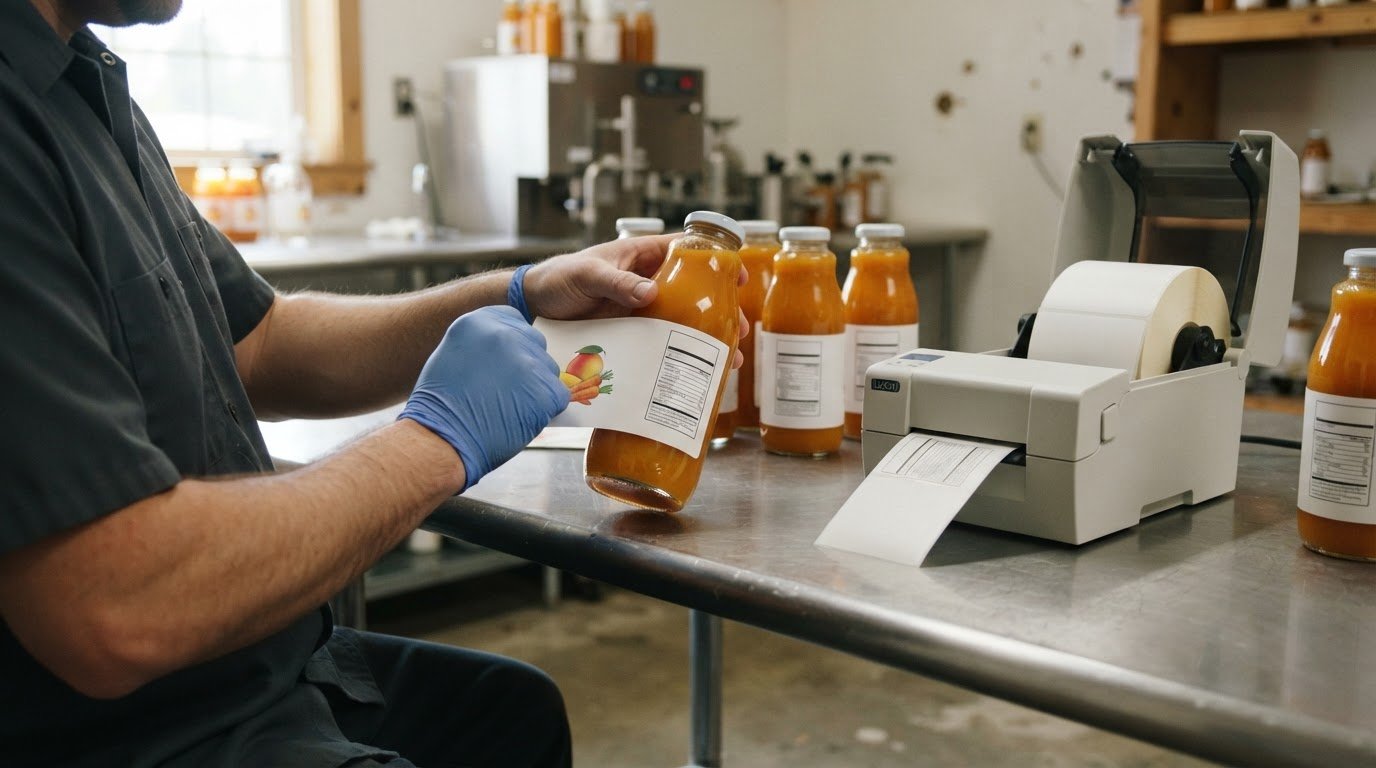
What does a Nutrition Facts label need to show, and how can it fit on your package? It presents key nutrition information, including serving size, calories, macronutrients, and vitamins or minerals. Printing a Nutrition Facts table on food labels starts with accurate product data, then uses a layout that keeps the required details clear and readable.
It’s easy to focus on the design and leave the nutrition panel until last. But the information and available label space both shape the final layout. This guide explains what the panel contains, how package shape and size affect its format, and what to consider when preparing custom food and beverage labels. You’ll also learn how accurate nutrition details support a label that’s easier for customers to read and apply to your packaging.
Key Takeaways
- Learn how Nutrition Facts panels organize serving size, calories, and nutrient details.
- Choose a label layout that works with your package shape and available space.
- Keep required information readable while planning a custom food or beverage label.
- Understand how serving information and nutrient rounding affect the values shown.
- See how label-printing equipment can help bring a prepared design onto your product packaging.
What is a Nutrition Facts Label?
A Nutrition Facts label organizes a food’s serving size, calories, and nutrient values. It can show fat, carbohydrates, protein, and selected vitamins or minerals. Printing a Nutrition Facts table on food labels means fitting this information into an FDA-style format that suits the package while keeping details legible.
How much does it cost to print food labels with a Nutrition Facts table in the United States? The cost depends on factors such as print quantity, label material, and printing method. These choices affect production, so there isn’t one price for every package.
- Start with the panel’s job. Use the Nutrition Facts area to present information in a structured, scannable format. Make serving size and calorie information easy to find, then arrange nutrient values clearly. Keep marketing claims separate from the nutrition table.
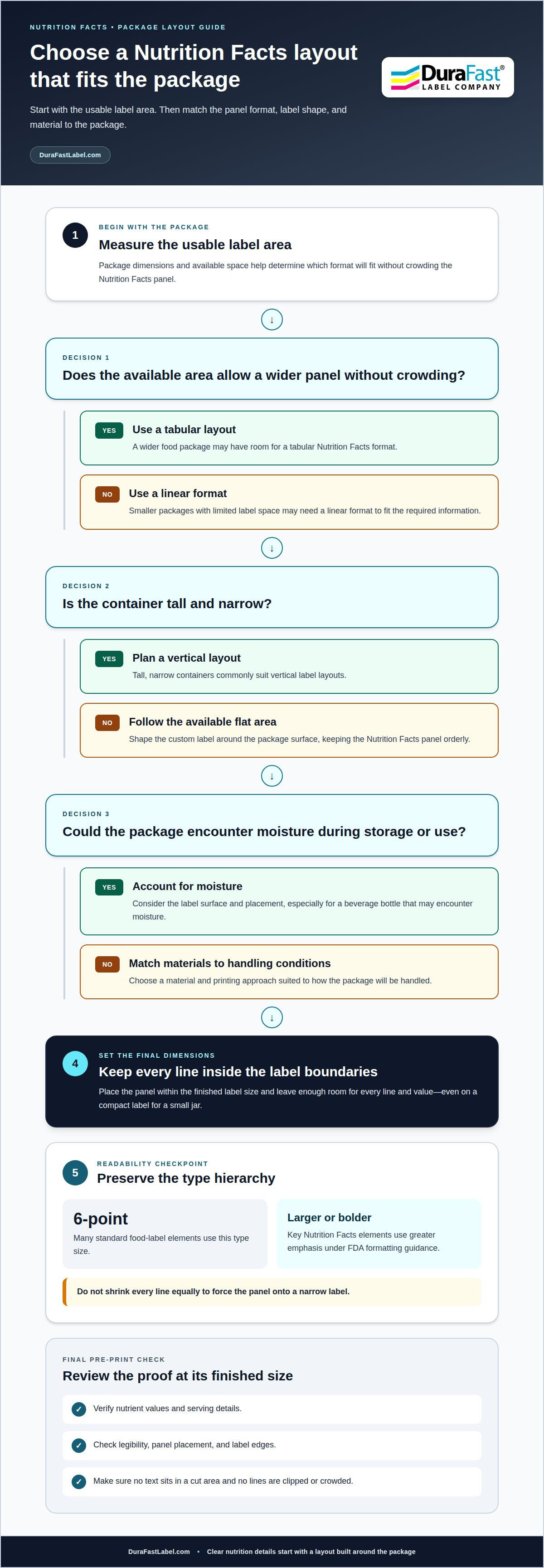
- Choose the format around the package. A wider food package may have room for a tabular Nutrition Facts layout. A smaller package with limited label space may need a linear format. The package dimensions and usable label area help determine which layout fits without crowding the panel.
- Respect FDA-style type hierarchy. Many standard food-label elements use 6-point type, while key Nutrition Facts elements use larger or bolder type under FDA formatting guidance. Preserve that visual hierarchy when adapting a design. Don’t shrink every line equally to force the panel onto a narrow label.
- Fit the label shape to the container. A custom nutrition-label format can follow the flat area available on a bottle, pouch, or carton. Tall, narrow containers commonly suit vertical layouts. Keep the Nutrition Facts panel orderly even when the outer label has rounded corners or a distinctive cut-to-size shape.
- Plan cut-to-size labels around the content. Set the finished label dimensions to match the package area, then place the panel within those boundaries. Leave enough room for every line and value. Even a compact label for a small jar needs readable spacing.
- Account for the label’s use. Choose a material and printing approach suited to the package’s handling conditions. A beverage bottle may encounter moisture during storage or use, so the label surface and placement matter. Consider these practical choices separately from the Nutrition Facts formatting requirements.
Smaller products with limited label space may need a linear Nutrition Facts format to fit all required information, rather than a wider tabular layout.
Customizing label design while keeping required information readable
How should food-label artwork be prepared for printing? File formats, resolution, and color settings depend on the printer and its design software. Use artwork accepted by the chosen workflow, preserve sharp text and graphics, and match color settings to the printer’s requirements.
What common Nutrition Facts printing errors should you avoid? Check nutrient values, serving details, text legibility, and panel placement before production. A design proof can catch problems such as clipped lines or a crowded vitamin entry.
- Set the package dimensions first. Measure the usable label area on the packaging, then build the design around it. A narrow bottle and a wide carton need different layouts. Keep the Nutrition Facts panel, ingredient details, and branding within the finished label boundaries.
- Give required information a clear visual order. Place the nutrition panel where shoppers can find it quickly. Use consistent spacing, strong contrast, and clean alignment for serving size, values, and nutrient names. Avoid decorative backgrounds behind dense text, as patterns can make individual lines harder to distinguish.
- Use software that supports precise layouts. Nutrition label design software can help position text, logos, and artwork within a defined label size. Set the document dimensions before arranging content. Keep text editable where possible, so correcting an ingredient or dietary detail doesn’t require rebuilding the whole design.
- Prepare artwork for the chosen print workflow. Confirm that the file opens correctly in the printer’s software, then inspect fonts, images, and color handling. Keep logos and text crisp when scaled. Don’t assume a file prepared for one printer will transfer unchanged to another workflow.
- Review online uploads carefully. If a design platform accepts artwork uploads, compare the preview with the original file. Look for missing fonts, shifted objects, or unexpected color changes. For example, a small allergen statement should remain visible after the platform resizes the label.
- Proof the label at its finished size. Review a physical or on-screen proof at the intended dimensions. Read each line, inspect the panel edges, and confirm no text sits in a cut area. A reduced preview can hide crowding that becomes obvious on the actual package.
- Run a final content and layout check. Compare the proof with the approved nutrition values and labeling requirements. Check serving details, claims, ingredient text, and placement together. Correct errors before printing the full run instead of relying on a last-minute visual scan.
For help aligning label materials and a print workflow with your packaging, contact the team about your label project.
Use a file format accepted by the chosen printer and its design software. Keep text and graphics sharp, and match color settings to the printer’s requirements, which depend on the print workflow.
Custom nutrition labels for food and beverages
Build each custom label around the specific food or beverage, its nutritional information, and its packaging. A granola pouch and a bottled drink may need different content arrangements. Keep product identity and nutrition details coordinated, and treat each formula and serving description as its own design input.
- Start with the exact product formula. Gather nutrition values for the product being labeled, not a similar flavor or an earlier recipe. For example, a berry beverage and its unsweetened version can have different sugar and calorie values. Accurate inputs help prevent outdated figures from carrying into new label artwork.
- Set the serving basis. U.S. serving sizes are determined using FDA Reference Amounts Customarily Consumed (RACCs), listed in 21 CFR Section 101.12(b). Record the serving description alongside its values. For a drink, that description should clearly identify the quantity represented by the nutrition information.
- Match the label to the package. Consider where the label sits on a bottle, carton, pouch, or jar. A curved beverage bottle can limit the usable panel area, while a broad carton may provide more room. Position information so package seams or folds don’t obscure the text.
- Keep product versions distinct. Give each flavor, recipe, or package size its own clearly identified artwork file. For example, don’t use a lemon drink’s Nutrition Facts panel on a lime drink label without confirming the values match. A simple naming system can reduce mix-ups during revisions.
- Arrange nutrition and other label content. Leave a defined area for the Nutrition Facts panel, then place ingredients and allergen information where applicable. Avoid squeezing promotional claims between closely spaced nutrition lines. Clear separation helps readers distinguish product messaging from nutritional information.
- Review sugars and other changing values. Compare the numbers on the proof with the approved product data. If a recipe change affects added sweeteners, update the relevant values before reusing artwork. Don’t rely on an old label file just because the package or flavor name looks familiar.
- Check the printed label on its actual package. Apply a sample to the intended container and inspect the Nutrition Facts panel, ingredients, and serving description. A label on a bottle may curve differently than it appears on a flat screen. Confirm the finished presentation remains easy to read.
- Save a record for each approved version. Keep the final artwork associated with its matching product formula and package. When a beverage recipe or serving description changes, use that record to identify which label needs revision. This helps prevent mixed versions from returning to production.
Nutrition label information
- Gather the product’s nutrition data. Start with the exact food or beverage formula and its serving description. Record calories, fat, carbohydrates, protein, and the other nutrient values used for that product. Keep the figures with the matching recipe version, so ingredient changes don’t leave outdated information on the label.
- Set the serving size using the applicable reference amount. U.S. food manufacturers determine serving sizes using FDA Reference Amounts Customarily Consumed, or RACCs, listed in 21 CFR Section 101.12(b). According to the U.S. Food and Drug Administration, a discrete food unit weighing between 67% and 200% of its RACC may be listed as one serving.
- Include the nutrients required for the label. U.S. Nutrition Facts labels must include added sugars, Vitamin D, and Potassium; Vitamins A and C are optional. Review the values against the product data before building the panel. Depending on the product, the package may also need an ingredient list and allergen information.
- Choose a layout that fits the label space. According to the U.S. Food and Drug Administration, if there isn’t sufficient continuous vertical space, approximately 3 in, for required components through the mandatory potassium declaration, the nutrition label may use a tabular display. Plan the panel and package layout together to avoid crowding.
- Identify the right requirements for the product. Products formulated for children younger than four have Nutrition Facts label regulations set out in 21 CFR Section 101.9. Treat these products as a distinct labeling case. Match the label information and design to the product category rather than reusing artwork without review.
- Account for the updated label requirements. According to the U.S. Food and Drug Administration, U.S. food and beverage manufacturers with annual U.S. sales exceeding $10 million had to comply with the updated Nutrition Facts label requirements as of January 1, 2020. That date helps distinguish the updated format from older label artwork.
- Consider the stated sales exemptions carefully. According to the U.S. Food and Drug Administration, a food business with gross sales below $500,000 or consumer food sales below $50,000 is exempt from providing a Nutrition Facts label. These thresholds describe different sales measures, so identify which one applies before making labeling choices.
- Update the complete label when product details change. A new recipe can affect nutrient values, ingredients, and allergen information. Compare revised product data with every corresponding field in the label file. For example, if a sweetener changes, review the added-sugars value and related artwork before approving the next print run.
What are the FDA rules for rounding nutrition values and declaring nutrients?
- Work from the product’s underlying nutrient values. Keep calculation data separate from the rounded values shown on the label. Apply the appropriate declaration method to each nutrient instead of rounding every figure the same way. For example, calories and sodium use different units and declaration thresholds.
- Handle calories according to the applicable declaration rule. For a simplified Nutrition Facts label, an amount below 5 calories is listed as an insignificant amount. Don’t treat that threshold as a general rounding instruction for every label format. Keep the calculation and displayed declaration distinct in your label records.
- Review total fat before preparing a simplified panel. The guide lists less than 0.5 g of total fat as an insignificant amount for a simplified Nutrition Facts label. Compare the product’s calculated amount with this threshold before choosing the declaration. Keep the unit in grams, and don’t confuse total fat with another fat category.
- Check cholesterol separately. For a simplified Nutrition Facts label, the listed insignificant amount is less than 2 mg of cholesterol. Use the cholesterol value for the specific product, not a similar recipe. Maintaining separate nutrient records helps prevent a milligram value from being copied into the wrong field.
- Review sodium using its own threshold. The guide lists less than 5 mg as an insignificant amount of sodium in a simplified Nutrition Facts label. Keep sodium’s milligram calculation attached to the product data. Don’t use the cholesterol or calorie threshold as a substitute when preparing this line.
- Check vitamins and minerals with their own criteria. The guide lists less than 2% of the RDI as an insignificant amount for vitamins and minerals in a simplified Nutrition Facts label. Keep each vitamin or mineral distinct in the working data. For example, don’t transfer one vitamin’s amount to another nutrient’s line.
- Review the complete panel after rounding. Compare each displayed value with its source calculation and check that the nutrient name and unit still match. The label proof should make clear which values belong to calories, grams, or milligrams. Correct mismatches before approving the final artwork.
- Keep the label format in view. Simplified-label thresholds apply to the simplified format described here. Don’t assume the same declaration choices automatically suit another Nutrition Facts layout. Match the panel to its intended format, then review the nutrient lines together for consistency.
For support choosing label-printing equipment for your nutrition panel workflow, discuss your label printing needs.
DuraFast Label Company
DuraFast Label Company is a practical next step when you’re ready to print approved nutrition artwork on product labels. Its selection includes color label printers such as the Epson ColorWorks C6000A, alongside the Zebra ZT411 Thermal Transfer Printer and DuraFast Matte Chemical Labels, which are well-suited for printing nutrition facts table on food labels.
These options support different label-production setups. Consider package shape, label material, and printing workflow when choosing equipment and supplies. For example, a beverage bottle and a food carton may need different label dimensions, even when both use an FDA-style Nutrition Facts panel. Keep finalized nutrition content and package measurements in view as you plan your setup.
For help exploring label-printing equipment and supplies for your needs, contact DuraFast Label Company.
Make Your Next Label Run Count
Treat printing a Nutrition Facts table on food labels as part of a repeatable packaging workflow, not a one-time artwork task. Keep the approved label file connected to the product version it represents. When ingredients, package shape, or design change, that connection helps identify which artwork needs review before the next run.
Before moving forward, decide how the label will be produced and applied. Consider the package surface, label material, and how the finished print will look on the actual container. A small test can reveal layout or handling issues while there’s still time to adjust the production setup.
DuraFast Label Company offers label printers and supplies that can support food and beverage labeling workflows. If you’re planning a setup or refining an existing one, contact DuraFast Label Company to discuss your label-printing needs. Take the next step with a clear plan for your packaging.
Frequently Asked Questions
Do all food products need a nutrition panel?
No. Most packaged foods sold in the United States require Nutrition Facts labeling, but some products may qualify for exemptions. The U.S. Food and Drug Administration states that a food business with gross sales below $500,000 or consumer food sales below $50,000 is exempt from providing a Nutrition Facts label. These are separate sales measures. A farmers’ market sale alone doesn’t automatically exempt a product from labeling rules.
What are the FDA requirements for Nutrition Facts labels on packaged foods?
Requirements cover the information shown, its format, and how nutrient values appear. For example, U.S. Nutrition Facts labels include added sugars, Vitamin D, and Potassium; Vitamins A and C are optional. The rules for Nutrition Facts labels appear in 21 CFR Section 101.9. Product type can affect other label details, so account for ingredients and allergen information where applicable.
What are the required dimensions, format, and type size for a Nutrition Facts table?
There isn’t one fixed label dimension for every package. The package’s available area and the panel’s required content affect the layout. Many standard food-label elements use 6-point type, while key Nutrition Facts elements use larger or bolder type under FDA formatting guidance. For instance, a narrow package may need a different display than a wide carton. Keep legibility central when adapting the design.
When can a food manufacturer use a simplified or dual-column Nutrition Facts label?
A simplified Nutrition Facts format uses criteria for insignificant nutrient amounts. For example, the guide lists less than 5 calories as insignificant for calories in a simplified label. Dual-column labeling applies in specific cases: U.S. labels require dual columns when a food can be consumed in multiple sittings. A recipe calling for 200% or more of a product’s RACC also requires prepared-product nutrition information in dual-column format.
How do I create a compliant Nutrition Facts table using food-labeling software?
Use food-labeling software to arrange the panel, not to assume the data is correct. Enter nutrition information tied to the exact recipe and serving basis, then review the generated layout for missing text, mismatched values, or clipped lines. DuraFast Label Company offers BarTender Professional Software, a label design and barcoding tool. Review the finished proof against applicable labeling requirements before printing.