
In-House Label Printing Solutions: The 2026 Guide to On-Demand Production
31st May 2026
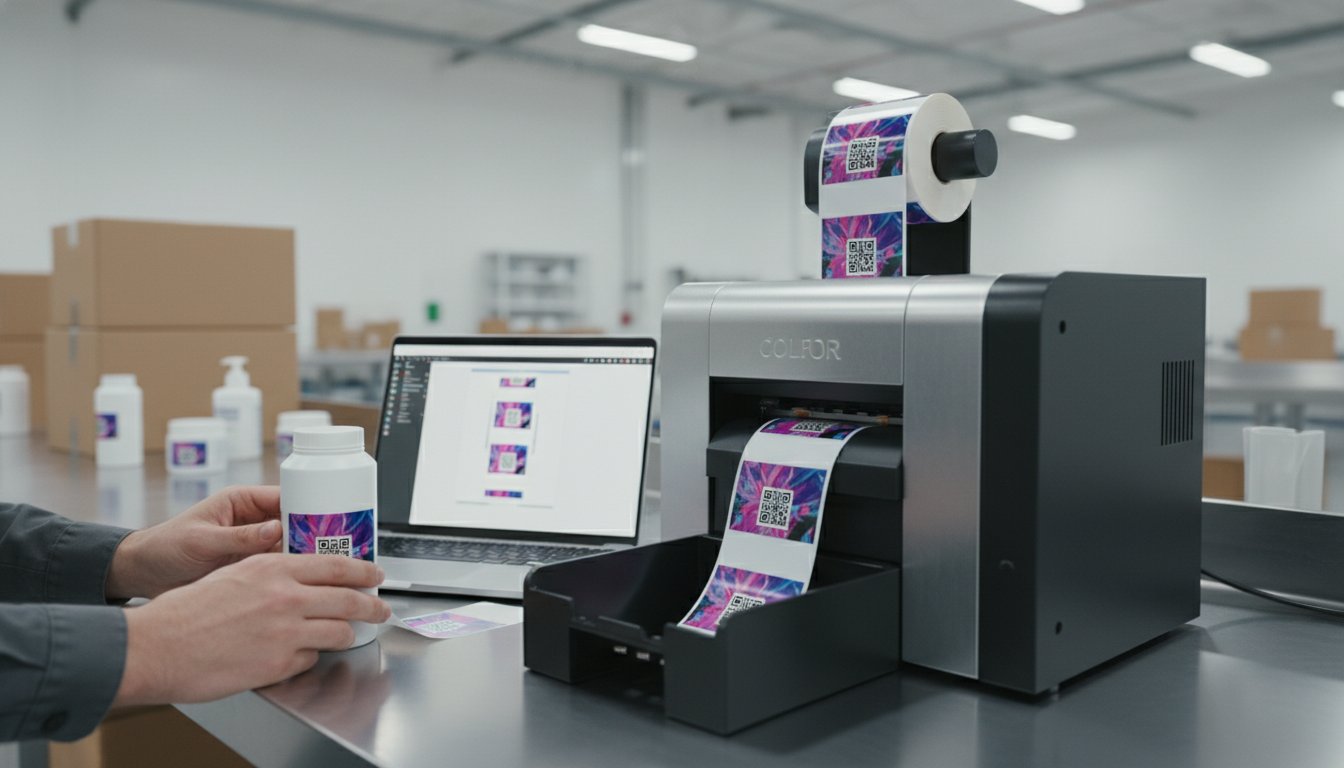
Did you know that as of January 1, 2026, Amazon discontinued all in-house labeling services for U.S. sellers? This shift means the responsibility for GS1 validation and FNSKU placement now rests entirely on your business. If you're currently relying on outside print shops, you've likely dealt with high minimum order quantities and frustrating shipping delays. It's a waste of money to toss out stacks of pre-printed labels every time a regulation changes or a product update occurs.
We believe that managing your brand should be simple and cost-effective. By investing in professional in-house label printing solutions, you can eliminate lead times and gain total control over your production schedule. This guide will show you how to build a custom system that lowers your cost-per-label while ensuring compliance with new standards like the EU Packaging and Packaging Waste Regulation. We'll walk through the hardware, software, and media combinations that will transform your labeling from a bottleneck into a competitive advantage.
Key Takeaways
- Stop overpaying for label stock you don't use by eliminating high minimum order quantities from third-party converters.
- Identify whether high-resolution color inkjet or durable thermal transfer technology is the best fit for your specific product packaging.
- Learn how to build complete in-house label printing solutions by combining professional hardware with specialized media and design software.
- Streamline your production workflow with a simple two-step audit to identify high-waste items and reduce your overall cost-per-label.
- Gain total control over your branding and compliance requirements, such as GS1 validation and updated environmental regulations.
Why Businesses Are Switching to In-House Label Printing Solutions in 2026
The shift toward in-house label printing solutions marks a significant change in how modern businesses manage their supply chains. Traditionally, companies relied on third-party converters to handle high-volume print runs. That model is failing fast. In-house production means bringing the entire process on-site. You own the equipment, the media, and the schedule. This transition isn't just about convenience; it's a strategic move to regain control over your brand and your budget. By eliminating the middleman, you remove the friction that slows down your growth.
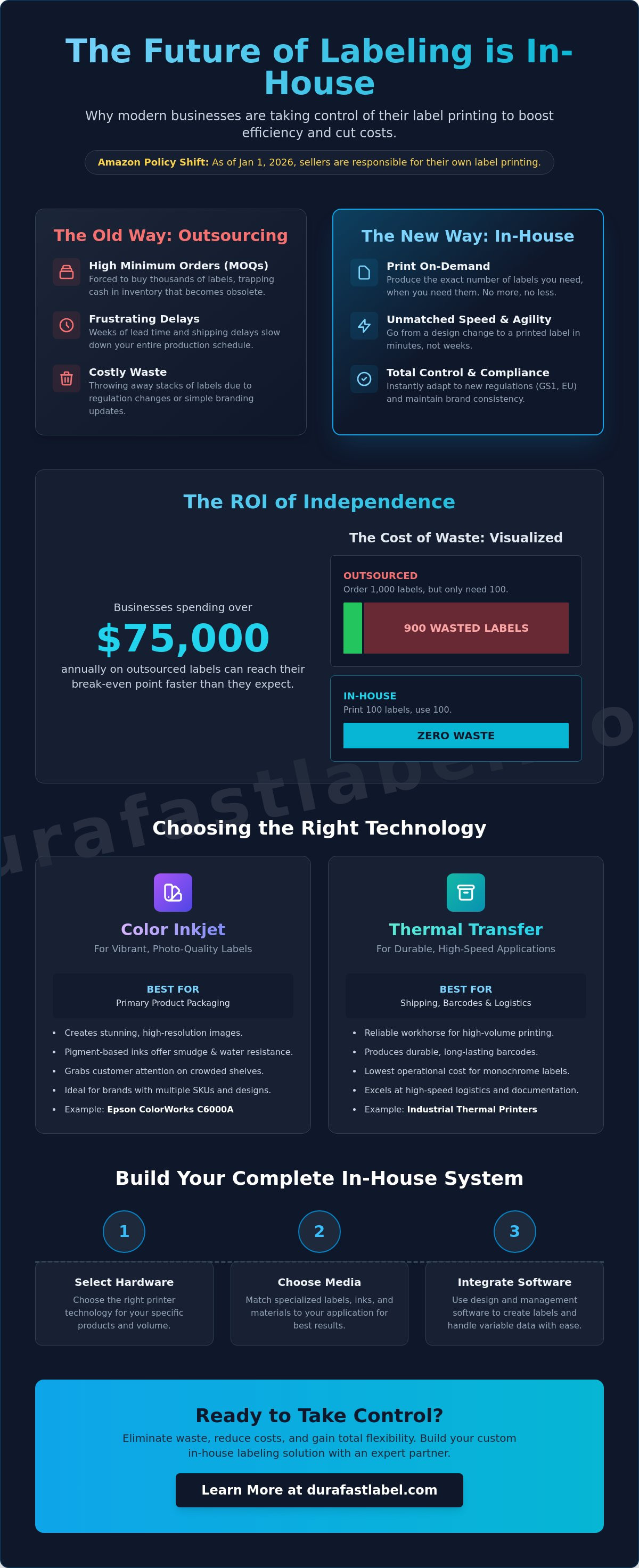
One of the biggest drivers of this change is the death of the Minimum Order Quantity (MOQ). Print shops often require you to order thousands of labels to get a reasonable price. This requirement traps your cash in inventory that might sit on a shelf for months. If a regulation changes or you update your logo, those labels become useless waste. On-demand printing allows you to produce exactly what you need for today’s production run. You don't have to wait weeks for a shipment that might contain errors or outdated information.
Speed is the new currency in retail and manufacturing. With the right label printer technology, you can go from a design tweak to a finished product in minutes. This agility is essential when dealing with seasonal shifts or sudden market demands. You aren't at the mercy of a vendor's backlog or shipping delays. You print, apply, and ship on your own terms.
The ROI of In-House Production
Calculating your return on investment starts with looking at hidden costs. Beyond the price of the label, consider the cost of storage and the risk of obsolescence. Most mid-size businesses reach their break-even point faster than they expect, especially when annual outsourced costs exceed $75,000. Printing 100 labels in-house costs less than ordering 1,000 from a vendor when you factor in the 900 labels you'd eventually throw away. By switching to color label printers, you eliminate the premium fees associated with short-run outsourced orders. These in-house label printing solutions turn a recurring expense into a controlled asset.
Customization and Variable Data
Modern markets demand personalization. Whether it's a seasonal promotion or a localized branding shift, your labels need to keep up. In-house systems make it easy to manage variable data like lot numbers, expiration dates, and serial numbers. You can update your files for inkjet labels instantly. This capability allows you to support diverse product lines without adding massive overhead. You can test new designs or run limited-edition packaging without the financial risk of a massive print order. It's about being responsive to your customers without sacrificing your bottom line.
Choosing the Right Technology: Inkjet vs. Thermal Printers
Selecting the right hardware is the most critical step in building effective in-house label printing solutions. You'll likely choose between two primary technologies: color inkjet and thermal transfer. Each serves a distinct purpose within your facility. High-resolution color inkjet printers are the gold standard for primary product packaging. They produce vibrant, photo-quality images that grab a customer’s attention. On the other hand, industrial thermal printers are the reliable workhorses of the logistics world. They excel at high-speed barcode generation and shipping documentation where durability is more important than color.
Your choice depends on your specific throughput needs. If you're printing thousands of shipping labels daily, a thermal system offers the lowest operational cost. If you're managing a boutique brand with dozens of SKU variations, an inkjet system provides the flexibility you need. Matching the technology to your environment ensures you don't overspend on features you won't use.
Color Inkjet Solutions: The Epson ColorWorks Advantage
The Epson ColorWorks C6000A is a top choice for businesses that need professional-grade primary labels. It uses pigment-based inks, which are essential for creating smudge-proof and water-resistant packaging. Unlike dye-based inks, pigment inks bond deeply with the media, ensuring your branding stays sharp even in harsh retail environments. For businesses with even higher volume requirements, the Afinia L801 utilizes Memjet technology. This allows for incredibly fast color print speeds without sacrificing the 1600 dpi resolution needed for fine text and intricate logos. These color label printers give you the power to pivot your branding instantly.
Thermal Transfer Power: Zebra and Beyond
Reliability is non-negotiable in a 24/7 industrial setting. The Zebra ZT411 is built for these demanding conditions. It uses thermal transfer ribbons to create permanent, heat-resistant barcodes that won't fade during long-distance transit. You should also understand the difference between direct thermal and thermal transfer methods. Direct thermal label printers are excellent for short-term use, like shipping labels that only need to last a few days. However, thermal transfer is the better option for inventory that might sit in a warehouse for months. If you're unsure which technology fits your specific warehouse layout, it's a good idea to speak with a labeling specialist who can audit your current workflow.
Essential Components of a Professional Labeling System
Building a successful system requires more than just unboxing a printer. A truly effective setup for in-house label printing solutions functions like a three-legged stool: hardware, media, and software. If any of these components are mismatched, your production will suffer. You might have a high-speed printer, but if your labels peel off in a freezer or your barcodes fail to scan, the entire investment is compromised. Success depends on ensuring every piece of the puzzle works together seamlessly to meet your specific environmental demands.
Compatibility is the foundation of reliability. Your ink or ribbon must bond correctly with the label substrate to prevent smudging or fading. For example, using a wax ribbon on a polyester label will result in text that wipes away with a finger touch. We help you avoid these mistakes by vetting the combinations of hardware and media before they reach your facility. This pre-validation ensures that your in-house label printing solutions remain consistent from the first label to the last.
Specialized Media and Durability
Choosing the right material is just as important as the design itself. If you work with hazardous materials, DuraFast Matte Chemical Labels are essential for achieving GHS and BS5609 compliance in-house. These labels are engineered to survive saltwater submersion and extreme chemical exposure. For standard applications, you need to understand the hierarchy of materials:
- Paper: Cost-effective for indoor, short-term use like shipping.
- Polypropylene: A durable plastic that resists water and tearing, perfect for refrigerated goods.
- Polyester: The ultimate choice for heat resistance and long-term outdoor durability.
For those using thermal transfer technology, high-quality ribbons are non-negotiable. They ensure that your barcodes remain crisp and readable throughout the entire supply chain. If you are using inkjet technology, selecting specialized inkjet labels with the correct top-coating will ensure your colors stay vibrant and smudge-free.
Software: The Brain of Your Printing Operation
Your software ensures that your labels are accurate and compliant with 2026 global standards. BarTender Professional is the industry standard for a reason. It allows you to automate barcode generation and integrate your printer directly with existing ERP or inventory management systems. This integration is vital for meeting the GS1-128 barcode standard, which is the global requirement for retail logistics in 2026. Professional software also helps you maintain the mandatory 0.25-inch "Quiet Zone" on both sides of your barcodes to ensure scanners calibrate correctly. By centralizing your designs, you ensure total consistency across multiple printers and different facility locations.
Implementing Your In-House Workflow: From Design to Print
Transitioning to in-house label printing solutions is a methodical five-step process that starts with data, not hardware. First, audit your current label usage. Look for items with high minimum order quantities or those that frequently become obsolete due to design changes. These are your "high-waste" targets. Second, select a printer based on your environment. If you need high-resolution primary branding, choose from our color label printers. For high-volume shipping and logistics, an industrial barcode printer is more efficient.
Third, source media that matches your printer's technology. For inkjet, use inkjet labels specifically designed to absorb pigment inks without smearing. For thermal systems, ensure your thermal ribbons are compatible with your specific label material. Fourth, design your template using BarTender Professional. This software ensures your barcodes meet GS1 standards and include the mandatory 0.25-inch Quiet Zones. Finally, calibrate your system for color accuracy. Once set up, you can print exactly what you need as orders arrive. This eliminates the need for massive inventory storage and reduces your total footprint.
Setting Up Your Print Station
High-volume printing requires a dedicated, organized area. Consider ergonomics to prevent staff fatigue during long production runs. Place your printer at a comfortable height and ensure easy access to media rolls and ink cartridges. Use Datalogic barcode scanners at the station to verify print quality and data accuracy immediately. This step prevents faulty labels from ever leaving your facility. Regular maintenance is also vital. Wipe down printheads with isopropyl alcohol during every media change. This simple habit prevents buildup and extends the life of your expensive equipment.
Compliance and Quality Control
Quality control doesn't end at the printer. Test your label adhesion on your actual product packaging under real-world conditions. If you ship frozen goods, verify that your labels stay attached in sub-zero temperatures. Maintaining GHS and industry-specific standards requires constant vigilance. Training is the final piece of the puzzle. Ensure your team knows how to manage media changes and use BarTender templates without altering critical data fields. If you're ready to streamline your production, contact our experts to request a workflow audit.
Finding the Best In-House Label Printing Partner
Choosing the right partner is the final step in securing your production line. Many businesses make the mistake of buying hardware from a single-brand manufacturer. This often leads to a biased solution where the vendor tries to fit your unique needs into their limited product box. A multi-brand distributor provides a more objective perspective. We look at your specific volume, environment, and budget to recommend the best machine for the job, whether it's an Epson, Zebra, or Afinia model. This objectivity ensures your in-house label printing solutions actually solve your problems instead of creating new ones.
Support and availability are just as vital as the hardware itself. If your printer goes down or you run out of media, your entire shipping department grinds to a halt. Working with a North American-based partner ensures you have access to technical support and a steady supply of labels when you need them most. You don't have to worry about international shipping delays or time zone gaps. We also specialize in custom media sourcing. If your product requires a unique size or a specific material like polyester for outdoor use, we can provide the exact substrate that matches your printer's specifications.
Future-proofing is another major advantage of a strategic partnership. Your business won't look the same in two years. You need scalable software and hardware options that grow with you. By starting with a flexible platform like BarTender and professional-grade printers, you can add more units or upgrade your capabilities without starting from scratch. This long-term approach protects your investment and keeps your cost-per-label low as your volume increases.
Why DuraFast Label Company?
We provide a curated selection of industry leaders to ensure you get the highest quality equipment available. Our team has specialized expertise in chemical-resistant and high-durability labeling, helping you meet strict standards like GHS and BS5609. We act as a one-stop shop for everything your facility needs. From high-resolution inkjet systems to thermal transfer supplies, we have the inventory to keep your production moving. We've already done the heavy lifting of vetting these products so you can buy with confidence.
Next Steps for Your Facility
Don't guess which printer is right for your brand. We recommend requesting print samples to verify color accuracy and material durability before you make a purchase. This allows you to see exactly how your designs look on the actual media you'll be using. You should also consult with a labeling expert to calculate the specific ROI for your current print volume. We can help you identify the point where owning your equipment becomes more profitable than outsourcing. Explore our full range of in-house label printing solutions today.
Take Full Control of Your Production Schedule
Transitioning your facility to in-house label printing solutions is a strategic move that pays dividends in agility and cost savings. You've learned how the right technology eliminates the burden of minimum order quantities and prevents inventory waste. By matching professional hardware with specialized media, you ensure your brand remains compliant and durable throughout the entire supply chain. This shift doesn't just save money; it gives you the freedom to pivot your branding whenever the market demands a change.
DuraFast Label Company has been serving North American businesses since 2012. We are authorized dealers for industry leaders like Epson, Zebra, and Afinia. Our team specializes in chemical-resistant media and high-durability labeling, ensuring your system is built for long-term reliability. We've already done the heavy lifting of vetting the best products so you can focus on growing your business. Ready to see the difference for yourself? Contact our labeling experts today to find the perfect system for your needs. It's time to stop waiting on vendors and start printing on your own terms.
Frequently Asked Questions
Is it cheaper to print labels in-house or outsource them?
It's typically more cost-effective to print in-house if your annual outsourced printing costs exceed $75,000. This threshold accounts for the initial hardware investment and the immediate reduction in inventory waste. By producing on-demand, you eliminate the need to pay for high minimum order quantities that often sit in storage for months. You'll also save significantly on the shipping fees and vendor markups that inflate the cost of third-party printing.
While labels are often best handled on-site for speed and cost, for larger-scale marketing needs that require specialized wide-format equipment, you can learn more about Banner 4 Sale to discover professional banner and signage solutions.
What is the best printer for small business product labels?
The Epson ColorWorks C4000 and Primera LX600 are the top recommendations for small business product labels. These models provide high-resolution color printing in a compact, desktop-friendly size. They are perfect for brands that need to pivot their designs quickly for seasonal promotions or small batches. These printers deliver professional-grade results without the massive space requirements or complexity of industrial-scale equipment.
Do I need special software to print barcodes in-house?
Professional design software like BarTender is vital for ensuring your barcodes meet global standards. It automates complex tasks like generating GS1-128 barcodes and serializing lot numbers. This software also helps you maintain the mandatory 0.25-inch Quiet Zone on both sides of every barcode. Using a professional tool prevents scan failures and helps you avoid costly chargebacks from retailers like Amazon or Walmart.
How do I choose between inkjet and thermal transfer labels?
Choose inkjet technology if your primary goal is high-resolution, full-color branding for retail shelves. It's the best option for photo-quality images and vibrant logos. Thermal transfer is the better choice for logistics and warehouse tracking where durability is the priority. Thermal transfer labels resist heat, sunlight, and friction much better than inkjet, making them ideal for shipping cartons and industrial inventory tags.
Can in-house labels be waterproof or chemical resistant?
Yes, you can produce highly durable labels on-site by using specialized media like DuraFast Matte Chemical Labels. These materials allow your in-house label printing solutions to achieve GHS and BS5609 compliance for chemical resistance and saltwater durability. When you pair these labels with pigment-based inks or high-quality thermal ribbons, they stay legible even after exposure to harsh solvents, extreme temperatures, or rough handling during transit.
What are the maintenance requirements for industrial label printers?
Maintenance is straightforward and mostly involves regular cleaning. You should wipe the printhead with a lint-free cloth and isopropyl alcohol every time you replace a roll of labels or ribbon. This simple habit prevents adhesive buildup and extends the life of your equipment. It's also important to clear dust from the media sensors and check the rollers for wear to ensure consistent label alignment and print quality.
How much space do I need for an in-house label printing station?
Most setups require a dedicated workbench or table approximately four to five feet wide. This space allows you to fit the printer, a label rewinder, and a computer for your design software comfortably. You'll also want enough room to store extra ink cartridges and a few rolls of backup media nearby. Keeping your station organized ensures that media changes are quick and production remains efficient.