Plain packaging cannabis label printer: match labels to your operation
20th Nov 2026
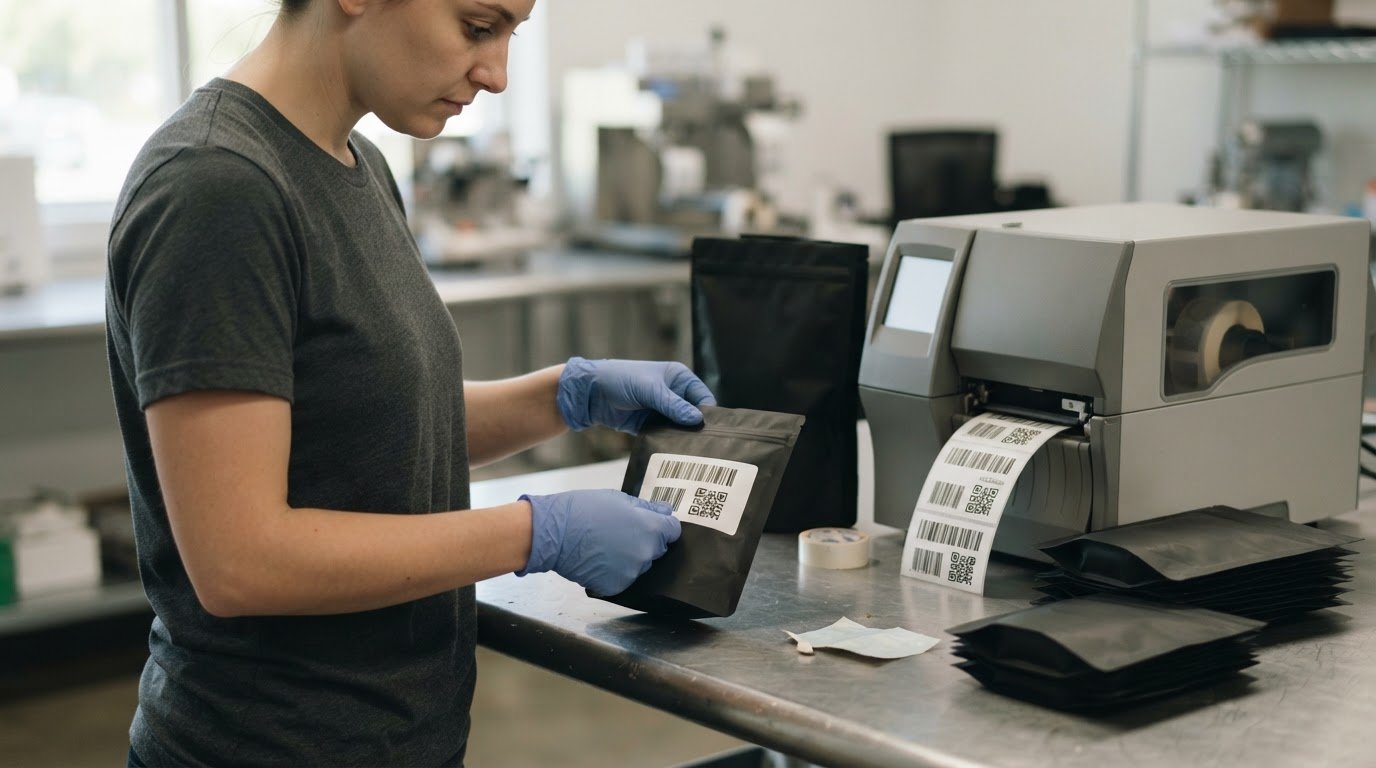
The fastest printer isn’t automatically the right choice for plain cannabis packaging. Choosing a plain packaging cannabis label printer starts with matching daily output, label material, size, and print quality to your operation. For small labels with dense information, a resolution of at least 300 DPI is recommended. Common adhesive label sizes range from 0.5 x 1.5 inches to 4.25 x 5.5879 inches.
It’s easy to focus on print speed or color first, but a label also needs to fit its container and keep key details readable. Cannabis label requirements vary by state, including wording, symbols, font sizes, placement, and product information. The right printer and label stock can help you produce clear, consistent labels for each product.
This guide explains how to compare color printers, label materials, sizes, and print quality. You’ll also learn what to consider when printing barcodes, QR codes, and other traceability data, so you can narrow your options using practical criteria instead of guesswork.
Key Takeaways
- Match label shape and adhesive to the container so labels fit cleanly and stay in place through storage and handling.
- Plan space for changing batch details, barcodes, QR codes, and serial numbers to support clear traceability.
- Choose a printer around your daily label volume and how labels will be applied, not print speed alone.
- Prioritize print quality for small text and dense codes, then test the layout at its actual label size.
- Compare printer, software, and label material options as a system to make packaging updates easier to manage.
Label sizes and shapes
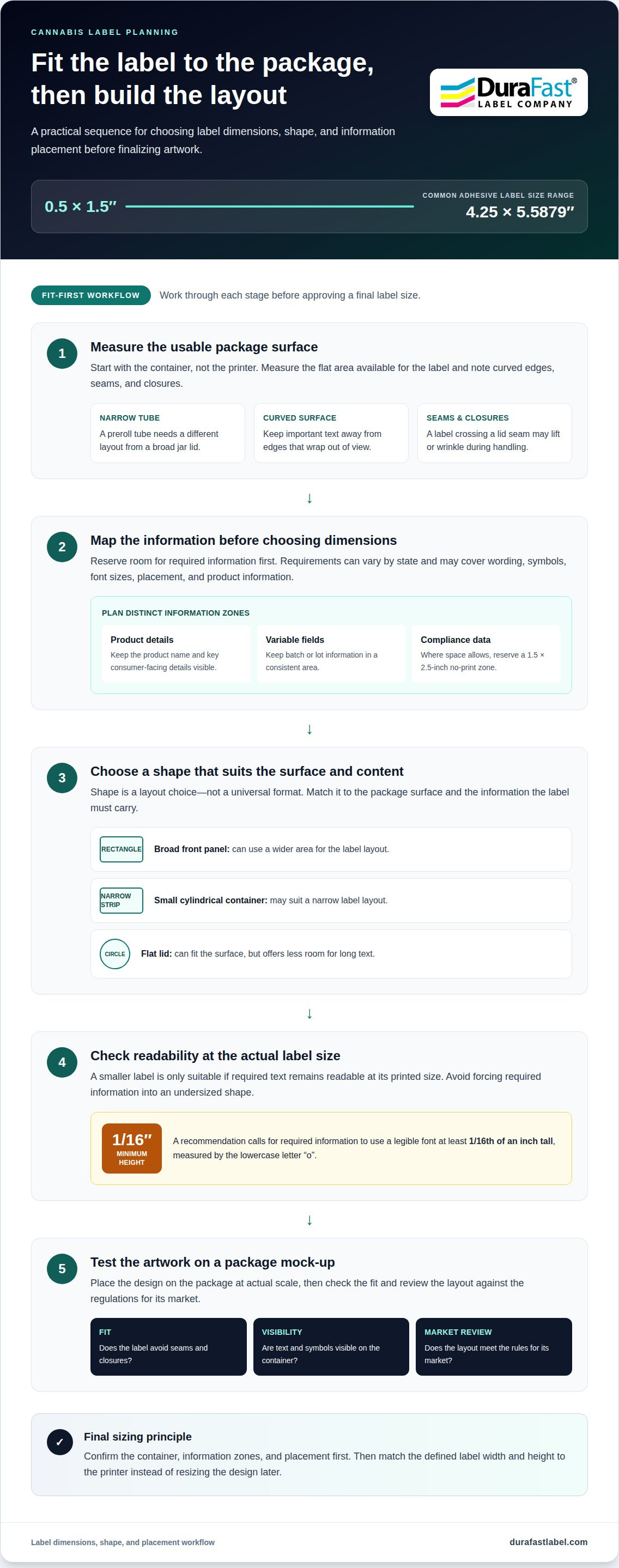
Cannabis adhesive labels can range from 0.5 x 1.5 inches to 4.25 x 5.5879 inches. That range covers compact labels and larger panels, but the package determines what fits. A narrow preroll tube needs a different layout from a broad jar lid. Measure the usable flat area, then account for curved edges, seams, and closures. A label that crosses a lid seam may lift or wrinkle during handling.
Choose a shape that suits the package surface and the information the label must carry. A rectangular label can use a broad front panel, while a narrow strip may suit a small cylindrical container. A circular label can fit a flat lid, but offers less room for long text. These are layout examples, not universal formats. Container dimensions, label placement, and readability all affect label design.
Regulations differ by state in the United States. Required wording, symbols, font sizes, placement, and product information can vary, so a design suitable for one market may not suit another. Cannabis packaging rules can also apply at federal, state, and local levels. Treat each package and market as a separate design case. Reserve clear space for required information rather than forcing text into an undersized shape.
Plan the information zones before choosing final dimensions. Place the product name and key consumer-facing details where they remain visible on the container. Keep variable fields, such as batch or lot information, in a consistent area. When space allows, reserve a 1.5 x 2.5-inch no-print zone for compliance data. That gives the layout a defined area for details that may change between products or production runs.
- Small container: use a narrow label only if required text remains readable at its printed size.
- Wide container: use a broader panel when the design needs separate areas for product details and traceability information.
- Curved package: keep important text away from edges that wrap out of view.
Before approving a size, place the artwork on a package mock-up at actual scale. Check whether text stays legible, symbols remain visible, and the label avoids seams or closures. Then review the layout against the regulations for its market. The Washington State Liquor and Cannabis Board handles Washington packaging and labeling submissions; the same fit-first approach applies to other regulated packaging, including pillow law labels.
Choose the final shape only after confirming the container, information zones, and placement. This helps prevent crowded artwork and wasted label area. It also gives you a defined label width and height to match to the printer, rather than resizing the design later.
Variable data, barcodes, QR codes, and serial numbers
A cannabis product label can combine fixed artwork with variable fields that change by batch or package. Required information depends on applicable state rules, which may specify wording, symbols, font size, placement, and product details. Common planning fields include the product name, state-issued license number, batch or lot code, and traceability data.
Keep variable information in a consistent area of the label. For example, a batch code printed beside a barcode is easier to locate during inventory handling than one that moves between designs. Digital printing can add barcodes, QR codes, or serial numbers to individual labels. This flexibility can connect each package to its relevant tracking record.
Each code has a different purpose. A barcode can be scanned at a retail or inventory point. A QR code can link a package to digital information, while a serial number can distinguish one unit from another. The encoded data must match the information used by your traceability process. An unreadable code or one linked to the wrong record adds work instead of simplifying identification.
Size the variable-data area for the longest expected entry, not just a short sample. A long lot code may need more width than a brief one. Leave enough contrast and clear space around each barcode or QR code so nearby artwork doesn’t crowd its edges. For inkjet printing, test a sample at the intended label size and check that small characters and code elements remain distinct.
- Product identity: label recommendations call for a common or usual product name in boldface and the word “Cannabis.”
- Quantity: show net quantity in U.S. customary and metric (SI) units.
- Traceability: plan space for the state-issued license number and product batch or lot code.
- Ingestible products: account for major food allergens and Nutrition Facts where applicable to the product.
These are planning recommendations, not a single national template. Requirements and label details can differ by state and product type. A recommendation also calls for required information to use a legible font at least 1/16th of an inch tall, measured by the lowercase letter “o”. Keep this text clear when variable fields occupy the same panel.
Review templates when regulations, product information, or internal processes change. A revised ingredient list, new package format, or growing product range can affect the space available for fields and codes. For help aligning label data with printing needs, discuss your barcode and label requirements.
Choosing a color label printer for cannabis operations
Match printer capacity and workflow to label volume, artwork, and package range. A plain packaging cannabis label printer should also accommodate changes to warnings, strain details, and symbols.
Printer Specialization and Comparison
Compare printers by label compatibility, color quality, output volume, and operating costs. Artwork is useful only if required details print clearly and the equipment suits your production needs. Smaller desktop printers can suit a few hundred labels per day. Compare that workload with your operation, then consider whether on-demand printing would help manage frequent product or design changes.
How do plain cannabis packaging requirements differ for medical and recreational products? Requirements vary by state and may also differ by product, including wording, symbols, font sizes, and placement. Use separate designs when market requirements or product details differ.
How can cannabis businesses compare label printers for compliance, quality, and cost? Compare label compatibility, sample print quality, output capacity, and operating costs. Test a real label with the smallest text, longest product name, warning, and traceability code. A plain packaging cannabis label printer should suit the workflow and reproduce the approved design clearly.
Setup, Order Sizes, and Turnaround
Setup, proofs, order size, and turnaround all affect the steps and costs involved in producing labels. Artwork changes and production volume also shape planning. How much do cannabis label printers charge for setup, proofs, and print runs? Costs depend on preparation, proofing, run size, and revision needs, so compare these components rather than relying on a single headline figure.
What are typical minimum order quantities and turnaround times for cannabis labels? Digital printing does not require minimum order quantities, while timing depends on artwork readiness, proof approval, materials, and production scheduling. These factors also affect how quickly a revised warning or strain-specific design can go into use.
For an in-house setup, compare printer capacity with daily output and label changes. A desktop printer may suit a few hundred labels per day, while a higher-volume workflow calls for capacity matched to the operation. Account for artwork updates, test prints, and staff application when assessing fit.
- Compliance: assess wording, warning placement, and symbol visibility for each market.
- Quality: review small text, color separation, and variable fields on a sample label.
- Cost: compare setup, proofing, materials, print volume, and design revisions.
What are the risks of using noncompliant cannabis labels or packaging? Missing or misplaced information can confuse consumers, interrupt retail handling, and require corrected labels or packaging. Inaccurate batch details can also weaken traceability records, so manage label revisions as part of product information management.
To discuss printer fit, label materials, and production needs, talk through your label requirements.
High-resolution printing for text, barcodes, and traceability data
Small cannabis labels can carry dense text, batch details, and machine-readable codes. A resolution of at least 300 DPI is recommended for printing small labels with dense information. Resolution matters because fine characters and barcode elements need defined edges to remain distinguishable at the printed size.
Higher resolution alone doesn’t guarantee a readable label. Artwork, label material, ink coverage, and print settings all affect the result. Digital printing image quality is described as 1600 x 1600 dpi, but that figure isn’t a substitute for checking the actual label. Review the amount of text, the smallest characters, and the code size together.
Start testing with a sample that matches the final package and label dimensions. Include the longest expected lot code, a small warning, and a barcode or QR code. Inspect the sample at a normal reading distance, then scan the code with the same type of scanner used in your workflow. If characters merge or a code won’t scan, adjust the layout or print settings before production.
Changing product details can affect the layout even when label size stays the same. A longer strain name, revised product description, or different batch identifier may crowd nearby text or codes. Give each data field a defined area and leave enough space around codes. Test the fullest label version, not just a short sample with fewer characters.
- Small text: print warnings and product details at the actual label size, then inspect letter shapes and spacing.
- Barcodes: test a printed sample with the scanner used for inventory or retail handling.
- QR codes: scan the printed code and confirm it resolves to the intended record or information.
- Variable fields: test the longest planned batch, lot, or strain entry in its assigned space.
Application can also affect readability. A label wrapped around a curved container may distort text or codes near its edges. Test the package after the applicator places the label, rather than judging only a flat sample. Check its position, surface, and readability after application to catch issues that appear when the label follows the container’s shape.
Use the same review sequence whenever artwork or settings change: print, inspect, scan, and apply a sample. Keep an approved sample for comparison when details change in a later batch. This practical test helps distinguish a design issue from a printing or application problem before labels enter production.
Cannabis traceability regulations require tracking from seed to sale. Printed label information should remain legible wherever it identifies a product or its associated details. Treat readability as part of the traceability check, not just a visual finish: confirm that text and codes remain usable on the package after printing and application.
When label content or layout changes, review a sample against the information it must carry. Make sure identifiers are not obscured, crowded, or distorted, and scan the code to confirm it can be read. Clear printed results help staff follow product information through the tracking process.
Which printers specialize in compliant cannabis labels and packaging?
No printer makes a cannabis label compliant by itself. A suitable label printer reproduces approved artwork and changing product details clearly, while compliance depends on the label content and rules for its market.
For an operation with color branding and changing product information, a color label printer can produce each design on demand. A thermal transfer printer uses a ribbon to print text and codes, making it another option when operations focus on variable data. The printer category is only one part of the decision. Match the printing method to the artwork, label stock, required data, and daily workflow.
Regulations differ by state in the United States. Required wording, symbols, font sizes, placement, and product information can vary, so a design suitable for one market may not suit another. Maintain separate approved layouts by market and product type. For example, a state-required warning or symbol may need a different position on another package design.
Compare printer options using a real label file, not a generic sample. Include the smallest text, the longest product name, a warning, and a traceability code. Print at final size, inspect the result, and scan any barcode used in the workflow. A recommendation for dense information is at least 300 DPI. Resolution is one comparison point, alongside media compatibility and the amount of label output required.
- Artwork: confirm the printer reproduces the required colors, small text, and symbols in the approved design.
- Traceability: test the actual barcode or QR code with the scanning process used in production.
- Workflow: compare on-demand printing with the operation’s volume and label application method.
- Market fit: maintain separate layouts where state requirements or product information differ.
Color does not replace required information, and a clear code does not prove that the whole package meets applicable regulations. Keep approved artwork with its matching product details. When an ingredient, warning, or package changes, update the relevant layout and review a fresh sample before use. This gives staff a practical way to distinguish current labels from outdated versions.
For Washington submissions, the Washington State Liquor and Cannabis Board provides a packaging and labeling submission process. Other states have their own requirements and processes. A printer can support consistent production, but your label workflow still needs a clear approval path for each market.
To discuss printer options for your label workflow, contact the label printing team.
Digital printing can include THC and CBD levels and genetics as strain-specific label information, helping match changing product details to the right label. One recommendation is to include contact information for the licensee responsible for producing or dispensing the finished product, so consumers can make complaints or inquiries. Another is to include a generic statement confirming compliance with mandatory contaminant testing.
Container material also matters: glass and plastic containers require adhesives suited to their surfaces. In Washington, the Washington State Liquor and Cannabis Board developed an expedited review and approval process for cannabis-infused edible products converting to Department of Health compliant products. These considerations connect printing choices with variable label information, consumer contact details, testing language, container compatibility, and applicable review processes.
DuraFast Label Company: Labelview label design and barcoding software
DuraFast Label Company offers Labelview label design and barcoding software for operations creating product labels with variable details and codes. Pairing design software with a suitable printer can help organize artwork and barcode layouts across product versions.
For color labels, the Epson ColorWorks C6000A and DuraFast digital color label printer options are available to consider. DuraFast Matte Chemical Labels provide a matte label material option for packaging workflows. The right combination depends on your label design, substrate, and printing process. Software and hardware support label production, but they don’t determine whether label content meets each market’s regulations.
If you’re choosing label design software, a color printer, or label material for your operation, contact DuraFast Label Company.
Build a label workflow ready for what comes next
Treat your next printer decision as an opportunity to build a workflow that can adapt as products, packaging, and internal processes change. A plain packaging cannabis label printer should suit how your team prepares, prints, and applies labels, not just how the design looks on screen.
Before selecting equipment, define how label updates move from approved artwork into daily production. Clarify who owns revisions, manage current files consistently, and include sample review when designs change. These habits give staff a shared reference point and help prevent outdated artwork from reappearing during a busy production run. They also make it easier to bring new team members into an established process.
Assess the setup against the work it needs to support, including your product range, production rhythm, and the people who prepare and apply each label. A thoughtful setup gives your team a practical foundation for organized packaging operations and future adjustments.
Contact DuraFast Label Company to discuss your label workflow and take the next step with confidence.
Frequently Asked Questions
What label materials and adhesives are suitable for cannabis products?
Polypropylene label media is recommended for almost all cannabis uses because it resists heat and oil. Glass and plastic containers need adhesives suited to their surfaces, so choose stock for the actual package. A varnish or laminated finish can help protect labels exposed to oil during shipment, storage, and home use. Avoid laminating preroll tube labels, as added thickness may cause them to flag.