Product labeling solutions for startup teams
22nd Oct 2026

A label system is more than a printer and a roll of stock. The right startup product labeling solutions bring together suitable label materials and finishes, barcode equipment, software, and samples. Together, these pieces help you create labels that suit your product and the way your team needs to print and use them.
It’s easy to focus on label design first. But material choice, barcode scanning, and the process for adding product details matter just as much, especially as your product range grows.
This guide explains how to compare label materials and finishes, choose barcode equipment, and use labeling software to manage templates and print-time information. You’ll also learn how samples can help you assess a label before settling on a setup. The goal is to make the options easier to understand, so you can build a practical labeling plan around your startup’s needs.
Key Takeaways
- Match label material, adhesive, and finish to the product and its handling conditions before choosing a setup.
- Choose barcode equipment around how labels will be printed and scanned, then consider whether thermal transfer or color printing best fits your workflow.
- Use labeling software to manage templates and print-time details, helping your team apply consistent information across products.
- Test label samples on the actual product or packaging to assess fit, appearance, and performance before settling on a format.
- Plan costs around the equipment, software, supplies, and label specifications your workflow requires, rather than focusing on one purchase alone.
Label materials, adhesives, and finishes
Start with the product surface and its journey through manufacturing, storage, shipping, and retail. These details guide your choices of material, adhesive, and finish.
In-house labeling gives startup teams control over print timing, revisions, and small orders. Outsourcing avoids buying equipment, but can reduce direct control over production timing and changes.
To choose a setup that can scale, map your current products and likely production changes. Choose materials and workflows that can accommodate new label sizes, designs, and print volumes without disrupting existing orders.
U.S. requirements for food, cosmetics, and consumer products depend on the product category and the information presented. Food and beverage products require certain label information, while the specific requirements for each product must be assessed against its category and intended retail channels.
Review ingredients, warnings, and country-of-origin details against the rules that apply to each product. Build the label from verified product information, then check that required details remain legible at the chosen size and on the selected material.
A practical design process starts with gathering product details, selecting a label size and material, and creating the artwork. Print a sample and test it on the actual package. Review legibility and barcode readability, then revise the design before production.
Common problems include labels lifting from packaging, text that is too small to read, and outdated product details. For shipping and retail, also review barcode placement, scan performance, and consistency between the label and product records.
Label Material Selection
Compare paper, film, and other label stocks against the container, handling conditions, and printer. A glass jar, flexible pouch, and shipping carton each present different surfaces and label needs. Digital labels can help startups with tight budgets order small quantities of high-quality labels. Technical guidance can help match stock to the printer and product; inkjet labels are one option for compatible workflows.
Test the selected stock on the actual package before committing to larger orders. Check how the label looks after application and whether text and barcodes remain clear. Shrink sleeve packaging can provide 360-degree visibility for graphics and product information, but its format differs from a pressure-sensitive label.
Adhesive and Finish Options
Choose an adhesive based on the surface and how the product is handled. A label for a smooth glass container may need a different adhesive from one for textured packaging. Consider whether the package is curved or flexible, or exposed to moisture during storage or use.
Finishes affect both appearance and readability. A matte finish can reduce glare on printed information, while a glossy finish can create a brighter look. DuraFast Matte Chemical Labels offer a matte option for a specific labeling need. U.S. food date labels aren't federally regulated, and state-level rules are inconsistent, according to the U.S. Government Publishing Office.
Barcode equipment and accessories
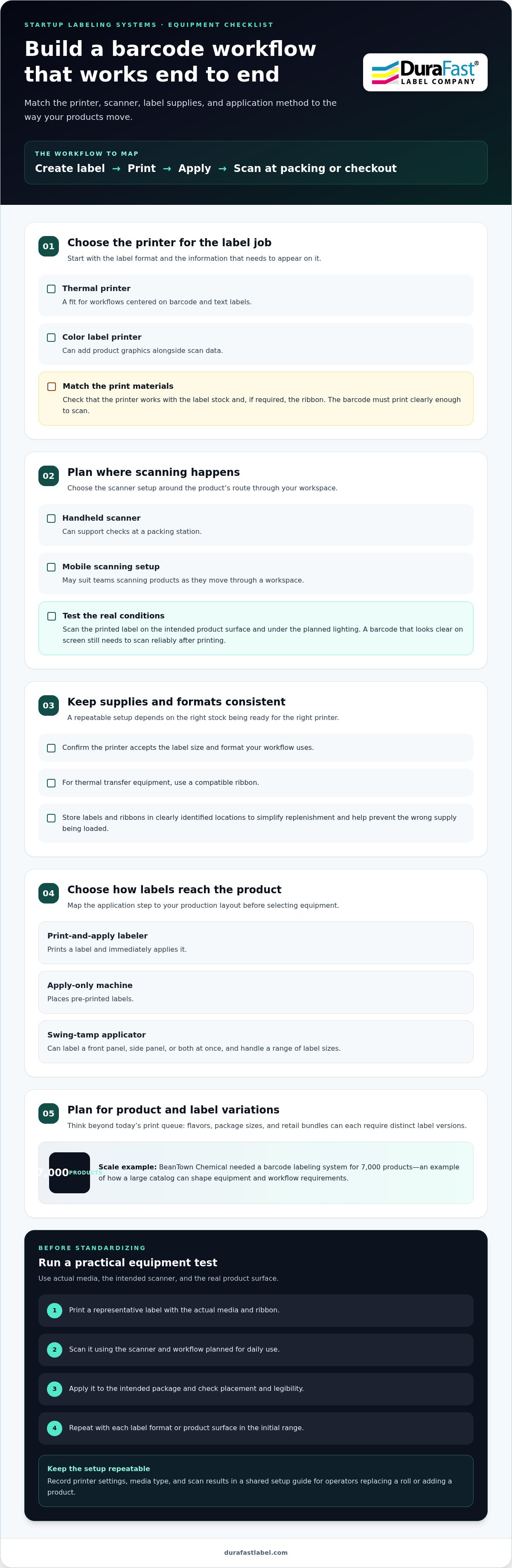
A barcode workflow connects the label printer, barcode scanner, label supply, and the system that holds product information. Trace one item from label creation to scanning at packing or checkout. This walkthrough shows where equipment belongs and which steps need to work together.
Choose a printer based on your label format and the information you need to print. A thermal printer suits workflows centered on barcode and text labels, while a color label printer can add product graphics alongside scan data. Match the printer to the label stock and ribbon, if required, so the barcode prints clearly enough to scan.
Next, decide where scanning will happen. A handheld barcode scanner can support checks at a packing station, while a mobile setup may suit teams scanning products as they move through a workspace. Test the intended scanner with the actual label, product surface, and lighting. A barcode that looks clear on screen still needs to scan reliably after printing.
Keep consumable supplies organized. The printer must accept the label size and format your workflow uses, and thermal transfer equipment needs a compatible ribbon. Store labels and ribbons in clearly identified locations. This simplifies replenishment and helps prevent a busy team from loading the wrong supply.
Automation depends on how labels reach the product. Print-and-apply labelers print and immediately apply a label. Apply-only machines place pre-printed labels. A swing-tamp applicator can label a front panel, side panel, or both at once, and handle a range of label sizes. These options suit different production layouts, so map the application step before selecting equipment.
Consider growth through the number of product records and label variations, not just today’s print queue. BeanTown Chemical needed a barcode labeling system for 7,000 products, illustrating how a large catalog can shape equipment and workflow requirements. A startup adding flavors, package sizes, or retail bundles should plan for those distinct label versions too.
Use a short equipment test before standardizing the process:
- Print a representative label with the actual media and ribbon.
- Scan it using the scanner and workflow planned for daily use.
- Apply it to the intended package and check placement and legibility.
- Repeat with each label format or product surface in the initial range.
Record the printer settings, media type, and scan results in a shared setup guide. This gives operators a repeatable reference when they replace a roll or add a product. If you’re planning a barcode equipment setup, discuss your labeling requirements with the team.
Barcode labeling software
Barcode software connects product records, label layouts, and print workflows. For startups, startup product labeling solutions work best when product data stays organized as packaging and sales channels evolve.
Barcode and GS1 Requirements
GS1-related needs can affect the identifiers and barcode formats used on product labels. Before designing a layout, document the requirements communicated by your retail or distribution partners, then match each product variation to its own accurate record.
A different size, flavor, or package configuration may need a distinct identifier and label version. Keep those details linked in the software, then test a printed sample with the scanner used in your workflow. This can catch mismatches before labels reach finished packaging.
Software and Service Costs
Software and service costs depend on the workflow, not just the design screen. Compare pricing models by users, printers, features, and subscription terms. A startup with one operator and a small catalog has different requirements from a team managing multiple label workflows.
Include setup tasks in your estimate. Creating templates, importing product data, connecting printers, and training staff can take time or require paid support. For example, launching several package sizes means preparing and reviewing each distinct label version. Ask for setup work to be itemized separately from recurring software charges.
Also account for hardware and consumables. Your budget may include a printer, compatible label stock, ribbon or ink, and replacement supplies. Estimate usage based on planned label designs and production needs, then update the forecast when the catalog or packaging changes.
Software can also affect staff time. Manual entry may involve repeatedly retyping details or correcting inconsistent records. Templates with controlled data fields can reduce that repeated work. Compare the time spent maintaining product records with the time needed to update and approve templates.
Build a comparison worksheet with these items:
- Software charges, setup work, and training.
- Printer requirements and compatible supplies.
- Staff time for data entry, approvals, and printing.
- Planned product variations and workflow changes.
Test the estimate against a real example, such as adding a new package size. Note the data, artwork, and approval steps that change requires. This shows whether your process can accommodate updates without duplicating unnecessary work. Strong startup product labeling solutions make responsibilities clear before the catalog grows.
Review the plan whenever printing frequency, product records, or team responsibilities change. This keeps software and service decisions aligned with the work your startup needs to do.
BeanTown Chemical's barcode labeling system needed to accommodate 5,500 unique chemicals. A large catalog makes consistent product records and reusable templates especially important. Print forms can be used to select a label template and populate print-time data. This approach can help keep variable information tied to the appropriate label while reducing repeated manual entry. Before printing, review the selected template and populated details so the printed result matches the intended product record.
QR-based serialization can give each food item a unique identity, supporting product authenticity checks. If your workflow uses serialization, make sure the label layout leaves room for the code and that it remains readable after printing and application. Keep associated item data organized so staff can follow the same process when preparing or updating labels. A small test run can reveal layout or scanning problems before broader use.
Label samples
A sample lets you inspect a label on the actual package. Use it to check fit, appearance, text accuracy, and whether the printed design suits the product before standardizing materials or artwork.
Start by defining what the sample needs to prove. For a small jar, examine how the label sits on the curved surface. For a shipping carton, check whether the barcode and handling details remain readable after application. Use the intended label dimensions and the same type of packaging planned for production.
Compare formats against the space available. Examples of listed waterproof label sizes include 4 by 6 inches, 4 by 2 inches, 3 by 5 inches, and 2 by 1 inches. These dimensions show how label area changes across uses. A larger format can leave room for more information, while a compact label requires careful layout and readable text.
Test more than the front view. Apply the sample to the package and inspect its edges, corners, and any curved or joined surfaces. A corner-wrap label crosses adjacent panels, making it suitable for outer cases and pallets. Check that its placement suits the package and leaves key information visible.
Use a repeatable review sequence so product decisions stay accurate:
- Confirm the label dimensions against the package’s flat or usable area.
- Apply the sample to the real container, carton, or tag.
- Review text, colors, barcode placement, and overall legibility.
- Scan the barcode with the device used in the planned workflow.
- Record the material, finish, and layout that passed the review.
Include the printer and application method in the test. A label that looks right on screen may appear different when printed. When evaluating startup product labeling solutions through DuraFast Label Company, use the intended printer, label stock, and ribbon or ink system, then compare the result with the approved artwork. If your startup will print several product versions, test a sample from each distinct layout.
Tags also deserve a physical trial. Listed examples include a green pot tag measuring 0.75 by 5 inches and a white wrap tag measuring 1 by 10 inches. Place each against its intended item and confirm that the format fits without hiding essential product details.
Keep the approved sample with its final artwork and product record. This reference helps the team compare future labels with the accepted version and spot changes to text, placement, or appearance. If the packaging changes, repeat the test using the revised package instead of relying on an earlier sample.
How much do product labeling software and services cost for startups?
There isn’t one standard budget for startup labeling. The total depends on what you buy, how your team prints, and how much support the workflow needs. Estimate costs by category rather than treating software as the only expense.
Start with the software model. Compare whether the quote is based on users, printers, features, or a subscription period. Then list the functions your team needs, such as reusable templates, barcode creation, print forms, and product-data management. A small catalog with one operator may need a simpler setup than a growing catalog with several people printing labels.
Next, account for setup work. Creating templates, importing product records, connecting printers, and training staff can all take time or require paid support. For example, a team launching several package sizes should include the effort to prepare and review each distinct label layout. Ask for those tasks to be listed separately in the estimate.
Hardware and supplies make up another part of the budget. Include the printer, compatible label stock, and ribbon or ink required by the chosen printing method. A color label workflow may have different supply needs from a thermal transfer setup. Estimate consumption based on planned label designs and expected order volume, then revisit the estimate when products or packaging change.
Also consider process costs that don’t appear on a software invoice. Manual data entry can consume staff time and increase the risk of incorrect product details. A controlled template and approval step may reduce repeated editing. Compare the labor involved in your current workflow with the time needed to maintain product records and print labels in-house.
Use a simple worksheet to compare options:
- List software, setup, and training charges separately.
- Record the printer, compatible stock, and ongoing consumables.
- Estimate staff time for design changes, data entry, and printing.
- Include planned products, package variations, and future workflow needs.
Keep the comparison tied to a real production example. For instance, calculate what changes when a product gains a new size or label design. This reveals whether the current plan handles updates easily or adds recurring setup work. Review the estimate when the catalog, printing frequency, or number of operators changes.
For a practical estimate based on your labeling workflow, request help comparing software and equipment needs.
DuraFast Label Company: Epson ColorWorks C6000A
DuraFast Label Company is a natural next step when your startup is choosing in-house label equipment and supplies. Its offerings include the Epson ColorWorks C6000A for color-label workflows, plus the Zebra ZT411 Thermal Transfer Printer for thermal transfer labeling and startup product labeling solutions.
Match the equipment to your label design, printing method, and production routine. For example, DuraFast Matte Chemical Labels may suit a project requiring that label category, while your printer choice depends on the workflow and compatible supplies. Consider the label stock and ribbon or ink needs alongside the printer so the setup works as a complete system.
Review the product options to narrow your selection, then contact DuraFast Label Company to discuss your in-house labeling needs.
Set up your next labeling decision
Choose an upcoming production run as the point to turn your labeling plan into a repeatable process. Document who approves product information, who manages label changes, and where the current approved artwork is kept. This gives your team a clear starting point as products and packaging evolve.
Think of startup product labeling solutions as a connected setup, not a single purchase. The equipment, label stock, and workflow should fit the work your team needs to do. DuraFast Label Company offers the Epson ColorWorks C6000A, Afinia L801 Color Label Printer, and DuraFast Matte Chemical Labels as options to consider for different labeling needs.
Bring your product type, packaging, printing goals, and planned workflow into your next decision. Clear requirements make it easier to compare available options and identify a practical path forward.
Contact DuraFast Label Company to discuss your labeling needs and take the next step with confidence.
Frequently Asked Questions
What are labeling solutions?
Labeling solutions are the tools and processes a business uses to create, print, and apply product labels. They can include label-design software, printers, label stock, barcode equipment, and steps for reviewing product information. For example, a small candle maker might use a saved label layout, a printer, and a process for updating scent and ingredient details before each new product run.
What product labeling solutions are best for startups?
The best fit depends on what you sell, how often product details change, and how labels enter your workflow. A startup testing a small product range may prioritize flexible layouts and manageable print runs. A business preparing products for retail or fulfillment should also plan how staff will scan, review, and update labels. For storefront environments where pricing and product details change rapidly, digital shelf labeling solutions from ESLtags, Corp. can also help streamline retail management. Start with one representative product, then expand the setup as new needs emerge.