Which Color Label Printer Do I Buy? A Comparative Guide
9th Aug 2026
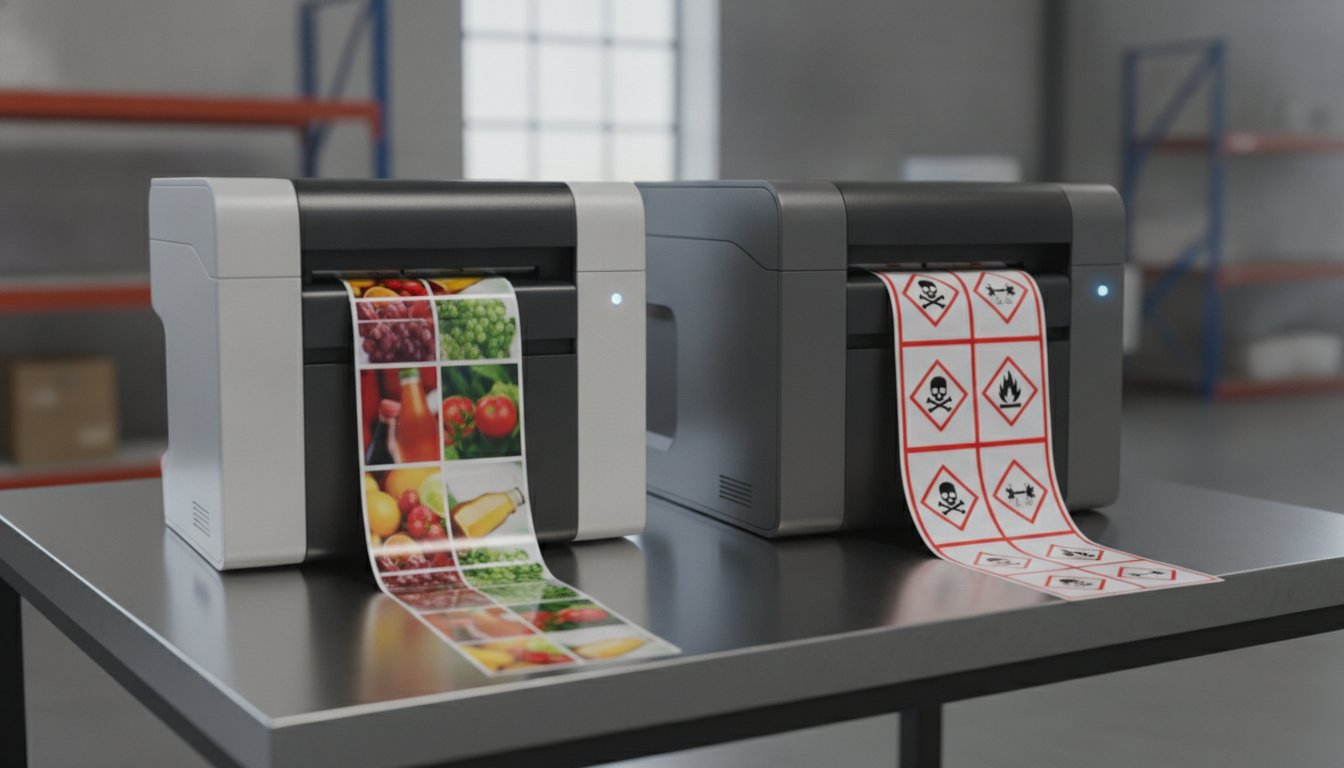
Most people search for the "best" printer on the market, but the truth is that the "best" printer doesn't actually exist. The right choice for your business depends entirely on the unique stressors of your environment. You might feel overwhelmed by technical jargon or the fear of hidden long-term costs. It's common to feel stuck between thermal transfer and inkjet technologies, wondering, "Which one do I buy to ensure my labels stay legible?"
We understand that choosing industrial hardware is a high-stakes decision. With upcoming OSHA deadlines in 2026 requiring updated GHS labels for chemical substances, the pressure to get it right is higher than ever. This guide is designed to stop the decision paralysis and help you discover the exact printing technology, model, and supply chain that fits your business. We'll explore the total cost of ownership for top models like the Epson ColorWorks C6000A and the Zebra ZT411. You'll gain a clear decision tree for hardware and the confidence to invest in a "buy it for life" industrial solution that handles your specific volume with ease.
Key Takeaways
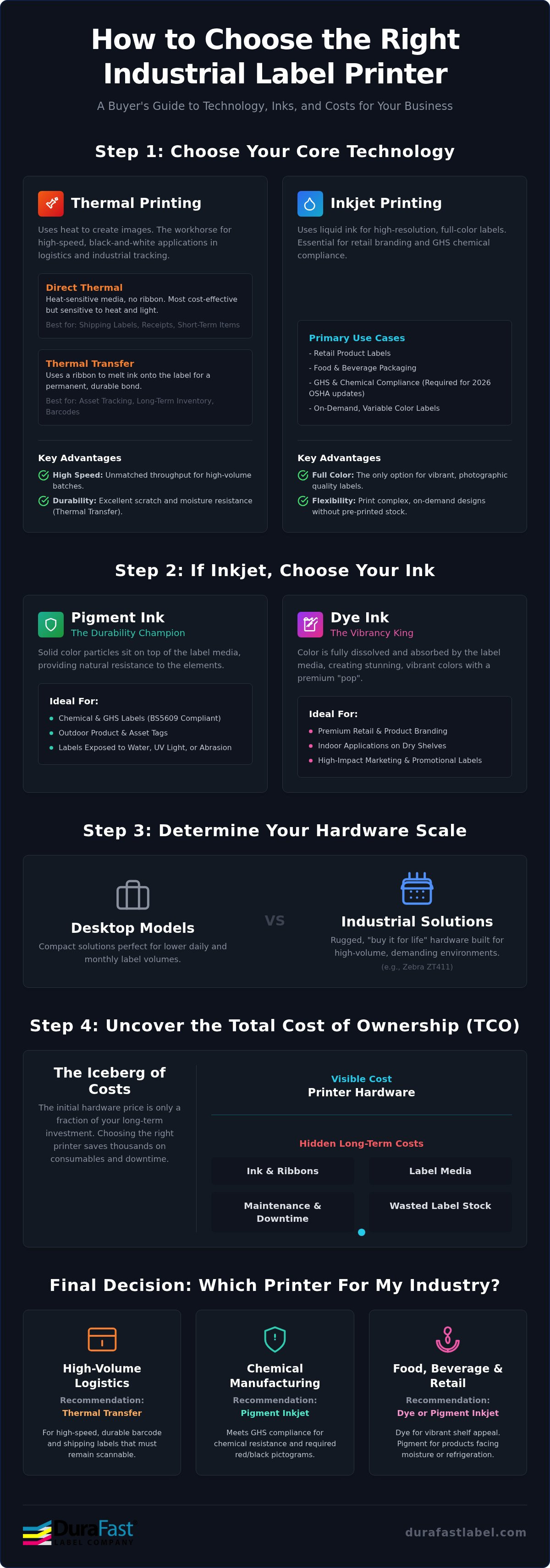
- Understand the fundamental differences between thermal transfer and inkjet technology to match your printer to your environment’s specific heat and moisture levels.
- Learn why pigment-based inks are essential for durability and GHS compliance, while dye-based inks offer the vibrant "pop" needed for premium retail branding.
- Calculate your daily and monthly label volume to determine if a compact desktop model or a rugged industrial solution like the Zebra ZT411 is right for your facility.
- Solve the question of "Which one do I buy" by uncovering the hidden costs of ownership and learning how the right hardware saves thousands in long-term ink and ribbon expenses.
- Get a clear industry-specific decision tree to find the perfect match for food and beverage, chemical manufacturing, or high-volume logistics.
Which One Do I Buy? Thermal vs. Inkjet Technology
The choice between thermal and inkjet technology isn't just about the price tag on the box. It's about how your labels will survive in the real world. When you ask yourself, "Which one do I buy," look at your labels' ultimate destination. Will they sit in a climate-controlled warehouse, or will they face rain, sunlight, and chemical spills? The technology you choose determines whether your barcodes remain scannable and your branding stays sharp.
When to Choose Thermal Printing
Thermal technology is the backbone of logistics and industrial tracking. Direct thermal printing uses heat-sensitive media and no ribbon, making it the most cost-effective solution for short-term items like shipping labels and receipts. However, these labels are sensitive to heat and light; they will turn black if left in a hot delivery truck or under direct sunlight.
For long-term durability, thermal transfer printing is the smarter move. This method uses a ribbon to melt ink onto the label surface, creating a permanent bond that resists scratching and moisture. It's the ideal choice for asset tracking and long-term inventory. If your facility handles high-volume shipping or rugged warehouse environments, explore our range of thermal label printers to find a durable, "buy it for life" solution.
When to Choose Inkjet Color Printing
Inkjet is the clear winner when your labels need to do more than just carry data. If you're printing product labels for retail, high-vibrancy color is essential for shelf appeal. Modern industrial inkjet printers have bridged the gap between beauty and durability. Models like the Epson ColorWorks C6000A use advanced pigment-based inks that are highly resistant to water and UV light.
This technology is particularly vital for GHS and chemical compliance. Since 2026 regulations require specific red-and-black pictograms, an on-demand color printer allows you to stay compliant without maintaining a massive inventory of pre-printed labels. When deciding "Which one do I buy" for a chemical or food-based business, inkjet provides the flexibility to update designs instantly while meeting strict durability standards.
Quick Comparison: Speed vs. Color vs. Durability
- Speed: Thermal printers generally offer faster throughput for high-volume batches.
- Color: Inkjet is the only viable option for full-color photographic quality.
- Durability: Thermal transfer with resin ribbons offers the highest scratch resistance, while pigment inkjet offers the best chemical and moisture resistance for color labels.
Inkjet Selection: Pigment-Based vs. Dye-Based Inks
Choosing an inkjet printer is only half the battle. The chemical composition of the ink determines where your labels can go and how long they'll last. When you ask yourself, "Which one do I buy," the answer usually starts with your environment. If your labels stay indoors on a dry shelf, you have options. If they face moisture, sunlight, or chemicals, your choice becomes much narrower.
The fundamental difference lies in how the color is delivered. Pigment ink uses solid particles suspended in liquid, while dye ink uses color that's fully dissolved. This distinction affects everything from how light hits the label to how well the image resists a splash of water. Matching your ink type to high-quality inkjet labels is the only way to ensure maximum adhesion and professional results.
The Durability Champion: Pigment Ink
Pigment ink is built for survival. Because the color sits on top of the media as solid particles, it's naturally resistant to UV fading and water damage. This makes it the non-negotiable choice for chemical and industrial applications. In fact, pigment ink is essential for BS5609 compliance, which ensures labels remain legible even after months of exposure to saltwater and abrasion.
For the best results, pair pigment printers like the Epson ColorWorks series with DuraFast Matte Chemical Labels. This combination creates a bond that resists smearing and chemical abrasion. With the November 20, 2026, deadline for updated workplace labeling fast approaching, switching to pigment technology helps you avoid OSHA penalties that can reach $15,625 per violation. If you're unsure about your specific compliance needs, reach out to our team for a technical consultation.
The Branding Expert: Dye-Based Ink
Dye-based inks are the masters of retail "pop." Because the color is a liquid that soaks into the label fibers, it produces incredibly vibrant, photographic quality. Many desktop label printers utilize this technology. It's the perfect fit for gourmet food, cosmetics, and premium wine labels where visual impact is the top priority.
However, dye ink has a weakness. It's prone to smudging if it gets wet and will fade quickly under direct sunlight. To prevent these issues, you must use specific top-coated gloss media. Never use dye ink for outdoor equipment or chemical containers. Doing so is a costly mistake that leads to unreadable labels and frustrated customers. Stick to dye for high-gloss indoor branding and pigment for everything else.
Determining Your Hardware Scale: Desktop vs. Industrial
Determining the correct hardware scale is the next vital step in answering "Which one do I buy?" This choice centers on your "duty cycle." This is the total volume a machine can handle before it requires cooling or service. Matching the printer’s build to your actual output prevents mechanical failure and keeps your production line moving. To find the right fit, follow this four-step evaluation process.
Start by calculating your total daily and monthly label volume. Be realistic about your growth. Next, assess your physical environment. Desktop printers are designed for clean, climate-controlled offices. If your printer will sit on a dusty warehouse floor or near heavy machinery, you need the protection of an industrial casing. Don't overlook print speed. A slow printer creates a bottleneck that slows down your entire shipping department. Finally, evaluate your workflow for efficiency-boosting features like internal rewinders or "Peel and Present" sensors that automate the application process.
The Desktop Solution: Compact and Capable
Desktop printers are compact and capable. They are the ideal choice for startups or businesses printing under 500 labels per day. These units fit easily on a standard packing station or office desk. While they have a lower upfront cost, they typically use smaller rolls of media. This often results in a higher cost-per-label compared to larger units. If you are managing small-scale logistics or boutique retail, explore our desktop thermal printers for a professional yet affordable solution.
The Industrial Powerhouse: Built for 24/7 Ops
Industrial printers are the backbone of high-volume manufacturing. They feature all-metal frames and internal components designed to withstand 24/7 operations. These machines accommodate much larger media rolls, which means fewer stops to reload supplies. Because they use bulk ink and ribbons, your long-term operating costs are significantly lower than desktop alternatives. A model like the Zebra ZT411 offers the rugged reliability needed for intense warehouse environments. Investing in industrial hardware is a "buy it once" strategy that saves thousands in replacement costs over time.
Hardware Scale Checklist:
- Volume: Under 500/day (Desktop); Over 1,000/day (Industrial).
- Environment: Office/Retail (Desktop); Warehouse/Factory (Industrial).
- Space: Compact footprint (Desktop); Larger footprint for bulk rolls (Industrial).
- Durability: Plastic casing (Desktop); Metal chassis (Industrial).
Total Cost of Ownership (TCO): The Hidden Price Tags
The sticker price of a printer is often the least important number in your budget. Many businesses fall into the trap of buying the cheapest hardware, only to discover that the proprietary ink or ribbons cost more than the machine itself within the first year. When you ask, "Which one do I buy," you're really asking which solution provides the lowest cost over the life of the equipment. Total Cost of Ownership (TCO) is the sum of the initial purchase price plus three years of consumables.
Transitioning to printing labels in house is a strategic move to reclaim your margins. By owning the hardware, you eliminate the high minimum order quantities (MOQs) and setup fees charged by third-party print shops. You also gain the freedom to print exactly what you need. This reduces the waste of obsolete labels that sit in storage until the adhesive fails or the design becomes outdated.
Don't forget to account for printhead replacements in your annual budget. Printheads are wear items, much like tires on a car. In high-volume environments, a printer with a user-replaceable printhead saves hundreds of dollars in service fees and eliminates days of downtime. Calculating the cost-per-label requires looking at the combined price of ink or ribbon, the label substrate, and the expected life of these wear parts.
Ink and Ribbon Efficiency
Efficiency varies significantly between technologies. For thermal printers, you must choose between thermal transfer ribbons made of wax, resin, or a hybrid blend. Wax is affordable for general shipping, but resin offers the longevity needed for harsh industrial environments. In the inkjet world, Epson's individual ink cartridges are a major advantage. Unlike systems that force you to replace a multi-color tank when just one color runs dry, individual cartridges ensure you use every drop of ink you pay for.
Maintenance and Software Costs
Reliability is a cost-saving feature. Choosing a brand with established North American support ensures your production line doesn't grind to a halt while waiting for overseas parts. Software also plays a role in your bottom line. Using BarTender Professional allows you to automate data entry. This reduces expensive design errors and misprints that waste physical stock. Avoid the trap of "locked" proprietary systems that force you to buy overpriced, brand-specific labels. Choosing open-platform hardware gives you the power to source the best media for your specific budget.
Calculating your TCO before you buy prevents expensive surprises down the road. If you need help running the numbers for your specific label volume, contact our specialists for a personalized cost-per-label analysis.
Final Decision: Which One Do I Buy for My Industry?
The final decision comes down to matching your specific industry requirements with the technical strengths we analyzed in previous sections. When you ask, "Which one do I buy," the answer is often found in your end-user's environment. A label that looks beautiful in a climate-controlled office might fail completely in a refrigerated warehouse or on a chemical drum. Choosing a solution based on your industry's specific "stressors" ensures long-term reliability and compliance.
- Food and Beverage: You need high-vibrancy inkjet technology. This provides the photographic quality required for shelf appeal and branding. These printers handle the high resolution needed for small nutritional facts and ingredient lists.
- Chemical and Industrial: Your priority is GHS compliance. You must use pigment-based printers and matte chemical labels to withstand moisture and chemical exposure. This setup ensures your safety pictograms remain legible under the 2026 OSHA standards.
- Logistics and Warehousing: Speed and volume are your drivers. High-speed thermal transfer printers are the gold standard for shipping labels that must survive abrasion during transit.
- Healthcare: Precision is non-negotiable. Specialized thermal printers deliver high-contrast barcodes for patient tracking and lab vials, ensuring accuracy in high-pressure environments.
Making the Final Selection
Selecting the right model within these categories depends on your daily output. The Afinia L801 is a top choice for speed-focused product labeling. It utilizes Memjet technology to deliver full-color labels at incredible speeds. For 24/7 warehouse environments, the Zebra ZT series remains the industry workhorse. It offers the rugged metal chassis needed for heavy industrial use. If you need a versatile, industrial color solution, the Epson C6000A provides the perfect balance of durability and high-impact color. This model is especially effective for businesses that need to switch between different label sizes and types frequently.
Your Next Steps to In-House Success
The path to a "buy it for life" solution starts with testing. Before finalizing your choice, request a printed sample. This allows you to test the adhesive and color quality in your actual environment. You should also consult with a specialist to verify your electrical and network requirements. This prevents unexpected installation delays. Transitioning to in-house production is a major step toward reducing costs and increasing operational flexibility. If you are still wondering "Which one do I buy" for your unique facility, we are here to help. Contact our experts for a personalized recommendation and a detailed cost-per-label analysis today.
Step Into In-House Printing Success
Choosing the right hardware is the first step toward reclaiming your production margins and ensuring total operational flexibility. By matching your specific industry stressors to the right technology, you eliminate the risk of faded barcodes or smudged retail branding. You no longer have to wonder, "Which one do I buy" while staring at a sea of technical specifications; the answer lies in your unique volume and environment.
As an authorized dealer for Epson, Afinia, and Zebra, we provide more than just hardware. We offer specialized North American support and custom-engineered DuraFast labels designed for your specific industrial use. Our goal is to make your transition to in-house labeling as seamless and cost-effective as possible. Let us help you eliminate the complexity and start printing with confidence.
Get a Personalized Label Printer Recommendation
You have the knowledge to make a smart investment. Let's get your production line moving today.
Frequently Asked Questions
Is it cheaper to print my own labels or outsource them?
In-house printing is typically cheaper for short to medium runs because you eliminate minimum order quantities and third-party markup. Outsourcing often involves setup fees and high shipping costs for heavy label rolls. By printing on-demand, you only produce what you need. This prevents the waste associated with obsolete inventory and allows you to update designs instantly without financial penalty.
For businesses that require specialized commercial print quality or rapid turnaround on complex projects before their in-house systems are fully optimized, you can visit London City Print for expert assistance.
What is the difference between direct thermal and thermal transfer printers?
Direct thermal uses heat-sensitive paper and no ribbon, while thermal transfer uses a ribbon to melt ink onto the label surface. Direct thermal is ideal for short-term items like shipping labels. Thermal transfer provides superior durability for long-term tracking. It resists heat, light, and scratching, making it the preferred choice for industrial assets and warehouse inventory labels.
Which one do I buy for waterproof product labels?
You should buy a pigment-based inkjet printer paired with synthetic media for truly waterproof results. Pigment inks are naturally resistant to moisture and UV light. When deciding "Which one do I buy" for refrigerated foods or bath products, look at models like the Epson ColorWorks series. These ensure your branding remains sharp even when submerged in water or exposed to chemicals.
Do I need a 203 dpi or 300 dpi printer for my barcodes?
Standard shipping labels work perfectly at 203 dpi, but 300 dpi is necessary for small text or dense 2D barcodes. If you are printing tiny labels for jewelry or electronics, higher resolution prevents scanning errors. 203 dpi is faster and more economical for large warehouse labels where photographic detail isn't required. Always match your resolution to your smallest font size.
Can one printer handle both shipping labels and product labels?
Yes, a versatile color inkjet printer can handle both, but it might not be the most cost-effective strategy for high volumes. While an inkjet can print a 4x6 shipping label, using color ink for a simple black barcode is inefficient. Many facilities use a dedicated thermal printer for shipping and an inkjet for product branding to optimize their total supply costs.
What are the hidden costs of buying a cheap desktop label printer?
The most common hidden costs are the higher price of small-roll consumables and the frequent replacement of light-duty printheads. Cheap printers often use proprietary cartridges with a significant markup. They also lack the robust duty cycle of industrial machines. This leads to downtime and maintenance costs that quickly exceed the initial savings you found at the checkout.
How do I know if my labels need to be BS5609 compliant?
You need BS5609 compliance if your labels are used on chemical containers shipped via international marine transport. This standard ensures labels stay attached and legible after three months of saltwater immersion. It requires a specific combination of certified pigment ink and durable film substrates. Check the 2026 OSHA deadlines to ensure your chemical labeling meets current GHS standards.
Which software is best for designing industrial barcodes?
BarTender Professional is the industry standard for designing and automating industrial barcodes. It allows you to connect to your existing databases to pull variable data automatically. This reduces manual entry errors and speeds up production. It supports all major barcode symbologies and integrates seamlessly with Zebra and Epson hardware for consistent, high-speed printing across your entire facility.