Zebra ZT411 Printer: Features & 2026 Buying Guide
27th Sep 2026
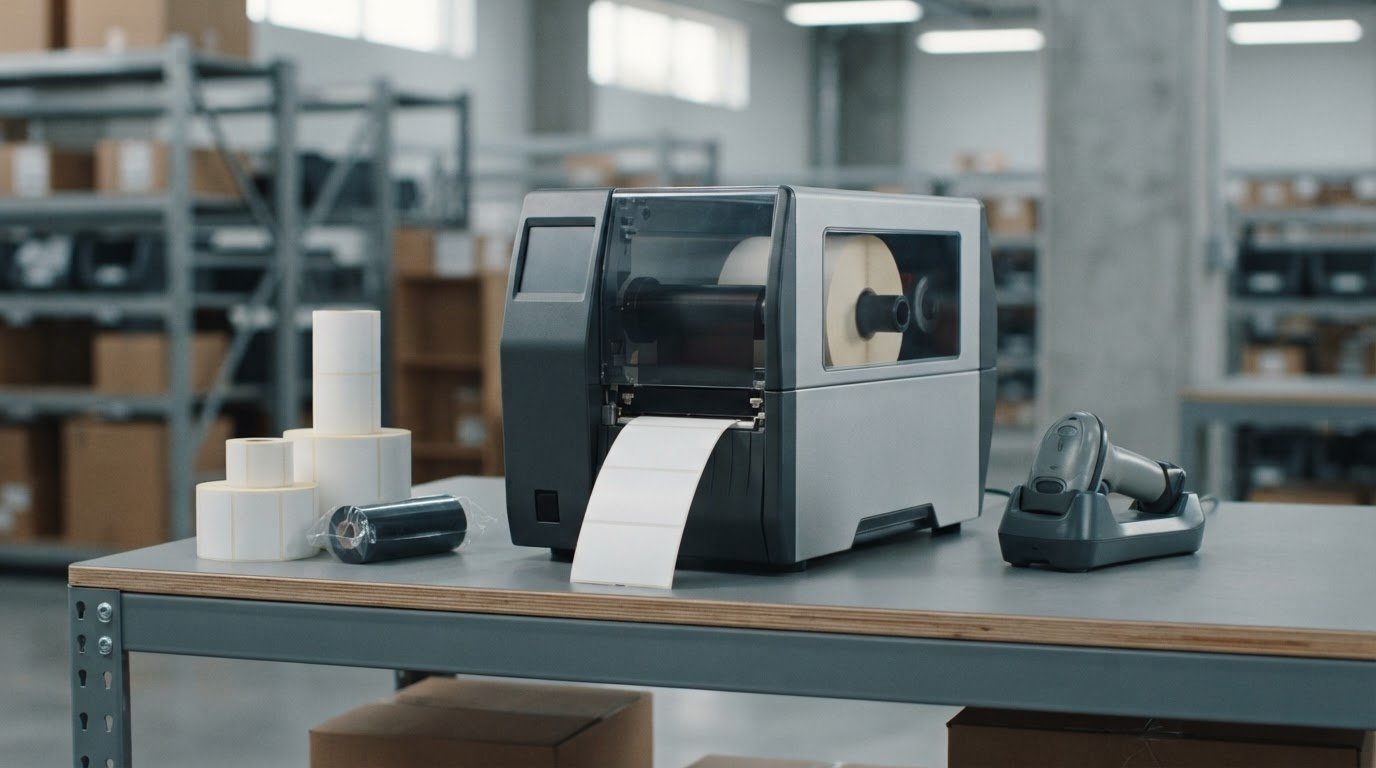
The fastest Zebra ZT411 printer may not be the best fit for your label workflow. A printer’s headline speed matters less if its resolution, print method, or media handling doesn’t match the labels you need to produce.
It’s easy to get stuck comparing configuration codes and wondering whether to choose 203, 300, or 600 dpi. You also need to know whether thermal transfer or direct thermal printing suits your labels, and which supplies will work with your setup.
This guide will help you assess whether the ZT411 fits your print volume, label requirements, and connectivity needs. You’ll learn how resolution and speed affect everyday use, what to consider when selecting print method and media handling, and how to narrow down the configuration to investigate. We’ll also cover how to match thermal transfer labels and Zebra ribbons to your workflow. The goal is a practical decision based on what you print, not just the specifications on a product listing.
Key Takeaways
- Assess whether the Zebra ZT411 printer suits your print volume, label requirements, and workflow before comparing configurations.
- Choose resolution based on the detail your labels need, and compare speed in the context of your actual print jobs.
- Confirm whether direct thermal or thermal transfer printing fits your label use and environment.
- Match thermal transfer labels with a compatible ribbon and printer setup to support reliable output.
- Before ordering, verify the exact configuration, included accessories, connectivity, software needs, and current availability.
Zebra ZT411 Printer: Overview and Target Workflows
Quotable definition: The Zebra ZT411 is an industrial barcode label printer model; its resolution, print method, connectivity, and media-handling options depend on the specific configuration.
That distinction matters. A model name identifies the printer family, but it doesn’t confirm which features are included in a particular unit. Check the configuration details before ordering, especially if your workflow depends on a certain connection, label-handling option, or print method.
Zebra describes the ZT411 as a 4-inch industrial printer. Its industrial class may be relevant where label printing is part of a regular production, warehouse, or distribution process. For example, teams may need to print barcode labels near a packing line, apply identification labels during production, or connect printing to existing business systems. The right fit depends on your actual workload, operating environment, media, and integration requirements, not the model name alone.
Also consider the printing method and supplies as part of the decision. Thermal printing uses heat to create an image, with direct thermal and thermal-transfer methods working differently. Understanding thermal printing technology can help you identify which method your labels and workflow call for.
What kinds of label workflows may suit the ZT411?
Think about how often labels are printed, where the printer will sit, and how print jobs reach it. A production floor or distribution area may favor an industrial printer if the workflow calls for regular output, integration with other systems, or equipment suited to a shared operational space. These are evaluation points, not a promise that every configuration will meet every demand. Confirm the model’s specifications and options against your requirements.
If printing is occasional, volumes are modest, or the printer needs to fit on a small work surface, a desktop model may be worth comparing. Explore desktop thermal printers alongside industrial options to see which printer class better matches your workspace and use.
When might an industrial printer be more than you need?
Start with three questions: How many labels do you print in a typical day? What duty cycle does the workflow require? How much room can you dedicate to the printer and supplies? If your answers point to a smaller workload and limited space, compare desktop thermal printers before choosing an industrial unit. If output demands vary, base the decision on peak workload as well as an average day, and verify the selected configuration’s capabilities before purchase.
ZT411 Specifications Explained: Resolution, Speed, Width, and Print Methods
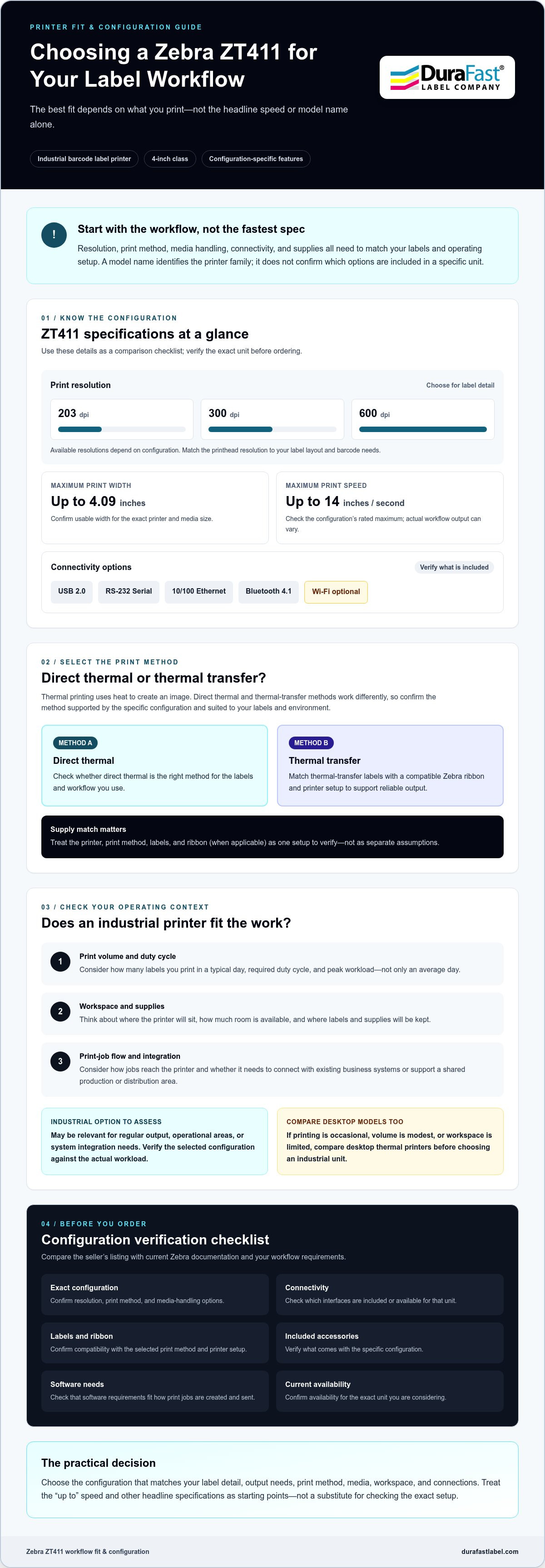
The Zebra ZT411 printer is available in multiple specifications, so don’t assume every listing describes the same setup. Configuration-specific specifications matter because a model-family headline can’t confirm the resolution, print method, or connections included in the unit you’re buying. Use the table as a starting point, then check the exact configuration against current Zebra documentation and the seller’s listing.
| Specification | ZT411 details to compare | What to verify |
|---|---|---|
| Resolution | 203, 300, or 600 dpi, depending on configuration | Match the printhead resolution to your label layout and barcode needs. |
| Print width | Up to 4.09 inches | Confirm usable width for the exact printer and media size. |
| Print speed | Up to 14 inches per second | Check the configuration’s rated maximum; actual workflow output can vary. |
| Print method | Thermal transfer or direct thermal support depends on the selected configuration | Confirm the specific unit supports your intended method. |
| Connectivity | Standard options include USB 2.0, RS-232 Serial, 10/100 Ethernet, and Bluetooth 4.1; Wi-Fi is optional | Check which interfaces are included or available for the configuration. |
How do 203 dpi and 300 dpi affect label output?
Resolution describes how much print detail the printer can produce. A basic shipping label with large text and straightforward barcodes may have different needs from a compact product label with small text, dense barcode content, or fine graphics. 203 dpi may suit simpler layouts; 300 dpi can be worth considering when added detail matters. Neither is universally better. Test representative labels and confirm barcode readability against the applicable requirements, such as the USPS barcode standards for relevant mail applications.
Thermal transfer or direct thermal: which print method fits?
Thermal transfer printing uses a ribbon to transfer ink onto the label, so the printer, ribbon, and label material must be compatible. Thermal transfer labels are one media category to consider when assessing that setup. Direct thermal printing creates an image without a ribbon and uses heat-sensitive media instead. Before choosing, confirm the method supported by the exact ZT411 configuration and consider the label’s use and environment.
Speed and resolution measure different things. A higher speed rating doesn’t guarantee a faster completed workflow, and more dots per inch don’t automatically improve every label. Media, print settings, label design, and connected systems also affect results. If you’re comparing configurations and supplies, contact DuraFast Label Company with your requirements for product information.
How to Compare Zebra ZT411 Configurations Without Overbuying
ZT411 listings don’t all describe identical printers. A model-family feature may be optional or available only with certain configurations, so don’t assume an accessory or interface is included just because it appears in a general product description. Compare the exact part number and configuration details before deciding.
Start with what your workflow requires, then separate essentials from extras:
- Resolution: Choose based on the detail your labels need, not simply the highest number listed.
- Print method: Confirm that the printer supports your planned direct thermal or thermal transfer setup.
- Connectivity: Identify the interface your host device and network require, and verify it’s included.
- Media handling: Check whether options such as a cutter, peeler, or rewinder are necessary and included.
- Expansion: Consider optional capabilities only if they support a real workflow need.
Then check the selected unit’s included accessories, not just the model-family feature list. A printer description may mention an option without confirming it comes with that specific configuration. Ask the seller or check current manufacturer documentation if a detail is unclear.
Which connectivity options should buyers confirm?
Match the printer’s connection to the way jobs will reach it. A wired connection may suit a fixed workstation or network setup, while wireless connectivity may matter in a different device workflow. Verify the interfaces listed for the exact unit rather than assuming every ZT411 includes the same ports or wireless features.
Before ordering, confirm driver support for your operating system and compatibility with the host device and label software. A connection can be present yet still require setup that doesn’t fit your environment. Check those requirements with your IT team or the relevant software documentation.
Should you compare the ZT411 with another industrial printer?
Yes, if you’re still deciding which printer class or feature set fits. Compare the ZT411 with a model such as the ZT231 using the same criteria: expected workload, required print method and resolution, connections, available media-handling options, and room to expand. Don’t rely on a model name or a single headline specification to determine which is best. Verify each candidate’s current configuration and documentation before making a like-for-like comparison.
For a broader view, consult a 2026 industrial label printer roundup alongside manufacturer specifications. Use the roundup to identify models worth investigating, then confirm their exact features and included options before purchase.
Choose Compatible ZT411 Labels, Ribbons, and Label Software
Supplies need to match the printer configuration and the job, not just the model name. Before ordering, identify your label material and print method, then check the media dimensions, roll orientation, and core against the printer specifications. For thermal transfer printing, confirm that the selected configuration supports the method and that you have a compatible ribbon. Direct thermal media uses a different setup and doesn’t use a ribbon.
Supply checklist: Confirm the print method, label material, operating environment, label dimensions, roll orientation, core size, and ribbon compatibility against the exact printer configuration before buying.
- Media type: Determine whether your workflow calls for direct thermal or thermal transfer labels.
- Material and environment: Consider the label surface and exposure to abrasion, heat, moisture, or chemicals.
- Roll fit: Check label width and length, core size, roll orientation, and any other media limits in the printer documentation.
- Ribbon: For thermal transfer, match the ribbon to the label face stock and intended conditions.
How do you match a thermal transfer ribbon to a label?
Start with the label’s face stock, then consider how the printed label will be handled and stored. Ribbon and label compatibility can affect print quality and durability, so test a sample using the intended printer settings before committing to a supply choice. A label exposed to rubbing, heat, moisture, or chemicals may call for a different combination than one used indoors for short-term identification. Review Zebra ribbons as you compare ribbon options, and verify compatibility with the specific media and printer setup.
What software and workflow details should you check?
Confirm that your label-design or barcode software supports the intended printer workflow. DuraFast offers BarTender software, but check the product’s compatibility, licensing terms, and required features for your environment before selecting it. Also review the label dimensions, barcode content, and any data sources the design needs, such as information passed from an existing business system. A test print can help reveal layout or data issues before labels enter regular use.
Have the printer configuration and a sample label specification ready when comparing supplies. Contact DuraFast about compatible labels and ribbons for your Zebra ZT411 printer setup.
Buying a Zebra ZT411: A Practical Checklist and Next Steps
Before ordering, connect the printer choice to the job it needs to do. Use this five-step checklist to narrow your requirements and catch configuration or supply mismatches early.
- Workload: Estimate label volume per day or week and note the printer’s typical operating schedule.
- Media: Record label dimensions, material, roll orientation, and exposure to conditions such as moisture, heat, or abrasion.
- Print method: Decide whether your workflow calls for direct thermal or thermal transfer printing, including a compatible ribbon if using thermal transfer.
- Configuration: Match resolution, connectivity, and any needed media-handling options to the task. Verify exactly what the selected configuration includes.
- Software: Check that your label-design or barcode software, operating system, and host devices support the intended workflow.
Have questions about product selection or purchasing details? Contact DuraFast about the Zebra ZT411.
What information should you gather before requesting assistance?
Prepare a short requirements sheet before comparing models or supplies. Include expected label volume and operating schedule, label size and material, and the conditions labels will face after printing. Add the resolution and connection your workflow needs, plus the software and devices used to create or send print jobs. A sample label layout can also help clarify barcode, text, and graphic requirements.
Use those details to check the exact Zebra ZT411 printer configuration, included accessories, and current availability before ordering. Don’t assume a feature shown for the model family is included with every unit. Confirm that the labels and ribbon match the printer setup as well.
How can DuraFast help with your ZT411 purchasing questions?
DuraFast sells the Zebra ZT411 thermal transfer printer, thermal transfer labels, and Zebra ribbons. It’s an equipment and supplies resource for buyers comparing the printer with the media and ribbon their workflow requires. Confirm product specifications and current availability for the specific items you’re considering.
DuraFast’s role is product and purchasing information. It doesn’t offer custom label printing or on-site technical repair. For questions about product selection, use the contact link above and include your requirements so you can ask about the relevant printer and supplies.
Choose the ZT411 Setup That Fits Your Workflow
A sound Zebra ZT411 printer decision starts with the work your labels must do, not a single headline specification. Use your label layout and print volume to guide resolution and speed comparisons, then check the exact configuration, included options, and media requirements before ordering. The printer, labels, ribbon, and software all need to suit the same workflow.
DuraFast offers the Zebra ZT411 thermal transfer printer, along with thermal transfer labels and Zebra ribbons. If you’re narrowing down a configuration or checking which supplies to consider, prepare your label dimensions, print method, connectivity needs, and operating environment before reaching out. That information can make your product questions more specific.
Contact DuraFast for help evaluating the Zebra ZT411 and related supplies for your requirements. With the right details in hand, you can make a more confident choice and move forward with a setup suited to your label workflow.
Frequently Asked Questions
What is the Zebra ZT411 printer used for?
The Zebra ZT411 printer is an industrial barcode label printer for business workflows such as production, warehousing, and distribution. It can be considered where regular label printing, integration with existing systems, or an industrial printer format fits the operation. Suitability depends on the required print volume, label media, operating environment, and exact configuration. Compare those needs with the printer’s documented specifications rather than relying on its model name alone.
Is the Zebra ZT411 a thermal transfer or direct thermal printer?
The ZT411 is available in thermal-transfer configurations, and specific listings may also identify direct thermal capability. Confirm the print method for the exact configuration before ordering. Thermal transfer printing uses a compatible ribbon and label, while direct thermal printing uses heat-sensitive media without a ribbon. Choose based on your label material, intended use, and operating conditions, then make sure the printer and supplies are suited to that method.
What is the difference between the 203 dpi and 300 dpi ZT411?
The difference is print resolution: 300 dpi can reproduce finer detail than 203 dpi, which may matter for small text, compact barcodes, or detailed graphics. That doesn’t make 300 dpi the right choice for every label. Consider the actual layout and required barcode content, then test a sample. Choose the resolution that produces readable output for your application, and verify that it matches the specific printer configuration.
How fast does the Zebra ZT411 print?
The ZT411 is rated for print speeds of up to 14 inches per second, depending on the configuration and conditions. Treat this as a maximum specification, not a guarantee of completed workflow output. Label design, media, print settings, and how jobs reach the printer can affect the overall process. Check the rating for the exact unit you’re considering, then evaluate it against your typical workload and required label quality.
Can the Zebra ZT411 print shipping labels?
Yes, the ZT411 can be used for shipping labels if the selected configuration supports the label size and print method your workflow requires. For a common 4-by-6-inch layout, confirm the printable width, media specifications, and software setup before ordering. Also check that barcodes and text render clearly at the selected resolution. A test print with your actual layout can help confirm the setup meets your operational needs.
Which labels and ribbons work with a Zebra ZT411?
Compatible supplies depend on the printer’s configuration, print method, and media specifications. For thermal transfer printing, select a label and ribbon combination suited to the label face stock and intended environment. Confirm label dimensions, roll orientation, and core size against the printer documentation. DuraFast offers thermal transfer labels and Zebra ribbons, but check compatibility with the exact ZT411 configuration and your label requirements before purchase.
What connectivity options does the Zebra ZT411 support?
Standard connectivity options include USB 2.0, RS-232 serial, 10/100 Ethernet, and Bluetooth 4.1; Wi-Fi is optional. Options can vary by configuration, so confirm which connections are included with the exact printer. Check compatibility with your host device, network, operating system, and printer driver as well. A connection that appears in model-family specifications may not be included in every unit or fit every workflow without additional setup.