Zebra ZT610 Industrial Printer: The 2026 High-Volume Buying Guide
10th Jun 2026
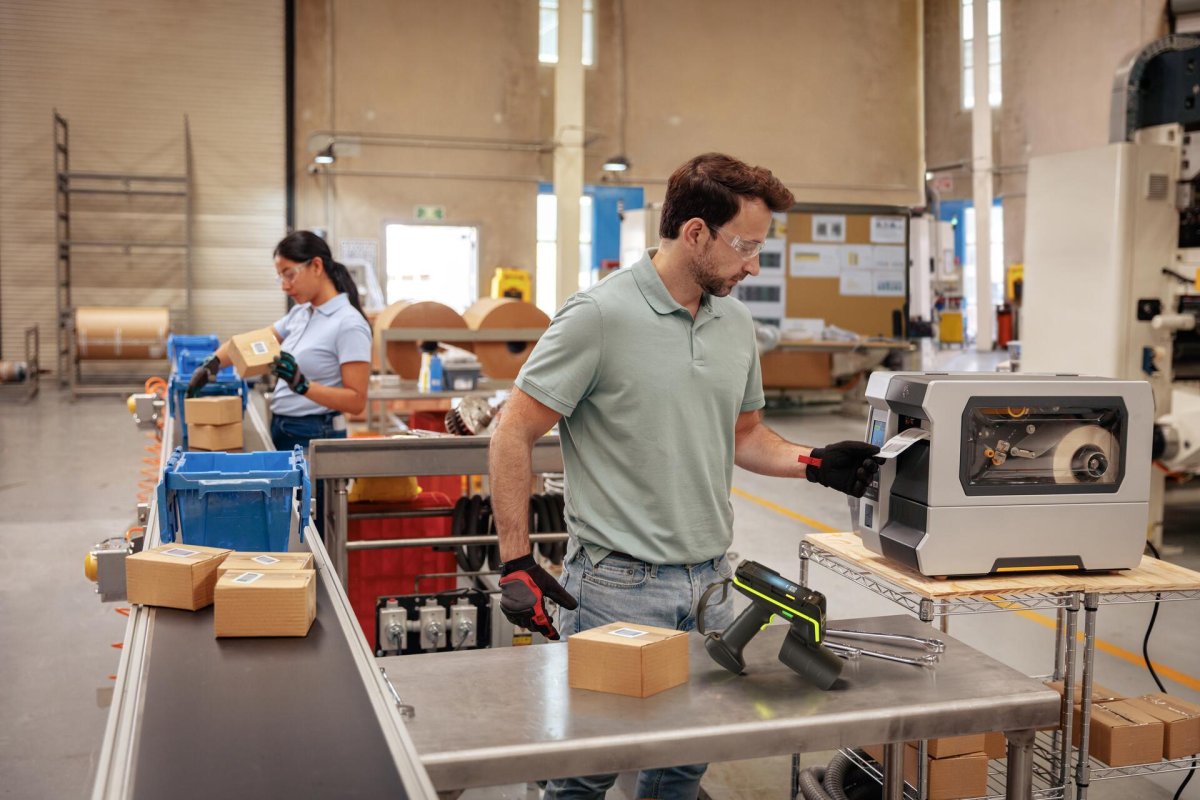
What if your labeling system was the most reliable part of your entire production line instead of the most fragile? You've likely felt the sting of a halted shift because a printer couldn't handle the heat or lost its connection to your ERP. When you're managing mission-critical workflows, "good enough" printing leads to expensive downtime and rejected shipments. We understand that your 24/7 operation needs more than just a piece of hardware; it needs a guarantee of performance. This is where the zebra zt610 steps in as the industry's undisputed powerhouse.
You already know that durability and precision are non-negotiable for high-volume environments. In this 2026 buying guide, we'll show you exactly how to leverage the zebra zt610 to achieve a zero-downtime labeling workflow. We'll explore everything from high-resolution 600 dpi micro-labeling for medical parts to the latest Link-OS security updates and multi-factor authentication requirements. By the end of this article, you'll know how to configure the perfect setup for your specific facility needs while ensuring long-term hardware reliability.
Key Takeaways
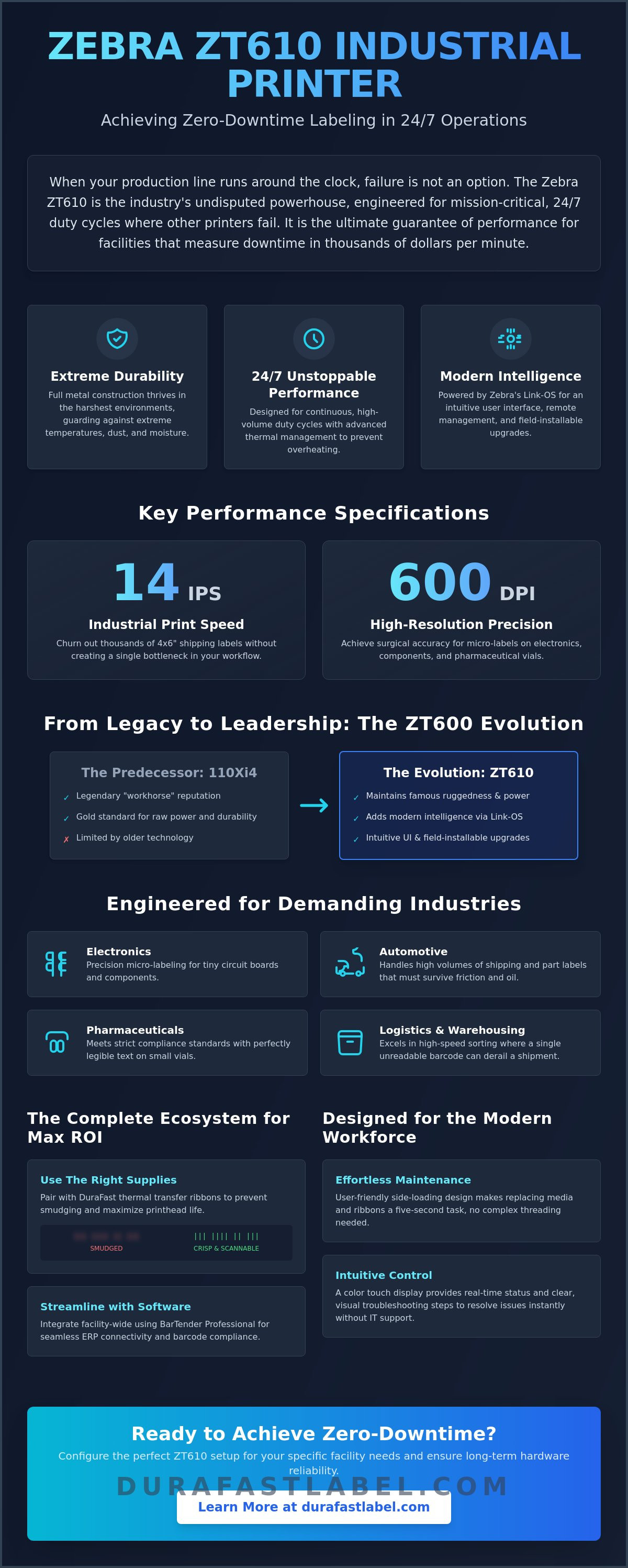
- Learn why the zebra zt610 is the preferred choice for 24/7 mission-critical environments where downtime isn't an option.
- Discover how to balance 14 ips print speeds with 600 dpi precision for high-quality micro-labels and complex electronics marking.
- Identify the structural and performance differences between the ZT610 and mid-range models to ensure your hardware matches your duty cycle.
- Find out how to pair your printer with the correct DuraFast thermal transfer ribbons to prevent smudging and maximize printhead life.
- Explore how to streamline facility-wide integration using BarTender Professional software for seamless ERP connectivity and barcode compliance.
##Table of Contents
-
Understanding the Zebra ZT610: Built for Mission-Critical 24/7 Operations
-
Key Performance Specs: 600 DPI Precision and Industrial Speed
-
Zebra ZT610 vs. ZT411: Which Industrial Printer Fits Your Workflow?
-
Maximizing ROI: Selecting the Right Thermal Ribbons and Labels
##Understanding the Zebra ZT610: Built for Mission-Critical 24/7 Operations
When your production line runs around the clock, your printer shouldn't be the weakest link. The zebra zt610 represents the absolute peak of Zebra’s industrial lineup. It's a heavy-duty machine designed for 24/7 duty cycles where failure isn't an option. While other printers might struggle with heat or dust, this model thrives in the harshest environments. It features a full metal construction that guards against extreme temperatures and moisture. Even during high-volume runs, the internal thermal management systems prevent overheating. This ensures your labels stay crisp from the first inch to the last mile of the roll. It is the ultimate industrial barcode printer for facilities that measure downtime in thousands of dollars per minute.
The ZT600 Series Heritage
Why did Zebra replace the legendary 110Xi4? The Xi series was the gold standard for decades, but the modern facility requires more than just raw power. The zebra zt610 maintains that famous ruggedness while adding modernized intelligence through Link-OS. You get a much more intuitive user interface and field-installable upgrades that weren't possible with older models. These reliability metrics are why it remains the top choice for high-speed manufacturing. It leverages advanced thermal-transfer printing technology to create labels that withstand chemical exposure and long-term storage. This transition from the Xi series to the ZT600 series wasn't just a refresh; it was a total structural evolution for the digital age.
Target Industries for the ZT610
Certain sectors simply can't compromise on print quality or hardware durability. This printer is the go-to solution for several demanding fields:
-
Electronics: Achieving micro-label precision for tiny circuit boards and components.
-
Automotive: Handling massive volumes of shipping and part labels that must survive friction and oil.
-
Pharmaceuticals: Meeting strict compliance standards with perfectly legible text on small vials.
-
Logistics: Managing high-speed sorting environments where a single unreadable barcode can derail an entire shipment.
Whether you're printing thousands of 4x6 shipping labels or tiny high-resolution tags, this machine keeps pace with your fastest conveyors. It bridges the gap between raw mechanical strength and the sophisticated software integration needed for modern ERP systems. You don't have to choose between a "smart" printer and a "tough" one because this model provides both in a single chassis.
##Key Performance Specs: 600 DPI Precision and Industrial Speed
Raw power is only half the story for the zebra zt610. To keep up with high-velocity production lines, you need a machine that combines rapid throughput with surgical accuracy. This printer delivers standard speeds up to 14 inches per second (ips) at 203 dpi. This means you can churn out thousands of shipping labels without a single bottleneck in your workflow. However, speed doesn't come at the expense of quality. By investing in high-performance supply chain visibility technologies, you ensure that every barcode is readable the first time it's scanned, reducing the risk of costly shipping errors or rejected inventory.
Maintenance shouldn't slow you down either. The zebra zt610 features a user-friendly side-loading design that makes replacing media and ribbons a five-second task. You won't have to thread labels through complex internal paths. A highly intuitive color touch display provides real-time status monitoring. If a roll runs low or a sensor needs cleaning, the screen shows a clear alert with troubleshooting steps. This visual guidance allows floor staff to resolve issues immediately without waiting for IT support. If you aren't sure which configuration fits your volume, feel free to talk to our specialists for a personalized recommendation.
Choosing Your Print Resolution
One of the most common questions we hear is which resolution is necessary for a specific job. The choice impacts both your print speed and your label clarity. Here's how to decide:
-
203 dpi: This is the standard for logistics. It's the fastest option and perfect for 4x6 shipping labels and standard warehouse tracking.
-
300 dpi: Choose this for product labels that include small company logos or detailed instructional icons. It offers a sharper look without significantly sacrificing speed.
-
600 dpi: This is essential for micro-labels. If you're printing on tiny circuit boards or pharmaceutical vials, the 600 dpi printhead ensures that even the smallest fonts remain perfectly crisp and scannable.
Connectivity and Integration
Modern operations require a printer that talks to your entire network. The ZT610 comes standard with USB, Serial, Ethernet, and Bluetooth 4.1. It also includes dual USB Host ports, which are incredibly useful for stand-alone applications where you might need to plug in a scanner or a keyboard. Because it's an industrial barcode printer built for the future, it utilizes the Zebra Link-OS environment. This software suite allows your IT team to manage an entire fleet of printers from a single remote dashboard. You can push firmware updates or change settings across multiple facilities simultaneously, ensuring consistent performance across your entire organization.
##Zebra ZT610 vs. ZT411: Which Industrial Printer Fits Your Workflow?
Is the ZT411 enough, or do you need the extra muscle of the zebra zt610? This is the most common question we help facility managers answer. While both are top-tier thermal transfer label printers, the ROI calculation changes based on your volume and environment. Think of the ZT411 as a heavy-duty workhorse and the zebra zt610 as an industrial powerhouse built for relentless, 24/7 cycles. The primary difference lies in the internal architecture. The ZT411 uses a composite and metal hybrid frame, which is great for most warehouses. However, the ZT610 features an all-metal structural components that resist the tiny vibrations and heat fluctuations common in high-speed manufacturing.
Registration accuracy is another area where the ZT610 pulls ahead. If you're printing tiny labels for electronics or medical parts, even a fraction of a millimeter of drift can ruin a batch. The ZT610 offers superior precision for micro-labels, ensuring your barcodes stay perfectly centered. Maintenance is also faster on this model. It's designed for high user-serviceability, allowing your team to swap out printheads and rollers in seconds. In an environment where every minute of downtime costs money, these quick changes provide a significant operational advantage over mid-range models.
When to Choose the ZT411
The ZT411 is an excellent industrial barcode printer for businesses with moderate print volumes. If you're typically printing fewer than 5,000 labels per day, this model will likely meet all your needs. It's a budget-conscious choice for applications where 24/7 operation isn't required and label sizes are standard. It's perfect for retail distribution centers or smaller manufacturing plants where micro-registration isn't the top priority.
When the ZT610 is Mandatory
You should step up to the zebra zt610 if your facility exceeds 10,000 labels per day. At this volume, the durability of the all-metal frame pays for itself by reducing long-term wear and tear. It's also mandatory for harsh environments where extreme temperatures or constant vibration are present. If your compliance standards require 600 dpi resolution for high-density barcodes or tiny fonts, the ZT610 is the only choice in this category that can handle those requirements while maintaining industrial-grade speed. It isn't just a printer; it's an insurance policy for your most critical production lines.
##Maximizing ROI: Selecting the Right Thermal Ribbons and Labels
Buying the hardware is only the first step in optimizing your labeling workflow. To get the best return on your investment, you must match your supplies to your specific application. The zebra zt610 is a versatile machine that supports both direct thermal and thermal transfer modes. However, using the wrong combination of ribbon and media can lead to smudging, unreadable barcodes, and premature printhead wear. If you're pushing the printer to its 14 ips limit, you need a thermal transfer ribbon that can transfer ink instantly and cleanly at high speeds. DuraFast offers Zebra-compatible ribbons specifically optimized for the ZT600 series to ensure consistent results.
Precision printing at 600 dpi requires even more attention to detail. When you're printing micro-labels for electronics, standard paper stock won't suffice. You need high-quality synthetic labels to achieve maximum clarity and ensure that tiny fonts don't bleed. Using the wrong supplies doesn't just hurt print quality; it can lead to increased maintenance costs. Low-quality ribbons often require higher heat settings, which shortens the life of your printhead. By choosing the correct supplies from the start, you protect your hardware and keep your 24/7 operations running smoothly.
Ribbon Types for the ZT610
Choosing the right ribbon depends entirely on what you're printing and how long the label needs to last. We generally categorize them into three main types:
-
Wax Ribbons: These are the most cost-effective choice for standard paper shipping labels. They work well at high speeds but offer limited resistance to chemicals or heavy friction.
-
Wax-Resin Ribbons: These provide a durable middle ground. They're ideal for coated paper and some synthetic labels, offering better smudge resistance for product labels that might be handled frequently.
-
Full Resin Ribbons: These are the gold standard for durability. You'll need these for chemical-resistant or high-heat labels, especially in automotive or pharmaceutical environments.
Industrial Label Options
The media you choose is just as important as the ribbon. Your choice should reflect the environment the label will live in:
-
Durable thermal transfer labels: These are best for long-term tracking. They require a ribbon but offer the best longevity against sunlight and moisture.
-
Direct thermal labels: These are great for short-term logistics and shipping. They don't require a ribbon, which simplifies your inventory, but they can fade over time if exposed to heat.
-
Specialized high-heat labels: Essential for circuit board applications where the label must survive the soldering process without melting or peeling.
Don't let poor supply choices undermine the performance of your zebra zt610. If you need help matching a ribbon to your specific label stock, contact our supply experts for a compatibility test.
##Implementing the ZT610 in Your Facility: Setup and Support
Standardizing your labeling fleet with the zebra zt610 isn't just about buying hardware; it's about simplifying your entire IT infrastructure. When every high-volume station uses the same industrial model, managing drivers, firmware, and security becomes a streamlined process. This consistency is vital for 24/7 facilities where a single configuration error can halt production. By using Zebra Print DNA, your team can access remote dashboards to push updates across multiple locations simultaneously. This proactive approach allows you to receive maintenance alerts before a failure occurs, ensuring your mission-critical workflows stay online. It transforms your printer from a standalone tool into a manageable enterprise asset.
Label Design Software Integration
To unlock the full potential of your hardware, you need a robust software partner. BarTender Professional software is the industry standard for a reason. It connects directly to your existing ERP or WMS systems to automate the printing process. This integration is especially important when using the zebra zt610 600 dpi model for micro-labels. You can create dynamic templates that pull real-time data, ensuring that tiny barcodes on electronics or medical parts are always accurate. Whether you're navigating complex GHS chemical requirements or FDA medical device compliance, software-driven labeling eliminates the risks associated with manual data entry. It's the most efficient way to maintain global standards across your entire production line.
Maintenance and Longevity
Protecting your investment requires a commitment to simple, regular maintenance. For high-volume users, a strict printhead cleaning schedule is the most effective way to prevent premature wear. You should clean the printhead every time you replace a ribbon to ensure maximum clarity and heat efficiency. It's also important to monitor your rollers. If you notice a slight drift in registration accuracy, it's usually a sign that the rollers have reached their end of life and need a quick swap. Because this model is designed for high user-serviceability, your floor staff can handle these replacements in seconds without calling for a technician. Consistent care ensures your hardware survives the rigors of a harsh industrial environment for years to come.
DuraFast Label Company is dedicated to supporting your industrial barcode printer needs through every stage of the product lifecycle. We don't just sell the hardware; we provide the specialized knowledge to help you choose the right ribbons and labels for your specific facility. From initial configuration to long-term supply management, our team ensures that your labeling system remains a reliable part of your success. If you're ready to upgrade your facility's printing capabilities, we have the inventory and expertise to make the transition seamless and stress-free.
##Future-Proof Your Production Line Today
Transitioning to a high-volume labeling environment doesn't have to be a stressful experience. You've seen how the zebra zt610 offers the ruggedness and precision needed for 24/7 mission-critical operations. Whether you're upgrading from the legacy Xi series or need the 600 dpi resolution for micro-label compliance, this printer provides a reliable foundation for your facility. By pairing this powerhouse with the correct thermal ribbons and labels, you eliminate the smudging and downtime that often stall production. It's about more than just hardware; it's about building a system that works as hard as your team does.
At DuraFast Label Company, we're proud to be an Authorized Zebra Partner with an extensive inventory of ZT600-compatible labels and ribbons. Our team provides expert technical support for industrial workflows to ensure your setup is optimized from day one. We take the complexity out of industrial supplies so you can focus on your output. Ready to eliminate labeling bottlenecks? Shop the Zebra ZT610 and Industrial Supplies at DuraFast Label Company to find the perfect configuration for your facility. We're here to help you achieve a more efficient, high-precision future.
##Frequently Asked Questions
What is the difference between the Zebra ZT610 and ZT620?
The primary difference between these two models is the maximum print width they can handle. The zebra zt610 is designed for labels up to 4 inches wide, making it perfect for standard shipping and micro-labels. In contrast, the ZT620 accommodates wider media up to 6.6 inches. Both printers share the same rugged all-metal frame and Link-OS intelligence, so your choice should depend entirely on the physical size of the labels your facility requires.
Can I upgrade my ZT610 from 300 dpi to 600 dpi later?
Yes, you can upgrade your print resolution in the field by simply swapping the printhead. The zebra zt610 features a user-serviceable design that allows you to switch between 203, 300, and 600 dpi as your production needs change. This flexibility means you don't have to buy a new printer if you suddenly require higher precision for electronics or pharmaceutical labeling. It's a cost-effective way to scale your capabilities without a major hardware reinvestment.
Does the Zebra ZT610 support RFID encoding?
The ZT610 supports UHF RFID encoding through an optional, field-installable encoder kit. This capability allows you to print and encode tracking tags simultaneously, which is essential for modern inventory management and meeting retail compliance mandates. You can purchase the printer with RFID already integrated from the factory or add the module later. This ensures your hardware remains compatible with evolving supply chain visibility technologies and tracking requirements across your organization.
What is the maximum print speed of the ZT610 at 600 dpi?
The maximum print speed for the ZT610 when using a 600 dpi printhead is 6 inches per second (ips). While this is slower than the 14 ips speed available at lower resolutions, it's specifically tuned to maintain surgical precision for tiny fonts and high-density barcodes. This speed provides a perfect balance between high-volume throughput and the extreme clarity required for micro-labeling in electronics manufacturing or medical device tracking.
Is the Zebra ZT610 compatible with older Xi4 series labels?
Yes, this printer is fully compatible with the media and ribbons used in the legacy Xi4 series. Because the ZT610 is the direct successor to the 110Xi4, it maintains the same media handling specifications and sensor positions. You can use your existing inventory of thermal transfer labels and ribbons without any modifications. This backward compatibility makes it easy to phase out older machines without disrupting your established supply chain or wasting current stock.
Does the ZT610 require special software for 24/7 operation?
No special software is required for the printer to function continuously, as its all-metal construction and advanced thermal management are built for 24/7 duty cycles. However, we recommend using BarTender Professional and Zebra Print DNA to optimize your workflow. These tools provide proactive maintenance alerts and remote monitoring capabilities. They help your IT team identify potential issues before they cause a stoppage, ensuring your mission-critical labeling operations remain reliable around the clock.