Primera Labels: Perfect for LX900 to LX4000 Printers
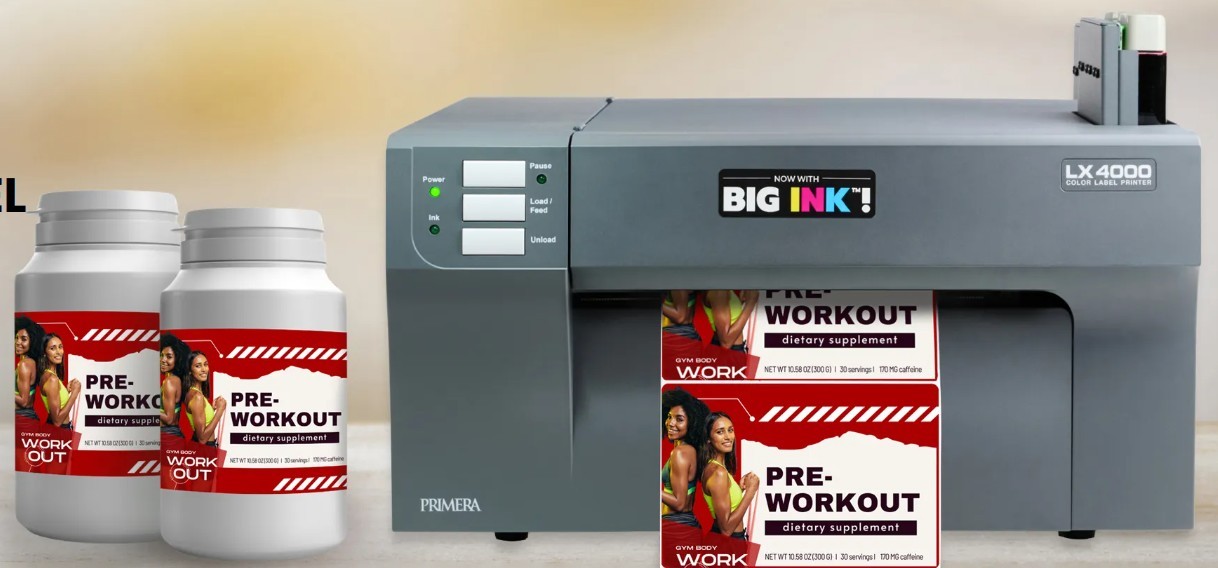
Key Highlights
-
DuraFast Label Company makes and sells Primera labels for Primera printers in the United States and Canada.
-
These inkjet roll labels work with many label printer models. They fit models from the LX900 all the way to the LX4000.
-
You can pick from matte paper, high gloss paper, polypropylene, GHS BS5609 labels, or tag stock.
-
Getting the right roll size is key. It helps with print quality, loading, and gives steady output.
-
The labels come in perforated or non-perforated options. These are good for hand use or for an applicator.
-
DuraFast also gives custom labels. The team offers helpful customer service. You can read about ordering, including shipping costs, right at checkout.
Introduction
If you use Primera label printers, picking the right label stock does make a big difference. DuraFast Label Company makes and sells Primera labels for the LX900, LX910, LX1000, LX2000, LX3000, and LX4000 models. You can get these inkjet labels in the United States and Canada. The inkjet labels are made for good feeding, bright image results, and high print quality. You have a choice between paper, film, tags, and chemical label stock based on your printer, type of ink, and what you need to use it for.
Understanding the Range of Primera Labels for Color Label Printers
Primera printers can work with many types of inkjet labels. This lets you choose a color label printer that fits your product, where you use it, and the look you want. DuraFast Label Company has labels for both dye and pigment uses. You can get labels made from strong synthetic materials or from paper, so there is something for all needs.
That means you can get labels for food, cosmetics, chemicals, and many products from one place. If you are not sure which label to use, good customer service helps you pick the right choice. They also give tips to make things simple for you.
Overview of Primera Inkjet Printer Models (LX900, LX910, LX1000, LX2000, LX3000, LX4000)
Choosing labels begins with picking your printer model. DuraFast Label Company sells labels for the Primera inkjet label printers. These include the LX900, LX910, LX1000, LX2000, LX3000, and LX4000. You can use these printers to make colorful product labels. They give sharp graphics and steady print quality when using roll media.
Here is a simple text table that can help you sort the lineup:
|
Printer Model |
Label Notes |
|---|---|
|
LX900 |
Uses Primera roll labels from DuraFast in approved sizes and materials |
|
LX910 |
Works with dye and pigment applications, including durable options |
|
LX1000 |
Uses the same basic Primera roll format requirements |
|
LX2000 |
Commonly paired with dye-based ink label choices |
|
LX3000 |
Supports wider-format product labeling needs |
|
LX4000 |
Uses 8-inch wide label capability with matching roll specs |
Before you buy, check the width of your inkjet media. Make sure you know the size of the roll and the kind of ink you will use. This step helps you get labels that feed well. It also gives you clean prints.
Authentic DuraFast Label Company Labels and Coverage in the United States & Canada
DuraFast Label Company makes and sells Primera labels on the internet. It sends them to people in the United States and Canada. If you need real label supplies for your printer, buying from a company that is all about this type of product is the good way. It helps you stay away from problems with fit or the material.
You can buy standard sizes and materials online. Add what you want to the shopping cart. Check shipping info before you finish your order. Some online Primera compatible listings say there is free shipping, but check shipping details at checkout to be sure.
If you need something different, DuraFast Label Company lets you get custom labels in the sizes and materials you want. You can buy standard rolls there and ask for labels made just for your needs. This makes it easy to have one place for both custom labels and regular label supplies.
Essential Specifications for Primera Printer Labels
Before you put in any inkjet roll, look at the core, outside diameter, and width of the media. The width and the other specifications are important. Primera label printing needs right width and size so your labels work with the roll holder and feed the right way.
DuraFast Label Company gives you label stock for these printers. The rolls always use the right format you need. Most rolls have small holes to break them apart, unless you see NP. NP means there are no holes. If you know what the printer needs, you can make sure to load the right media. It also helps to stop wasting rolls and labels.
Roll Cores, Diameter, and Media Width Requirements
All of these Primera color label printers use label stock rolls. The rolls have 3-inch cores and a 6-inch maximum outer diameter. You might see this size called roll OD, which stands for outer diameter. This is one of the first things you need to look at when picking inkjet roll labels for your printer.
Width is important too. The smallest width for media is 1.5 inches. A roll with less width will not fit in the holder. The biggest width is 8.125 inches. This lets you use an 8-inch label width for bigger jobs.
So, how do you pick the right roll? First, check the width, core, and diameter. They should fit your specific model and the label size you want to use. If these match, the label stock will fit well. Your printer will also have fewer feeding problems when you start printing.
Perforated vs. Non-Perforated Primera Label Rolls
Many Primera rolls from DuraFast have little cuts called perforations. These help you tear off each label. You can stack labels into a neat pile, so they are easy to pick up. This works well if you have to put labels on products by hand. It is a useful way to handle when printing batches of gloss labels or paper labels.
There are times when using non-perforated media works better. If you use a label applicator, a perforation can break if you pull too hard on the liner during use. When this happens, non-perforated or continuous label rolls are usually a good choice.
-
Choose perforated rolls if you want to tear off labels easily and have quick fanfold handling.
-
Choose non-perforated rolls when labels will be put on by a machine.
-
Use NP media. It helps stop labels from tearing when they go on a bottle or another product.
-
Pick the perfect label format by thinking about how you handle the labels. Do not focus only on face finish or shipping needs.
Types of Primera Labels for LX900 to LX4000 Printers
DuraFast has many types of inkjet labels for Primera label printers. These labels are made from paper and synthetic materials. The inkjet labels are for color printing. You can get them in different widths and lengths for LX900 to LX4000 systems.
Most choices are roll labels. A few fanfold types may be found in this bigger group. Even though these are not thermal transfer labels, they offer you many sizes and different materials. You can use them for product labeling, industrial use, and special jobs.
Label Material Options: Matte Paper, High Gloss Paper, BOPP, GHS BS5609, Tags
Material you pick changes how the label looks and how long it stays good. DuraFast Label Company gives you paper, polypropylene, strong chemical media, and tag stock to use with Primera printers. Some types work with dye and pigment inks. Others are made just for pigment.
Here are the main options:
-
Inkjet matte paper labels are used in many types of businesses. They make color coding easy. You can print them with dye and pigment inks.
-
Inkjet high gloss paper is great for food items, stores, and special boxes. It is printable using both dye and pigment inks.
-
Matte polypropylene and glossy polypropylene, also known as BOPP, help protect things from oil and water.
-
Inkjet GHS BS5609 chemical labels work with pigment inks only. They give strong durability.
-
Matte and high gloss tags do not have sticky backs. They are good for name badges, frames, and ads.
If you are looking for synthetic materials that are tough, GHS BS5609 and polypropylene are good options. If you want something that looks nice, you can go with matte or high gloss paper first.
Choosing the Right Primera Labels for Your Application
Start by thinking about the place where the label will go. A product kept inside may use paper. Bottles, cosmetics, and things that get wet need a tough inkjet film. The specific model and the type of ink you use will help you pick what is best for your labels.
Use these checkpoints when choosing:
-
Match the roll format that fits your specific model and what it needs.
-
Choose media that works with your printer. Pick dye-compatible or pigment-compatible as your printer needs.
-
Use paper for usual products. Choose polypropylene if you need better moisture resistance.
-
Select GHS BS5609 labels if you need the labels to resist chemicals, alcohol, or saltwater.
If you feel unsure, DuraFast Label Company can help you get the perfect label. A good customer service team makes it easy to pick the right size, finish, and material. This way, you do not have to go through mistakes or guesswork.
Model-Specific Primera Label Choices
Each printer model in the Primera family uses the same basic roll style shown here. But the ink you use and how you use the printer can make a difference for what material works best. Because of this, it is helpful to read advice for each printer model when you compare Primera label printers.
DuraFast Label Company sells inkjet labels for the LX900, LX910, LX1000, LX2000, LX3000, and LX4000. The sections below show the inkjet label options and specifications for these machines. This will help you feel good about your order.
Primera LX900, LX910, LX1000 & LX2000 Label Details
Primera LX900 labels from DuraFast are made for the usual roll setup used by Primera printers. Primera LX910 labels use the same roll style, and work for jobs where you need labels that last and can handle pigment. Primera LX1000 labels and Primera LX2000 labels also come on roll media with the same size core and width.
For these models, you have a few choices. You can pick matte paper, high gloss paper, matte polypropylene, glossy polypropylene, tags, or some chemical media. What you choose depends on the ink and how this will be used. Gloss labels are a top pick for food, retail, and showing off special products.
When you pick media, check your width, finish, and if you will apply it by hand or with a machine. This helps you find the right label fast. You will not get a roll that does not fit your way of working.
Primera LX3000 & LX4000 Label Specifications and Usage
Primera LX3000 labels and Primera LX4000 labels from DuraFast both use the same roll specifications. The roll has a 3-inch core. The biggest outside width is 6 inches. Media width can be from 1.5 inches to 8.125 inches. This wide format makes the primera printers good for bigger product and package labeling.
For usage, you can pick inkjet paper if you want it for general branding. Polypropylene works well if you need more protection from water and oils. GHS BS5609 media is good for tough places where you must use pigment ink. Most rolls have cut marks unless they show NP.
If you need labels in a width or length that is not standard, you can ask for custom labels. This is good for a business that uses the LX3000 or LX4000. You can get a setup that fits your needs for bigger labels.
Custom Primera Labels from DuraFast Label Company
Sometimes you may find a stock size that is close for your printer, but it does not fit right. If this happens, DuraFast Label Company can make labels for your printer that have the material and size you need.
You just fill out the Contact Us form with your printer information and the label you want. This helps you get custom labels in unique sizes. You will also get good customer service from a supplier that works with Primera-compatible media.
Requesting Custom Labels for Unique Sizes, Shapes, or Materials
If you cannot find the label that you need, DuraFast can make custom labels for Primera. They will make them in the size and material you want. This helps when your packaging, branding, or product size is not the same as what is in a standard roll.
A custom request should include:
-
Your printer model
-
The width and length of the label you need
-
The material you want, like paper or synthetic materials
-
Any notes about perforation, how strong the adhesive should be, or other things you want
This process helps with a simple question. Are Primera labels offered in many shapes and sizes? The answer is yes. You can find rectangles and many standard shapes in stock. There are also continuous choices. If you need something different for your job, custom labels are the way to go.
Turnaround Time and Ordering Process for Custom Primera Labels
The steps for ordering custom Primera labels start with asking for a quote. If you cannot find the product you want online, you can fill out the form with your printer and label details. DuraFast Label Company will look at your request. They will let you know what they can make for you.
Custom labels are usually ready in about four weeks. In the inkjet label market, some special order items can take from four to six weeks. So, it is good to plan ahead if your packaging needs a custom run.
For most items, you can add them to the shopping cart. You will see shipping details during the time of checkout. If you need help before you buy, check the free live chat support and product guidance. These may be different for each seller, so make sure to look at the site for their support choices.
Using Primera Labels for Diverse Applications
Primera printers are picked by people in lots of industries. This is the main reason the range works for jobs you do every day and tough jobs too. You can use one for printing labels to go on food, cosmetics, chemicals, and more. You always keep good print quality and a clean, skilled look for what you make.
The label you use depends on what your product will go through after printing. A dry store shelf needs one kind of label. But items for shipping, bath, or chemical containers often need labels that are stronger.
Food, Cosmetics, Chemicals, Shipping, and Other Industries
Yes, you can use these labels in many types of businesses. A Primera label printer, when used with the right material, will help with small batch branding, naming your products, and strong compliance labels that last.
Common uses include:
-
Food labels are made with high gloss paper. This helps them look bright on the shelf.
-
Cosmetics labels use matte or glossy BOPP. These materials help the labels resist liquids.
-
Labels for chemicals use GHS BS5609 media. This type gives strong durability against chemicals.
-
Shipping and product identification use labels where clear sizing and handling are important.
-
For medicines and hospital uses, labels must resist alcohol cleaning.
For example, the GHS BS5609 label is a good pick for chemical makers and medical products. People often clean these items with alcohol and disinfectants. This label is also right for outdoor labels, bumper stickers, and bath products. It works well in wet places.
Considerations for Shape, Size, and Material Selection
When you pick a label, start by looking at the surface of your product. Think about the style you want. Gloss labels make colors come out bright. A matte finish looks softer and cuts down on glare. After that, check the width and length that your printer can take before you make your choice.
Keep these points in mind:
-
Make sure to check the width and length by how the label comes out of the printer, so you do not mix them up.
-
Pick a label that is a little longer if you cannot find the exact size.
-
Use continuous label rolls if a set die-cut length does not work well.
-
Choose the label’s material based on moisture, oil, chemical exposure, and how people handle it.
Shape and size will depend on what is available in stock. But, if the normal choices do not work for you, custom production can help. This lets you have more options without needing to change your printer.
Accessories and Supplies for Optimal Primera Printer Performance
Labels are not the whole story. Accessories and supplies like ink cartridges matter too. These things help with output, handling, and your work every day. Ink, software, and application equipment are good to have for stable production. All these parts work together to make sure you get reliable results.
Some Primera products include things like label applicators, cutters, cleaning items, and parts that help with support. If you want everything to run well, it is good to look at the whole printing process instead of just focusing on the label roll.
Recommended Supplies for Printing and Applying Primera Labels
Several supplies can help you get better results when printing Primera labels. The right list will depend on your printer and how you work. It is usually best to use genuine accessories, because they are made to fit your printer and give steady performance.
Useful items include:
-
Ink cartridges made for your printer, with both dye and pigment ink inside.
-
Approved label rolls that are either matte, gloss, paper, or film.
-
Design software that helps with layout, barcodes, and changing information.
-
Maintenance items like cleaning products or parts that get used up, if your printer supports them.
These accessories help keep print quality good. They also cut down on problems when you need to print for a longer time. If you use gloss or synthetic media, it is important that the ink and media fit your machine. This helps you get steady results every time.
Role of Label Applicators and Handling Strategies
Label applicators take printed labels off the liner and put them on bottles, containers, or packaged items. They do this with more speed and precision. If you use them with the right materials, they cut down on manual work. This also makes the finished product look cleaner.
A few handling strategies matter:
-
Be sure to use rolls that do not have holes if labels will be put on by a machine.
-
Use fanfold labels with holes when you want to put labels by hand.
-
Pick a roll size that fits the printer and the equipment you will use to put the labels on.
-
Stay away from material that can tear when it is pulled during the process.
This is why many people like to use NP labels with applicators. When the machine pulls the liner, a small cut can turn into a tear. A smooth, non-perforated liner helps the process go steady and keeps things moving well.
Conclusion
Choosing the right Primera labels for your LX900 to LX4000 printers helps you get great results for many uses, like food, cosmetics, or chemicals. DuraFast Label Company gives you a wide pick of materials, such as inkjet matte paper, high gloss paper, and BOPP. These custom labels are made to meet your needs. You can get labels that match your specifications and fit different work areas. If you want custom labels, let us know your needs. Ask for a quote made just for you. Make your labeling easy and better by checking out our wide range of options today!
Frequently Asked Questions
Are there compatible label rolls for Primera printers besides official ones?
Yes, you can get inkjet roll labels that work with primera printers. DuraFast Label Company sells some. The main thing is picking inkjet rolls made for your printer model, ink type, and the size you need. Good customer service can help you check if the roll fits and feeds right. It also helps you know what print quality to expect before you buy.
What is the difference between blank and pre-printed Primera labels?
Blank labels come ready for you to print your colors, text, and graphics with Primera printers. Pre-printed labels are made with artwork or information that does not change. You can pick which type you need. This depends on if you want to do the printing in-house or get a finished design. For both blank and pre-printed labels, you still have to check the roll size and printer specifications.
Why would you want Non-Perforated Primera Labels?
If you use primera printers with an applicator, it is often better to choose non-perforated labels. When the applicator pulls the liner to put on labels, the perforations can rip from the pressure. Using continuous label rolls or NP labels helps lower this risk. People still like perforated rolls when applying gloss labels by hand or for glossy products.
Primera LX500 skips labels while printing?
If your Primera LX500 skips labels while printing, check for alignment issues or incorrect label settings. Ensure the roll is properly loaded and that the sensors are clean. Adjust the media type in your printer settings to match the labels used, which can resolve skipping problems effectively. Checkout our Primera LX500 label section.