What Causes Ribbon Wrinkles in Thermal Printing and How Can You Fix Them?
28th Jul 2026
Key Highlights
-
Ribbon wrinkles occur when a thermal transfer ribbon forms folds as it passes over the printhead, causing missing barcode lines, blurry prints, and diagonal defects on labels.
-
Common causes include ribbon width mismatch, incorrect ribbon installation, uneven printhead pressure, and misaligned label media that disrupts ribbon tension.
-
Fixes include using a ribbon at least 5 mm wider than the label, reloading the ribbon correctly, balancing printhead pressure, centering media, and reducing print speed if instability appears.
-
Ribbon and media incompatibility can also create wrinkles when friction between the ribbon coating and label surface causes slipping or uneven tension.
-
High-speed printing environments, such as packaging lines or TTO systems, magnify alignment and tension problems, making wrinkles appear more frequently.
-
Near-edge thermal printing reduces wrinkling by enabling fast ribbon separation, stable tension control, and minimal ribbon drag during high-speed printing.
-
Preventative maintenance, such as cleaning the printhead, inspecting platen rollers, storing ribbons correctly, and using manufacturer-compatible ribbons, helps maintain stable ribbon tracking.
Ribbon wrinkling is one of the most common issues in thermal transfer printing. It can lead to poor print quality, unreadable barcodes, wasted ribbons, and even potential printer damage if left unresolved.
Whether you're printing shipping labels, warehouse barcodes, or packaging codes, understanding why ribbon wrinkles occur and how to fix them can save time, materials, and maintenance costs.
This guide explains the main causes of ribbon wrinkles and practical ways to prevent them.
What Is Ribbon Wrinkle in a Thermal Printer?
A ribbon wrinkle happens when your thermal transfer ribbon fails to lay perfectly flat, forming small folds as it passes over the printhead. Instead of a smooth transfer, the ribbon bunches up, which physically interferes with the ink melting process.
When this occurs, you will typically notice these frustrating performance issues:
-
Inconsistent Print: The ink won't transfer where the wrinkle occurs, leading to missing barcode lines or broken text
-
Blurry Output: Folds prevent proper contact, causing images to look fuzzy or faded.
-
Mechanical Strain: A wrinkled ribbon is prone to snapping, leading to mid-job failures and increased wear on the delicate printhead.
-
Diagonal Defects: You will often see clean, white diagonal lines running across your labels or smudged ink along one edge.
Think of it like trying to iron a piece of fabric; if the material isn't pulled taut, you end up with creases that ruin the final result. Troubleshooting usually involves checking your tension settings or ensuring the printhead pressure is balanced.
Learn what causes thermal ribbon wrinkling, streaks, and uneven prints and how to fix these common printing issues.
Ribbon Wrinkle vs. Other Common Print Problems: How to Tell the Difference?
Ribbon wrinkles are often confused with other printing defects, such as printhead damage, heat imbalance, or ribbon compatibility issues. Identifying the exact symptom helps prevent unnecessary troubleshooting and ensures you apply the correct fix.
Use the table below to quickly distinguish ribbon wrinkles from other common print problems.
|
Problem |
What It Looks Like |
Most Likely Cause |
Different From Wrinkle? |
|---|---|---|---|
|
Ribbon Wrinkle |
Diagonal white lines or smudged streaks across the label |
Ribbon tension imbalance, misalignment, or pressure imbalance |
— |
|
Printhead Damage |
Consistent vertical white lines that appear in the same location on every label |
Burned or damaged printhead elements |
Yes |
|
Low Heat Setting |
Faded or incomplete print across the entire label |
The heat setting is too low for the ribbon/media combination |
Yes |
|
Excessive Heat |
Smudged print or melted ribbon coating |
The heat setting is too high |
Yes |
|
Media Tracking Issue |
The image appears shifted or stretched on one side |
Labels are feeding off-center in the printer path |
Yes |
Quick rule of thumb: wrinkles usually create diagonal or irregular lines, while printhead issues produce straight vertical defects that repeat on every label.
What Causes Ribbon Wrinkles When Printing?
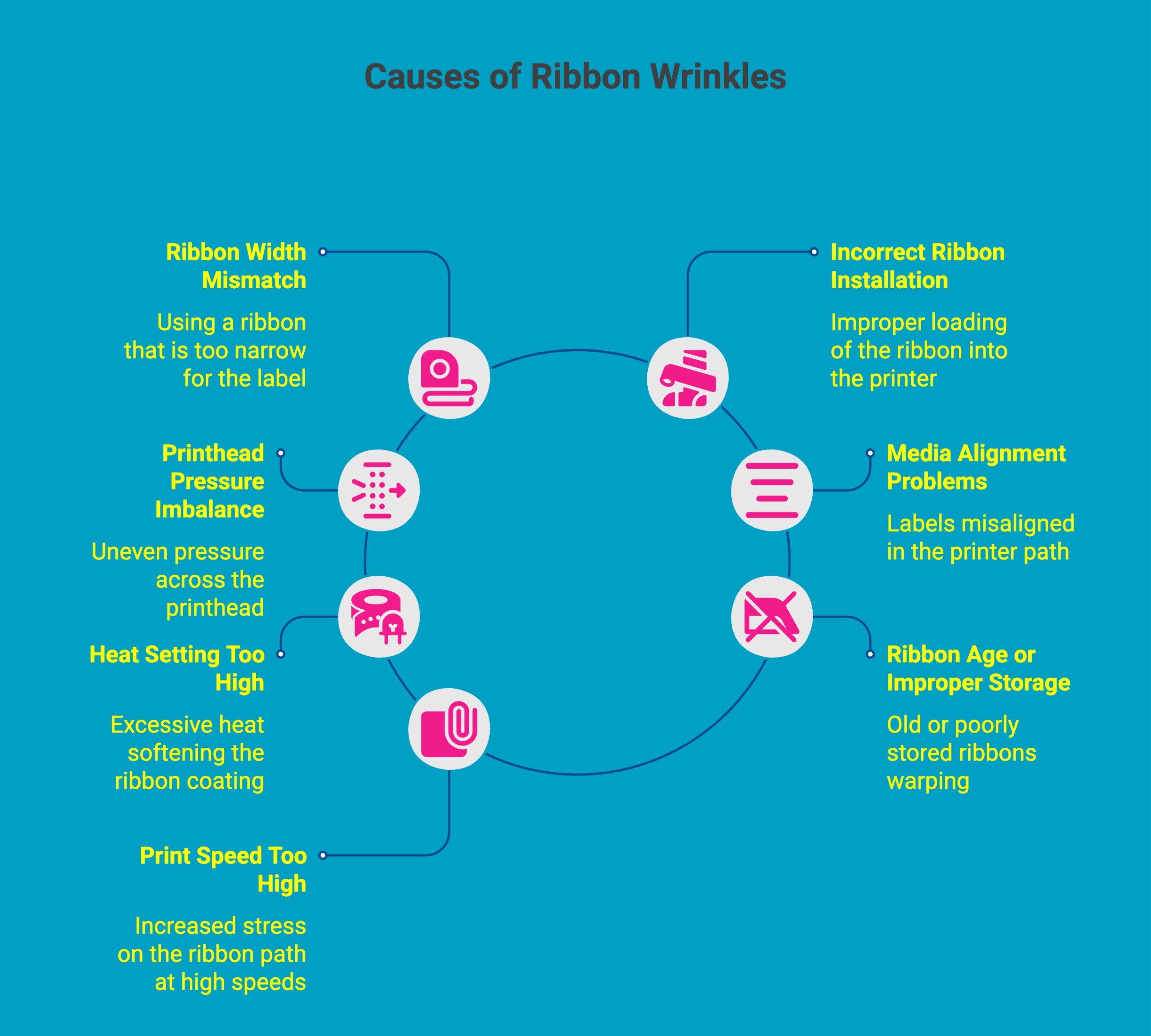
Ribbon wrinkles are a common issue in thermal printing that can affect print clarity, barcode readability, and equipment performance. They typically occur due to ribbon alignment problems, pressure imbalance, incorrect printer settings, or media setup errors that disrupt smooth ribbon movement across the printhead during printing operations.
Below are the most common reasons ribbon wrinkles occur in thermal printers:
1. Ribbon Width Mismatch
One of the most frequent causes of ribbon wrinkles is using a ribbon that does not properly match the label width. Ideally, the ribbon should be at least 5 mm wider than the label to ensure balanced tension and smooth ribbon movement.
2. Incorrect Ribbon Installation
Improper ribbon loading can cause uneven ribbon tracking inside the printer. When the ribbon is not centered, aligned with the printhead, or properly tensioned on the spindle, it may shift during printing and begin to wrinkle.
3. Printhead Pressure Imbalance
Uneven pressure across the printhead can cause the ribbon to wrinkle on one side while printing. This imbalance forces the ribbon to stretch unevenly, leading to distorted prints and inconsistent ribbon movement during high-speed printing environments.
4. Media Alignment Problems
Labels that are misaligned in the printer path can pull the ribbon unevenly during printing. When media feeds off-center, ribbon tension becomes unstable, increasing the chances of wrinkles and reducing overall print clarity.
5. Heat Setting Too High
Excessive heat settings can soften the ribbon coating too quickly, increasing friction between the ribbon and the printhead. This added drag can cause the ribbon to stick momentarily and form wrinkles as it moves through the print path.
6. Ribbon Age or Improper Storage
Old or poorly stored ribbons may develop slight warping in the polyester base film. Exposure to heat, humidity, or sunlight can degrade the ribbon structure, causing uneven tension and increasing the likelihood of wrinkles during printing.
7. Print Speed Too High
High print speeds place greater mechanical stress on the ribbon path. If the ribbon tension or alignment is not perfectly calibrated, the increased movement speed can cause the ribbon to drift, fold, or wrinkle under the printhead.
Identifying these issues early helps maintain consistent printing performance and prevents unnecessary wear on thermal printer components.
Discover how thermal transfer printing works and why it produces sharp, durable, and smudge resistant labels across industries.
How Do You Troubleshoot Ribbon Wrinkles by Printer Brand?
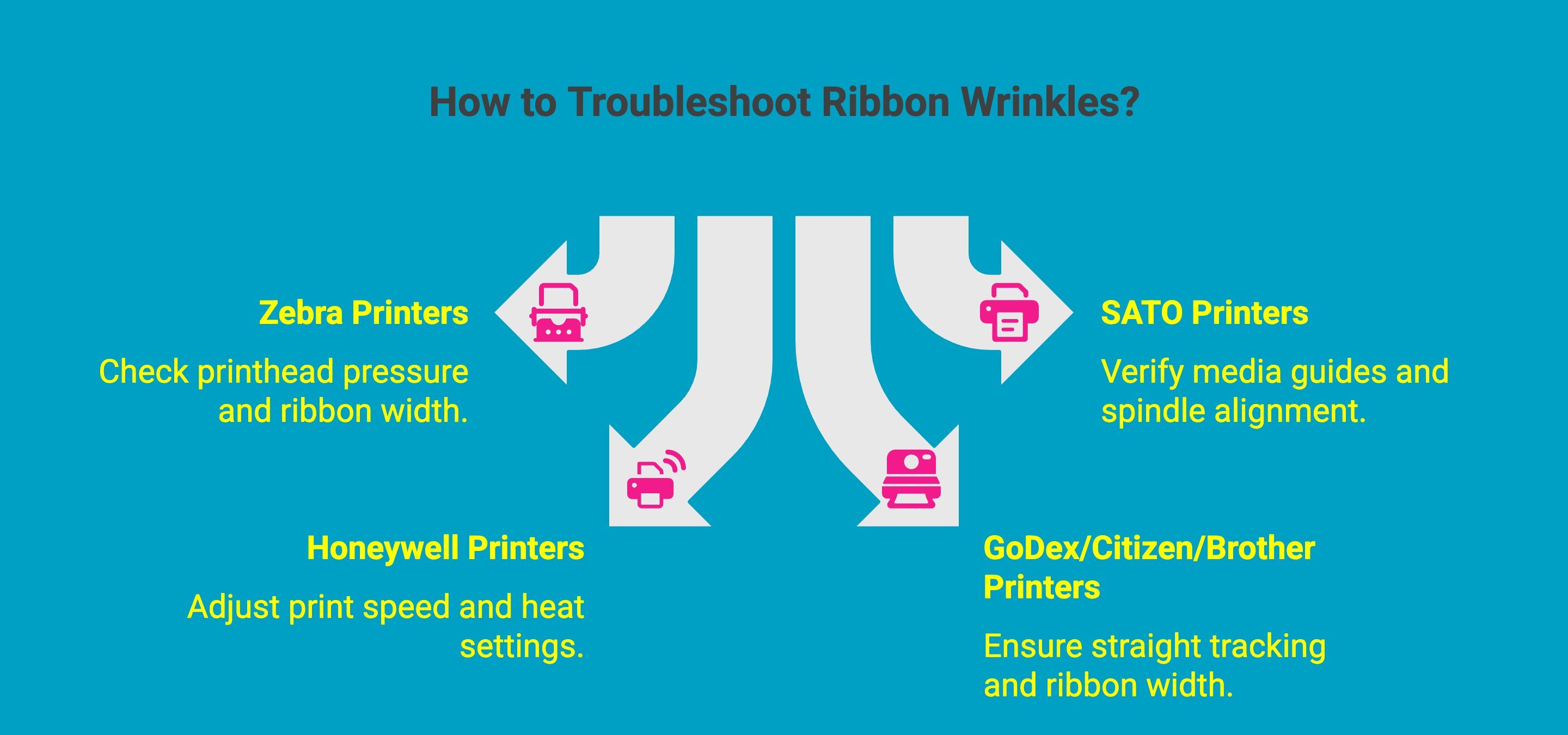
Different printer manufacturers use slightly different ribbon paths, tension systems, and printhead pressure controls. Understanding these differences can help you troubleshoot ribbon wrinkles more efficiently.
1. Zebra Printers (ZD420, ZD620, ZT410, ZT610)
Common wrinkle causes in Zebra printers often relate to printhead pressure imbalance or incorrect ribbon width.
Recommended checks:
-
Ensure ribbon width exceeds label width by at least 5 mm.
-
Adjust left/right printhead pressure toggles.
-
Confirm the ribbon path is centered through the guides.
-
Reduce print speed slightly if wrinkles occur at high throughput.
Zebra industrial models like the ZT410 and ZT610 allow fine pressure adjustment, which is one of the most effective ways to eliminate wrinkles.
2. SATO Printers (CL4NX, CL6NX)
SATO printers typically provide excellent ribbon tracking, but wrinkles can occur when media guides or ribbon spindles are not aligned properly.
Recommended checks:
-
Verify ribbon is centered on the supply and take-up spindles.
-
Ensure media guides are properly adjusted.
-
Confirm ribbon type matches the label material.
-
Inspect the platen roller condition if wrinkles persist.
The CL4NX series also allows precise tension control through its printer configuration settings.
3. Honeywell Printers (PC42d, PC45, PX940)
Honeywell printers may experience ribbon wrinkles if print speed and heat settings are not balanced.
Recommended checks:
-
Reduce print speed when printing dense graphics or barcodes.
-
Adjust the heat setting gradually to avoid ribbon drag.
-
Confirm ribbon installation is straight across the spindle.
-
Inspect the platen roller for wear.
The PX940 industrial printer includes calibration features that help maintain stable ribbon tracking during long production runs.
4. GoDex / Citizen / Brother Printers
Compact desktop printers from these brands can develop wrinkles when ribbon tension becomes unstable or when ribbons are loaded at an angle.
Recommended checks:
-
Reinstall the ribbon carefully to ensure straight tracking.
-
Confirm ribbon width matches label size requirements.
-
Clean the printhead to remove residue that may increase friction.
-
Verify ribbon compatibility with label material.
Because these printers are often used for continuous label printing, keeping the ribbon path clean and centered is critical for wrinkle-free performance.
How to Get Wrinkles Out of Ribbon During Printing?
Ribbon wrinkles are a common nuisance, but they are almost always a result of mechanical tension or alignment issues. If your prints are showing diagonal creases or missing ink, following these steps systematically will help restore crisp, clean output to your production line.
Follow this troubleshooting guide to get your ribbon tracking perfectly:
-
Diagnosis: Before adjusting settings, run a test print and note where the wrinkle appears, left edge, right edge, centre, or diagonal across the label. The location of the wrinkle tells you where in the ribbon path the problem originates.
-
Verify Ribbon Width: Ensure your ribbon is at least 5 mm wider than your label stock. If the ribbon is too narrow, it can easily shift and buckle under the printhead.
-
Reload the Ribbon: Remove the ribbon roll entirely and reinstall it. Check that it is perfectly centered and tracking straight. Even a slight angle during loading can cause the material to fold under pressure.
-
Adjust Printhead Pressure: If your industrial printer allows it, fine-tune the left and right pressure knobs. Uneven pressure is a leading cause of ribbon shifting to one side.
-
Align Your Media: Check that your labels are centered properly between the printer guides. If the media is off-center, the ribbon will likely follow suit, leading to inconsistent tension.
-
Reduce Print Speed: Sometimes, the mechanical stress of high-speed printing causes the ribbon to "drift." Lowering your print speed can stabilize the ribbon path and eliminate instability.
Quick Troubleshooting Reference for Ribbon Wrinkles
Use this quick reference to match common printing symptoms with their most likely causes and the fastest corrective action.
|
Observed Symptom |
Likely Cause |
Quick Fix |
|---|---|---|
|
Wrinkle on the left edge of label |
Printhead pressure imbalance |
Increase pressure slightly on the left side |
|
Wrinkle on the right edge of label |
Ribbon tracking shift |
Recenter the ribbon and adjust the right pressure |
|
Diagonal white lines across print |
Ribbon wrinkling under printhead |
Reload ribbon and verify ribbon width |
|
Wrinkle across the center of label |
Media misalignment or unstable tension |
Recenter labels between printer guides |
|
Wrinkles appearing only at high speed |
Tension instability during fast printing |
Reduce print speed or inspect the ribbon path |
If you have tried these adjustments and the wrinkles persist, it may indicate a worn-out platen roller or an issue with the printhead alignment itself, which might require a more technical inspection.
Important note: On Zebra printers, running a printer configuration label (hold Feed button on startup) will display current ribbon tension and pressure settings. Check these values against the recommended range in your printer manual before making manual adjustments
How Can Ribbon and Media Mismatch Cause Wrinkling in Your Thermal Printer?
It’s easy to assume that printer wrinkles are purely mechanical, but the friction between your ribbon and your label material is equally critical. If the surface of the label and the ribbon aren't compatible, the ribbon can slip, stick, or pull unevenly, leading to folds and creases.
Think of it like tyres on a road; if you use the wrong "tread" for the surface, you get skidding. Here is why specific pairings matter:
-
Wax on Synthetic Labels: Wax ribbons have a lower melting point and are designed for porous paper. When used on slick synthetic surfaces, they often lack the necessary friction, causing the ribbon to "skate" rather than track straight, which creates wrinkles.
-
Resin on Rough Paper: Resin ribbons are engineered for hard, smooth surfaces. When they try to pull across a rough, fibrous paper surface, they encounter inconsistent resistance, causing the ribbon to experience uneven tension and buckle.
-
Coating Incompatibility: Every ribbon has a specialized back-coating. If this coating isn't designed for the heat transfer requirements of your label media, the ribbon may not release the ink cleanly, causing it to "stick" to the printhead and wrinkle as it tries to pull away.
-
Wax-Resin on Uncoated Paper: Wax-resin ribbons are optimized for coated papers and synthetics. When used on uncoated paper, the ribbon can grip the surface unevenly, creating inconsistent drag across the printhead and increasing the risk of ribbon wrinkles during printing.
Ribbon–Media Compatibility Quick Reference
|
Ribbon Type |
Best Media |
Likely Issue if Misapplied |
|---|---|---|
|
Wax |
Uncoated and coated paper labels |
Poor adhesion or ribbon skating on synthetic films |
|
Wax-Resin |
Coated paper and some synthetic labels |
Drag or uneven tension on uncoated paper |
|
Resin |
Synthetic labels (PET, polypropylene, polyester) |
Excess friction or tension instability on rough paper |
Choosing the right ribbon-to-media pairing isn't just about print longevity; it’s about ensuring the ribbon moves through your printer as smoothly as possible.
Quick test: if your wrinkle issue started after switching ribbon type or label material, and not after any printer change, a mismatch is almost certainly the cause. Swap back to your previous ribbon or label stock to confirm
Why Are Ribbon Wrinkles More Prevalent in High-Speed and Packaging Lines?
High-speed production environments leave little room for setup errors. Printing systems such as TTO units, continuous label lines, and industrial barcode stations operate under constant tension and movement.
At these speeds, even slight ribbon misalignment or a mismatch between ribbon and label media can quickly result in recurring ribbon wrinkles and inconsistent print quality.
As a general rule, ribbon wrinkling risk increases significantly above 200mm/s on flat-head systems, and becomes difficult to eliminate entirely above 300mm/s without switching to near-edge technology or significantly reducing speed.
Why Compatibility Is Your Best Defense?
The secret to reliable, high-speed performance lies in using ribbons explicitly engineered for your printer’s tension and tracking systems. Manufacturer-compatible ribbons are designed to work in harmony with your printer's internal rollers and printhead geometry.
Using a ribbon specifically engineered for your printer's tension and tracking system is one of the most effective single steps for preventing high-speed wrinkling. Generic or 'universal' ribbons are a common cause of problems on production lines.
We offer a comprehensive selection of brand-specific thermal transfer ribbons to ensure your line stays running smoothly:
-
Zebra Ribbons: View Collection
-
Sato Ribbons: View Collection
-
GoDex Ribbons: View Collection
-
Citizen Ribbons: View Collection
-
Brother Ribbons: View Collection
By matching your ribbon to your specific machine, you guarantee the tension control and thermal consistency required to withstand the rigors of high-speed production.
How Does Near-Edge Printing Help Reduce Ribbon Wrinkles?
Near-edge thermal printing is a structural solution to the common problem of ribbon wrinkling. Unlike traditional flat-head printers, where the ribbon and printhead maintain extended contact, near-edge systems are engineered for instant separation, which naturally minimizes the conditions that lead to creases and folds.
Why Near-Edge Systems Are More Stable?
Near-edge technology utilizes specific mechanical design features that stabilize the ribbon path, especially during high-speed operations:
-
Angled Printhead Geometry: By positioning the printhead at a precise angle, the system reduces the friction area between the ribbon and the printhead surface.
-
Instant Ink Transfer: The separation of the ribbon from the packaging film occurs almost immediately after the ink is heated and transferred. This rapid release prevents the ribbon from "dragging" against the label material.
-
Consistent Tension Control: Because the ribbon does not linger in the high-heat zone, the mechanical tension remains stable throughout the entire print cycle, which is essential for preventing the ribbon from bunching or shifting.
-
Reduced Ribbon-Related Downtime: In production environments running above 250 mm/s, near-edge systems typically reduce ribbon-related downtime by 30-50% compared to equivalent flat-head setups, largely by minimizing ribbon wrinkling and ribbon breaks.
What Are the Ideal Environments for Near-Edge Technology?
Because this technology is so effective at preventing wrinkles, it has become the standard for demanding, high-throughput environments where speed is non-negotiable:
-
Flexible Packaging Lines: Ideal for printing directly on thin films without tearing or folding the ribbon.
-
Flow-Wrap Printing: Ensures consistent, error-free codes even on continuous, fast-moving wrap materials.
-
High-Speed Coding Systems: Provides the reliability needed for TTO (Thermal Transfer Overprinter) integration, where even a slight wrinkle could cause a production bottleneck.
By choosing a near-edge system for these applications, you significantly reduce the risk of mechanical ribbon issues that frequently plague standard flat-head setups.
How Can You Prevent Ribbon Wrinkles Before They Start?
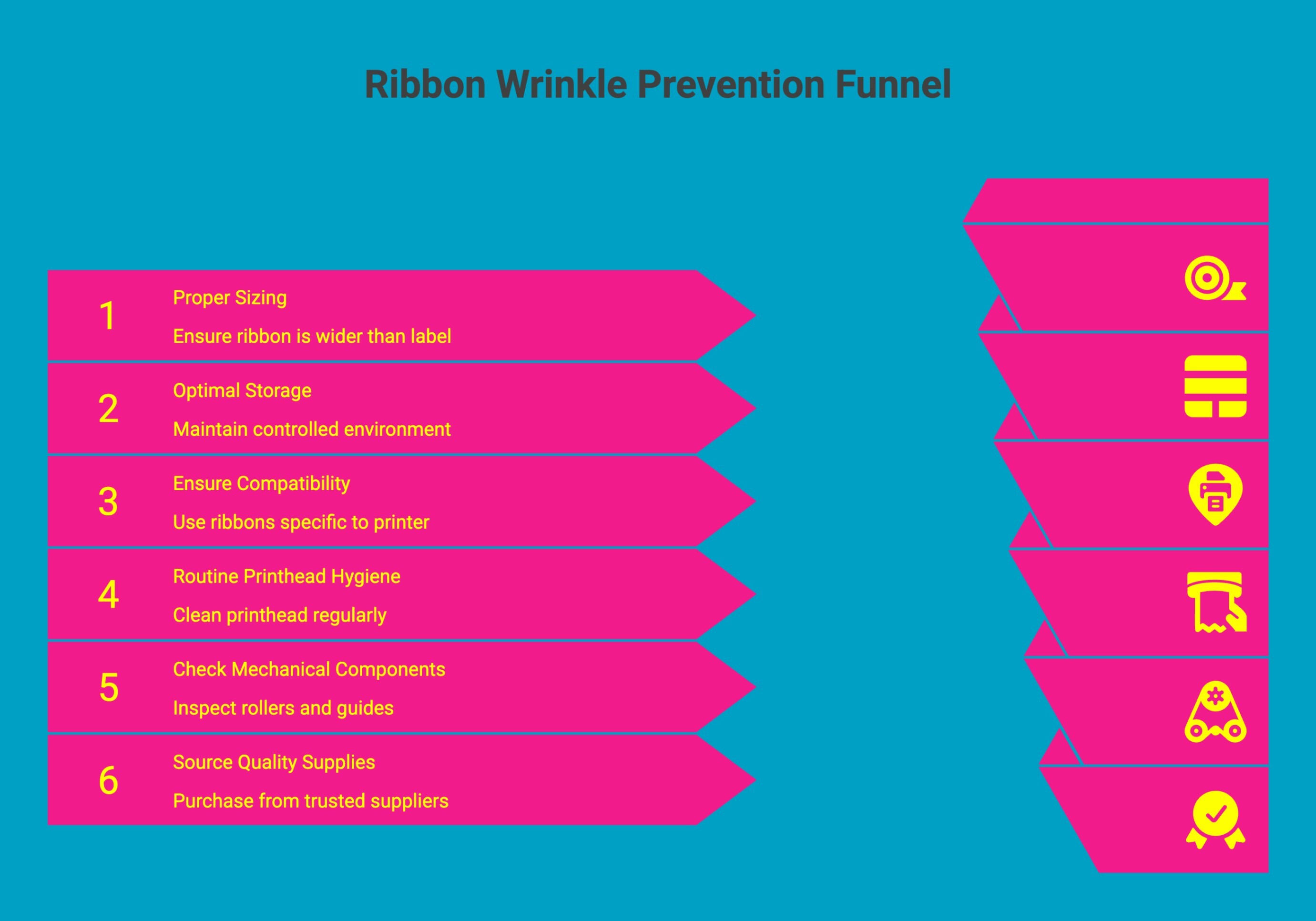
Ribbon wrinkling is rarely a mystery; it is usually the result of mechanical misalignment, material mismatch, or lack of maintenance. By shifting from a reactive "fix-it" mindset to a proactive, preventative approach, you can virtually eliminate these issues from your production floor.
To keep your production line running without the frustration of ribbon folds or tears, follow these preventative maintenance habits:
-
Proper Sizing: Always select a ribbon that is at least 5 mm wider than your label stock. This buffer ensures that even if there is slight lateral movement, the printhead remains fully covered by the ribbon.
-
Optimal Storage: Store ribbons in a clean, dry, climate-controlled area at 15-25°C (59–77°F) with 40-60% relative humidity. Keep them in original packaging and away from sunlight and dust. Avoid temperatures above 30°C (86°F) or humidity above 70%, which can warp the polyester film and degrade the ribbon coating.
-
Ensure Compatibility: Never gamble on "universal" ribbons. Use only those specifically engineered for your printer model’s tension and tracking systems to ensure consistent movement.
-
Routine Printhead Hygiene: Clean the printhead after every ribbon change or at least once every 8-24 operating hours using a lint-free swab and 90-99% isopropyl alcohol
-
Check Mechanical Components: Periodically inspect your platen rollers and ribbon guides for signs of wear. Grooves or flat spots on these parts can cause the ribbon to "drift" and wrinkle.
-
Source Quality Supplies: Purchase ribbons from trusted suppliers like DuraFast Label Company. Quality control in the manufacturing of the ribbon coating and base film is the first line of defense against tracking errors.
A small investment in regular maintenance, cleaning the printhead, replacing aging rollers, and keeping the environment dust-free often costs far less than the downtime associated with a stalled packaging line.
Learn the correct way to load thermal ribbons in your printer to ensure smooth printing and consistent label quality.
When Ribbon Wrinkling Signals a Deeper Mechanical Issue?
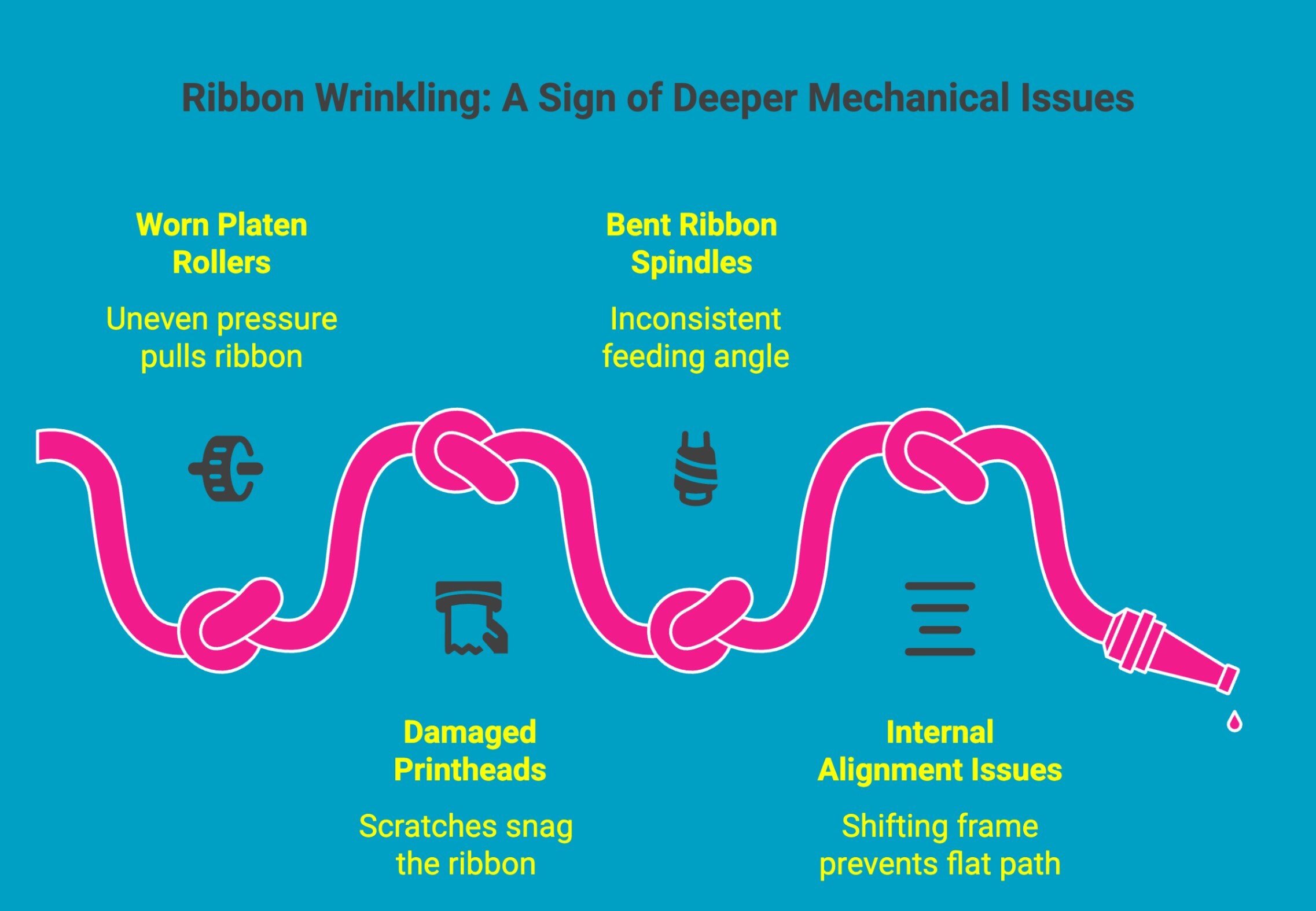
Sometimes, despite your best efforts to calibrate tension, alignment, and material compatibility, the wrinkles simply won't go away. When your standard troubleshooting fails, the problem has likely migrated from a simple setup error to a physical hardware failure.
If you have tried the basic adjustments and are still seeing consistent creases, you should inspect the following mechanical components:
-
Worn Platen Rollers: Over time, these rubber surfaces develop flat spots, become hardened, or lose their "tack," leading to uneven pressure that pulls the ribbon at an angle.
-
Damaged Printheads: Surface scratches, debris buildup, or a degraded protective coating can snag the ribbon, physically forcing it to crinkle as it passes.
-
Bent Ribbon Spindles: Even a slight, invisible distortion in the ribbon supply or take-up spindle prevents the material from feeding at a consistent angle.
-
Internal Alignment Issues: If the internal frame or guide assembly of the printer has shifted due to vibration or heavy use, achieving a perfectly flat ribbon path becomes virtually impossible without professional intervention.
If you have exhausted your troubleshooting checklist, it is usually time to bring in a technician. Continuing to operate with persistent wrinkles can cause "domino" damage, where a simple roller issue leads to a catastrophic printhead failure.
Still Guessing Which Ribbon to Buy? Let Us Send You a Sample!
Finding the ideal ribbon formulation shouldn't be a game of trial and error. To ensure you get perfect, wrinkle-free prints every time, DuraFast Label Company offers free sample ribbons tailored to your specific hardware and media.
Why Test Before You Invest?
-
Eliminate Guesswork: Test compatibility directly in your production environment before committing to a full order.
-
Prevent Costly Issues: Ensure your ribbon tracks perfectly across your printhead to avoid wrinkles, tears, and production downtime.
-
Guarantee Quality: Confirm you are getting the sharpest text, highest barcode scan rates, and most durable finish for your specific application.
Request Your Free Sample Today
Stop wondering if you've made the right choice. Visit DuraFast Label Company to request your sample today and experience the DuraFast difference firsthand.
Conclusion
Ribbon wrinkles usually result from alignment, tension, or ribbon-to-media compatibility issues that disrupt smooth ribbon movement across the printhead. Addressing these factors early helps prevent print defects, equipment wear, and production interruptions. Start by verifying ribbon width, media alignment, and printhead pressure settings, then confirm that your ribbon formulation matches your label or film material.
If wrinkles persist, inspect mechanical components such as platen rollers or spindles. Testing manufacturer-compatible ribbons in your actual printing environment is one of the most reliable ways to maintain stable, wrinkle-free performance.
Frequently Asked Questions
What causes ribbon wrinkles in thermal printers?
Ribbon wrinkles occur when ribbon width mismatch, incorrect installation, or misaligned media disrupt tension across the print head. Improper printer settings can worsen ribbon movement, increasing friction and leading to a thermal printer ribbon wrinkle that affects printing performance.
How do I fix ribbon wrinkles when printing?
To fix wrinkles, reload the ribbon correctly and ensure media alignment. Adjust tension and pressure near the print head, check printer settings, and confirm ribbon compatibility. Proper setup helps maintain optimal print quality and prevents recurring thermal printer ribbon wrinkle issues.
Can ribbon wrinkles damage the printer?
Yes, persistent wrinkles can damage components over time. A ribbon wrinkle printer problem may cause uneven pressure on the print head, leading to premature wear. Poor printer settings and ribbon misalignment may also reduce optimal print quality and increase downtime.
Are ribbon wrinkles more common in high-speed printing?
Yes, high-speed printing increases ribbon tension and movement. If ribbon width or alignment is incorrect, friction near the print head may trigger a thermal printer ribbon wrinkle. Correct printer settings help maintain ribbon stability and support optimal print quality.
Does near-edge printing reduce ribbon wrinkle?
Yes, near-edge technology reduces ribbon contact time with the print head, lowering friction and tension. This helps prevent thermal printer ribbon wrinkle problems in fast production lines. Correct printer settings also ensure smooth ribbon movement and maintain optimal print quality.
Is there a way to restore wrinkled ribbons or bows to their original shape?
Once a wrinkle forms, restoring the ribbon is difficult. A ribbon wrinkle printer issue usually requires replacing the ribbon roll. Adjusting printer settings and inspecting the print head can prevent further damage and help maintain optimal print quality.
Are there common mistakes people make while cleaning that can cause ribbon wrinkles?
Yes, improper cleaning techniques can cause ribbon tracking problems. Using harsh tools near the print head or ignoring recommended printer settings may create tension inconsistencies, leading to a thermal printer ribbon wrinkle and reducing optimal print quality during printing.
How do I troubleshoot ribbon wrinkle problems specific to Zebra or Honeywell printers?
Start by inspecting the print head, ribbon path, and media alignment. Update printer settings according to manufacturer guidelines. If a ribbon wrinkle printer issue persists, adjust pressure balance and ribbon width to restore smooth operation and optimal print quality.