Professional Inkjet Card Grading Label Selection Guide
5th Jul 2026
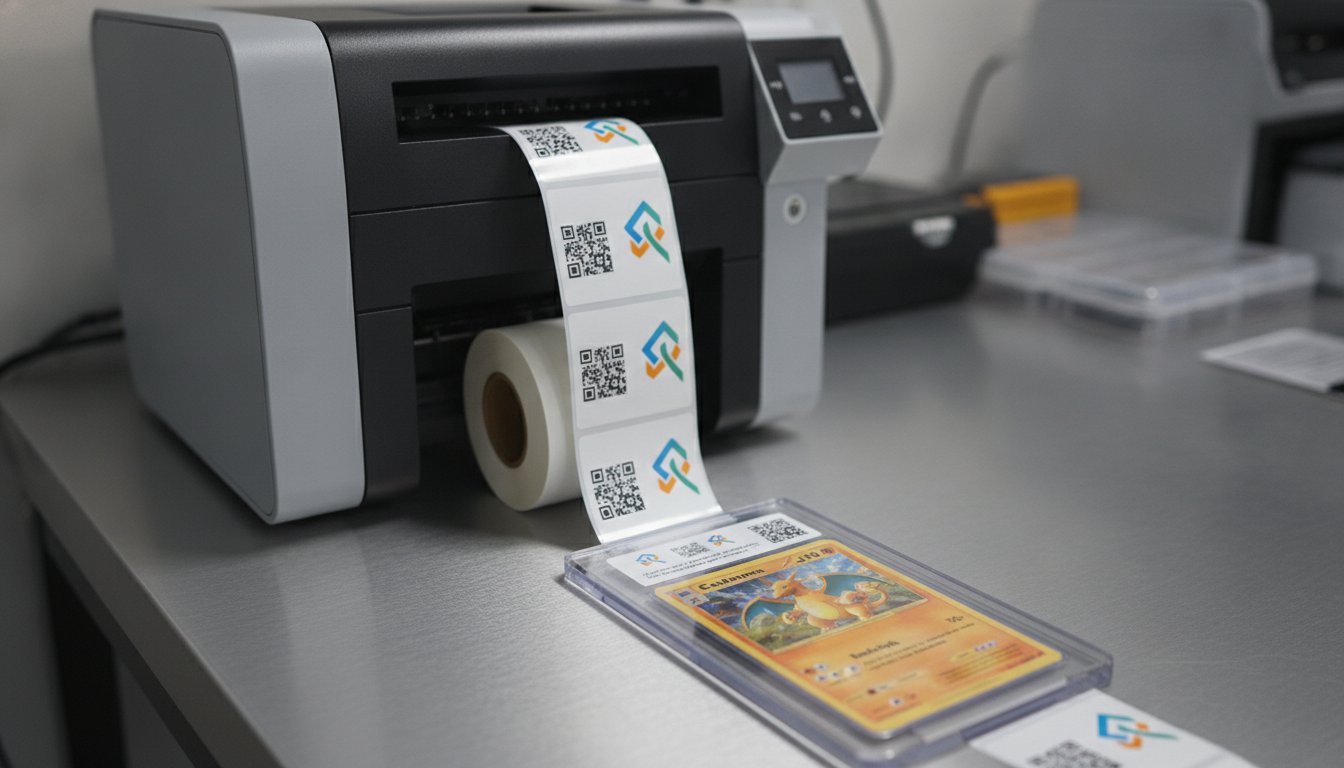
What if a single smudged Inkjet Card Grading Label is the only thing standing between your submission and a premium sale? You already know that a professional finish is everything in the secondary market, especially when PSA Value Bulk fees start at $24.99 per card. Collectors expect crisp text and vibrant logos that stay put for decades. It's frustrating when ink rubs off on glossy surfaces or colors shift between different batches, making your slabs look inconsistent and unprofessional.
This guide shows you how to choose the right high-performance technology to produce archival-quality results in-house. You'll learn how to achieve high-resolution text and perfect QR code scans for your slabs using pigment-based inkjet systems. We'll break down the best printer models for 2026 from brands like Epson and Afinia, compare synthetic materials like BOPP and polyester, and help you master cost-effective, on-demand printing. Our goal is to help you create labels that don't just look great today, but maintain their integrity for years to come.
Key Takeaways
- Discover why synthetic BOPP materials are the industry standard for creating durable, high-gloss labels that won't peel or fade inside a sonic-welded slab.
- Learn how to select the right Inkjet Card Grading Label media to ensure high-resolution text and smudge-proof results that rival major grading houses.
- Compare professional hardware like the Epson ColorWorks C6000A and Afinia L801 to find the perfect balance of precision and production speed for your business.
- Master the design of secure, scannable QR codes and implement a clean-room workflow to prevent debris from ruining your final presentation.
What is an Inkjet Card Grading Label and Why Does Media Quality Matter?
An Inkjet Card Grading Label is a specialized, small-format identification tool designed to fit perfectly inside sonic-welded or magnetic card slabs. It does more than just list a grade. It serves as the face of your brand and the primary record of a card's authenticity. As the grading market evolves, we're seeing a massive shift from traditional black-and-white thermal printing to high-resolution inkjet technology. Collectors now expect the vibrant color gradients and crisp logos that only inkjet can deliver. With PSA grading over 19 million cards in 2025 alone, the competition for shelf appeal is higher than ever. A professional look starts with the right media.
Media quality is about more than just aesthetics; it's about archival security. High-end sports and TCG cards are often held for decades as investments. If a label fades, yellows, or peels, the perceived value of the entire slab drops. Standard "off-the-shelf" stickers are a major liability in this industry. Their cheap adhesives can leach oils into the slab environment, and their paper faces are prone to moisture damage. Using a dedicated Inkjet Card Grading Label ensures that the physical record remains as pristine as the card it describes. Understanding How Inkjet Printing Works reveals why specialized coatings are necessary to lock in ink and prevent the bleeding often seen on generic materials.
Pigment vs. Dye Inks for Card Grading
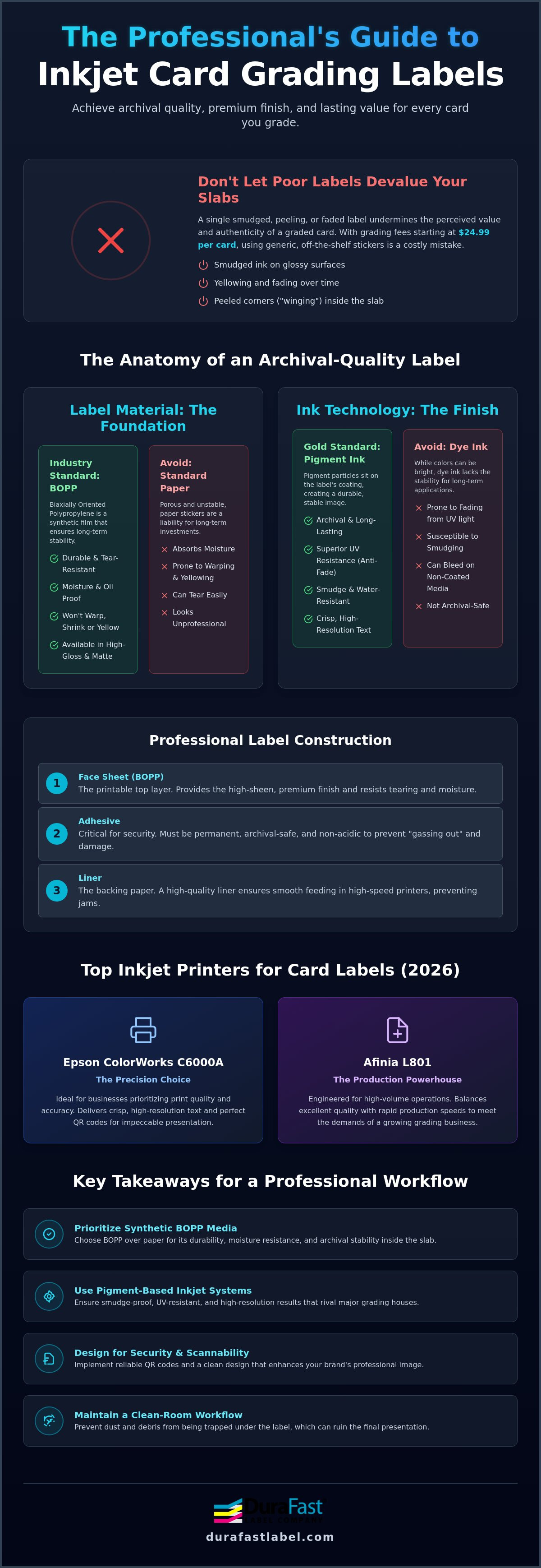
Pigment ink is the gold standard for long-term smudge resistance on card slabs. While dye inks offer bright colors, they lack the chemical stability needed for archival applications. Pigment particles sit on top of the media and bond with the coating, creating a shield against moisture and handling. This technology also provides superior UV resistance. It prevents the label from yellowing or losing contrast when displayed in hobby shops or home offices. Pigment ink provides the archival durability required for permanent card storage and protection.
The Anatomy of a Professional Grading Label
A professional label is built in layers to handle the unique stresses of a card slab. The face sheet is typically a synthetic material like BOPP, which offers a high-sheen, premium finish that resists tearing. Beneath that, the adhesive is the most critical component. It must be strong enough to prevent "winging" at the corners where the label might pull away from the plastic. However, it also needs to be chemically inert. Finally, a high-quality liner is essential for high-speed printing. It allows for easy peeling and consistent feeding through your printer without causing expensive downtime or jams.
Selecting the Best Material for Professional Grading Slabs
Choosing the right material for an Inkjet Card Grading Label isn't just about looks. It's about protecting the asset. Many hobbyists on social media suggest using standard glossy paper stickers from retail sites. This is a mistake. Paper is porous and absorbs moisture from the air, which can lead to warping or yellowing within the slab. If you're building a professional grading brand, you need synthetic media that offers archival stability. You've already invested in the card and the slab; don't let the label be the weak link.
BOPP (Biaxially Oriented Polypropylene) is the superior choice for card slabs. Unlike paper, BOPP is a plastic film that provides incredible dimensional stability. It won't shrink or curl even after being sealed in a sonic-welded holder for years. This material also resists oils from skin contact during the labeling process. For businesses aiming for the high-sheen look of major grading companies, glossy BOPP is the standard. However, matte finishes are gaining traction. Matte labels reduce glare, which is essential for collectors who want to photograph their cards for social media or sales listings. This texture also improves the reliability of scanners following QR code design and security standards.
Adhesive safety is another critical factor. You must choose non-acidic, archival-safe adhesives. Standard adhesives can "gas out" over time, creating a hazy residue on the inside of the slab or even damaging the card's surface. A professional Inkjet Card Grading Label uses a permanent adhesive that stays flat without "winging" at the edges, ensuring the label remains perfectly centered for the life of the card.
Why BOPP is the Industry Standard
BOPP wins because it's tough. It offers excellent resistance to moisture and UV light. This ensures your labels stay crisp and white over time. Because it's a synthetic film, it won't react with the plastic of the slab. You can browse specialized inkjet card grading labels designed specifically for these high-stakes applications. These materials ensure your grades remain legible and professional for decades.
Testing for Ink Compatibility
Your workflow depends on instant-dry results. Perform a "smudge test" by running your finger across a freshly printed label. If it smears, the coating isn't compatible with your pigment inks. High-volume production requires labels that are ready for slabbing immediately. You should also check the thickness of the media. If a label is too thick, it might press against the card or prevent the slab from sealing correctly. If you're unsure about which material fits your specific slab design, you can speak with a labeling expert for a recommendation.
Top Inkjet Printers for High-Resolution Card Labels in 2026
While home office printers might seem like a bargain, they often fall short when producing an Inkjet Card Grading Label. Home units lack the precision required for the tiny text and dense QR codes found on professional slabs. In the grading world, 1200 dpi resolution is non-negotiable. It ensures that every micro-print security feature and logo remains sharp. If your text is blurry, your brand looks amateur. Investing in industrial-grade hardware is the only way to match the quality of industry leaders like PSA or SGC.
Printing in-house also transforms your bottom line. Custom-ordered labels come with high minimums and long wait times. When you print on-demand, you only produce what you need. This eliminates waste and allows you to adjust designs instantly for special editions or new card sets. The ROI is clear: lower per-label costs and total control over your production schedule. You aren't just buying a printer; you're building a flexible manufacturing line for your grading business.
Epson ColorWorks C6000A for Grading
The Epson ColorWorks C6000A is the ultimate precision tool for small-format grading labels. It features a unique "peel-and-present" sensor that's perfect for manual slabbing workflows. The printer waits for you to take the label before it prints the next one, keeping your workspace organized. Because it uses pigment-based inks, your labels will be smudge-proof and archival-grade right out of the machine. For a deeper look at this technology, read our Epson ColorWorks Guide to On-Demand Printing. This model is ideal for businesses that prioritize absolute color accuracy and long-term durability.
Afinia L801 for High-Volume Operations
If you process thousands of cards daily, the Afinia L801 is your best ally. It utilizes Memjet technology to deliver incredible speeds without sacrificing image quality. You can print a full day's worth of labels in just a few minutes. This printer excels at producing deep blacks and vibrant colors on glossy media, giving your slabs a premium "pop" that collectors love. To maintain these results, it's vital to use genuine supplies. You can explore Afinia ink solutions to ensure your high-speed production never misses a beat. The L801 is a powerhouse for growing companies that need to scale their labeling workflow quickly.
Design Best Practices: QR Codes, Security Features, and Gradients
Designing an Inkjet Card Grading Label requires a balance of aesthetics and technical precision. You only have a few square inches to convey authority. It's vital to respect "safe zones" within your design. These are the margins where the label might meet the edges of the recessed slab area. If your text is too close to the edge, it can look cramped or get obscured by the plastic rails of the holder. Professional designers usually leave at least a 2mm buffer around all critical text and logos to ensure a clean, centered look every time.
Serialization is another key element. Every card you grade needs a unique identifier. Using BarTender Professional Software, you can link your label design directly to a database or spreadsheet. This allows you to print thousands of unique labels in a single batch without manual data entry. It reduces human error and ensures that every slab matches its digital record perfectly. This level of automation is what separates a professional grading operation from a hobbyist project.
QR Code Optimization
High-contrast printing is essential for mobile phone scanning. If your QR code is too small or lacks contrast against the background, collectors will struggle to verify their cards in low-light environments. You should size the code to be at least 1cm square for reliable results. Data-driven design using BarTender ensures that every slab features a unique, functional link that updates automatically as you print your batch. This creates a seamless bridge between the physical card and your online certification database.
Advanced Visual Elements
Smooth gradients are a hallmark of premium grading brands. Unlike older thermal systems, modern Design software for grading labels and inkjet technology can produce transitions without visible pixelation. This is where your brand's color profile matters. You must ensure your logo's specific hues remain consistent across different batches of media. Using ICC color profiles helps the printer translate your digital design into accurate physical colors. This consistency builds trust with collectors who want their entire collection to look uniform on the shelf.
Anti-counterfeit measures are no longer optional. Adding micro-text is a simple yet effective way to protect your brand's reputation. Micro-text is so small that it appears as a solid line unless viewed under magnification. Most standard home printers can't replicate this level of detail, making it harder for scammers to forge your labels. When you combine micro-text with serialized data, you create a robust security layer for every card you grade. If you need help setting up these advanced security features, you can consult with our technical team to find the right software and printer combination for your business.
Implementing an In-House Labeling Workflow for Your Grading Business
Establishing a professional labeling workflow is the final step in bringing your grading operation to life. It's about more than just owning a printer. You need a structured process to ensure that every Inkjet Card Grading Label is applied with surgical precision. Most errors happen during the physical handling of the slab and label. By creating a repeatable system, you reduce waste and maintain the high standards collectors expect from a premium grading service. For more insights on setting up your own production line, check out our guide on How to Print Your Own Product Labels for In-House Success.
A clean-room environment is your most powerful tool for quality control. Dust and debris are the enemies of a clear card slab. Even a single speck of lint trapped under the label or inside the plastic holder can ruin the presentation. Set up your labeling station in a low-traffic area with an air purifier. Use anti-static wipes on the slabs before applying your labels. Before you seal the card, verify the scanability of every QR code. With global QR code usage expected to reach 2.2 billion scans in 2026, collectors will definitely use that feature to check your certification database. If the code doesn't scan, the slab shouldn't ship.
As your business grows, your equipment needs will shift. You might start with a desktop unit like the Epson C6000A for small batches. However, if you're part of the 5.3% CAGR growth in the label printing market, you'll eventually need to scale. Moving to industrial presses or high-speed systems like the Afinia L901 allows you to handle thousands of cards per week without bottlenecks. Scaling isn't just about speed; it's about maintaining consistency as your volume increases.
Workflow Efficiency
Organize your printing by card type to keep your team focused. Grouping Sports, Pokemon, and MTG cards separately allows you to use specific label templates without constantly switching designs. For higher volumes, consider using label rewinders. These devices neatly roll your printed labels, making them easier to manage during the slabbing process. Training staff to use alignment jigs or manual applicators ensures that every Inkjet Card Grading Label is perfectly centered. This level of uniformity is a hallmark of professional grading.
Future-Proofing Your Grading Service
Stay ahead of industry trends by exploring new media options. Collectors are increasingly drawn to holographic or textured inkjet labels that offer a unique tactile feel. On-demand printing also helps you stay environmentally conscious. You only print what you need, which significantly reduces the waste associated with large, pre-printed label orders. This flexibility allows you to pivot your brand design quickly as the market evolves. If you're ready to build a reliable production line, Contact DuraFast Label Company for a customized card grading label solution tailored to your specific business needs.
Elevate Your Grading Brand with Professional In-House Printing
Taking control of your labeling process is the most effective way to ensure your slabs meet the highest market standards. By choosing specialized synthetic media like BOPP, you protect the long-term value of every card you grade. High-resolution technology from Epson and Afinia delivers the crisp text and vibrant gradients collectors demand. Producing a professional Inkjet Card Grading Label in-house doesn't just save money; it gives you the flexibility to adapt to new security needs instantly.
It's important to have a partner who understands the nuances of the hobby. We are a proud Epson and Afinia Authorized Partner, offering specialized synthetic media designed specifically for collectors. Our team provides expert technical support to help you master your in-house printing workflow from day one. If you're ready to transform your presentation and scale your operations, we're here to help you find the right equipment and supplies.
Shop High-Resolution Inkjet Card Grading Labels at DuraFast
Your journey toward professional-grade slabs starts with the right foundation. Let's build a grading service that collectors trust for decades to come.
Frequently Asked Questions
What is the standard size for a card grading label?
Standard labels are typically 2.5 by 1 inches, though custom sizes are common depending on the specific slab manufacturer. Most sonic-welded holders feature a recessed area designed for these dimensions. It's best to measure your specific slabs before ordering media to ensure a perfect fit without overlapping the plastic rails.
Will inkjet ink smudge on card grading slabs?
Inkjet ink won't smudge on card grading slabs if you use the correct ink and media combination. Pigment inks paired with compatible synthetic media are smudge-proof almost instantly. This is vital for high-volume workflows where cards are slabbed immediately after printing. Using an Inkjet Card Grading Label with a specialized top-coat ensures the ink bonds permanently to the surface.
Do I need a special printer for QR codes on grading labels?
You need a printer with at least 600 dpi resolution, though 1200 dpi is recommended for the crispness required for small QR codes. High resolution ensures that the dense data patterns remain sharp and scannable by mobile devices. Industrial units like the Epson ColorWorks series provide the precision needed for these technical design elements.
Can I use thermal labels for card grading?
While you can use thermal labels, they generally lack the professional, premium feel that inkjet provides for high-end collectibles. Thermal printing is usually limited to black and white and can fade over time when exposed to heat or light. Inkjet technology allows for vibrant brand logos and complex security gradients that collectors prefer.
What is the best material for card grading labels?
Polypropylene (BOPP) is the industry standard and best choice for card grading labels. It offers superior durability, moisture resistance, and archival safety compared to standard paper stickers. This ensures the label doesn't yellow, warp, or degrade inside the sealed slab environment over several decades.
How do I ensure my labels don't peel off the plastic slabs?
To ensure labels don't peel, you must use a high-tack permanent adhesive specifically rated for low-energy surfaces like plastic. This prevents the edges from lifting or "winging" over time. Choosing media designed for the specific chemical properties of card slabs ensures a long-lasting bond that remains centered and flat.
Can I print holographic elements with an inkjet printer?
You can achieve holographic effects by using specialized holographic inkjet media. This adds a significant security boost and a premium aesthetic to your slabs without requiring expensive custom foils. It's an excellent way to differentiate your grading service and make your slabs stand out in a crowded marketplace.
Is in-house printing cheaper than ordering custom labels?
In-house printing is significantly more cost-effective for grading companies because it eliminates minimum order quantities and shipping delays. You gain the ability to print an Inkjet Card Grading Label exactly when you need it, which reduces inventory waste. This on-demand flexibility allows you to scale your production and change designs without extra costs.