The 2026 Professional Guide to Thermal Label Printers: Technology and Selection
29th Jun 2026
Did you know that as of January 2026, Amazon discontinued all in-house prep and labeling services for U.S. sellers? This shift puts the full weight of GS1 validation and placement accuracy directly on your shoulders. You likely already know that a reliable thermal label printer is the backbone of your shipping and inventory workflow. It's frustrating when labels fade in storage or your hardware jams right when you hit peak volume. No one wants to deal with the high cost of ink or confusing ribbon compatibility issues while trying to scale a business.
This guide will help you master the technical differences between direct thermal and thermal transfer methods. Our goal is to help you identify the ideal hardware for your specific volume and durability needs. We'll explore how to reduce your cost-per-label and ensure your new system integrates seamlessly with your existing shipping software. By the end of this article, you'll have the confidence to choose a labeling solution that keeps your operations running smoothly and meets the latest 2026 compliance standards.
Key Takeaways
- Learn the technical differences between direct thermal and thermal transfer methods to prevent label fading and ensure long-term durability.
- Determine if your business needs a compact desktop model or a high-capacity industrial thermal label printer based on your daily volume.
- Master critical specifications like DPI and print speed to produce crisp, scannable barcodes that meet strict shipping standards.
- Find out how to choose compatible ribbons and labels that protect your hardware while reducing your overall cost-per-label.
- Follow a clear implementation plan to set up an efficient labeling station that handles environmental stress and high-volume demands.
Understanding Thermal Label Printer Technology: Direct vs. Transfer
How does a Label Printer create crisp images without a single drop of ink? It's a common question for business owners tired of expensive toner. The answer lies in heat. A thermal label printer uses a specialized print head to generate text and barcodes through one of two distinct methods. While both technologies eliminate the mess of traditional printing, they serve very different operational needs. Understanding these differences is the first step toward a labeling system that won't let you down.
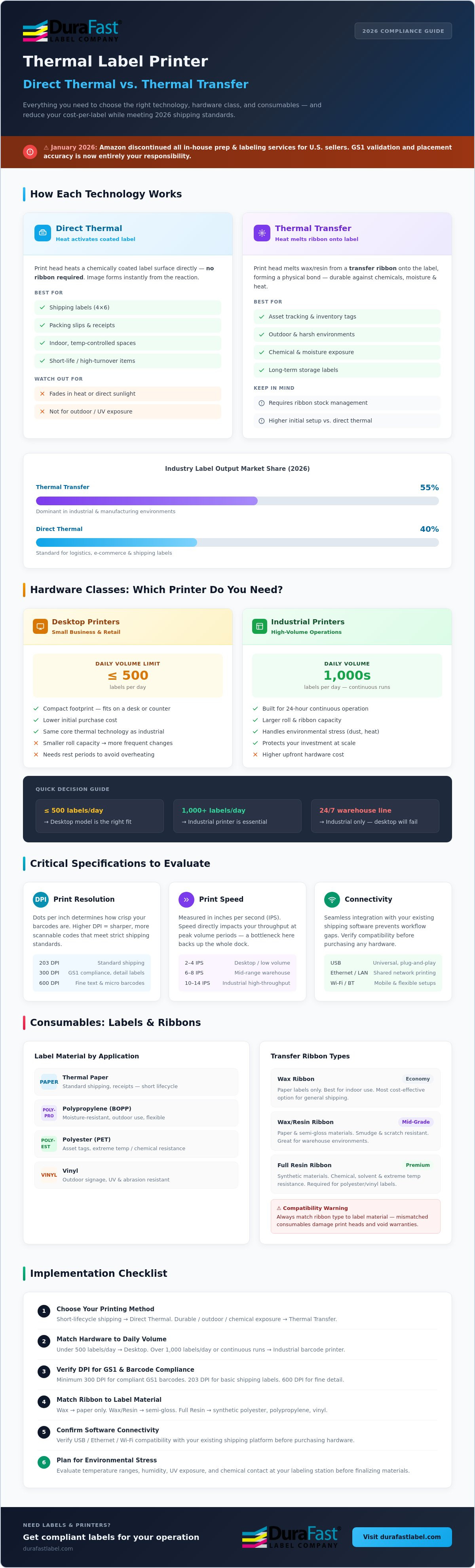
Direct thermal technology is a popular choice for high-speed logistics. In this process, the print head applies heat directly to direct thermal labels, which are coated with a heat-sensitive chemical layer. This reaction creates the image instantly. It's efficient and easy to manage because there are no ribbons to replace. Currently, direct thermal printers cover roughly 40% of logistics labels. However, because these labels remain chemically active, they'll eventually fade or darken if they're exposed to high heat or direct sunlight for too long. If you've ever seen a shipping label turn black in a hot car, you've seen this limitation in action.
Thermal transfer printing solves the problem of label longevity. Instead of reacting with the paper, the print head melts a thermal transfer ribbon onto the label surface. This creates a physical bond that's much tougher than a chemical reaction. Thermal transfer printers account for about 55% of industrial label output today. This method is essential if you need your labels to survive harsh warehouse conditions or long-term storage. It's the professional choice for assets that must remain identifiable for years, providing a level of durability that direct thermal simply cannot match.
When to Choose Direct Thermal Printing
This method is your best bet for high-turnover items. It's the standard for 4x6 shipping labels and packing slips that only need to last for the duration of a delivery. Because you don't need to stock ribbons, your inventory management is much simpler. It's a great fit for indoor office environments where temperature stays consistent. Just remember that these labels aren't meant for the dashboard of a hot truck or outdoor exposure where UV rays can wash out your data.
The Advantages of Thermal Transfer Systems
Do you need labels that can withstand chemicals, moisture, or extreme temperatures? Thermal transfer is the answer. By using thermal transfer labels, you can print on durable materials like polyester, polypropylene, and vinyl. This makes it the ideal technology for asset tracking and outdoor signage. The resulting print is crisp and permanent; it won't smudge or scratch off during heavy handling in a busy warehouse environment. It's a reliable solution for anyone prioritizing long-term legibility.
Hardware Classes: Desktop vs. Industrial Thermal Printers
Choosing the right hardware class is just as important as picking the printing method. If you buy a small desktop thermal printer for a 24-hour manufacturing line, it will likely fail within weeks. These machines are designed for specific duty cycles. Industrial models are built to run constantly, while desktop units usually need periods of rest to prevent the print head from overheating. Matching your hardware to your actual daily output is the best way to protect your investment and keep your shipping dock moving.
Desktop Printers for Small Business and Retail
Space is often at a premium in retail shops or small offices. A compact thermal label printer fits easily on a desk or counter without cluttering the area. The Godex desktop series is a perfect example of this balance, providing professional features in a space-saving design. These units are cost-effective for businesses printing fewer than 500 labels per day. They utilize the same Thermal printing technology as their larger counterparts but have smaller internal capacities. This means you'll change label rolls and ribbons more frequently, which is a fair trade-off for the lower initial price point.
Industrial Barcode Printers for High-Volume Operations
When your operation scales to thousands of labels every day, you need a machine built for endurance. Industrial printers feature rugged metal frames and high-performance internal components that withstand dust, heat, and vibration. The Zebra ZT411 Thermal Transfer Printer is an industry benchmark for a reason. It handles high-volume printing with incredible precision. These models often reach print speeds of 10 to 14 inches per second (IPS), allowing you to churn through massive print jobs in minutes. They also support much larger media rolls, which minimizes the time your staff spends reloading supplies. In a 24/7 warehouse environment, this extra capacity translates directly into higher productivity and less frustration.
For businesses with a mobile workforce, portable printers offer another layer of flexibility. These battery-powered units allow for on-the-spot labeling in logistics or field service, ensuring that data is captured the moment it's needed. Regardless of the size you choose, always verify the manufacturer's recommended daily volume. Pushing a printer beyond its intended limits is the fastest way to cause hardware failure. If you're struggling to decide between a desktop and an industrial model for your current growth, ask a professional for a hardware recommendation based on your specific workflow.
Critical Specifications: DPI, Print Speed, and Connectivity
Choosing a thermal label printer isn't just about picking a brand. It's about the technical specs under the hood. If your barcodes aren't scannable or your printer lags between every label, your workflow will suffer. You need to evaluate three core specifications: DPI, print speed, and connectivity. These numbers determine if your hardware will solve your business pains or create new ones in your daily operations.
Print speed is measured in inches per second (IPS). While a desktop model might print at 4 to 6 IPS, a high-performance industrial model can reach 10 to 14 IPS. This speed is vital for high-volume environments where every second counts. However, don't ignore the processing power. A printer with more memory and a faster processor will start the first label of a batch much quicker. This "time to first label" is a hidden bottleneck in many shipping departments. For a deeper look at how these machines function, you can explore label printer applications and hardware to see how different components work together.
Choosing the Right DPI for Your Application
Dots Per Inch (DPI) determines the clarity of your print. While some competitors claim 203 DPI is enough for everything, that's no longer true in 2026. As of this year, a minimum of 300 DPI is recommended for many applications to avoid scanning issues. This is especially true for dense GS1-128 barcodes required by major retailers.
- 203 DPI: Works well for standard 4x6 shipping labels and large text.
- 300 DPI: The professional standard for complex logos, small fonts, and high-density 2D barcodes.
- 600 DPI: Necessary for specialized electronics, jewelry tags, and tiny healthcare specimen labels where precision is non-negotiable.
Connectivity and Software Integration
How will your printer talk to your computer? Most units come with a standard USB port, but that's rarely enough for a modern warehouse. You might need Ethernet for a shared network or Wi-Fi for a mobile workstation. If you're using tablets or handheld scanners in the field, Bluetooth connectivity is a must-have feature. It's also vital to ensure your hardware supports standard languages like ZPL or EPL. This ensures it will play nice with your existing shipping software without requiring custom drivers.
To get the most out of your hardware, use professional design tools like BarTender Professional Software. This software allows you to create compliant, high-performance labels that take full advantage of your printer's resolution. Whether you're printing a single asset tag or ten thousand shipping labels, the right software integration makes the process stress-free. Always check your network infrastructure before buying to ensure your new thermal label printer can integrate seamlessly into your current digital ecosystem.
Consumables: Thermal Labels and Transfer Ribbons
Your choice of supplies is just as critical as the hardware itself. Low-quality consumables can wear down your print head prematurely. The print head is the most expensive component in your thermal label printer. It pays to use high-quality media. You'll avoid unnecessary downtime and save money on repairs. Beyond quality, you must match the chemistry of your labels to the chemistry of your ribbons for the best results.
It's a simple rule: always match the ribbon width to the label width. In fact, the ribbon should be slightly wider than the label backing. This prevents the edges of the label from rubbing directly against the print head. This abrasion can cause permanent damage over time. By using a slightly wider ribbon, you provide a protective layer of lubricant that extends the life of your hardware.
Selecting the Correct Thermal Transfer Ribbon
Thermal transfer ribbons aren't all the same. They use different chemical formulations to bond with specific label materials. Choosing the wrong one can lead to smudging or labels that won't print at all. Explore our full range of thermal transfer ribbons for all major brands to find the right match for your printer.
- Wax Ribbons: These are the most economical choice. They're perfect for standard paper labels and general shipping tasks where labels won't face heavy handling.
- Wax-Resin Ribbons: These provide increased smudge and scratch resistance. Use these for semi-gloss or synthetic labels that need to stay legible in busy warehouse environments.
- Resin Ribbons: This is the gold standard for durability. Resin bonds permanently to polyester and other high-end synthetic labels. They're essential for labels exposed to chemicals, moisture, or extreme heat.
Direct Thermal Label Applications
Direct thermal printing is a favorite for e-commerce and logistics. It's perfect for 4x6 shipping labels that only need to last during the delivery process. These labels come in various grades, including standard paper and synthetic versions for mobile use. You can even find them in different colors and adhesive strengths for temporary retail pricing or office organization. Learn more about direct thermal labels for ink-free operations.
Selecting the wrong supply combination is a common mistake that leads to hardware failure. If you aren't sure which ribbon formulation matches your specific label material, contact our experts for a compatibility check. We'll help you find a durable solution that keeps your business running without the stress of hardware jams or faded prints.
Implementation: Setting Up Your In-House Labeling Station
Setting up an in-house labeling station doesn't have to be a daunting task. It's about following a logical progression from your specific business needs to the final hardware choice. You've already learned about the chemistry of ribbons and the durability of different print methods. Now, it's time to put that knowledge into action. Your first step is to be honest about your maximum daily volume. A thermal label printer is an investment in your operational efficiency, and picking the right class from the start prevents costly hardware failures down the road.
Environment matters just as much as volume. If your warehouse is prone to moisture, chemicals, or high heat, you'll need a thermal transfer setup to ensure your barcodes remain scannable. Choosing a reputable brand like Zebra, Godex, or Brother ensures you have access to reliable long-term support and updated drivers. Don't forget to integrate professional design software. This ensures your labels meet industry compliance standards and scan correctly every single time. A well-organized station saves time and reduces the stress of shipping deadlines.
Step-by-Step Selection Framework
Use this simple framework to narrow down your choices and avoid common buying mistakes. It's designed to move you from a problem to a solution with minimal friction.
- Step 1: Determine label lifespan. If your labels need to last more than six months or face sunlight, choose thermal transfer. For short-term shipping, direct thermal is fine.
- Step 2: Calculate daily volume. Be realistic about your peak seasons. If you're hitting over 500 labels a day, move up to an industrial model.
- Step 3: Identify required resolution. Most shipping labels look great at 203 DPI, but choose 300 DPI if you have small text or complex 2D barcodes.
- Step 4: Select compatible supplies. Ensure you stock high-quality thermal labels and ribbons that match your specific printer model.
Why Sourcing from a Specialized Provider Matters
It's tempting to buy from a big-box retailer, but they lack the technical depth to support your business. A specialized provider has already done the heavy lifting of vetting products. You get access to expert support and hardware that's actually suited for industrial use. Consistent supply of high-quality consumables is also vital. Using the wrong labels can cause adhesive ooze or abrasive wear that kills your print head. For a deeper look at material choices, check out our 2026 Guide to Thermal Transfer Labels to find the best match for your durability needs. We're here to be your dependable expert and friendly guide through the entire process.
Future-Proof Your Labeling Operations
Selecting the right thermal label printer is a strategic decision that directly impacts your operational efficiency and bottom line. By matching your technology to your environment and choosing a hardware class that fits your daily volume, you eliminate the risk of hardware failure. You now have the technical knowledge to navigate DPI settings, connectivity options, and consumable formulations with confidence. It's about building a system that works as hard as you do.
We are an authorized distributor for industry leaders like Zebra, Godex, and Brother, ensuring you receive genuine hardware and reliable support. Our inventory of high-performance DuraFast ribbons and labels is always ready for immediate shipment. If you have questions about software integration or hardware vetting, our expert North American technical support team is ready to help.
Shop our complete collection of professional Thermal Label Printers to find the ideal solution for your business. We're here to help you simplify your labeling process and achieve long-term reliability. Let's get your shipping dock moving faster today.
Frequently Asked Questions
Do thermal label printers really not need ink?
Yes, thermal label printers do not require liquid ink or toner cartridges. Direct thermal models use heat-sensitive media that darkens when the print head applies heat. Thermal transfer units use a solid ribbon that melts onto the label. This design eliminates the mess of leaking cartridges and the high cost of replacement ink. It's an efficient way to manage your labeling budget without sacrificing quality.
How long do thermal labels last before fading?
The lifespan of your labels depends on the printing technology you choose. Standard direct thermal labels typically remain legible for six to twelve months in indoor office conditions. However, heat or sunlight can cause them to fade much faster. If you need labels to last for years in harsh warehouse environments, thermal transfer technology is the better choice. These labels are designed for long-term durability and resist environmental stress.
Can a thermal printer print in color?
Standard thermal technology is primarily designed for black-and-white printing of text and barcodes. While some specialized thermal printers can produce limited spot colors using specific ribbons, they aren't meant for full-color product branding. If your business requires vibrant, full-color labels, you should explore inkjet models like the Epson ColorWorks C6000A or Afinia L801. These machines are built specifically for high-quality color output and detailed graphics.
What is the difference between wax and resin ribbons?
Wax ribbons are the most economical choice and work best with standard paper labels for general shipping. Resin ribbons offer the highest level of durability and are required for printing on synthetic materials like polyester. They resist chemicals, moisture, and extreme heat. If you need a balance of both, wax-resin ribbons provide better smudge resistance than pure wax while remaining more affordable than full resin options for semi-gloss labels.
Will any thermal label work in my printer?
No, you must match the label type to your specific printer's technology and physical requirements. A thermal label printer designed for direct thermal media cannot use thermal transfer labels without a ribbon. You also need to check the roll's core size and maximum width. Using incompatible labels can cause jams or even damage your print head. Always verify your hardware specifications before ordering a new roll of media to ensure compatibility.
Is it cheaper to print labels in-house or outsource?
Printing in-house is typically much more cost-effective for businesses with consistent shipping or inventory needs. While outsourcing might seem easier initially, the per-label cost is significantly higher due to vendor markups and shipping fees. Managing your own station gives you total control over your inventory levels. You can print exactly what you need, when you need it, which eliminates waste and reduces your long-term operational expenses as you scale.
How do I clean a thermal print head?
You should clean the print head every time you change a roll of labels or ribbon. Use a lint-free cloth or a specialized cleaning pen dipped in 99% isopropyl alcohol. Gently wipe the heating elements to remove any adhesive residue or dust buildup. This simple maintenance task prevents poor print quality and extends the life of your hardware. To keep the rest of your equipment and workspace free of loose debris, BarberNation: Professional Barber Tools and Grooming Supplies provides high-performance air dusters that are perfect for precision cleaning. Never use sharp objects to scrape the print head, as this causes permanent and expensive damage.
Can I print shipping labels from my phone?
Yes, many modern thermal printers support mobile printing through Bluetooth or Wi-Fi connectivity. Models like the Seiko MP-A40 or Zebra portable printers are designed specifically for this workflow. You can easily pair your smartphone or tablet with the printer using a dedicated app or standard print drivers. This is a game-changer for field service workers or warehouse staff who need to generate scannable labels while moving around a large facility.