The Ultimate Guide to Building an Efficient Labeling System Across Your Entire Business
31st Dec 2025
Labeling plays a huge role in keeping a business organized. The right labeling system saves time, reduces errors, and improves productivity. This guide covers everything growing companies need: label printers, software, scanners, ribbons, materials, and workflow planning.
We’ll also highlight tools like thermal label printers, best label design software for printers, barcode scanners online, custom thermal transfer labels, and blank inkjet labels for sale.
Why You Need a Unified Labeling System
Many companies start small with a simple printer and a stack of labels. Over time, this approach leads to mistakes, slowdowns, and wasted supplies.
A unified system ensures:
- Consistent label design across products and departments.
- Faster order processing and shipping.
- Easy tracking of inventory and assets.
- Reduced errors in labeling and scanning.
Investing in the right tools upfront saves costs and headaches later.
Choosing the Right Label Printer
The printer is the heart of your system. Businesses mostly choose thermal printers for speed and durability. Thermal printers use heat to print labels, eliminating the need for ink in many cases.
Direct Thermal vs. Thermal Transfer
- Direct Thermal: Prints directly on heat-sensitive labels. Ideal for short-term labels like shipping tags.
- Thermal Transfer: Uses a ribbon to print on a variety of materials. Best for long-lasting labels.
Look for printers compatible with custom thermal transfer labels. Check speed, resolution, and connectivity. USB and network options allow multiple users to print easily.
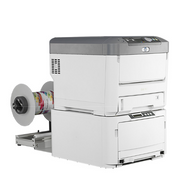
The UniNet iColor 700 is a powerful LED-toner production label printer designed for high-volume, on-demand runs. It supports a wide range of substrates — from standard paper stocks to durable vinyl, BOPP, and PET — making it great for products that require moisture, tear, or UV resistance.
With fast print speeds of around 30 ft/min and optional white or fluorescent toner, it gives growing brands the flexibility to update labels anytime without outsourcing.
Label Materials Matter
Not all labels are equal. Material choice affects durability, readability, and application.
- Paper labels: Affordable, good for indoor use, not moisture-resistant.
- Polyester or vinyl labels: Durable, tear-resistant, ideal for chemicals or outdoor use.
- Blank inkjet labels for sale: Perfect if you print in-house with inkjet printers.
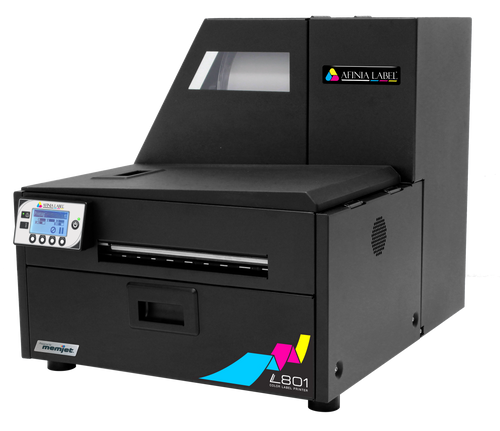
Choose materials that match your environment and the product life cycle. The Afinia L801 takes advantage of Memjet’s ultra-fast inkjet technology, printing at up to 60 ft/min for efficient roll-to-roll operation. It’s built for production environments where vivid color and fast turnaround are both critical — such as food, beverage, and industrial labels. Its low ink cost per label helps companies scale without breaking their budget.
Picking the Best Label Design Software
Software helps you create professional, consistent labels. Look for tools that support multiple templates, variable data, and barcode generation.
Top features include:
- Easy integration with your printer.
- Pre-designed templates for fast setup.
- Compatibility with both barcode and QR code printing.
Search for the best label design software for printers to ensure your labels look professional and meet compliance standards.
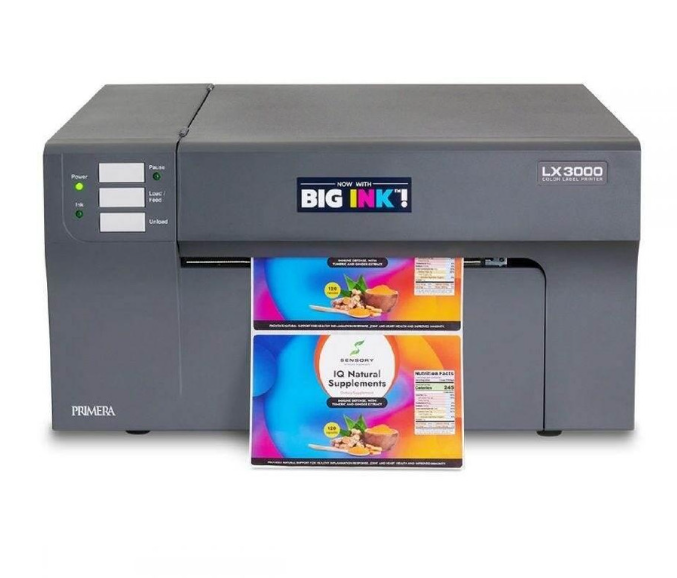
For businesses focused on premium branding, the Primera LX3000 offers photo-quality labels up to 1200 dpi. Its large-capacity ink tanks lower the cost for full-color printing, making it suitable for small to medium runs where quality matters — like cosmetics, gourmet foods, and consumer goods.
Barcode Scanners: Speed and Accuracy
Scanners make inventory tracking and shipping efficient. Wireless or USB scanners connect directly to your system.
- 1D vs. 2D scanners: 1D reads traditional barcodes. 2D reads QR codes, which store more information.
- Check durability for warehouse use.
- Look for scanners that are easy to clean and maintain.
You can buy barcode scanners online with options for various budgets and use cases.
Ribbons and Consumables
If using thermal transfer printers, select the right ribbon. Options include:
- Wax ribbons for paper labels.
- Resin ribbons for synthetic materials.
- Wax/resin blend for general use.
Ribbons affect print longevity and quality. Always match ribbon type to label material.
Streamlining Workflow Across Departments
A labeling system works best when integrated into business processes. Follow these steps:
- Assess Needs: Identify products, packages, and assets that need labeling.
- Standardize Designs: Use consistent branding and layouts.
- Assign Roles: Define who prints, applies, and audits labels.
- Automate Where Possible: Use software to populate variable data automatically.
- Train Staff: Make sure employees know proper labeling and scanning procedures.
- Monitor and Adjust: Regularly review errors or inefficiencies and refine your process.
A planned workflow reduces mistakes and improves efficiency.
Maintenance Tips for Long-Term Efficiency
- Clean printheads regularly.
- Keep labels and ribbons in dry, cool storage.
- Update software and drivers.
- Track printer usage and schedule preventive maintenance.
Routine care prevents downtime and keeps labels looking professional.
Cost Considerations
Investing in a labeling system may seem expensive, but it saves money over time. Consider:
- Printer cost versus speed and durability.
- Software licensing fees.
- Label materials and ribbons.
- Scanners for accuracy.
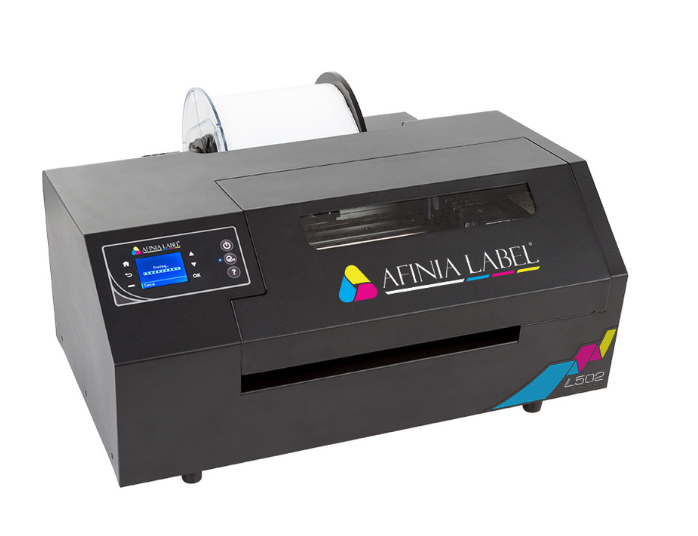
Choosing the right components ensures you get the most value for your investment. The Afinia L502 is a versatile desktop solution offering water- and chemical-resistant pigment inks — a strong choice for durable warehouse, GHS chemical, and outdoor labels. It’s ideal for companies wanting both short-run flexibility and long-term durability.
Choosing Between In-House and Outsourced Printing
Some companies print all labels in-house. Others outsource large runs.
In-house printing advantages:
- Immediate label updates.
- Lower shipping errors.
- Control over design and quality.
Outsourcing advantages:
- Bulk pricing.
- Access to high-end printers.
- Reduced internal workload.
Often, a hybrid approach works best for growing businesses.
The Role of Custom Labels
Custom labels reinforce branding and compliance. Features can include:
- Logos and color schemes.
- Regulatory symbols.
- QR codes or serial numbers.
Using custom thermal transfer labels ensures your brand stands out while keeping information clear and durable.
Integrating Inkjet Labels
If your business uses inkjet printers for small runs, consider blank inkjet labels for sale. They allow flexible printing without wasting pre-printed stock.
Inkjet labels work best for low-volume, high-variability printing. They are easy to design and print on demand.
Measuring Labeling System Success
Track key metrics to ensure your system works:
- Labeling error rate.
- Time per label printed and applied.
- Inventory accuracy.
- Staff satisfaction and ease of use.
Refine your system regularly based on these insights.
Ready to Upgrade Your Labeling System?
A complete labeling system combines printers, software, scanners, ribbons, materials, and workflow planning. Companies that invest in a structured approach save time, reduce errors, and improve efficiency.
At DuraFast Label Company, we help businesses get reliable, professional labels quickly. We offer a wide selection of thermal label printers for sale, custom thermal transfer labels, and consumables for both inkjet and thermal printers. Our team can guide you to the right software and scanners to streamline your operations. Get in touch here to learn more.