How to Print on Heat Shrink Tubing Like a Pro?
16th Jan 2026
Key Insights
- Heat shrink tubing provides durable, professional wire labeling that resists heat, moisture, chemicals, and wear.
- Printing on tubing ensures long-lasting identification, reduces errors, and simplifies cable management.
- Thermal transfer printers are ideal; inkjet printers work for small-scale or DIY projects.
- Use high-quality tubing, resin ribbons, proper label design, and a heat gun for clean, precise results.
- Print before shrinking; ensure proper alignment, tubing diameter, and shrink ratio for clarity and fit.
- Common issues include smudging, misalignment, wrinkling, or peeling; testing and correct technique prevent errors.
- DuraFast offers professional-grade labels and supplies for reliable, long-lasting heat shrink labeling solutions.
Messy, fading wire labels can turn a quick job into hours of confusion. In fast-paced electrical or industrial work, clear identification isn’t just nice to have; it’s essential for safety, accuracy, and efficiency.
That’s where heat shrink tubing comes in. It offers durable, professional-grade labeling that stands up to heat, moisture, and wear. However, to achieve crisp, lasting results, you need to know exactly how to print on heat shrink tubing the right way.
In this guide, you’ll learn everything you need to print clean, permanent labels on custom printed heat shrink tubing with professional precision using the right materials, tools, and techniques made simple.
What Is Heat Shrink Tubing & Why Should You Print on It?
If you’ve ever dealt with tangled wires or faded labels, you know how quickly a neat setup can turn into a confusing mess. That’s where heat shrink tubing comes in.
It’s a flexible plastic sleeve that shrinks tightly around wires when heat is applied, creating a clean, secure, and professional finish. Beyond protecting cables, it’s one of the most effective ways to label them clearly and permanently.
Printing directly on heat shrink tubing gives your work a durable, high-quality look that lasts. Unlike paper or adhesive labels that can peel, fade, or fall off, printed tubing keeps your markings clear and intact even under heat, moisture, oil, chemicals, and everyday wear.
Here’s why printing on heat shrink tubing is worth it:
- Long-lasting identification: Printed tubing stays legible for years, even in harsh environments.
- Error prevention: Clear, consistent labeling helps avoid costly wiring mistakes.
- Professional finish: Clean, printed labels give your work a polished, reliable look.
- Easy organization: Simplifies cable tracing and maintenance.
- Regulatory compliance: Meets labeling standards required in many industries.
Printing on heat shrink tubing isn’t just about neatness; it’s about working smarter, safer, and more efficiently every single time.
How Does Printing on Heat Shrink Tubing Work?
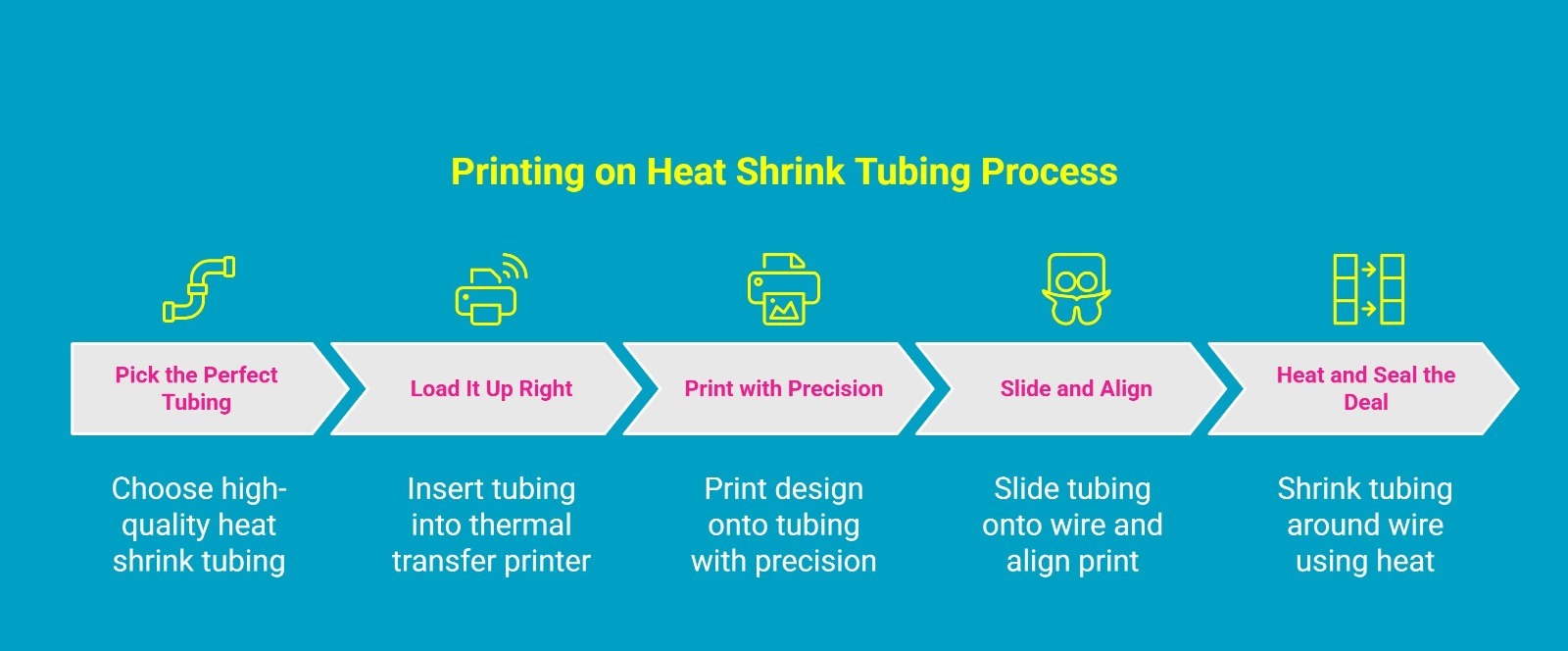
Printing on heat shrink tubing is all about precision and durability. The process ensures that every wire label stays clear and readable, even after exposure to heat, moisture, and handling. While it might sound technical, it’s actually simple once you understand each step.
Here’s how it works:
Step 1: Pick the Perfect Tubing
Start by choosing high-quality continuous heat shrink tubing that fits your wire size and shrink tube printer type. Polyolefin tubing is flexible, heat-resistant, and ideal for heat shrink tubing custom printing. Always check the shrink ratio, such as 2:1 or 3:1, so the shrinkable tubing fits snugly once heated.
Step 2: Load It Up Right
Insert the tubing into a heat shrink tubing wire label printer, which uses heat and pressure to bond ink from a ribbon onto the tubing. This creates a permanent, smudge-proof print. Use compatible software to design your labels with text, symbols, or barcodes for a professional finish.
Step 3: Print with Precision
Print your design directly onto the tubing, ensuring the text size and placement match your wire dimensions. The printer applies heat precisely, giving you sharp, high-contrast labels that remain legible from any angle.
Step 4: Slide and Align
After printing, carefully slide the tubing onto the correct section of the wire. Align the printed text so it’s easy to read once installed. Make sure everything is in place before shrinking, since repositioning isn’t possible afterwards.
Step 5: Heat and Seal the Deal
Use a heat gun or controlled heat source to shrink the tubing evenly around the wire. Avoid overheating to protect both the tubing and the print. As it tightens, your label becomes permanent, smooth, and professional.
When done right, this process delivers durable, professional-grade wire labels that resist fading, moisture, and wear. It’s a simple technique that brings order, safety, and clarity to every project.
What Tools and Printers Do You Need to Print on Heat Shrink Tubing?
Getting clean, long-lasting results on heat shrink tubing depends on using the right combination of printers and tools. Both play a vital role in ensuring your labels stay clear, durable, and professional-looking even after heat and handling.
Before you start printing, it’s important to understand what equipment makes the process work smoothly. From selecting the right printer to using the right tools, every part of your setup contributes to that crisp, professional finish.
Finding the Best Heat Shrink Tubing Printer
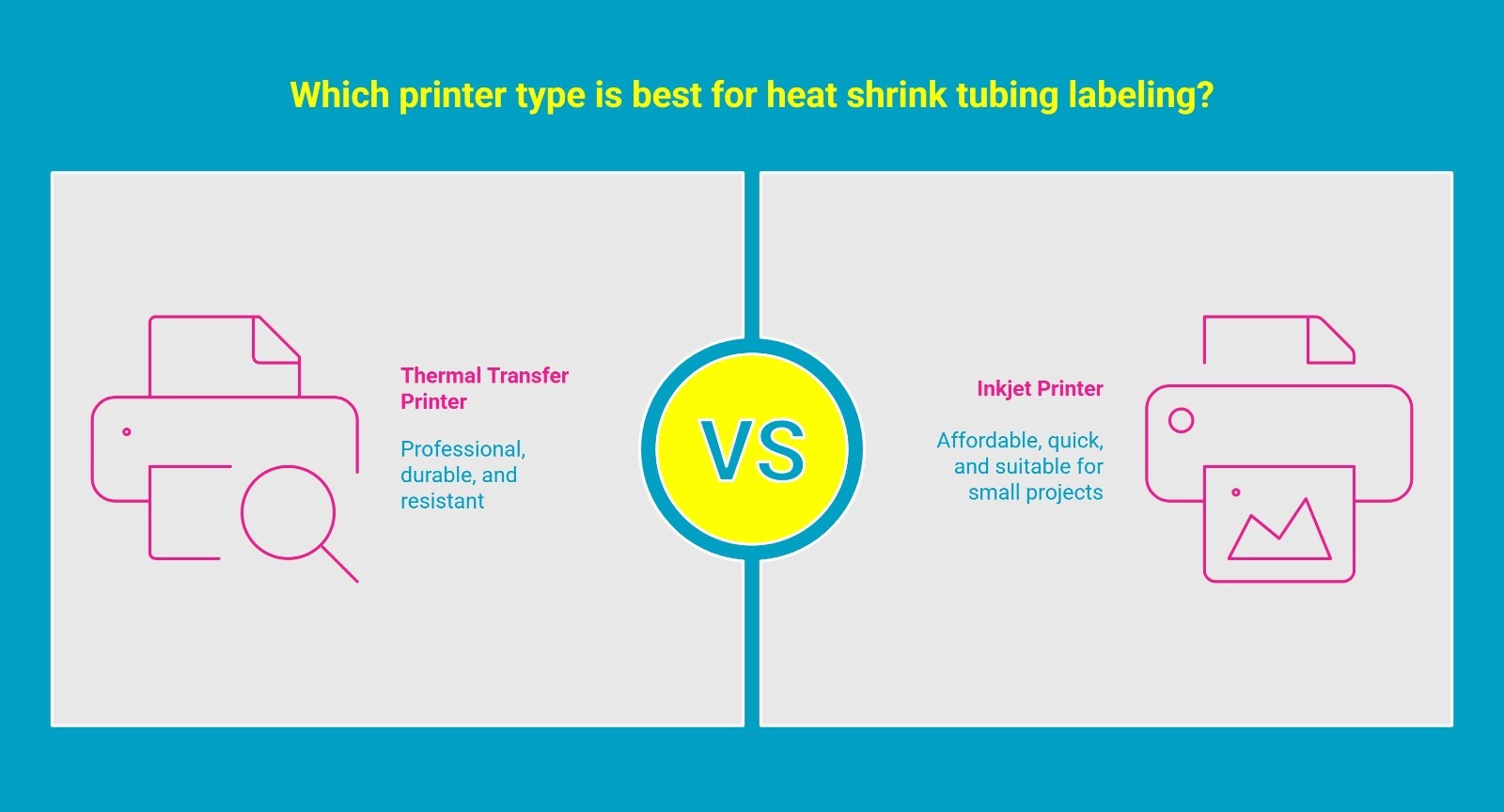
Your printer determines how sharp, durable, and long-lasting your printed labels will be. Here are the main printer options to consider before you get started.
1. Thermal Transfer Printer: The Professional’s Choice
A thermal transfer printer is the most reliable and widely used option for heat shrink labeling. It uses heat and pressure to transfer ink from a resin ribbon onto the tubing surface, creating sharp, permanent prints that resist smudging, fading, and chemicals. These printers are ideal for professional and industrial applications where durability and precision matter most.
2. Inkjet Printer: A Handy Option for Light Projects
Inkjet printers can also be used with specially coated, inkjet-compatible heat shrink tubing. They spray fine droplets of ink directly onto the tubing surface to create clear, readable labels. While not as durable as thermal transfer prints, inkjet printers are a great fit for small-scale, short-term, or DIY projects that need quick and affordable labeling.
Essential Tools for Professional Heat Shrink Printing
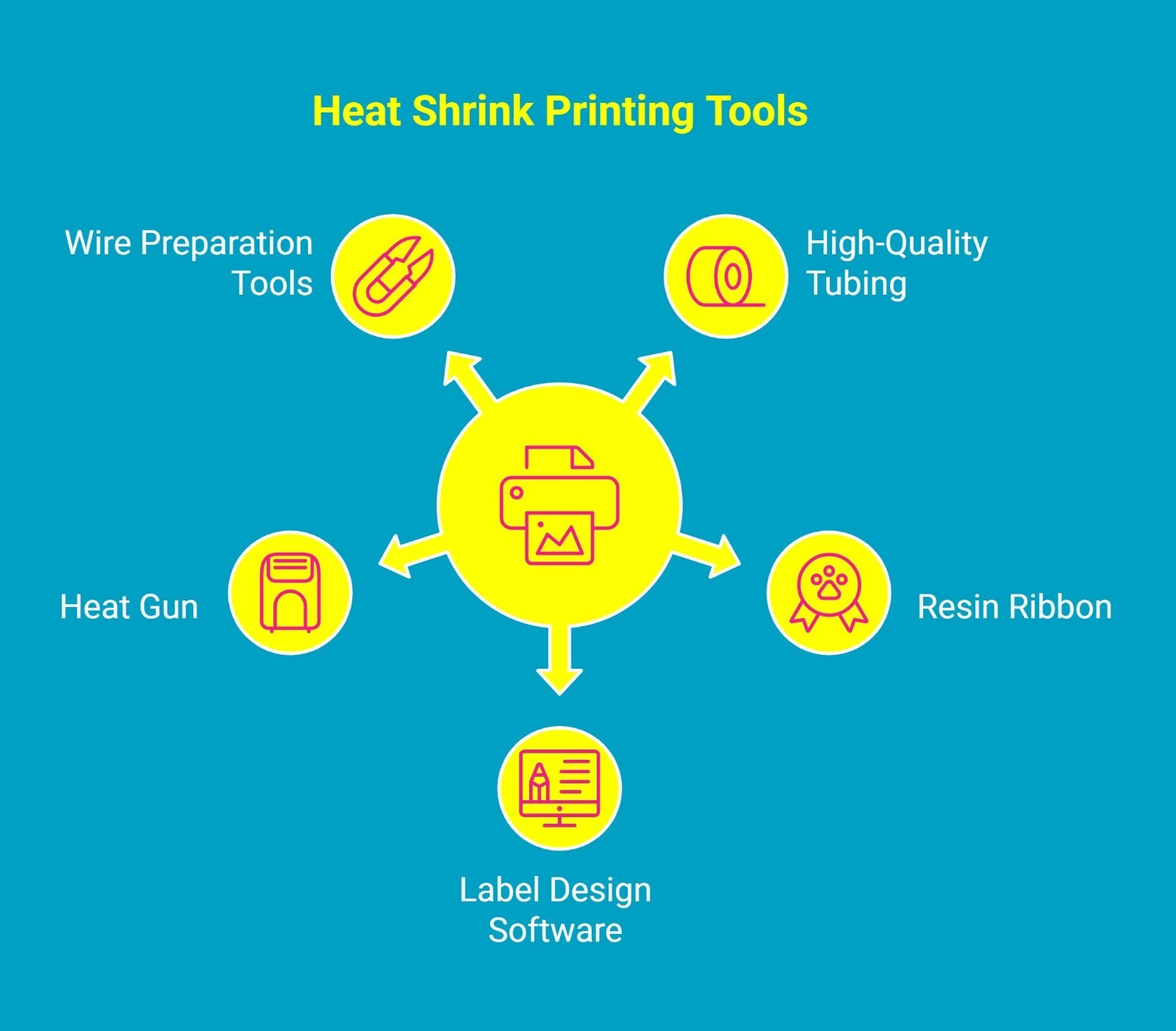
Once you’ve picked the right printer, you’ll need a few supporting tools to complete the job effectively. Let’s look at the essential items that make your printing process smooth and professional.
1. High-Quality Heat Shrink Tubing
Select tubing made from durable materials like polyolefin. Make sure it’s print-compatible and fits both your wire size and printer type. Choosing the correct shrink ratio, such as 2:1 or 3:1, ensures a snug and secure fit after heating.
2. Resin Ribbon for Thermal Printers
If you’re using a thermal printer, a resin-based ribbon is a must. It delivers long-lasting, fade-resistant prints that hold up against heat, chemicals, and abrasion. Always match your ribbon type to your printer model and tubing specifications for the best results.
3. Label Design Software for Custom Printing
Good label design software helps you create precise, professional layouts. You can adjust text, symbols, and barcodes for easy identification. Programs like Brady Workstation or LabelMark are perfect for detailed labeling projects.
4. Heat Gun for Smooth, Even Shrinking
A heat gun ensures the tubing shrinks evenly and smoothly around the wire. Applying steady, controlled heat prevents print distortion and leaves a clean, professional finish.
5. Wire Preparation Tools for a Clean Setup
Wire cutters, strippers, and crimpers help prepare your wires before labeling. Clean, trimmed ends make it easier to slide on the tubing and achieve a polished final look.
By combining the right printer with high-quality materials and tools, you’ll get sharp, durable, and professional results every time. Whether you’re managing a large wiring project or labeling for personal use, the right setup ensures your work stays organized, legible, and built to last.
Can All Label Printers Print on Heat Shrink Tubing?
It’s easy to think any label printer can print on heat shrink tubing, but that’s a common misconception. Regular label printers are made for flat surfaces, not for curved and flexible tubing that reacts to heat. Printing on this type of material requires a completely different approach.
Why Standard Label Printers Struggle?
Most everyday label printers simply can’t handle tubing. The material can twist, jam, or feed unevenly through the printer. Even when it does print, the ink often smears or fades once the tubing is heated. Standard printers just aren’t built to manage the flexibility or heat sensitivity that comes with shrink materials.
The Secret to Printing on Heat Shrink Tubing
This is where heat-shrink label printers make a difference. They use advanced printing technologies such as thermal transfer or industrial inkjet systems that allow the ink to fuse directly to the tubing. This ensures clear, permanent text that remains sharp even after the tubing has shrunk around a wire or cable.
Printer Types That Actually Work
If you plan to print on heat shrink tubing, look for one of these reliable options:
- Thermal transfer printers are commonly used in electrical, telecom, and manufacturing environments
- Industrial inkjet printers are ideal for labeling cables and wires
- Benchtop identification systems designed for workshops and production lines
The Real Answer
So, can all label printers print on heat-shrink tubing? Not quite. Only printers designed for flexible, heat-resistant materials can deliver crisp, professional, and lasting results. If you want labels that stay clean and legible, choosing the right heat shrink printer is the best decision you can make.
How to Customize Heat Shrink Tubing Labels for Your Wires?
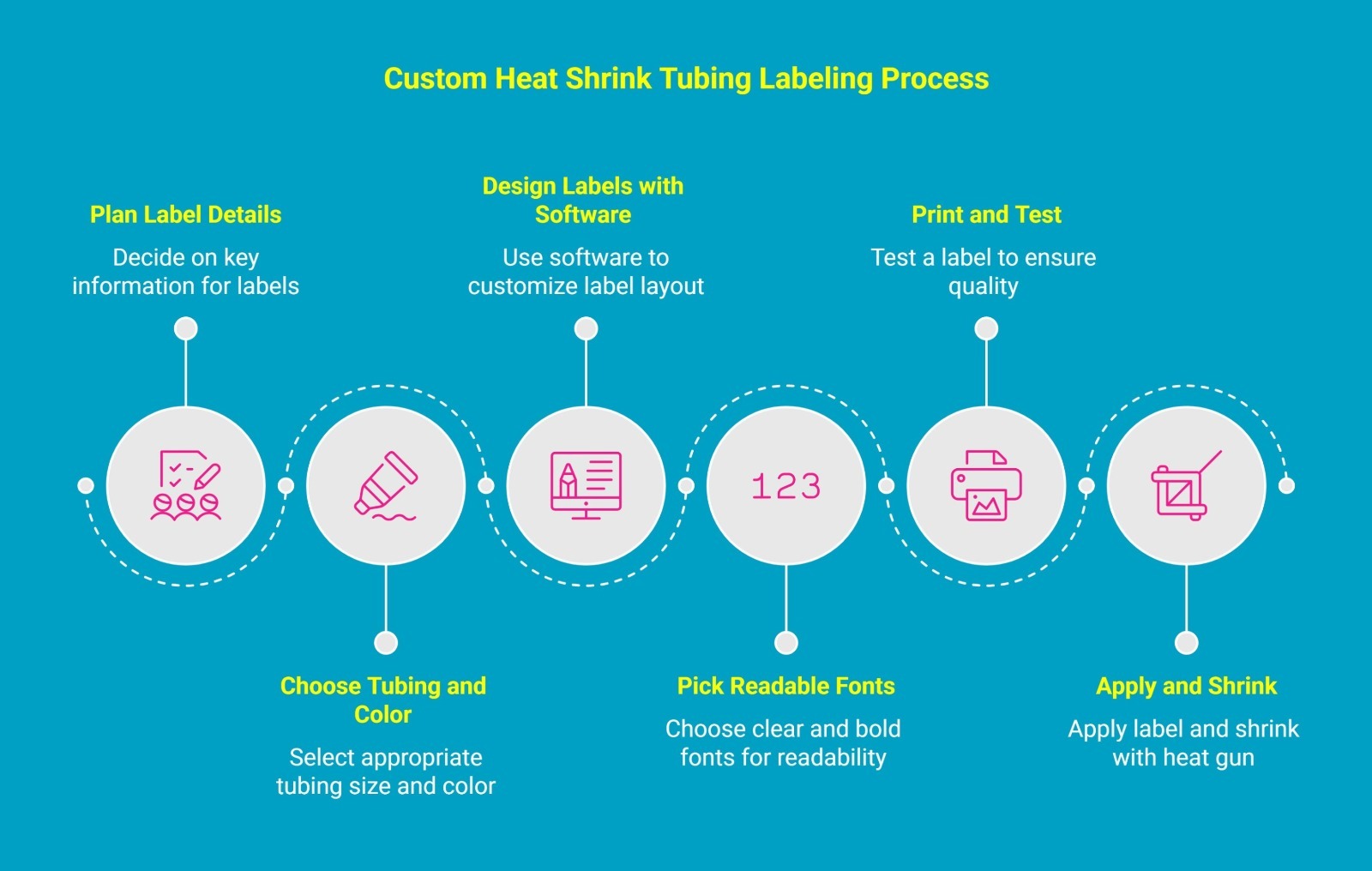
Creating custom heat shrink tubing labels is one of the easiest ways to bring order, clarity, and professionalism to your wiring setup. Whether you’re managing complex electrical panels, data networks, or home wiring projects, a well-labeled system saves time, prevents errors, and makes maintenance much simpler.
Here’s a simple step-by-step guide to help you design, print, and apply personalized heat shrink labels that look professional and last.
1. Plan Your Label Details
Start by deciding what each label should display. Include key details like wire numbers, circuit names, voltage, or equipment identifiers. Keep your text short, consistent, and meaningful so anyone working on the system can quickly understand it.
2. Choose the Right Tubing and Color
Select tubing that fits your wire snugly before shrinking. The right diameter and shrink ratio ensure a clean, professional look. You can also color-code your labels, such as red for power, blue for data, and yellow for grounding, to make identification even faster.
3. Design Your Labels with Software
Use compatible label design software to customize your layout. You can adjust font style, size, and spacing, or even add barcodes and symbols for better organization. For example, the Brother PTE560BTVP lets you design and print labels directly from your phone or computer using Bluetooth, making customization quick and easy.
4. Pick Clear and Readable Fonts
Always choose simple, bold fonts that stay legible after the tubing shrinks. Fonts like Arial or Helvetica work best. Use high-contrast colors such as black text on light tubing or white text on dark tubing for easy readability.
5. Print and Test Before Applying
Before printing a full batch, test one label. Shrink it and check the alignment, spacing, and readability. If the text looks too tight or stretched, make small adjustments in your design.
6. Apply and Shrink with Care
Slide the printed tubing onto the correct wire section and use a heat gun to shrink it evenly. Keep the heat moving to avoid burning or distorting the print. Once it cools, you’ll have a smooth, tight label that looks clean and professional.
Customized heat shrink tubing labels don’t just make your work look organized; they make it safer and easier to maintain. With a little planning and the right tools, you can turn any wiring project into a polished, professional setup that lasts.
What Are the Best Practices for Printing on Heat Shrink Tubing?
To achieve high-quality, durable heat shrink labels, following a few best practices is key. The quality of your final product depends on the materials you choose and the process you follow.
Proper technique ensures your labels will not only look professional but also withstand the environmental challenges of their application, such as heat, moisture, and abrasion.
One of the most important tips to prevent smudging is to use the right combination of ribbon and tubing. A resin-based ribbon with a compatible thermal transfer printer is the best defense against smudging. Here are a few more tips to ensure excellent results:
- Select the Right Tubing: Match the heat shrink products to your industry's standards. For example, use chemical-resistant tubing for automotive applications.
- Use Compatible Ribbons: For thermal transfer printing, always use resin-based ribbons for maximum durability and resistance to smudging and abrasion.
- Test Before Production: Always print and shrink a test label to verify legibility and adhesion before starting a large batch.
- Clean Tubing Surface: For best results, ensure the tubing is clean and free of oils or dust before it passes through the print head.
By following these simple yet effective best practices, you’ll produce clean, professional heat shrink tubing labels that last even in tough environments. The right approach doesn’t just make your labels look better; it ensures your work stays organized, safe, and reliable.
Struggling with Heat Shrink Labels? Here’s How to Avoid Common Mistakes
Even with the right printer, heat shrink tubing labels can sometimes turn out imperfect. Understanding the most common issues and how to prevent them will help you achieve clean, durable, and professional results every time.
Let’s look at the most common problems when printing on heat shrink tubing and how to fix them:
1. Smudged or Faded Print
Text may appear blurred or light, making it hard to read. This usually happens when the tubing surface has dust, oil, or moisture, or when the ribbon isn’t compatible.
Solution: Use a resin-based ribbon with a thermal transfer printer designed for heat shrink tubing. Clean the tubing before printing to ensure the ink sticks properly and stays bold.
2. Misaligned or Crooked Text
Labels that are off-center or wrap unevenly around the tubing can make your wiring look messy. This happens when the tubing isn’t loaded straight or the label design isn’t sized correctly.
Solution: Preview your design before printing and test on a sample piece. Make sure the tubing sits straight in the printer to achieve evenly spaced, centered text.
3. Wrinkled or Uneven Shrinking
After applying heat, the tubing may wrinkle or shrink unevenly, distorting the print. This is usually caused by applying heat too fast or unevenly.
Solution: Heat the tubing slowly and evenly with a heat gun, rotating the wire gently for consistent shrinking and a smooth, professional finish.
4. Print Peeling or Rubbing Off
Over time, labels may lift or fade, especially in high-contact areas. This happens when the ribbon and tubing are incompatible or the print doesn’t adhere properly.
Solution: Use a resin ribbon on tubing rated for thermal printing. Ensure the shrink ratio fits the wire snugly for long-lasting adhesion.
5. Tubing Too Tight or Too Loose
If the tubing is too tight, it’s hard to slide onto the wire. If too loose, it won’t stay in place and can look sloppy.
Solution: Measure your wires accurately and select tubing with the right diameter and shrink ratio for a secure, professional fit.
By following these tips, you’ll consistently produce clean, durable, and professional heat shrink tubing labels that are easy to read, long-lasting, and reliable.
Why Choose DuraFast for Your Labeling Needs?
Frustrated with labels that smudge, fade, or peel off under heat, moisture, or abrasion? This is a common problem for electricians, technicians, and DIY enthusiasts who rely on durable labeling for wires, industrial equipment, or office organization.
DuraFast.com offers a complete solution. Their professional-grade labels and printing supplies are designed to withstand the toughest conditions, ensuring your prints stay clear, readable, and reliable.
Why Professionals Trust DuraFast:
- Built for Durability: Weatherproof, chemical-resistant, and UL-certified labels that won’t fail under extreme conditions.
- Wide Product Range: Thermal transfer, direct thermal, and specialty labels for electronics, automotive, and industrial applications.
- Easy to Use: Compatible with desktop, industrial, and handheld printers for smooth, precise printing.
- Reliable Support: Live chat and phone assistance to help you find the perfect labeling solution for any project.
With DuraFast, you get labeling solutions that combine strength, precision, and versatility, helping you create organized, professional, and long-lasting results every time.
Ready to upgrade your labeling? Contact DuraFast today.
Conclusion
Labels are more than markings. They show care, precision, and foresight. A properly labeled system reduces mistakes, saves time, and makes complex projects easier to manage. Thoughtful labeling turns ordinary tasks into work that is organized, reliable, and efficient.
When every wire and connection is clearly identified, you gain not just clarity but control. Your work becomes easier to maintain, safer to operate, and more professional to showcase.
Frequently Asked Questions
What type of printer can print on heat shrink tubing?
You need a specialized printer designed for tubing, typically a thermal transfer model. For flexible spools, a continuous heat shrink tubing printer allows you to print long runs efficiently, while handheld units work for on-site jobs.
Can I print custom designs or barcodes on heat shrink tubing?
Yes, specialized printers allow custom designs and barcodes. Prints remain durable and legible, resisting fading and wear, making them ideal for clear identification and organization in various applications.
What’s the difference between continuous and pre-cut tubing?
Continuous shrink wrap tubing comes on a spool and can be cut to any length. Pre-cut tubing comes in fixed sizes. Both offer excellent insulation, but continuous tubing provides more flexibility for custom lengths.
Is it better to print before or after shrinking?
Always print before shrinking. The print head works best on flat tubing, ensuring text remains clear and durable. Printing after shrinking leads to distorted, illegible, or easily damaged labels.
What is the best printer for heat shrink labeling?
Thermal transfer printers are ideal. Desktop models handle high-volume durable printing, while handheld label makers offer portability for on-site jobs. Choose one that suits your workflow and heat shrinkable tubing type.